
RestoPOS | Restaurant POS and Inventory Flutter Dashboard Template
Description
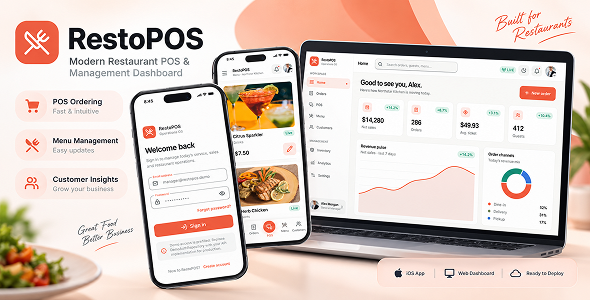
RestoPOS is a modern Flutter restaurant point-of-sale and operations dashboard template designed to help developers build restaurant management, cashier, and food-service applications faster.
Rather than simply shrinking a desktop interface for smaller devices, RestoPOS uses responsive layouts specifically designed for mobile, tablet, and expanded desktop screens.
The project provides a complete frontend foundation for restaurant operations, including dashboard insights, order management, touch-friendly POS ordering, menu management, customers, inventory, analytics, settings, and authentication flows.
RestoPOS is suitable for developers, agencies, startups, and businesses looking for a professional and well-structured Flutter frontend that can be customized and connected to an existing backend or cloud service.
Key Features
- Modern restaurant POS interface
- Responsive Flutter dashboard
- Mobile-first application experience
- Tablet-optimized layouts
- Expanded desktop POS experience
- Touch-friendly product selection
- Responsive product grid
- Product search and category filtering
- Live cart and ticket management
- Cart totals and checkout workflow
- Order management and filtering
- Menu and product management
- Product pricing management
- Product availability controls
- Customer management
- Inventory management
- Stock level and low-stock indicators
- Sales analytics
- Category performance analytics
- Charts powered by fl_chart
- Restaurant configuration and settings
- Currency and operational preferences
- Login and authentication screens
- Sign Up
- Forgot Password
- Reset Password
- Change Password
- Logout
- Splash and authentication bootstrap flow
- Protected application routes
- Light theme
- Dark theme
- Responsive navigation system
- Mobile navigation
- Tablet navigation rail
- Desktop navigation
- Feature-first project organization
- Riverpod state management
- GoRouter navigation
- Reusable Kite UI components
- Lucide Icons
- Centralized colors and typography
- Easy branding and customization
- Backend-ready repository architecture
- Android support
- iOS support
- Flutter Web support
- Complete HTML documentation
Responsive POS Experience
RestoPOS adapts its POS interface based on the available screen size to provide an efficient experience across phones, tablets, laptops, and desktop displays.
Mobile / Compact POS
- Product-focused layout
- Fast product search
- Responsive product grid
- Touch-friendly controls
- Persistent cart summary
- Large cart and ticket bottom sheet
- Optimized workflow for smaller screens
Desktop / Expanded POS
- Menu and ticket displayed side by side
- Independent content areas
- Efficient use of wide-screen space
- Responsive bounded layouts
- Fast cashier-focused workflow
- Improved visibility of cart and order information
This responsive architecture avoids forcing a desktop split-screen interface onto smaller devices and provides layouts that feel natural on each supported screen size.
Application Sections
Dashboard
A responsive restaurant operations overview for displaying key business information, sales summaries, operational insights, and quick actions.
Orders
A structured order management experience with filtering and responsive layouts for managing restaurant orders across different device sizes.
Point of Sale
A touch-focused POS interface with product selection, search, cart management, ticket information, totals, and checkout-oriented interactions.
Menu Studio
Manage restaurant menu content through a clean and responsive interface.
- Product imagery
- Categories
- Category filtering
- Availability management
- Pricing management
Customers
A customer management interface ready to connect to your own customer database, REST API, Firebase, Supabase, or other backend service.
Inventory
- Stock information
- Par levels
- Low-stock indicators
- Inventory progress visualization
Analytics
- Weekly sales insights
- Category performance
- Chart-based data visualization
Settings
- Restaurant profile
- Operational preferences
- Currency settings
- Appearance settings
- Application preferences
Authentication Experience
RestoPOS includes the frontend screens and navigation flow required for a typical authentication experience.
- Login
- Sign Up
- Forgot Password
- Reset Password
- Change Password
- Logout
- Splash screen
- Authentication bootstrap flow
- Protected application routes
Demo authentication is included for preview purposes. Production authentication should be connected to your own backend or authentication provider.
Demo Instructions
You can test the live demo using the following credentials:
Email: manager@restopos.demo
Password: password123
The demo credentials may also be prefilled on the login screen for faster testing.
Important: The demo account, demo authentication, and included mock data are intended for preview and evaluation purposes only.
Clean Project Architecture
The source code is organized using a feature-first approach to keep functionality separated into focused modules.
This structure makes the project easier to understand, customize, extend, and maintain as the application grows.
Features can follow the same organization while keeping data access, business responsibilities, state management, and presentation concerns clearly separated.
The architecture is designed to provide a strong starting point for larger restaurant management, POS, and food-service applications.
Technology Stack
- Flutter
- Dart
- Riverpod
- GoRouter
- Kite UI
- fl_chart
- Lucide Icons
Backend Integration
RestoPOS is provided as a frontend application template and can be connected to your preferred backend or cloud infrastructure.
The included demo repositories and mock data can be replaced with production implementations using technologies such as:
- REST API
- Firebase
- Supabase
- GraphQL
- Laravel API
- Node.js API
- Custom backend services
The project architecture keeps backend communication, data access, and application state separated from UI components, making integrations and future maintenance easier.
Third-Party Services & Additional Costs
Important: RestoPOS can be integrated with third-party services such as Firebase, Supabase, payment gateways, cloud hosting, analytics platforms, cloud storage, email/SMS providers, and other external APIs.
These third-party services are not included with the purchase of RestoPOS.
Depending on the provider and your usage, these services may require separate accounts and may incur:
- Subscription fees
- Usage-based charges
- Transaction fees
- Cloud hosting costs
- Database or storage charges
- Email or SMS charges
- API usage fees
- Other provider-specific charges
Any fees charged by Firebase, Supabase, payment providers, hosting providers, communication providers, or other third-party platforms are the responsibility of the buyer and are separate from the RestoPOS item purchase price.
Buyers should review the pricing, limits, and usage policies of each third-party provider before enabling or deploying those services.
What’s Included
- Complete Flutter source code
- Responsive mobile, tablet, and desktop layouts
- Restaurant dashboard UI
- POS interface
- Order management UI
- Menu management UI
- Customer management UI
- Inventory UI
- Analytics UI
- Authentication screens
- Settings screens
- Demo data and demo authentication flow
- Light and dark themes
- Responsive navigation
- HTML documentation
What’s Not Included
RestoPOS is a Flutter frontend/template and does not include a production restaurant backend.
- Production backend / server API
- Production database
- Production authentication service
- Firebase or Supabase paid services
- Payment gateway accounts
- Payment gateway transaction fees
- Cloud hosting
- Email or SMS service accounts
- Receipt printer hardware
- POS terminal hardware
- Other restaurant hardware integrations unless explicitly included in the source package
Payment gateways, receipt printers, POS hardware, and other external hardware or service integrations are not included unless explicitly provided in the source package.
System Requirements
- Flutter stable SDK
- Dart 3.12 or newer
- Android Studio, IntelliJ IDEA, VS Code, or another Flutter-compatible IDE
- Android SDK for Android builds
- Chrome for Flutter Web development
- macOS with Xcode for iOS builds
Dart requirement: Dart >=3.12.0 <4.0.0
Production Configuration
Before publishing your own application, replace the included demo configuration and configure your production environment.
You should configure your own:
- Backend / API
- Authentication implementation
- Database
- Production credentials
- Firebase / Supabase project if used
- Payment provider credentials if used
- Android application ID
- iOS bundle identifier
- Application signing configuration
- Store metadata
- Production images and assets
- Privacy policy and required legal information
Customization
RestoPOS is designed to be customized for different restaurant businesses, brands, workflows, and backend systems.
Developers can customize:
- Brand colors
- Typography
- Restaurant information
- Application assets
- Menu data
- Dashboard information
- Backend implementations
- Authentication
- Navigation
- Business logic
- External integrations
Ideal For
- Restaurant POS applications
- Cafe POS applications
- Food-service dashboards
- Restaurant management systems
- Cashier applications
- Restaurant admin dashboards
- Food ordering management systems
- Inventory dashboards
- Restaurant SaaS frontends
- Custom restaurant software projects
- Client restaurant applications
Documentation
Complete HTML documentation is included with the package to help developers configure, run, customize, and build the project.
The documentation covers project setup, dependency installation, configuration, development workflow, building release versions, and common troubleshooting information.
Important Notes
- RestoPOS is primarily a frontend Flutter application template.
- The included demo authentication and mock data are intended for demonstration purposes.
- A production backend and database are not included.
- Third-party services may require separate accounts and additional fees.
- Production credentials must be supplied by the buyer.
- External hardware and payment integrations are not included unless explicitly stated.
- Developers should configure production security, authentication, privacy, and deployment requirements before publishing an application.
| Type | Flutter App |
|---|---|
| Author | orkitt |
| Price | $39 |
| Sales | 0 |
| Rating | 0 (0) |
| Published | Sep 18, 2026 |
| Last Update | Sep 18, 2026 |
| Compatible Software | Flutter 3.x |
| Demo Url | https://orkitt.dev/restopos/ |
| Mobile Files Included | Dart, YAML |
Categories
Tags
External listing. code.market does not sell this product and does not process payment for it. Pricing, payment, delivery, licensing, refunds, and support are handled by the third-party merchant on its own website. We may earn an affiliate commission from a referral. Details.