
Restaurant Management System and Digital Menu
Description
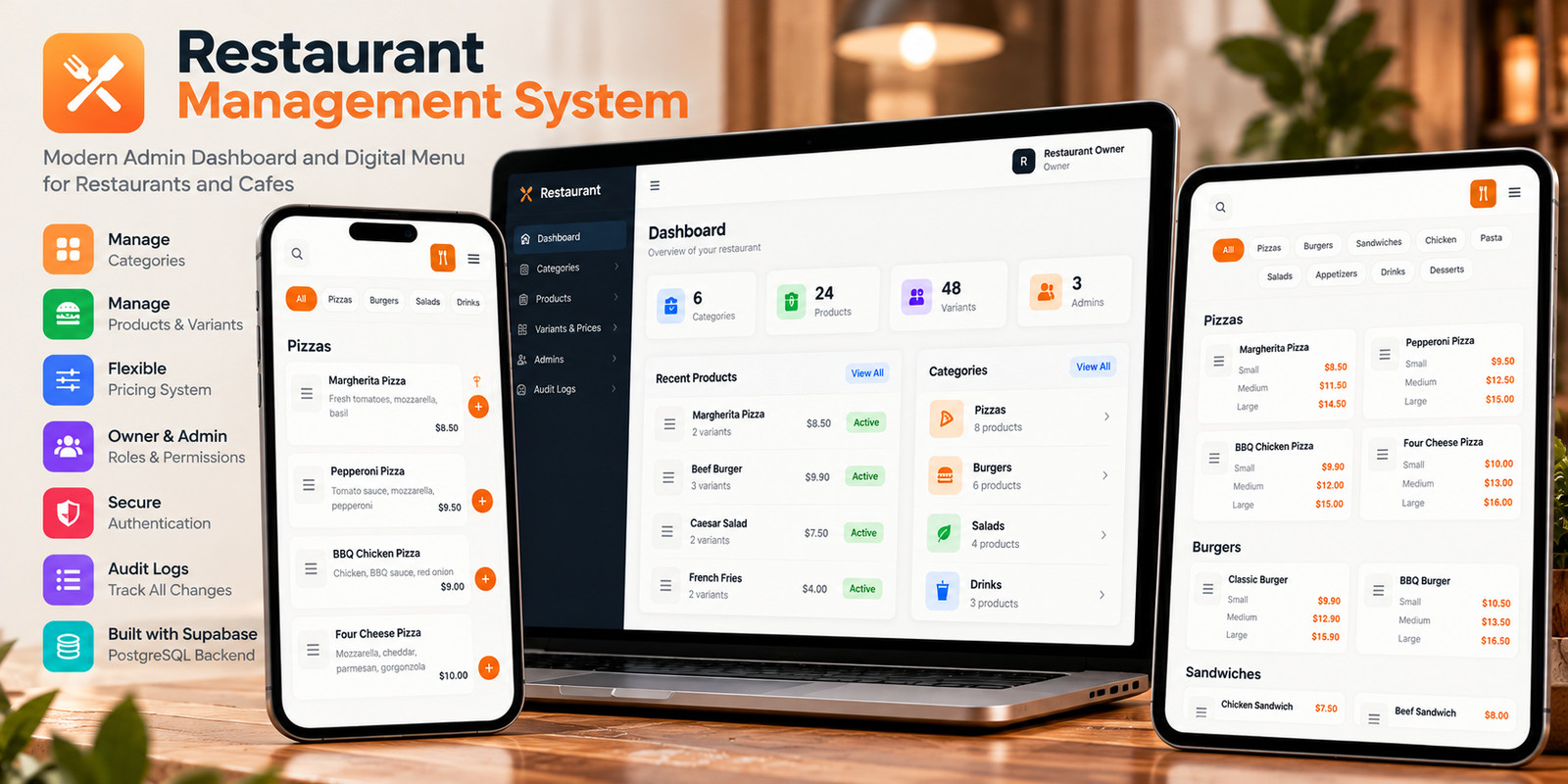
Restaurant Management System is a full-stack platform designed to help restaurants manage their digital operations through a centralized administration system and a customer-friendly online menu.
The administration dashboard provides tools for organizing menu categories, managing products and variants, controlling prices, managing administrators, assigning permissions, and reviewing system activity through audit logs.
Customers can access the digital menu through a responsive interface designed for both desktop and mobile devices. Menu content is loaded dynamically from the connected database, allowing restaurant staff to update the menu without modifying the frontend code.
The system is powered by Supabase PostgreSQL and uses Row Level Security, Supabase Authentication, and Edge Functions to provide a secure backend architecture.
A built-in setup wizard simplifies the initial configuration by allowing the restaurant owner to create the first account and initialize the system after connecting a new Supabase project.
The source code is built with React, TypeScript, Tailwind CSS, and Supabase, providing a modern foundation that can be adapted to different restaurants, cafes, and food businesses.
Features
Admin Dashboard Digital Restaurant Menu Dynamic Menu Management Category Management Product Management Product Variants Flexible Pricing Owner and Admin Accounts Role-Based Access Control Custom Permissions Administrator Management Audit Logs First-Time Setup Wizard Secure Authentication Supabase PostgreSQL Row Level Security Supabase Edge Functions Responsive UI Light and Dark Themes React + TypeScript Tailwind CSS Generic Demo Data
Requirements
Node.js 22 or later npm Supabase account and project Basic React and TypeScript knowledge Basic Supabase knowledge
Instructions
1. Extract the purchased project files.
2. Create a new Supabase project.
3. Open the supabase/schema.sql file and run it in the Supabase SQL Editor.
4. Run supabase/seed.sql if you want to populate the database with sample restaurant data.
5. Create the required environment files using the provided .env.example files.
6. Deploy the admin-auth Edge Function to your Supabase project.
7. Navigate to the Dashboard directory and install the dependencies with npm install.
8. Start the Dashboard application.
9. Open the First-Time Setup Wizard and create the initial restaurant Owner account.
10. Sign in using the account created during the setup process.
11. Configure your restaurant, categories, products, variants, administrators, and permissions.
12. Configure the Digital Menu environment variables.
13. Navigate to the Digital Menu directory and run npm install.
14. Start the Digital Menu application.
15. When the system is ready, build and deploy the Dashboard and Digital Menu applications.
| Author | yousefatef04 |
|---|---|
| Category | Scripts & Code / JavaScript |
| Price | $44 |
| Extended License | $132 |
| Likes | 2 |
| First Release | Oct 12, 2026 |
| Last Update | Oct 12, 2026 |
| Database | PostgreSQL 17 |
| Files included | .css, .html, .ts, .tsx, .jsx, .json, .svg, .webp, .sql, package.json, JavaScript .js |
| Software version | Node.js 22 |
| Html/css framework | Tailwind CSS |
| Software framework | React |
| Javascript framework | React, Node.js |
| Programming language | JavaScript, TypeScript |
Categories
Tags
External listing. code.market does not sell this product and does not process payment for it. Pricing, payment, delivery, licensing, refunds, and support are handled by the third-party merchant on its own website. We may earn an affiliate commission from a referral. Details.
Products of the Week.
Submit🥇

Actionbook
It works inside the user's own browser with the accounts already signed in. The user describes the result they need, and the agent reads, clicks and types through the pages, then delivers a dashboard or report where each data links back to its source.
Other · 712 views · 9 clicksOther · Week 44 · 712 views · 9 clicks
🥈

Free social media tools for creators & solofounders
295 free tools for growing your social media: write, plan, grow on local AI models, 100% free forever, No sign-up required, No trial. Write, check and measure posts on LinkedIn, Instagram, TikTok, X, YouTube, Reddit, Product Hunt and more: a free social media scheduler for 17 networks, engagement rate calculators, character counters, best time to post, hook generators and follower growth calculators. No login anywhere, no API or credit usage.
682 views · 6 clicksWeek 44 · 682 views · 6 clicks
🥉

STOP GUESSING WHAT TO POST
AI that learns your brand voice and builds a month of consistent, on-brand social content: carousels, posts and hooks that sound like you, not like everyone else's AI.
SaaS · 1,928 views · 21 clicksSaaS · Week 44 · 1,928 views · 21 clicks
#4

Hand-Placed Backlinks $9.99 per link. Flat rate.
Buy hand-placed forum, Q-A and directory backlinks. Flat $9.99 per link, no subscriptions — you only pay for approved listings.
Website · 1,880 views · 17 clicksWebsite · Week 44 · 1,880 views · 17 clicks
#5

Conversational Backlinks for Busy Founders
Place Backlink Relevant Conversation for your domain across Forums and Conversations
39,338 views · 211 clicksWeek 44 · 39,338 views · 211 clicks
#6

Free Invoice Generator - PDF Invoices in Your Browser, No Sign-Up
A free invoice maker for freelancers and small businesses: fill in the invoice, check the live preview, and download a PDF that looks exactly like it. Any currency, tax per item, three templates, no sign-up, and nothing leaves your device.
620 views · 11 clicksWeek 44 · 620 views · 11 clicks
#7

Merge PDF Files Free - Combine PDFs in Your Browser, No Upload
A free PDF merger for office workers, students, and freelancers: combine PDFs and images into one file in the browser, reorder files and pages, pick page ranges, keep bookmarks, and open password-protected PDFs. Nothing is uploaded, no sign-up, no watermark.
562 views · 4 clicksWeek 44 · 562 views · 4 clicks