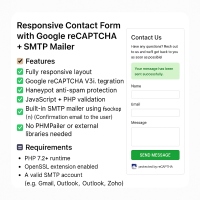
Responsive Contact Form with Google reCAPTCHA

Description
Create secure, professional contact forms in minutes.
This lightweight PHP script features Google reCAPTCHA v3 integration, built-in SMTP mail sending, spam protection, and no external libraries needed.
Fully responsive and mobile-ready, it's perfect for modern websites that need reliable contact functionality with minimal setup.
Includes JavaScript and PHP validation, honeypot security, and user confirmation emails - all in one clean, customizable package.
🚀 How It Works
- ➤ User fills out the form and submits
- ➤ Client-side JavaScript validates inputs
- ➤ Google reCAPTCHA is verified
- ➤ Honeypot spam trap is checked
- ➤ Admin receives an email
- ➤ User receives a confirmation email
Features
✨ Features
- ✅ Fully responsive layout. Designed to work seamlessly on all screen sizes—desktops, tablets, and mobile devices.
- ✅ Google reCAPTCHA v3 integration. Helps protect your form from bots and spam without user interaction, using invisible background validation.
- ✅ Honeypot spam protection. A simple but effective hidden field technique that blocks most automated spam bots.
- ✅ JavaScript + PHP validation. Ensures that the form is validated both on the client side (for UX) and server side (for security).
- ✅ Built-in SMTP mailer using. Sends messages securely via any SMTP server without relying on third-party libraries.
- ✅ Confirmation email to the user. Automatically sends a confirmation message to users, enhancing trust and communication.
- ✅ No PHPMailer or external libraries needed. Lightweight and dependency-free, making it easy to maintain and deploy.
Requirements
🔧 Requirements
- PHP 7.2+ runtime.
- OpenSSL extension enabled.
fsockopen()must be enabled on your server. (contact us for additional server support).- A valid SMTP account. (e.g., Gmail, Outlook, Zoho, etc).
Instructions
💻 Installation
- ➤ Upload the files to your PHP web server
- ✎ Open
send.phpand edit the configuration section:
// === CONFIGURATION ===
$admin_email       = 'your@email.com';
$from_email        = 'your@email.com';
$from_name_prefix  = 'Your Site Name';
// reCAPTCHA keys (get from https://www.google.com/recaptcha/admin)
$recaptcha_sitekey = 'your-site-key';
$recaptcha_secret  = 'your-secret-key';
// SMTP credentials
$smtp_host = 'smtp.yourhost.com';
$smtp_port = 587;
$smtp_user = 'smtp-user@example.com';
$smtp_pass = 'your-smtp-password';
// === END CONFIGURATION ===
- ✎ Edit
index.phpand update this button to use your site key:
<button
  class="g-recaptcha"
  data-sitekey="your-site-key"
  data-callback="onSubmit"
  data-action="submit">
  Send Message
</button>
| Author | WillAK89 |
|---|---|
| Category | Scripts & Code / PHP Scripts / Forms |
| Price | $12 |
| Extended License | $36 |
| First Release | May 15, 2025 |
| Last Update | May 15, 2025 |
| Files included | .php, .css, .html, JavaScript .js |
Categories
Tags
External listing. code.market does not sell this product and does not process payment for it. Pricing, payment, delivery, licensing, refunds, and support are handled by the third-party merchant on its own website. We may earn an affiliate commission from a referral. Details.
Products of the Week.
Submit🥇

STOP GUESSING WHAT TO POST
AI that learns your brand voice and builds a month of consistent, on-brand social content: carousels, posts and hooks that sound like you, not like everyone else's AI.
SaaS · 6,524 views · 59 clicksSaaS · Week 46 · 6,524 views · 59 clicks
🥈

Conversational Backlinks for Busy Founders
Place Backlink Relevant Conversation for your domain across Forums and Conversations
Website · 45,433 views · 229 clicksWebsite · Week 46 · 45,433 views · 229 clicks
🥉

upvote.club
Free Social Media Engagement that Helps Boost Your Content. Upvote Club supports 19 social networks with 100+ engagement actions in one dashboard. Add links to your posts and get free engagement from real users.
SaaS · 43,424 views · 124 clicksSaaS · Week 46 · 43,424 views · 124 clicks
#4

Substack Posting API
Onboard your Agent to Substack. Write Publish on Substack via API
SaaS · 62,359 views · 204 clicksSaaS · Week 46 · 62,359 views · 204 clicks
#5

Seenshot App
Free, Fast, MacOS Screenshot app. Make Screenshot cmd+shift+2 and send it via link
Desktop App · 31,613 views · 125 clicksDesktop App · Week 46 · 31,613 views · 125 clicks
#6

Hand-Placed Backlinks $9.99 per link. Flat rate.
Buy hand-placed forum, Q-A and directory backlinks. Flat $9.99 per link, no subscriptions — you only pay for approved listings.
Website · 7,317 views · 19 clicksWebsite · Week 46 · 7,317 views · 19 clicks
#7

Free Invoice Generator - PDF Invoices in Your Browser, No Sign-Up
A free invoice maker for freelancers and small businesses: fill in the invoice, check the live preview, and download a PDF that looks exactly like it. Any currency, tax per item, three templates, no sign-up, and nothing leaves your device.
5,937 views · 20 clicksWeek 46 · 5,937 views · 20 clicks
#8

Merge PDF Files Free - Combine PDFs in Your Browser, No Upload
A free PDF merger for office workers, students, and freelancers: combine PDFs and images into one file in the browser, reorder files and pages, pick page ranges, keep bookmarks, and open password-protected PDFs. Nothing is uploaded, no sign-up, no watermark.
5,488 views · 16 clicksWeek 46 · 5,488 views · 16 clicks