
React Multipurpose Admin Dashboard
Description
React Multipurpose Admin Dashboard
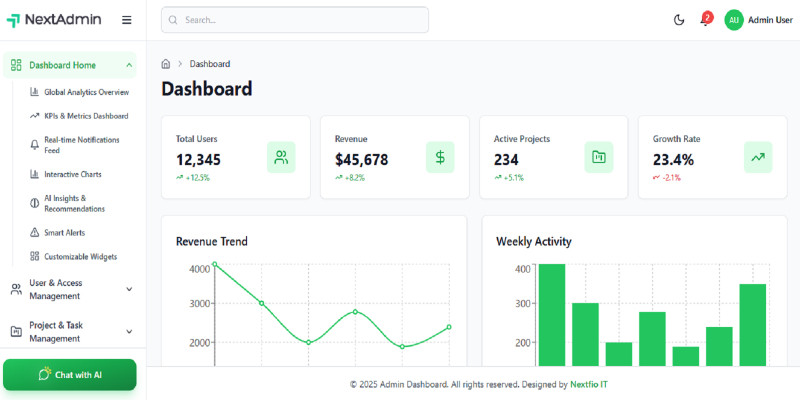
A modern, feature-rich admin dashboard built with React 18, TypeScript, Vite, and Tailwind CSS. Perfect for building admin panels, dashboards, and management systems.
Key Features:
- Modern React 18 with TypeScript
- Fully Responsive Design (Mobile, Tablet, Desktop)
- Dark Mode Support with persistence
- 14 Comprehensive Modules
- AI Chat Integration
- Modern UI/UX Design
- Multiple Deployment Options
Modules Included:
- Dashboard Home with Analytics & Charts
- User & Access Management
- Projects & Task Management (Kanban, Gantt, Timeline)
- CRM & Client Management
- Finance & Billing
- HR / Employee Management
- AI & Intelligence
- Reports & Analytics
- Support / Ticketing
- Inventory & Asset Management
- Marketing & Communication
- Knowledge Base / Documentation
- System Tools / Utilities
- Settings & Configuration
Tech Stack:
- React 18.2.0
- TypeScript 5.2.2
- Vite 5.0.8
- Tailwind CSS 3.3.6
- React Router 6.20.0
- Zustand (State Management)
- Recharts (Charts & Analytics)
- Lucide React (Icons)
- React Hot Toast (Notifications)
Deployment Ready:
Works on Cloudflare Pages, cPanel, VPS (Nginx/Apache), Netlify, Vercel, and more!
Complete Documentation:
Includes Installation Guide, Deployment Guide, Customization Guide, and more.
Features
Features:
- 14 Fully Implemented Modules
- Responsive Design (Mobile, Tablet, Desktop)
- Dark/Light Mode Toggle
- AI Chat Integration
- User Authentication System
- Data Tables with Search & Filter
- Interactive Charts & Analytics
- Modern UI Components
- TypeScript Support
- Multiple Deployment Options
- Complete Documentation
- Clean & Well-Structured Code
Requirements
Requirements:
- Node.js 18.0 or higher
- npm 9.0 or higher
- Modern web browser (Chrome, Firefox, Safari, Edge)
Quick Start:
- Extract the ZIP file
- Run:
npm install - Run:
npm run dev - Open:
http://localhost:5173
Demo Credentials:
Email: admin@example.com Password: admin123
Instructions
Installation Instructions:
- Extract Files: Extract the downloaded ZIP file to your desired location.
- Install Dependencies: Open terminal in the project folder and run:
npm install
- Start Development Server:
npm run dev
The app will be available at http://localhost:5173 - Build for Production:
npm run build
Production files will be in the 'out' folder.
Deployment:
See DEPLOYMENT.md for detailed instructions on deploying to Cloudflare Pages, cPanel, VPS, and other platforms.
Documentation:
Complete documentation is included in the package:
- README.md - Project overview
- INSTALLATION.md - Installation guide
- DEPLOYMENT.md - Deployment instructions
- CUSTOMIZATION.md - Customization guide
| Author | nextfio |
|---|---|
| Category | Themes / HTML / Admin Templates |
| Price | $18 |
| Extended License | $54 |
| First Release | Nov 15, 2025 |
| Last Update | Nov 15, 2025 |
| Files included | .css, .html, JavaScript .js |
Categories
Tags
External listing. code.market does not sell this product and does not process payment for it. Pricing, payment, delivery, licensing, refunds, and support are handled by the third-party merchant on its own website. We may earn an affiliate commission from a referral. Details.
Products of the Week.
Submit🥇

STOP GUESSING WHAT TO POST
AI that learns your brand voice and builds a month of consistent, on-brand social content: carousels, posts and hooks that sound like you, not like everyone else's AI.
SaaS · 6,691 views · 64 clicksSaaS · Week 46 · 6,691 views · 64 clicks
🥈

Conversational Backlinks for Busy Founders
Place Backlink Relevant Conversation for your domain across Forums and Conversations
Website · 45,717 views · 230 clicksWebsite · Week 46 · 45,717 views · 230 clicks
🥉

upvote.club
Free Social Media Engagement that Helps Boost Your Content. Upvote Club supports 19 social networks with 100+ engagement actions in one dashboard. Add links to your posts and get free engagement from real users.
SaaS · 43,695 views · 125 clicksSaaS · Week 46 · 43,695 views · 125 clicks
#4

Substack Posting API
Onboard your Agent to Substack. Write Publish on Substack via API
SaaS · 62,623 views · 204 clicksSaaS · Week 46 · 62,623 views · 204 clicks
#5

Seenshot App
Free, Fast, MacOS Screenshot app. Make Screenshot cmd+shift+2 and send it via link
Desktop App · 31,867 views · 125 clicksDesktop App · Week 46 · 31,867 views · 125 clicks
#6

Hand-Placed Backlinks $9.99 per link. Flat rate.
Buy hand-placed forum, Q-A and directory backlinks. Flat $9.99 per link, no subscriptions — you only pay for approved listings.
Website · 7,557 views · 19 clicksWebsite · Week 46 · 7,557 views · 19 clicks
#7

Free Invoice Generator - PDF Invoices in Your Browser, No Sign-Up
A free invoice maker for freelancers and small businesses: fill in the invoice, check the live preview, and download a PDF that looks exactly like it. Any currency, tax per item, three templates, no sign-up, and nothing leaves your device.
6,171 views · 21 clicksWeek 46 · 6,171 views · 21 clicks
#8

Merge PDF Files Free - Combine PDFs in Your Browser, No Upload
A free PDF merger for office workers, students, and freelancers: combine PDFs and images into one file in the browser, reorder files and pages, pick page ranges, keep bookmarks, and open password-protected PDFs. Nothing is uploaded, no sign-up, no watermark.
5,701 views · 16 clicksWeek 46 · 5,701 views · 16 clicks