
Raxus Slider / Easy-to-Use Advanced HTML5 Slider

Description
Raxus Slider is HTML5 Slider with Easy-to-use and Advanced features. No more edit in javascript files. You can change features you want with HTML5 data-attributes.
WHAT IS RAXUS SLIDER?
Raxus Slider is simply image and slide gallery. You can slide easily any image and text with this slider. There is no need to edit javascript code for these options that you will see. And some HTML5 attribute features will help you during this time. Let’s start to browse Raxus Slider features, options and see how to use.
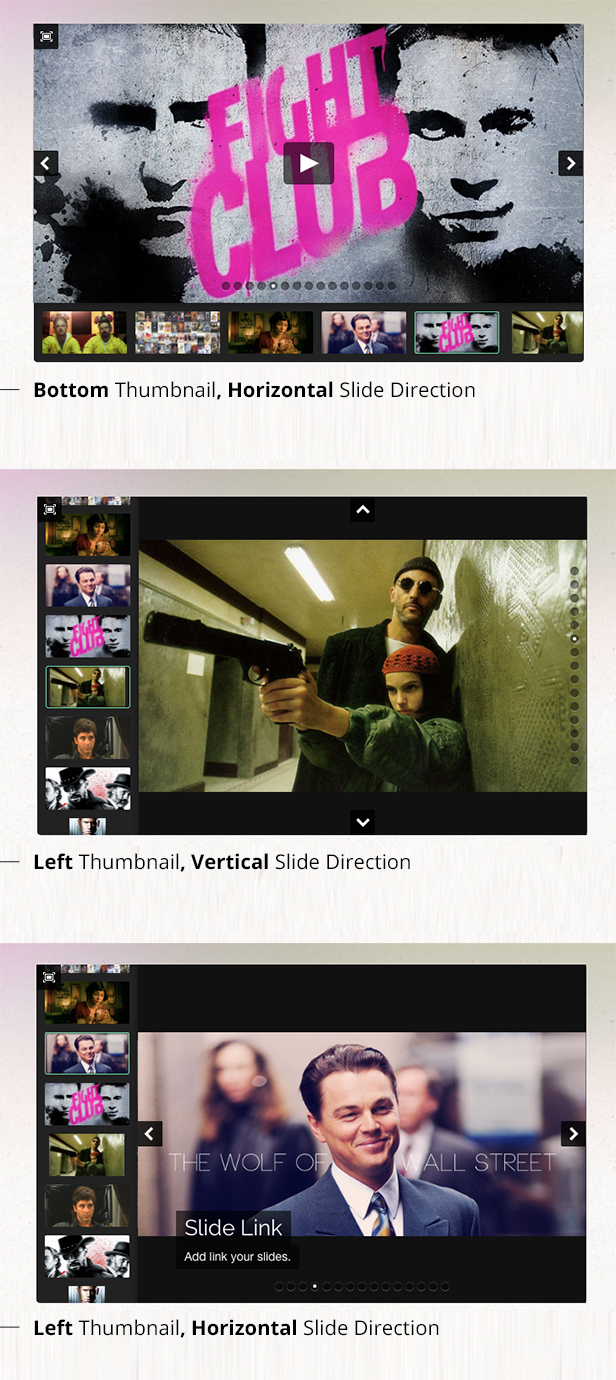
FEATURES & OPTIONS
- THUMBNAIL POSITIONS You can select top, bottom, left and right position for thumbnail shown. Or you can remove thumbnails.
- VERTICAL SLIDE Raxus Slider can slide two way. Vertical and horizontal. If you select vertical slide option, arrow positions changes automatically, if its open.
- AUTO PLAY Raxus slider can slide itself if you want. Just define your ms(milisecond) like ‘5000’.
- ARROWS & DOTS SHOW / HIDE You can hide slider arrows and dots separately.
- FULLSCREEN Raxus slider have fullscreen option. But you can close this option easily if you don’t want that button.
- KEYBOARD CONTROL You can control Raxus Slider with your keyboard. Slider needs to be focus that features to using.
- CAPTIONS You can write any title and description text for each slides that have animation option.
- VIDEO SLIDE You can put direct video link to image attributes for show video in that slide.
- AUTO / CUSTOM THUMBNAIL URLS Raxus Slider gets thumbnail urls automatically. But don’t scare, you can define your custom thumbnail urls easily.
- CUSTOM SIZE FOR THUMBNAILS You can set thumbnails size whatever you want. Default is 70px / 70px.
- IMAGE RATIO OPTIONS For protect your image ratios, you can select right class-name like ‘fix-width’, ‘fix-height’ or nothing.
- CUSTOM SIZE FOR RAXUS SLIDER You can set slider area sizes whatever you want. Images can be protect themselves ratio based your class that you defined.
- MULTI-RAXUS SLIDER You can put multi-Raxus Slider in one page without any problem.
- PERFORMANCE For better performance, used css3 transition effects.
- FILE SIZE Raxus Slider is 16KB. If you use minified version then you’re lucky. Because Raxus Slider minified .JS file only 10KB
- RESPONSIVE LAYOUT Raxus Slider is responsive, adaptive. When you change your window size, slide can be located again from where it left off area automatically.
- SWIPE You can use Raxus Slider on touch device. When you swipe on slide area, slider can slide that way.
- LOOP SLIDE You can disable loop option from data-attributes if you want. When you’re in the last and first slide, slider don’t loop.
- BACKGROUND COLORS You can change slide area’s and thumbnail area’s background color with data-attributes. Or you can set transparent.
- Draggable Slide Area You can drag slide area in all direction.
- Draggable Thumbnail Area You can drag thumbnails area in all direction.
- Add Link All Slide Area You can add url each slide area.
Changelog

v2.0.4
    Bug is fixed that slider is not stop when you press play button on videos

v2.0.3
    Some navigation menu closing bug when slideshow slides with autoplay is fixed
    Improved multi-Raxus Slider stability in one page

v2.0.2
    Bug when scrolling the page on touchscreen is fixed

v2.0.1
    Some bugs fixed
    Performance improvements for firefox

v2.0
    Added: Draggable slide area in all directions
    Added: Draggable thumbnail area in all directions
    Added: Add link your slides
    Added: Custom cursor pointers by slide way status
    Improved javascript file

v1.4
    raxus-slider.js file compatibility is improved for Wordpress users
    Added: Caption animations now coming from 4 directions which you want. Just set your class-name.

v1.3
    Added background-color change option with data-attributes for slide and thumbnail area
    Added do not loop option. Now, you can set slider for don't loop from data-attribute.
    Improvements in js and css files

v1.2
    Fixed arrow, play and thumbnail clicks for mobile
    Now autoplay pausing while you sliding. And it's resuming when slide animation done
    Added some css class for mobile views (captions and dots)

v1.1
    Now, arrows positions are calculating from css.
    Improved code in .js file

v1.0
    Raxus Slider / Easy-to-Use Advanced HTML5 Slider has been approved for sale on CodeCanyon.
Also you can follow changelog to this link: Changelog
| Type | JavaScript Script |
|---|---|
| Author | bqra |
| Category | Javascript / Sliders |
| Price | $16 |
| Sales | 164 |
| Rating | 3.33 from 3 ratings |
| Published | Mar 2, 2014 |
| Last Update | Mar 23, 2015 |
| Compatible Browsers | IE9, IE10, IE11, Firefox, Safari, Opera, Chrome |
| Compatible Software | jQuery |
| Source Files Included | JavaScript JS, HTML, CSS |
Categories
Tags
External listing. code.market does not sell this product and does not process payment for it. Pricing, payment, delivery, licensing, refunds, and support are handled by the third-party merchant on its own website. We may earn an affiliate commission from a referral. Details.
Products of the Week.
Submit🥇

STOP GUESSING WHAT TO POST
AI that learns your brand voice and builds a month of consistent, on-brand social content: carousels, posts and hooks that sound like you, not like everyone else's AI.
SaaS · 4,290 views · 38 clicksSaaS · Week 45 · 4,290 views · 38 clicks
🥈

Conversational Backlinks for Busy Founders
Place Backlink Relevant Conversation for your domain across Forums and Conversations
Website · 42,003 views · 223 clicksWebsite · Week 45 · 42,003 views · 223 clicks
🥉

upvote.club
Free Social Media Engagement that Helps Boost Your Content. Upvote Club supports 19 social networks with 100+ engagement actions in one dashboard. Add links to your posts and get free engagement from real users.
SaaS · 40,044 views · 117 clicksSaaS · Week 45 · 40,044 views · 117 clicks
#4

Substack Posting API
Onboard your Agent to Substack. Write Publish on Substack via API
SaaS · 59,053 views · 198 clicksSaaS · Week 45 · 59,053 views · 198 clicks
#5

Seenshot App
Free, Fast, MacOS Screenshot app. Make Screenshot cmd+shift+2 and send it via link
Desktop App · 28,431 views · 122 clicksDesktop App · Week 45 · 28,431 views · 122 clicks
#6

Hand-Placed Backlinks $9.99 per link. Flat rate.
Buy hand-placed forum, Q-A and directory backlinks. Flat $9.99 per link, no subscriptions — you only pay for approved listings.
Website · 4,263 views · 19 clicksWebsite · Week 45 · 4,263 views · 19 clicks
#7

Free Invoice Generator - PDF Invoices in Your Browser, No Sign-Up
A free invoice maker for freelancers and small businesses: fill in the invoice, check the live preview, and download a PDF that looks exactly like it. Any currency, tax per item, three templates, no sign-up, and nothing leaves your device.
2,939 views · 17 clicksWeek 45 · 2,939 views · 17 clicks
#8

Merge PDF Files Free - Combine PDFs in Your Browser, No Upload
A free PDF merger for office workers, students, and freelancers: combine PDFs and images into one file in the browser, reorder files and pages, pick page ranges, keep bookmarks, and open password-protected PDFs. Nothing is uploaded, no sign-up, no watermark.
2,716 views · 13 clicksWeek 45 · 2,716 views · 13 clicks