
QuickQR - Saas - QR Code Restaurant Menu Maker

Description
QuickQR is a complete digital QR code restaurant menu maker and contactless ordering system built with Laravel PHP Script. Restaurants, cafés, hotels, and bars can instantly create a QR code food menu that customers scan with their phone to browse items and place orders—without touching physical menus or waiting for staff.
This contactless restaurant menu software saves time, improves service speed, and reduces printing costs. Whether you run a single café or manage multiple restaurants, QuickQR is the fastest way to launch a QR menu ordering system and start accepting orders online in just a few minutes.
Try the online demo and see why QuickQR is one of the #1 rated QR menu scripts on CodeCanyon.
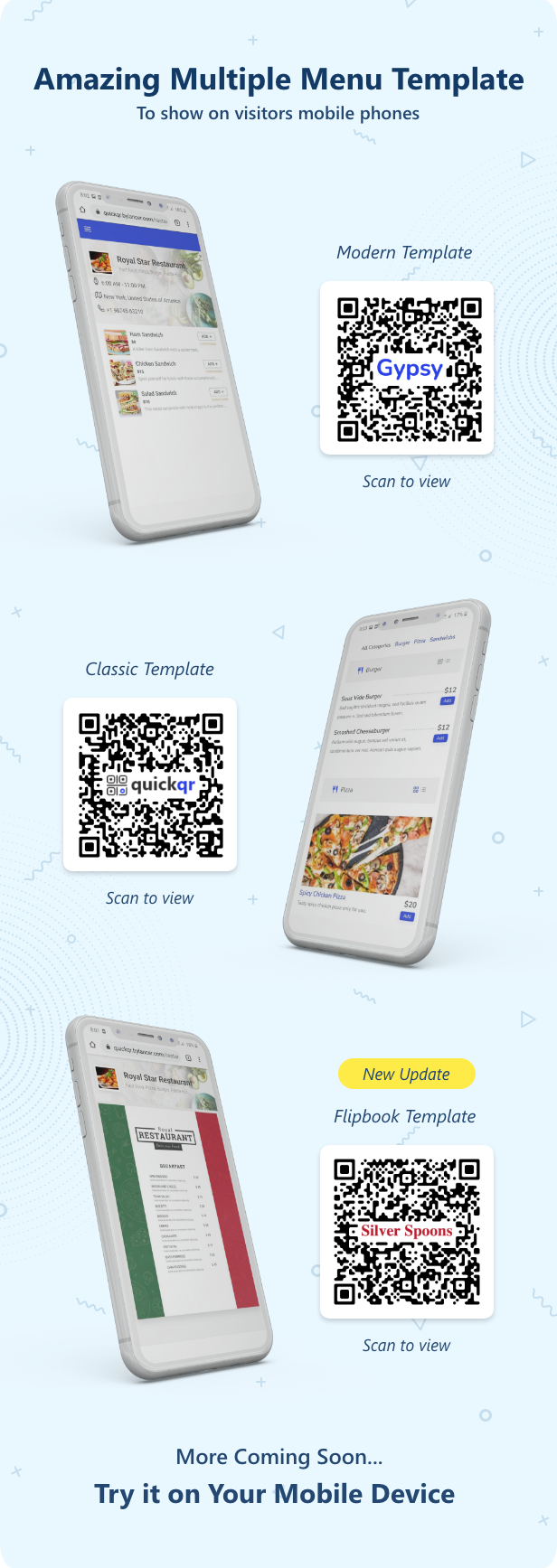
Online Demo
Username: demo
Password: 123456
Username: admin
Password: 123456





Why Choose QuickQR?
- Contactless Ordering System – Customers scan, browse, and order from their phones.
- Eco-Friendly Digital Menu – Reduce printing costs and paper waste.
- Multi-Restaurant & SaaS Ready – Create unlimited restaurants with full admin control.
- Instant Setup – Launch your digital menu in less than 5 minutes.
- Laravel PHP Script – Secure, scalable, and easy to customize.
How QuickQR Works (for Restaurants)
- Register your restaurant and create an account.
- Build your digital menu with items, images, prices, and extras.
- Generate QR codes for tables or print them on flyers and boards.
- Receive instant orders directly in your admin panel.
How It Works (for Customers)
- Scan the restaurant QR code with any phone.
- Browse the digital food menu without downloading apps.
- Place orders instantly—fast, safe, and contactless.
Benefits of a Digital QR Code Menu
- Reduce printing costs and waste with an eco-friendly digital menu.
- Deliver a safer, contactless dining experience.
- Update menu items and prices anytime—no reprinting required.
- Gain insights into customer ordering behavior.
- Add QR codes to anything: tables, flyers, boards, or marketing materials.
Key Features of QuickQR (Laravel CMS)
- Membership system (Monthly, Yearly, Lifetime)
- Discount coupons & tax support
- 15+ integrated payment gateways (PayPal, Stripe, Razorpay, Paytm, etc.)
- Multi-language support (Arabic, Hindi, French, Spanish, Italian, German, Japanese)
- Advanced admin panel & CMS pages (FAQ, Blog, Privacy, Terms, etc.)
- Google login, Facebook login, reCAPTCHA, and Adsense support
- Fully responsive Bootstrap design
- SEO optimized for Google ranking
- Simple wizard installation and upgrade
How to make a contactless digital QR Code menu for your restaurant or bar?
The easy and quick process of creating a QR Code menu makes QuickQR the best QR menu maker among others. In less than a minute create your restaurant’s menu QR Code with this no contact digital menu maker.
It helps your customers to instantly communicate with you, at every moment. Take a look at these 4 steps restaurant’s menu creation process.
Step 1: Go to QuickQR’s QR Code Manage Restaurant
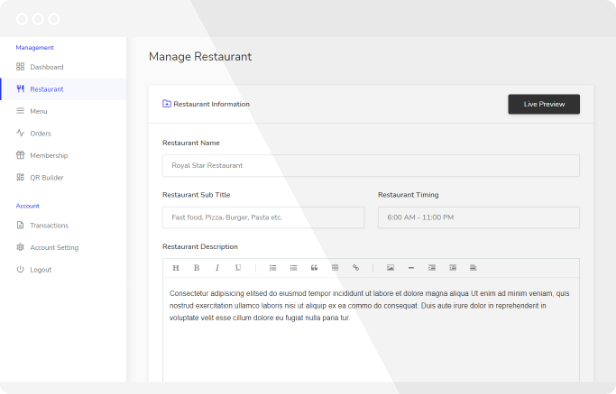
In this first step you need to fill in your restaurant’s information like restaurant Name, subtitle, restaurant timing, description of your restaurant, logo image, cover image, address location, etc. Also, you have an option to allow your customer to send an order or not. Why QuickQR is the best QR Code menu maker because of its unique and advance multi-template feature that allows you to choose which template you want to show your customer.
Step 2: Create a Restaurant Menu
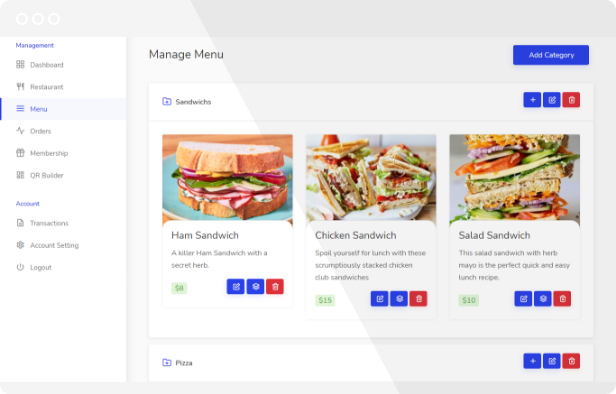
Create your menu categories and their dishes or item, upload item images, add as much information as you want about the dishes you offer. Add extras to your menu item. You have the option to set the availability of an item and extras.
Step 3: Design QR Code
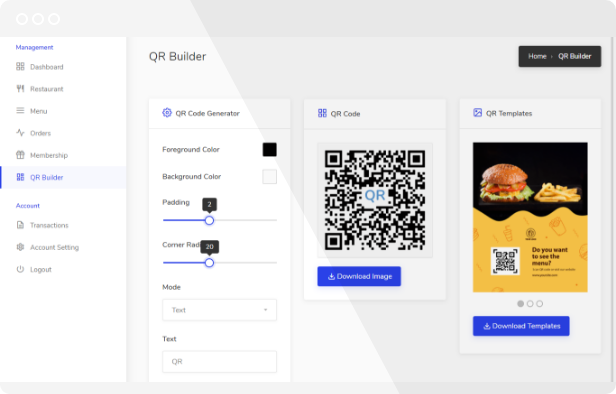
QR Code generator allows you to design QR code as you want. You can change the foreground color, background color, padding, corner radius, etc.
Also, you have the option to choose a mode of QR code with logo (set your logo icon in QR code), text (add your restaurant text or title in QR Code), or basic. change the size of the logo icon and text or its position to look perfect.
Step 4: Download a high-quality QR Code
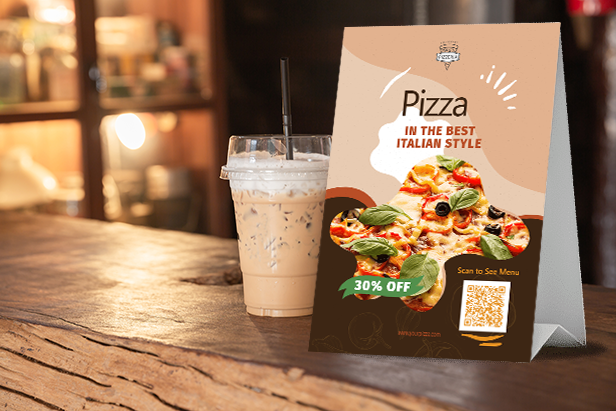
You have the option to download the QR Code in PNG format. Once downloaded QR Code, you can apply it in anything print materials from menus to marketing materials like flyers, table tents, and sandwich boards. We provide 3 pre-design QR template (Flyer), you can download them and edit them to print and online advertising. No need to reprinting your QR menu every time, you can live updates to your digital menu any time.
Why QuickQR is the Best QR Menu Script
QuickQR is trusted by thousands of restaurants worldwide. From small cafés to enterprise chains, it delivers a fast, secure, and contactless ordering solution that works on any device. With multi-restaurant support, SaaS features, and built-in payment gateways, QuickQR is the most complete QR code restaurant menu system available on CodeCanyon.
Start your digital menu journey today with QuickQR – the leading QR menu script for restaurants.
Main Features
- Simple wizard installation and upgrade.
- Membership System (Monthly, Yearly, Lifetime)
- Discount Coupons
- Taxes
- Multiple Payment Gateways support
- Bootstrap – Classic Design
- Multi-language Support (Arabic, Hindi, French, Spanish, Italian, German, Japanese Included)
- Powerful Admin panel for controlling your site.
- New pages (FAQ, Contact Us, Feedback, Privacy and Terms)
- Blog and Testimonials
- SEO optimized
- Change the currency
- Transaction History
- Adsense Support
- Facebook Login
- Google+ Login
- Unlimited Colors
- Google captcha integrated
- Live Support Chat (Tawk.to)
- Laravel Framework
- Easy to edit html template files.
- Fully Responsive
- And many more…
15 Payment Gateways Plugins Included Save $406
- Wire Transfer (Offline) Payment Gateway
- Paypal Payment Gateway
- Stripe Payment Gateway
- Payumoney Payment Gateway
- Mollie Payment Gateway
- Paystack Payment Gateway
- Paytm Payment Gateway
- 2Checkout Payment Gateway
- CCAvenue Payment Gateway
- Iyzico Payment Gateway
- Midtrans Payment Gateway
- Paytabs Payment Gateway
- Telr Payment Gateway
- Razorpay Payment Gateway
- Paddle Payment Gateway
System Requirements
- Server Requirements
- PHP 8.2x
- MySql: 5.7+
- Required Upgrades
- allow_url_fopen = on
- max_execution_time = 600
- max_input_time = 600
- post_max_size = 1G
- memory_limit = 1024M
- upload_max_filesize = 1G
- PHP Extensions
- BCMath
- Ctype
- Fileinfo
- JSON
- Mbstring
- OpenSSL
- PDO
- pdo_mysql
- Tokenizer
- XML
- cURL
- zip
- GD
Changelog
Check the below article before updating the old script to the new Laravel version. https://bylancer.com/docs/other/how-update-quickcms-php-version-quickcms-laravel-version
Multi-language Issue fixed in restaurent menu= QuickQR Pro 2.4 = 18 June 2025 * Fixed - Multi-language issue fix in restaurant menu
= QuickQR Pro 2.3 (Laravel CMS) = 30 May 2025
* Fixed - RTL Issues
* Added - Arabic lang File
= QuickQR Pro 2.2 (Laravel CMS) = 14 Jan 2024
* Fixed - A few issues
= QuickQR Pro 2.1 (Laravel CMS) = 27 Dec 2024
* Fixed - A few issues
= QuickQR Pro 2.0 (Laravel CMS) = 25 Dec 2024
* Added - Restaurant Limit in Membership Plans
* Added - Table specific QR Codes
* Fixed - A few issues
= QuickQR Pro 1.3 (Laravel CMS) = 28 Nov 2024
* Added - Paddle Payment Gateway
* Fixed - A few issues
= QuickQR Pro 1.2 (Laravel CMS) = 30 Aug 2024
* Fixed - Decimal values for menu price
= QuickQR Pro 1.1 (Laravel CMS) = 29 Aug 2024
* Fixed - A few issues
= QuickQR Pro 1.0 (Laravel CMS) = 14 Aug 2024
* Added - A whole new CMS with the Laravel Framework (QuickQR Pro)
* Added - A whole new advanced admin panel
* Added - Multiple restaurants for one user
* Added - Discount Coupon
* Added - Advertisements
* Added - Newsletter
* Fixed - A few issues
= = PHP Version 6.3.7 = 06 Jan 2023
* Fixed - Security Issue
| Type | PHP Script |
|---|---|
| Author | bylancer |
| Category | Php Scripts / Images And Media |
| Price | $89 |
| Sales | 1,951 |
| Rating | 4.69 from 144 ratings |
| Published | Oct 19, 2020 |
| Last Update | Sep 9, 2025 |
| Compatible Browsers | IE10, IE11, Firefox, Safari, Opera, Chrome, Edge |
| Compatible Software | PHP 8.x, MySQL 8.x, MySQL 5.x |
| Software Framework | Laravel |
| Source Files Included | JavaScript JS, HTML, CSS, PHP, SQL |
Categories
Tags
External listing. code.market does not sell this product and does not process payment for it. Pricing, payment, delivery, licensing, refunds, and support are handled by the third-party merchant on its own website. We may earn an affiliate commission from a referral. Details.
Products of the Week.
Submit🥇

STOP GUESSING WHAT TO POST
AI that learns your brand voice and builds a month of consistent, on-brand social content: carousels, posts and hooks that sound like you, not like everyone else's AI.
SaaS · 4,313 views · 38 clicksSaaS · Week 45 · 4,313 views · 38 clicks
🥈

Conversational Backlinks for Busy Founders
Place Backlink Relevant Conversation for your domain across Forums and Conversations
Website · 42,047 views · 223 clicksWebsite · Week 45 · 42,047 views · 223 clicks
🥉

upvote.club
Free Social Media Engagement that Helps Boost Your Content. Upvote Club supports 19 social networks with 100+ engagement actions in one dashboard. Add links to your posts and get free engagement from real users.
SaaS · 40,092 views · 117 clicksSaaS · Week 45 · 40,092 views · 117 clicks
#4

Substack Posting API
Onboard your Agent to Substack. Write Publish on Substack via API
SaaS · 59,097 views · 198 clicksSaaS · Week 45 · 59,097 views · 198 clicks
#5

Seenshot App
Free, Fast, MacOS Screenshot app. Make Screenshot cmd+shift+2 and send it via link
Desktop App · 28,471 views · 122 clicksDesktop App · Week 45 · 28,471 views · 122 clicks
#6

Hand-Placed Backlinks $9.99 per link. Flat rate.
Buy hand-placed forum, Q-A and directory backlinks. Flat $9.99 per link, no subscriptions — you only pay for approved listings.
Website · 4,304 views · 19 clicksWebsite · Week 45 · 4,304 views · 19 clicks
#7

Free Invoice Generator - PDF Invoices in Your Browser, No Sign-Up
A free invoice maker for freelancers and small businesses: fill in the invoice, check the live preview, and download a PDF that looks exactly like it. Any currency, tax per item, three templates, no sign-up, and nothing leaves your device.
2,978 views · 17 clicksWeek 45 · 2,978 views · 17 clicks
#8

Merge PDF Files Free - Combine PDFs in Your Browser, No Upload
A free PDF merger for office workers, students, and freelancers: combine PDFs and images into one file in the browser, reorder files and pages, pick page ranges, keep bookmarks, and open password-protected PDFs. Nothing is uploaded, no sign-up, no watermark.
2,749 views · 13 clicksWeek 45 · 2,749 views · 13 clicks