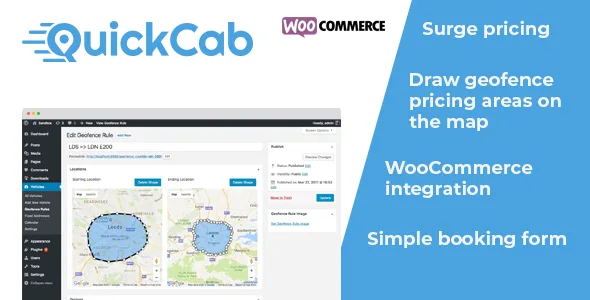
QuickCab: WooCommerce Taxi Booking Plugin
Description
Demo
Description
QuickCab is a powerful WordPress plugin for any business that provides transport as a service. It facilitates the price estimation, booking and payment of journeys. QuickCab has been professionally designed to provide a high quality user experience both for customers and admins.
QuickCab allows for the creation of multiple, complex pricing conditions to accommodate for any situation. You can charge based on distance, time, number of passengers, and number of luggage items. Alternatively, you can also use our powerful geofence pricing conditions allowing you to draw custom areas on a map and charge a specified amount to collect/drop off in that area. You can also add uber-style surge charges, for example multiplying fares by 1.5x in rush hour.
Because QuickCab is compatible with WooCommerce, it allows for a wide variety of options and customisations. Customers can pay by Card, Cash, PayPal or more. It is up to you how you customise the experience.
Features
Geofence Pricing Conditions
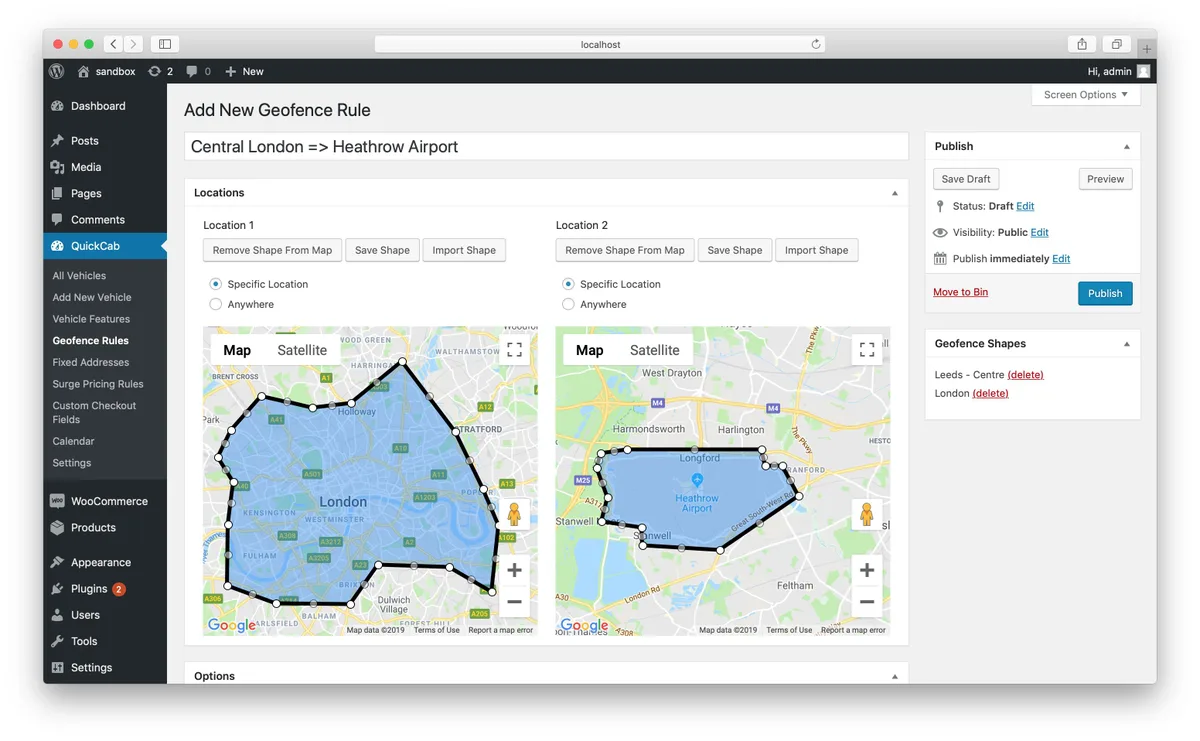
Draw two geofence areas on the map, if someone is picked up inside one and dropped off in the other you can either set a fixed price for that journey or increase the price by a fixed amount/multiplier.Create Your Own Pricing Structure
Charge passengers based on, duration, distance, number of passengers, and number of suitcases. Combined with surge pricing and geofence pricing conditions QuickCab allows you to create a truly unique pricing structure that will suit your business.Multilingual Ready
.pot files are provided to allow for easy translation.Uber-style Surge Pricing
Charge an increased amount for using your service at certain times of the day.Customisable
Almost everything your clients will interact with can be customised allowing you to create a truly unique experience that suits your business perfectly.Future-proof Code
QuickCab was designed by an industry professional with years of experience. The code powering it is well structured and simple to edit.Responsive Form
The booking form is responsive and looks great on all devices.Intelligent Code
QuickCab will keep track of bookings to ensure no vehicle is overbooked.WooCommerce Integration
QuickCab is fully compatible with WooCommerce allowing you to take payments easily from card, PayPal or cash and take advantage of the huge WooCommerce eco-system of additional plugins.Lifetime Updates
QuickCab is constantly getting new features. You will get the full benefit of all these features for no extra cost. If you have a request for a feature, get in touch. If it’s a useful feature that will benefit many customers I’ll add it in one of the future updates.Intuitive Admin Area
The admin area is very intuitive with helper text explaining what settings do next to fields and a simple layout.Fixed Addresses
Only want to pick up/drop off customers at specific destinations? No problem, with QuickCab you can ensure the customer can only select from a list of pre-defined locations for the collection address, the destination address, or both.Vehicle Customisation
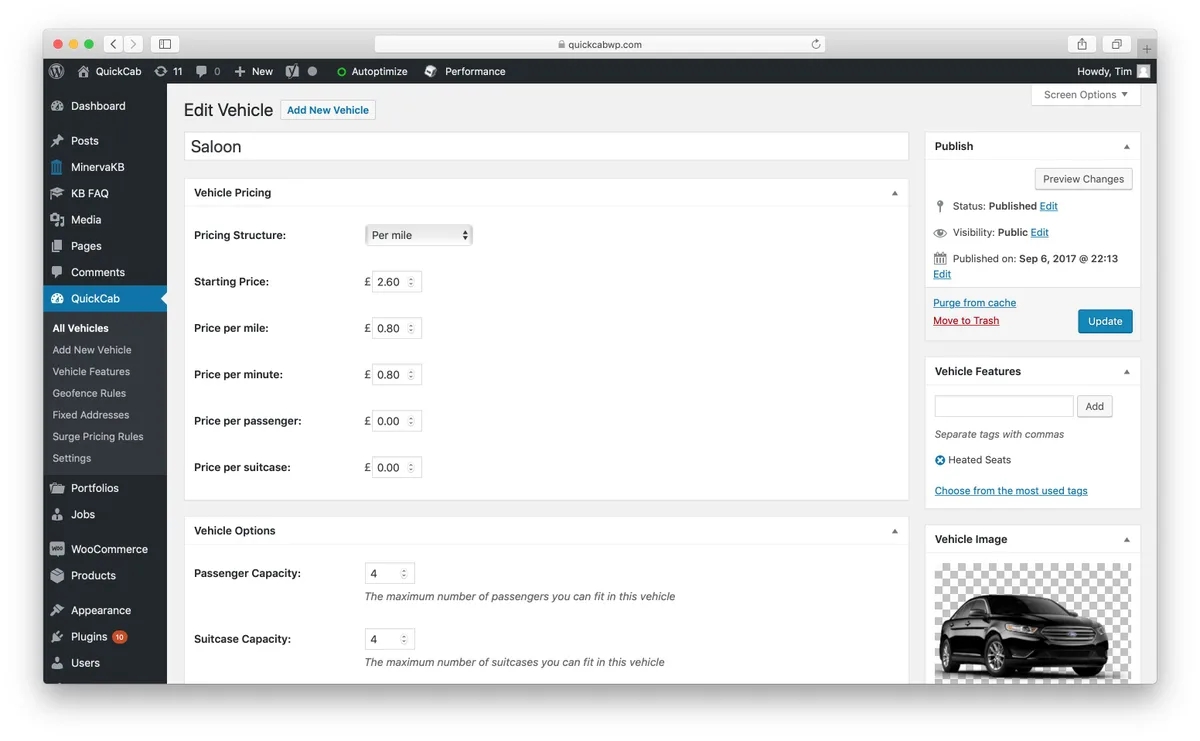
QuickCab allows you to create highly customisable vehicles with custom images, pricing structures, and vehicle information which QuickCab will use when calculating quotes for your customers.
The different pricing options for vehicles includes:
- Base price
- Price per mile/kilometer (including tiered pricing)
- Price per minute
- Price per hour (including tiered pricing)
- Price per passenger
- Price per suitcase
Geofence Pricing Conditions
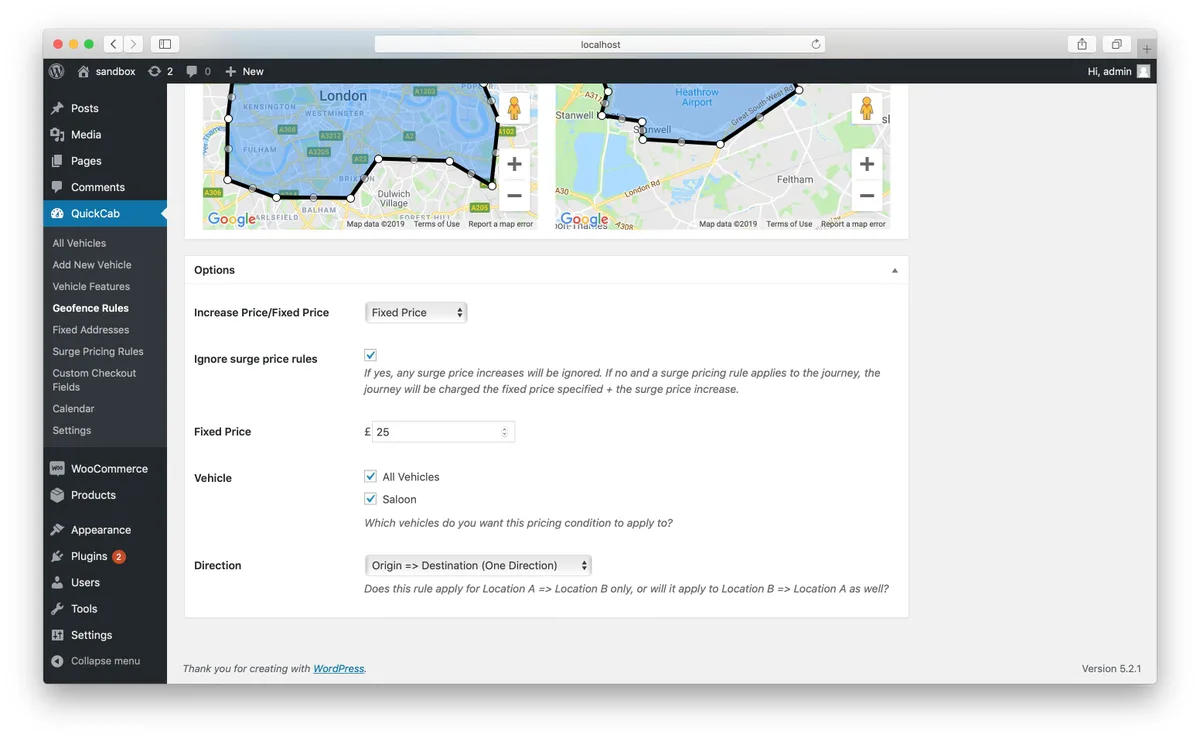
QuickCab has the very powerful, market-leading feature of Geofence pricing rules. This allows you to draw custom areas on the map, if a customer is picked up in one of the regions and dropped off in the other you can either set a fixed price for that journey or increase it by an amount/multiplier.
Optionally, you can just draw one geofence area on the map and set the other location to ‘anywhere’. This will allow you to apply the custom pricing rule to any journey that begins or ends in a certain area. This would be useful if, for example, you want to charge an additional $5 to drop someone off at the airport.
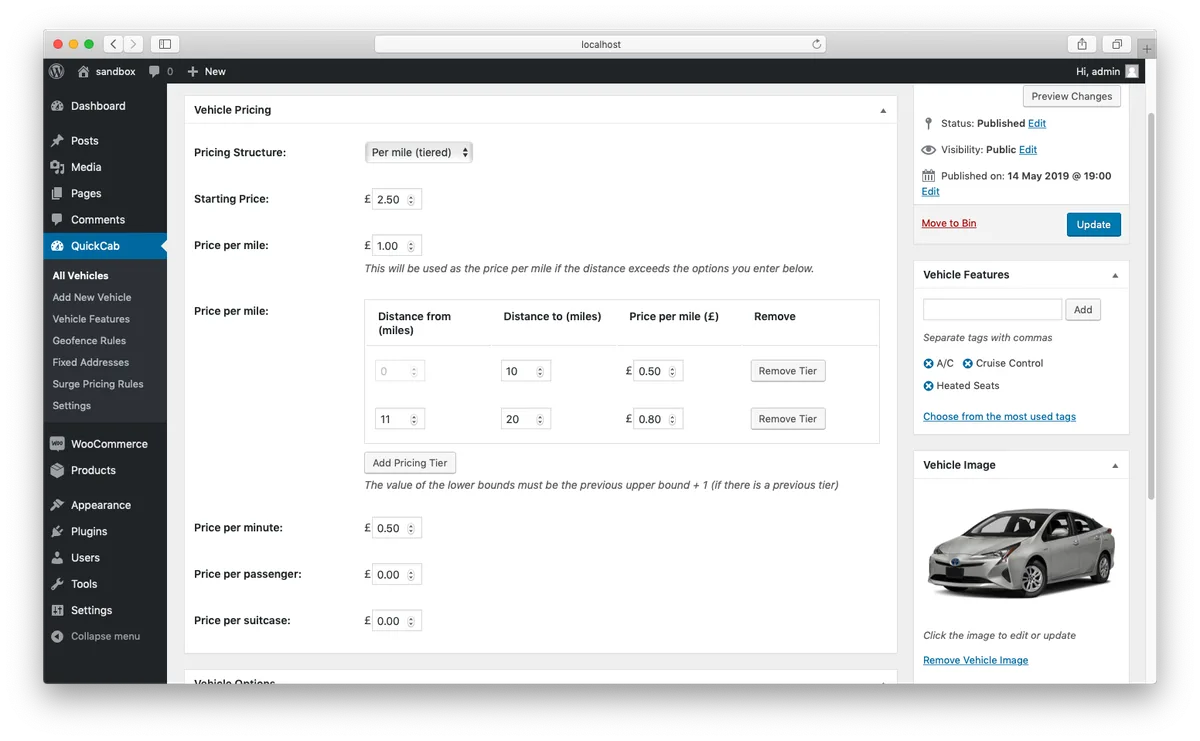
Tiered Pricing Rules
QuickCab allows you to easily define a tiered pricing rule for either distance-based pricing rules, or duration-based.
You can define prices for certain ranges, for example 0-10 miles = £1.00/mile, 11-20 miles = £0.80/mile, 21+ miles = £0.60/mile.
Surge Pricing Rules
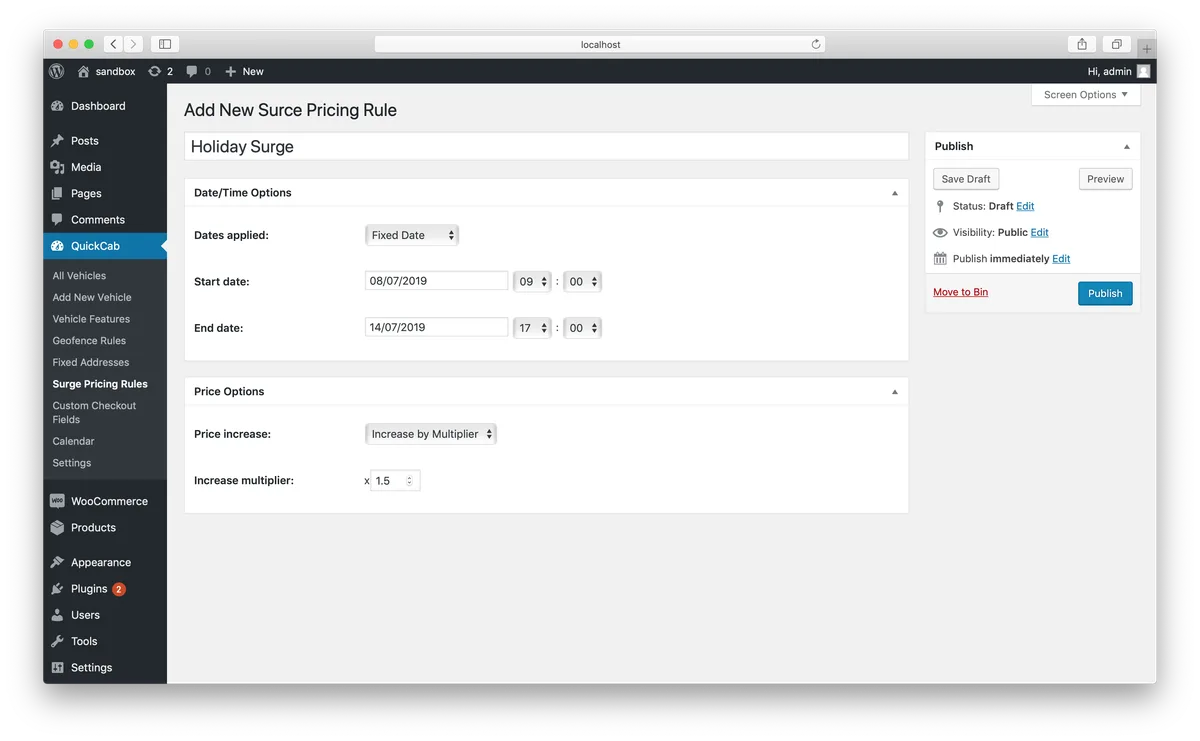
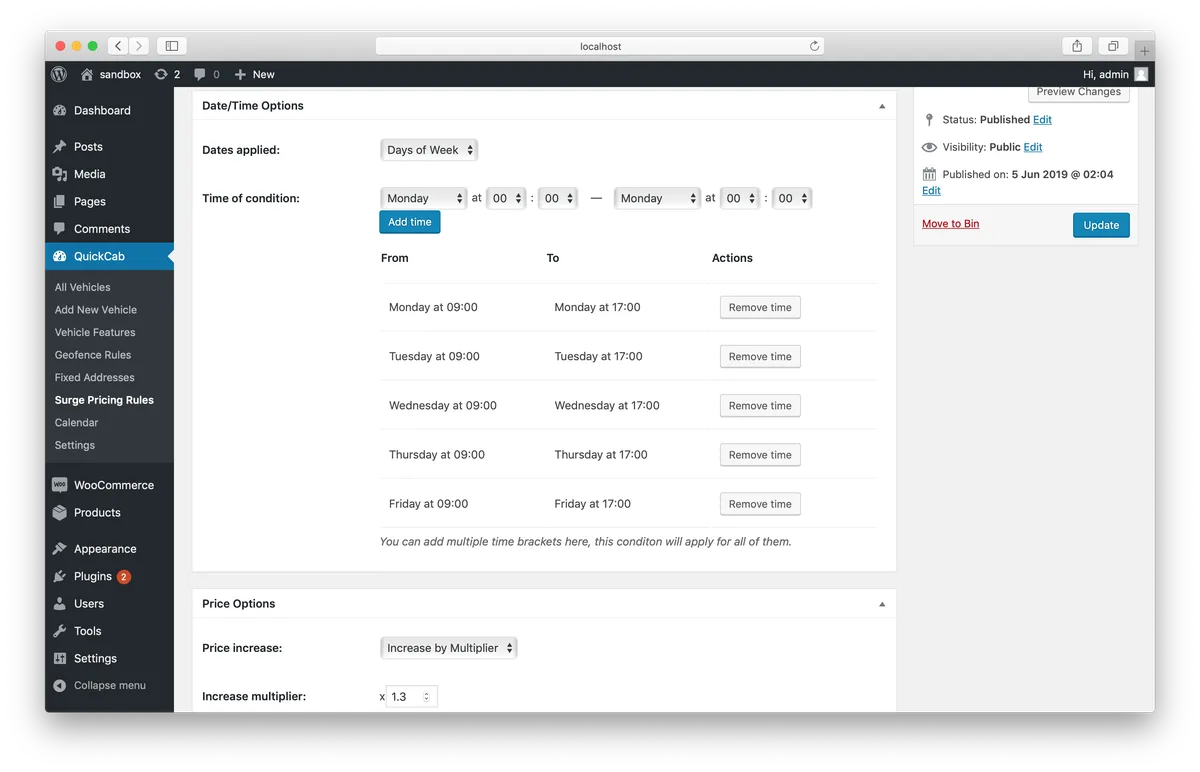
Define Uber-like surge pricing rules either for a fixed date and time, or for a regular weekly intervals.
You can either increase the price by a multiplier (e.g. x1.2) or by a fixed amount (e.g. +£2.00).
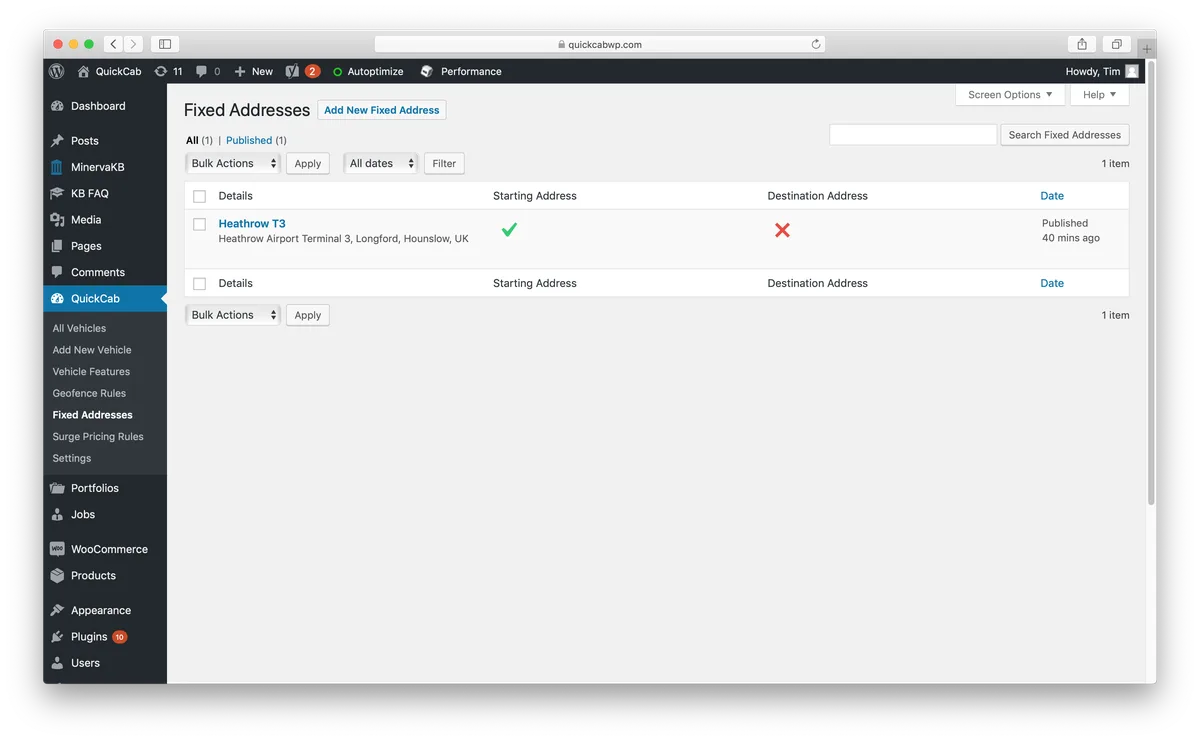
Fixed Addresses
If your business only picks up/drops off from certain destinations then you can make the user choose from a predefined list of addresses instead of letting them type it themselves.
Calendar View
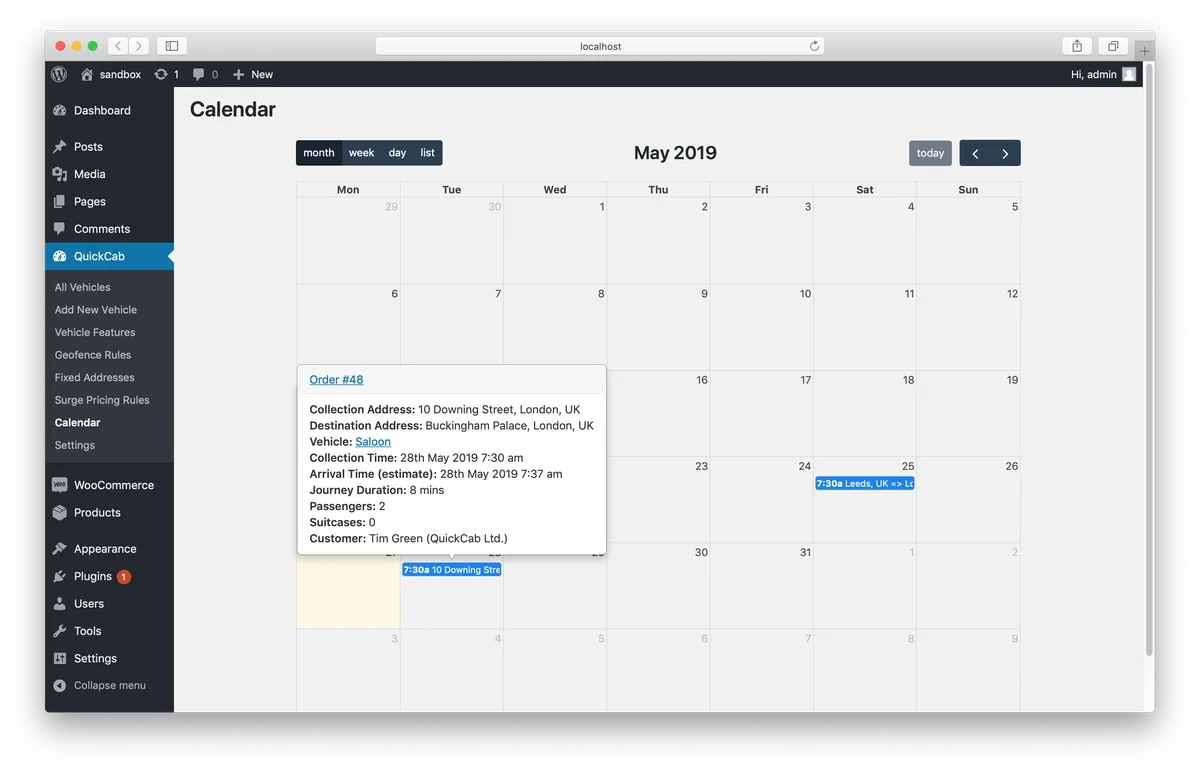
Along with the default WooCommerce pages to manage and view your existing orders, QuickCab also provides a calendar view of orders to give you a quick view of upcoming orders.
There are multiple different time scales available (month, week, day, list) and you can choose your favourite in the QuickCab settings which will be used as the default. You can hover over each order in the calendar to get a quick overview of the important details.
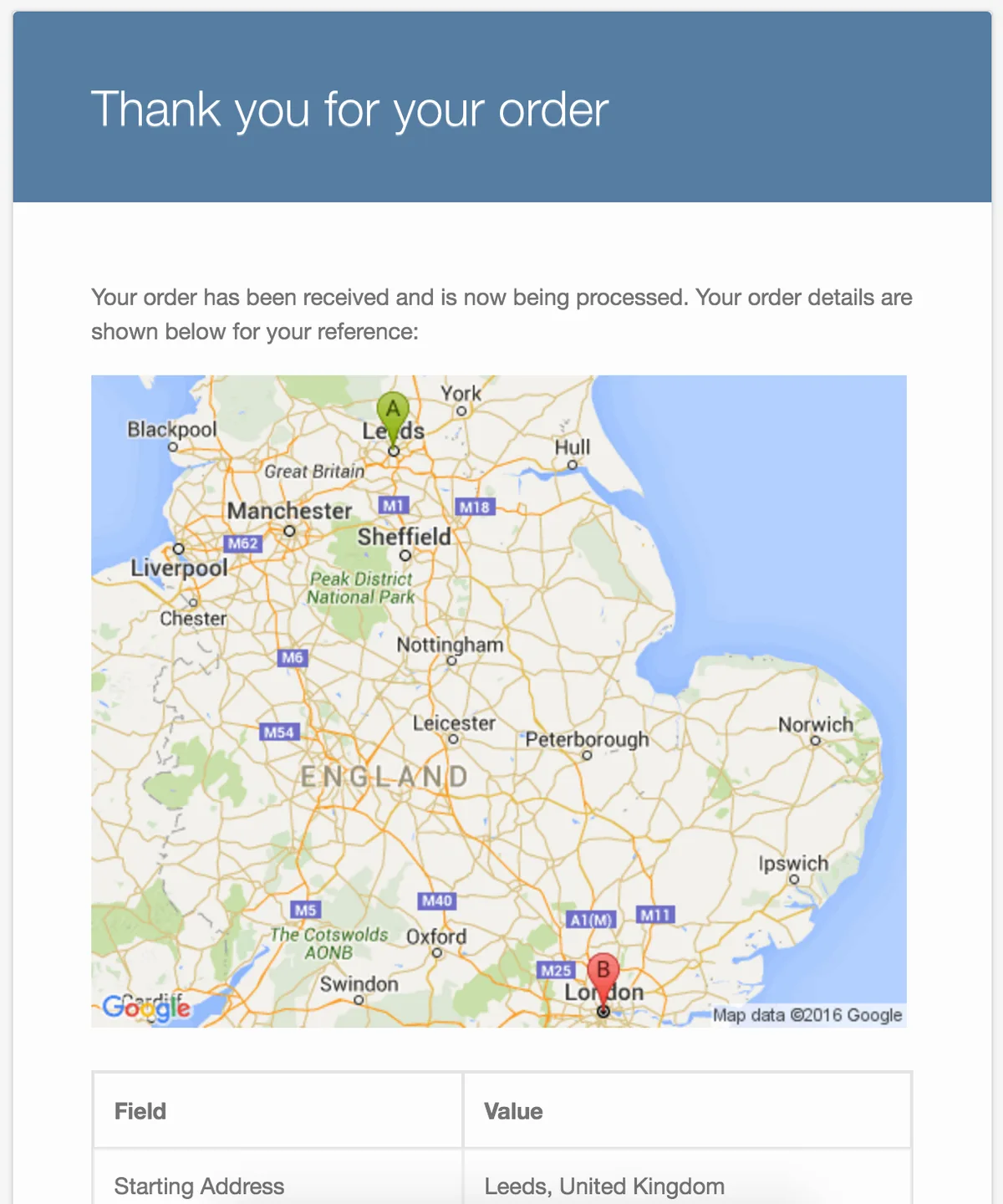
Emails
The Journey Information is displayed in emails to both admins and customers to give a quick overview of the order.
Custom Checkout Fields
Create custom checkout fields to request extra information from your customers when booking. These can optionally be displayed in the confirmation email.
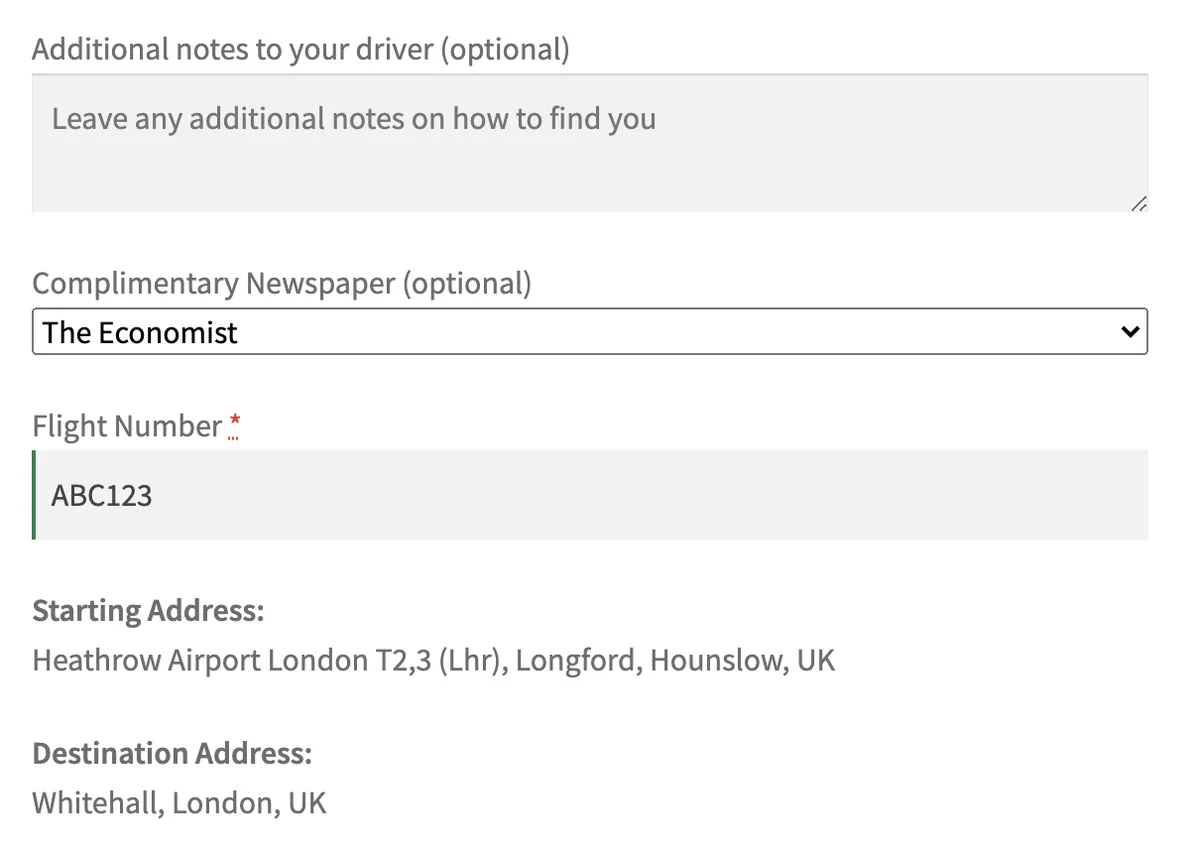
Multiple different input types can be selected with the option of making fields required
Feature List
Vehicles
-
Fully customisable pricing structures:
- Base price
- Price per minute – with the option of charging different amounts depending on distance
- Price per passenger
- Price per suitcase
- Price per hour (to rent hourly) – with the option of charging different amounts depending on duration
- Enter passenger capacity
- Enter suitcase capacity
- Enter number owned (to prevent overbooking of a vehicle)
- Upload associated image which displays on booking form
- Add all features associated with the vehicle
- Unlimited vehicles
Geofence Pricing Conditions
- Draw your own custom geofence areas on the map
- If customer is collected from within one geofence area and dropped off within the other geofence area, you can charge a fixed amount for that journey or increase that journey by a set amount
- For example: you define a geofence pricing condition from central London to Heathrow Airport for £40
- You can also select the first area as ‘Anywhere’ and draw the second location which would apply to any journey that ends within the second Geofence area
- For example: charge an extra £5 for all journeys that end at Heathrow airport
- Choose whether Surge Pricing Conditions also apply to this journey or ignore them
- Choose which vehicles this pricing condition applies to (or select all vehicles)
- Choose whether the Geofence pricing condition works in one direction (i.e. Central London => Heathrow) or both directions (i.e. Central London => Heathrow and Heathrow => Central London)
- Unlimited Geofence pricing conditions
Booking
- Fully responsive booking form that looks great on all devices
- Create multiple different forms, each with their own settings
- Customise the colours of the form to match your website
- Intelligent code that ensures no vehicles are over-booked
- Automatic calculation of distance and time, taking traffic into account at the time of departure
- Add restrictions to ensure bookings satisfy a min/max threshold of price or distance
- Allow customers to specify waypoints on their journey which are included in the price calculation
Admin
- All strings are translatable
- Calendar view to get a quick overview of upcoming orders – hover for quick info on the booking
- Seamless integration with WooCommerce
- Informative order pages which gives you all the information you need about a journey
Surge Pricing Rules
- Define certain periods that prices increase (or decrease)
- Define a weekly recurring time period (e.g. every Monday 9am to 5pm)
- Define a fixed date for this to happen (e.g. Friday 10/3/2019 10am to 7pm)
- Increase the fare by a fixed amount (e.g. +£5) or a multiplier (e.g. x1.3)
- Unlimited surge pricing rules
Fixed Addresses
- Ensure that the customer can only book from a pre-defined list of locations
- Choose to ensure collection address, destination address, or both use Fixed Addresses
- Unlimited fixed addresses
Custom Checkout Fields
- Define your own input fields to get custom information from your customer
- For example: ask your customers for a flight number on booking
- Either allow user to type input or let them select from a list of inputs that you select
- Unlimited custom checkout fields
QuickCab, the Wordpress Taxi Booking Plugin. For documentation, visit our website at quickcabwp.com
Changelog
== v1.2.7 ==
FIX: bug where the user got sometimes redirected to the beginning of the process when trying to checkout.

== v1.2.3 ==
FEATURE: improve how fixed addresses are loaded
FIX: bug where Geofence rules were not being applied when they should be
FIX: ensure booking form IDs are i18n adjusted

== v1.2.2 ==
FEATURE: add waypoints to email map
FEATURE: add JavaScript filters and actions to allow customisation
FEATURE: add ability to hide suitcase and passenger input field
FIX: extra waiting time bug
FIX: ensure return departure time is used in quote generation

== v1.2.1 ==
FIX: improve google maps marker logic
FIX: ensure orders with no ID are not provided

== v1.2.0 ==
FEATURE: add waypoints to booking form
FEATURE: add extra waiting time to booking form
FEATURE: add map settings to booking form
IMPROVE: fix marker logic on booking form map
FIX: fix surge price calculation logic
FIX: fix timezone issue for orders

== v1.1.0 ==
FEATURE: add ability to create multiple different forms, each with their own settings
FEATURE: set a colour for each vehicle which is used in the calendar
FIX: make quote calculation speed faster

== v1.0.10 ==
FEATURE: add time interval as an option for the booking form
FIX: timezone error preventing form being submitted

== v1.0.9 ==
FEATURE: add vehicle base location to be used to calculate vehicle availability
FIX: API referrer restriction error
FIX: Error when price in settings was > 1000

== v1.0.8 ==
FEATURE: Add textarea option for custom checkout fields
IMPROVE: Add more columns to vehicle index page
IMPROVE: Make API settings helper text more descriptive
IMPROVE: Improve form layout
FIX: departure_time is in the past bug when booking in different time zones
FIX: $ is not defined error

== v1.0.7 ==
FEATURE: Add custom checkout fields functionality
IMPROVE: Make order page responsive
IMPROVE: Remove some unused code
FIX: French translation not working

== v1.0.6 ==
FEATURE: Add French translation
IMPROVE: Update translated text
IMPROVE: Change qTip viewport so content isn't hidden on calendar page
IMPROVE: Change setting helper text
FIX: QuickCab bootstrap overwriting bootstrap for other themes

== v1.0.5 ==
FEATURE: Add multilingual support to the calendar
IMPROVE: More order information in calendar popover
IMPROVE: Calendar popover design

== v1.0.4 ==
FEATURE: Add calendar view of bookings
FIX: Remove some unused settings

== v1.0.3 ==
FIX: Error when calculating price

== v1.0.2 ==
IMPROVE: Add more booking information to the receipt email
IMPROVE: Display error if customer tries to make a booking in the past
IMPROVE: Display the error returned by Google Maps API if there is one

== v1.0.1 ==
IMPROVE: Update documentation
IMPROVE: Change text when clicking vehicle book button
FIX: Form header responsive issue

== v1.0.0 ==
First version
Categories
Tags
External listing. code.market does not sell this product and does not process payment for it. Pricing, payment, delivery, licensing, refunds, and support are handled by the third-party merchant on its own website. We may earn an affiliate commission from a referral. Details.
Products of the Week.
Submit🥇

STOP GUESSING WHAT TO POST
AI that learns your brand voice and builds a month of consistent, on-brand social content: carousels, posts and hooks that sound like you, not like everyone else's AI.
SaaS · 4,631 views · 44 clicksSaaS · Week 45 · 4,631 views · 44 clicks
🥈

Conversational Backlinks for Busy Founders
Place Backlink Relevant Conversation for your domain across Forums and Conversations
Website · 42,478 views · 225 clicksWebsite · Week 45 · 42,478 views · 225 clicks
🥉

upvote.club
Free Social Media Engagement that Helps Boost Your Content. Upvote Club supports 19 social networks with 100+ engagement actions in one dashboard. Add links to your posts and get free engagement from real users.
SaaS · 40,530 views · 120 clicksSaaS · Week 45 · 40,530 views · 120 clicks
#4

Substack Posting API
Onboard your Agent to Substack. Write Publish on Substack via API
SaaS · 59,497 views · 200 clicksSaaS · Week 45 · 59,497 views · 200 clicks
#5

Seenshot App
Free, Fast, MacOS Screenshot app. Make Screenshot cmd+shift+2 and send it via link
Desktop App · 28,874 views · 124 clicksDesktop App · Week 45 · 28,874 views · 124 clicks
#6

Hand-Placed Backlinks $9.99 per link. Flat rate.
Buy hand-placed forum, Q-A and directory backlinks. Flat $9.99 per link, no subscriptions — you only pay for approved listings.
Website · 4,672 views · 19 clicksWebsite · Week 45 · 4,672 views · 19 clicks
#7

Free Invoice Generator - PDF Invoices in Your Browser, No Sign-Up
A free invoice maker for freelancers and small businesses: fill in the invoice, check the live preview, and download a PDF that looks exactly like it. Any currency, tax per item, three templates, no sign-up, and nothing leaves your device.
3,330 views · 17 clicksWeek 45 · 3,330 views · 17 clicks
#8

Merge PDF Files Free - Combine PDFs in Your Browser, No Upload
A free PDF merger for office workers, students, and freelancers: combine PDFs and images into one file in the browser, reorder files and pages, pick page ranges, keep bookmarks, and open password-protected PDFs. Nothing is uploaded, no sign-up, no watermark.
3,078 views · 14 clicksWeek 45 · 3,078 views · 14 clicks