
QuickBooking
Description
Elevate Your Business with a Comprehensive Full-Stack Appointment Booking System! Built with a cutting-edge and modern tech stack, this robust web application provides a complete solution for managing appointments, streamlining operations, and enhancing customer experience. It offers both a seamless front-end for your clients and a powerful, easy-to-use back-end for your staff. Key Features Include:
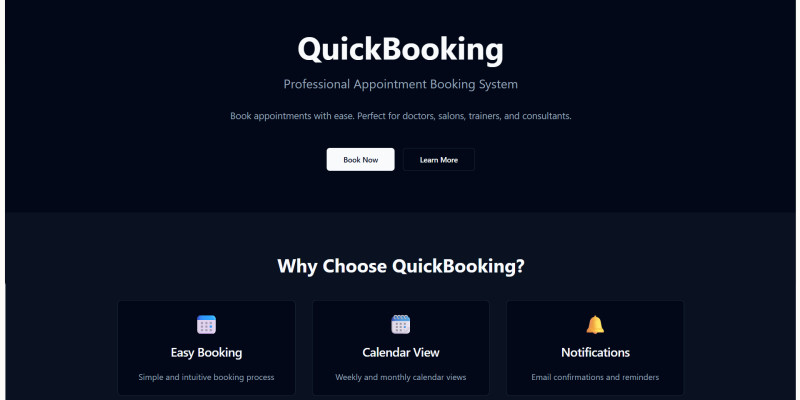
- Effortless Client Booking Portal: A clean and responsive interface allows customers to easily select services, choose available dates and times from a clear calendar view, and confirm their appointments in just a few clicks.
- Powerful Staff & Admin Dashboard: Gain full control over your scheduling with a comprehensive backend. Manage all appointments, view client details, confirm/edit/delete bookings, and update their status.
- Service & Time Slot Management: Easily configure your services, set working hours, and manage available time slots to suit your business needs.
- User Authentication System: Secure login and registration for both clients and staff ensures data privacy and controlled access.
- Multi-Language Support: Reach a wider audience with built-in multi-language capabilities (e.g., Arabic, English shown).
- Modern & Responsive Design: Optimized for all devices, ensuring a consistent user experience whether on desktop, tablet, or mobile.
Why Choose This Script?
- State-of-the-Art Technologies: Built with the latest and most popular frameworks, ensuring high performance, scalability, and maintainability.
- Time & Cost Saving: Get your online booking system up and running quickly without the need for extensive custom development.
- Scalable & Customizable: Developed with clean, modular code, making it easy to understand, modify, and extend to fit specific business requirements.
- User-Friendly Interface: Designed with both the end-user and administrator in mind, ensuring a smooth and efficient workflow.
- Deployment Ready: Easily deployable on platforms like Vercel and Netlify.
Perfect for various service-based businesses: Salons, clinics, consulting firms, fitness studios, educational institutions, and more! Invest in this professional appointment booking solution and empower your business with efficient scheduling and superior customer service. Technologies Used:
- Frontend: React + TypeScript
- Styling: Tailwind CSS + shadcn-ui
- Build Tool: Vite
- Backend: Supabase (PostgreSQL + Auth)
- Deployment: Vercel/Netlify ready
Features
Here's a detailed list of features you can use. Adapt and expand based on any other functionalities your system has. I. General & Core Features:
- Full-Stack Application: A complete web solution covering both frontend and backend functionalities.
- Modern & Responsive Design: Optimized for seamless performance and display across all devices (desktops, tablets, mobiles).
- Multi-Language Support: Easily switch between languages (e.g., Arabic, English) to cater to a diverse user base.
- Clean & Intuitive User Interface (UI): Designed for ease of use for both clients and staff.
- Scalable Architecture: Built with modern technologies (React, Supabase) for easy expansion and handling of increased loads.
- Easy Deployment: Ready for deployment on popular platforms like Vercel and Netlify.
II. Client-Side Features (Frontend - User Experience):
- Effortless Appointment Booking: Simple, step-by-step process for clients to book appointments.
- Service Selection: Clients can easily browse and select from available services.
- Interactive Calendar View: Clear calendar interface to check available dates and time slots.
- Real-time Availability: Shows only available slots to prevent double bookings.
- Client Information Form: Secure collection of necessary details (name, email, phone) during booking.
- Appointment Confirmation: (If implemented) Instant confirmation upon successful booking.
- User Account Creation/Login: Clients can create accounts to manage their past and upcoming appointments.
- View Booked Appointments: Registered clients can view their appointment history and upcoming bookings.
III. Staff / Admin Dashboard Features (Backend - Management & Control):
- Comprehensive Dashboard Overview: A central hub to monitor daily operations and key metrics.
- Appointment Management:
- View All Appointments: See a comprehensive list of all scheduled bookings.
- Add New Appointments: Manually create appointments for clients.
- Edit Appointment Details: Modify existing appointment information (date, time, service, client details).
- Update Appointment Status: Change appointment status (e.g., Confirmed, Pending, Completed, Canceled).
- Delete Appointments: Remove appointments from the system.
- Search & Filter: Easily find specific appointments by client name, date, service, or status.
- Service Management:
- Add/Edit/Delete Services: Full control over the services offered, including names, descriptions, and durations.
- Schedule & Working Hours Management:
- Set Business Hours: Define daily/weekly working hours.
- Manage Staff Availability: (If applicable for multiple staff) Set individual staff schedules.
- Block Time Slots: Mark specific times as unavailable (e.g., for breaks, meetings).
- User Management (Admin Credentials):
- Manage Staff Accounts: (If applicable) Create, edit, and manage staff user accounts.
- Manage Client Accounts: View and manage registered client profiles.
- Email Templates (Notifications): (Based on your "Email Templates" in the image)
- Customizable Email Notifications: Ability to customize templates for appointment confirmations, reminders, etc.
- Automated Notifications: Send automated emails to clients and/or staff.
IV. Technical Features (Under the Hood):
- Frontend: React + TypeScript (for robust, maintainable, and scalable UI development).
- Styling: Tailwind CSS + shadcn-ui (for modern, utility-first CSS and beautiful, accessible UI components).
- Build Tool: Vite (for lightning-fast development experience and optimized builds).
- Backend & Database: Supabase (utilizes PostgreSQL for powerful relational database management and Supabase Auth for secure user authentication).
- API Management: (Mention if you're using RESTful APIs or GraphQL for communication).
- Code Quality: Clean, modular, and well-structured code.
- Deployment Ready: Pre-configured for easy deployment on Vercel and Netlify (popular serverless platforms).
Requirements
To successfully set up and run this full-stack appointment booking system, you will need the following: I. For the Backend (Supabase):
- Supabase Account: Access to a Supabase project. This will host your PostgreSQL database and manage user authentication.
- Note: Supabase offers a generous free tier for getting started.
- Supabase Project Configuration:
- API Keys: Your Supabase Project URL and Public API Key (anon key) will be required.
- Database Setup: The necessary database tables and schema (instructions should be provided in your documentation).
- Authentication Setup: Supabase Auth is used, so ensure its settings are configured as per your documentation.
II. For the Frontend (React + Vite):
- Node.js: Version 16.x or higher (LTS recommended) installed on your local development machine. This is required for running
npmoryarncommands. - npm or Yarn: A package manager (npm usually comes with Node.js, or you can install Yarn).
- Code Editor: A text editor or IDE like VS Code is highly recommended for working with the codebase.
III. Deployment (Frontend Hosting):
- Vercel Account OR Netlify Account: An account on either of these platforms is recommended for easy deployment of the React frontend.
- Note: Both offer free tiers suitable for many projects.
- Git Repository: The project should be connected to a Git repository (e.g., GitHub, GitLab, Bitbucket) for seamless deployment with Vercel/Netlify.
IV. General Requirements:
- Basic Understanding of Web Development: Familiarity with JavaScript, React concepts, and environment variables is beneficial for customization.
- Internet Connection: Required for installing dependencies, connecting to Supabase, and deployment.
V. Environment Variables:
- You will need to set up environment variables (e.g., in a
.envfile for local development and in your deployment platform's settings) for:VITE_SUPABASE_URLVITE_SUPABASE_ANON_KEY- (Any other sensitive API keys or configurations specific to your app)
Instructions
This guide will walk you through the necessary steps to set up and deploy your full-stack appointment booking system. I. Prerequisites: Before you begin, ensure you have the following installed on your development machine:
- Node.js: Version 16.x or higher (LTS recommended). Download from
- nodejs.org.
- npm (Node Package Manager) or Yarn: npm comes bundled with Node.js.
- Git: Installed and configured.
- Code Editor: A text editor like VS Code is highly recommended.
II. Supabase Backend Setup: Your application uses Supabase for its backend (Database & Authentication).
- Create a Supabase Project:
- Go to
- Supabase.com and create a new account or log in.
- Click "New Project" and follow the instructions to create a new project.
- Crucial: Note down your Project URL and your
anon(public) API Key from your Project Settings > API section. You will need these for your frontend configuration.
- Database Schema Setup:
- You will need to import the required database tables and initial data into your Supabase project.
- [Important: You MUST provide an SQL script (e.g.,
schema.sqlordatabase.sql) with your project files that includesCREATE TABLEstatements for all necessary tables (e.g.,services,appointments,users).] - Go to your Supabase project dashboard > SQL Editor.
- Create a new query and paste the content of your
_schema.sqlfile (or similar) here, then click "Run".
- Authentication Configuration:
- Supabase handles authentication. Ensure the "Email Provider" is enabled in your Supabase project dashboard > Authentication > Providers.
- [Optional: If you use other providers like Google/GitHub, mention configuring them here.]
III. Frontend Application Setup (React + Vite):
- Clone the Repository:
- Open your terminal or command prompt.
- Navigate to the directory where you want to store your project.
- Run:
git clone - Navigate into the project directory:
cd
- Install Dependencies:
- In the project root directory, run:
npm install(oryarn install)
- In the project root directory, run:
- Configure Environment Variables:
- Create a file named
.envin the root of your project directory. - Add your Supabase API keys to this file:
<code>
VITE_SUPABASE_URL="YOUR_SUPABASE_PROJECT_URL"
VITE_SUPABASE_ANON_KEY="YOUR_SUPABASE_ANON_PUBLIC_KEY"
</code>
- Create a file named
<strong>Replace <code>YOUR_SUPABASE_PROJECT_URLandYOUR_SUPABASE_ANON_PUBLIC_KEYwith the actual values obtained from your Supabase project.
<br><br><br><strong>Run in Development Mode:</strong><br><br>After installing dependencies and configuring <code>.env, run: npm run dev (or yarn dev)<br>###licode###http://localhost:5173 (or a similar port). You can now access and test the application locally.
IV. Deployment to Vercel/Netlify: This application is optimized for easy deployment on modern hosting platforms.
- Push to Git Repository:
- Ensure your local project is committed and pushed to a remote Git repository (e.g., GitHub, GitLab, Bitbucket).
- Deploy with Vercel:
- Go to
- Vercel.com and log in.
- Click "Add New..." -> "Project".
- Import your Git repository. Vercel will usually auto-detect the Vite/React setup.
- During deployment configuration, remember to set your Environment Variables:
VITE_SUPABASE_URLVITE_SUPABASE_ANON_KEY
- Click "Deploy". Vercel will build and deploy your application.
- Deploy with Netlify:
- Go to
- Netlify.com and log in.
- Click "Add new site" -> "Import an existing project".
- Connect to your Git repository. Netlify will usually auto-detect the Vite/React setup.
- During deployment configuration, set your Environment Variables:
VITE_SUPABASE_URLVITE_SUPABASE_ANON_KEY
- Click "Deploy site". Netlify will build and deploy your application.
V. Post-Deployment (Initial Admin Setup):
- Once deployed, you will likely need to register your first admin/staff user.
- [Crucial: Provide clear instructions here on how to create the initial admin account. For example, "Navigate to the
/registerpage and create an account. This account will automatically be assigned admin privileges upon first registration" OR "You can manually set a user as admin through the Supabase database table (e.g.,userstable, setis_adminto true)." - Choose whichever applies to your system].
| Author | AhmadAlothman |
|---|---|
| Category | Scripts & Code / NodeJS |
| Price | $10 |
| Extended License | $30 |
| Likes | 3 |
| First Release | Jun 20, 2025 |
| Last Update | Jun 20, 2025 |
| Files included | .css, .html, JavaScript .js |
Categories
Tags
External listing. code.market does not sell this product and does not process payment for it. Pricing, payment, delivery, licensing, refunds, and support are handled by the third-party merchant on its own website. We may earn an affiliate commission from a referral. Details.
Products of the Week.
Submit🥇

STOP GUESSING WHAT TO POST
AI that learns your brand voice and builds a month of consistent, on-brand social content: carousels, posts and hooks that sound like you, not like everyone else's AI.
SaaS · 5,417 views · 51 clicksSaaS · Week 45 · 5,417 views · 51 clicks
🥈

Conversational Backlinks for Busy Founders
Place Backlink Relevant Conversation for your domain across Forums and Conversations
Website · 43,618 views · 226 clicksWebsite · Week 45 · 43,618 views · 226 clicks
🥉

upvote.club
Free Social Media Engagement that Helps Boost Your Content. Upvote Club supports 19 social networks with 100+ engagement actions in one dashboard. Add links to your posts and get free engagement from real users.
SaaS · 41,632 views · 123 clicksSaaS · Week 45 · 41,632 views · 123 clicks
#4

Substack Posting API
Onboard your Agent to Substack. Write Publish on Substack via API
SaaS · 60,582 views · 203 clicksSaaS · Week 45 · 60,582 views · 203 clicks
#5

Seenshot App
Free, Fast, MacOS Screenshot app. Make Screenshot cmd+shift+2 and send it via link
Desktop App · 29,912 views · 124 clicksDesktop App · Week 45 · 29,912 views · 124 clicks
#6

Hand-Placed Backlinks $9.99 per link. Flat rate.
Buy hand-placed forum, Q-A and directory backlinks. Flat $9.99 per link, no subscriptions — you only pay for approved listings.
Website · 5,656 views · 19 clicksWebsite · Week 45 · 5,656 views · 19 clicks
#7

Free Invoice Generator - PDF Invoices in Your Browser, No Sign-Up
A free invoice maker for freelancers and small businesses: fill in the invoice, check the live preview, and download a PDF that looks exactly like it. Any currency, tax per item, three templates, no sign-up, and nothing leaves your device.
4,316 views · 17 clicksWeek 45 · 4,316 views · 17 clicks
#8

Merge PDF Files Free - Combine PDFs in Your Browser, No Upload
A free PDF merger for office workers, students, and freelancers: combine PDFs and images into one file in the browser, reorder files and pages, pick page ranges, keep bookmarks, and open password-protected PDFs. Nothing is uploaded, no sign-up, no watermark.
3,965 views · 14 clicksWeek 45 · 3,965 views · 14 clicks