
QuickBite | Flutter Food Delivery App with Supabase Backend and Admin Panel
Description
Demo Instructions
- Customer app (web version): https://quickbite-demo-eight.vercel.app
- Admin panel: https://quickbite-admin-demo.vercel.app
- Demo logins: admin panel admin@quickbite-demo.com, customer app customer@quickbite-demo.com, password for both Demo1234!
- Customer app: open the demo, tap Create account (Sign up) and create your own test account with any email and password. You can browse the menu as a guest without an account.
- Admin panel: the panel only lets in users with the admin role. After you buy, you create your own admin account in your own Supabase project in a few minutes (the buyer guide shows each step: sign up, then run
make_admin.sql). The admin panel also has an offline demo mode with sample data (DEMO_MODEinadmin/js/config.js).
The demo uses a shared test database, so other visitors may change the data. The live demo is not the download: the download contains placeholders and you connect your own Supabase project.
QuickBite: a food delivery app you can launch as your own
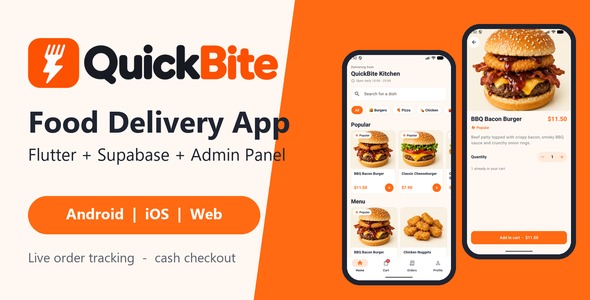
QuickBite is a ready-to-run source-code package for a single restaurant. It has three parts that work together: a Flutter customer app (Android, iOS and web), a Supabase database (SQL files included) and a web admin panel for the restaurant. Customers browse the menu, fill a cart, order with cash on delivery and watch the order move from the kitchen to their door, live. The restaurant manages orders, menu, categories and settings from the admin panel.
It comes with a demo restaurant (6 categories, 24 dishes with photos), a step-by-step buyer guide with screenshots of every main screen, and 61 unit and widget tests.
Customer app features
- Splash screen, three onboarding slides (shown once), and email + password sign in / sign up
- Forgot password: reset email, then a “Choose a new password” screen when the link is opened (Android, iOS and web)
- Delete account inside the app (Profile), as required by Apple and Google Play: profile, addresses and sign-in are deleted, past orders are kept for the restaurant without personal data
- Guest browsing: the menu can be viewed without an account, sign-in is asked at checkout
- Home screen with search, category chips, a Popular row and a product grid
- Product detail with quantity picker and add to cart
- Cart saved on the phone (survives restarts), quantity editing, subtotal, delivery fee and total
- Checkout with saved or new delivery address, phone number, note and cash on delivery
- Orders list and order detail with a live status timeline (Supabase Realtime)
- Cancel your own order while it is still in the “placed” status
- Profile with name, phone, saved addresses and sign out
- Light and dark theme that follow the phone setting
- Friendly “Set up Supabase” screen while the URL and key are still placeholders
- All app texts in one file (
lib/config/strings.dart)
Admin panel features
- Admin-only sign in (everyone else sees “Not an admin”), with Forgot password and a set-new-password form
- Live order board with status columns, order details, status buttons, and a sound and badge for new orders
- Menu manager: add, edit, delete, switch Available / Popular
- Category manager with sort order
- Settings: restaurant name, currency symbol, delivery fee, minimum order, opening hours text
- Dashboard: orders, revenue and top products
- Plain HTML, CSS and JavaScript: no build step, host it on any static web host
- All admin texts in one file (
js/strings.js) and an optional demo mode with fake data
Database (Supabase / Postgres)
schema.sql: tables, row-level security, grants, and theplace_order,cancel_orderanddelete_my_accountfunctions- Prices, delivery fee and minimum order are checked on the server. The app only sends product ids and quantities.
seed.sql: demo restaurant with 6 categories and 24 dishes (safe to run more than once)make_admin.sql: turns one user into an adminmigrations/1.1.0_account_deletion.sql: upgrade for projects created with version 1.0.0
What is included in the download
app/: the full Flutter project (Android, iOS and web), with demo dish photos, logo, onboarding and launcher images, and testsadmin/: the web admin panel (static files)supabase/: schema.sql, seed.sql, make_admin.sql, an upgrade script and a short READMEdocumentation/index.html: the buyer guide (requirements, screens, 10-minute quick start, Supabase setup including password reset links and account deletion, project structure, reskin checklist, editing texts, Android and iOS signed release, launch and splash screens, deploying the admin panel, testing, FAQ and troubleshooting)app/android/key.properties.example: template for your own release signing (no keys or keystores are included)- README, CHANGELOG, a short licence note (your marketplace purchase licence applies) and
documentation/THIRD-PARTY-LICENSES.txt
Requirements
- Flutter 3.41 or newer (Dart 3.11 or newer)
- Android: compileSdk and targetSdk 36, minSdk 24 (Android 7.0 or newer)
- A Supabase account (one project holds the database for both the app and the admin panel)
- Android Studio for Android builds; a Mac with Xcode for iOS builds
- A static web host (or any web server) for the admin panel
- Your own Google Play and Apple developer accounts if you publish to the stores
About Supabase (external service)
Supabase is an external, third-party service. You sign up for your own Supabase account and agree to Supabase’s own terms. The free plan is enough to start; any Supabase usage costs (for example a paid plan when your shop grows, extra emails or storage) are paid by you to Supabase and are not covered by the purchase price of this item.
Backend setup in a few lines
- Create a project at supabase.com.
- In its SQL Editor, run
supabase/schema.sql, thensupabase/seed.sql. - Sign up one user, then run
supabase/make_admin.sql(with your email) to make it an admin. - Paste your Project URL and anon key into
app/lib/config/app_config.dartandadmin/js/config.js. - Add your app and admin addresses to the Supabase Redirect URLs (for password reset; the guide lists them).
- In
app/runflutter pub getandflutter run. Serve theadmin/folder and sign in.
What is not included
- Online payments: orders are cash on delivery only
- Push notifications (customers see live status inside the app; the admin panel plays a sound for new orders while it is open)
- A driver / courier app
- Multi-restaurant support: one restaurant per project (a second restaurant needs its own project and licence)
- Right-to-left languages are not set up or tested
- Hosting, a Supabase account, store accounts and a privacy policy page are yours to provide
AI disclosure
- Code: AI-assisted tools were used to help write parts of the code.
- Documentation: AI-assisted tools were used to help write the buyer guide and README files.
- Graphics: the demo dish photos, the logo, the onboarding pictures and the launcher icon were made with AI image tools. The screenshots show the real app.
- Review and testing: the author reviewed and tested everything. The package includes 61 unit and widget tests, and the order flow was tested on a real Supabase project.
Credits
- Flutter and Dart (BSD-3-Clause)
- supabase_flutter and supabase-js 2.45.4 (MIT)
- provider, cupertino_icons, flutter_launcher_icons (MIT)
- shared_preferences, intl, flutter_lints (BSD-3-Clause)
- app_links, url_launcher (Apache-2.0 / BSD-3-Clause, used by supabase_flutter)
- Material Icons (Apache-2.0)
- No bundled fonts: the app uses the phone’s system font. Demo photos and brand images were made for QuickBite (see AI disclosure) and are included under the purchase licence.
- The full list is in the buyer guide, section “Credits and third-party licences”.
Changelog
Version 1.1.0 (2026-10-29)
- New: Delete account in the app, backed by the
delete_my_accountdatabase function (orders kept without personal data) - New: Forgot password / set new password in the app and in the admin panel
- Changed: Android compileSdk 36, targetSdk 36, minSdk 24
- Docs: Screens section, password reset and account deletion setup, upgrade steps, AI disclosure
- 61 unit and widget tests
Version 1.0.0 (2026-10-24): first release.
Support
Support covers questions about installing and using the package and bugs in the code as shipped. It does not cover custom changes, third-party services (Supabase, Apple, Google), store review decisions, or heavily changed code.
| Author | certainity |
|---|---|
| Price | $43 |
| Sales | 0 |
| Rating | 0 (0) |
| Published | Oct 30, 2026 |
| Last Update | Oct 30, 2026 |
| Compatible Software | Flutter 3.x |
| Demo Url | https://quickbite-demo-eight.vercel.app |
| Mobile Files Included | Dart, YAML, JavaScript JSON, JavaScript JS, CSS, HTML |
Categories
Tags
External listing. code.market does not sell this product and does not process payment for it. Pricing, payment, delivery, licensing, refunds, and support are handled by the third-party merchant on its own website. We may earn an affiliate commission from a referral. Details.
Products of the Week.
Submit🥇

Perceptle
Perceptle is a daily browser-based game that challenges you to test your sensory intuition through five quick estimation and rhythm-based rounds.
Other · 1 views · 0 clicksOther · Week 47 · 1 views · 0 clicks
🥈

Free LinkedIn Likes From Real
Get free LinkedIn likes on your posts from real members who react by hand. No
SaaS · 124 views · 2 clicksSaaS · Week 47 · 124 views · 2 clicks
🥉

STOP GUESSING WHAT TO POST
AI that learns your brand voice and builds a month of consistent, on-brand social content: carousels, posts and hooks that sound like you, not like everyone else's AI.
SaaS · 7,686 views · 71 clicksSaaS · Week 47 · 7,686 views · 71 clicks
#4

aaas.market
407 reliable micro tools for solo founders, marketers and creators. They work in your browser
SaaS · 122 views · 0 clicksSaaS · Week 47 · 122 views · 0 clicks