
QuantumVault - Android App Source Code
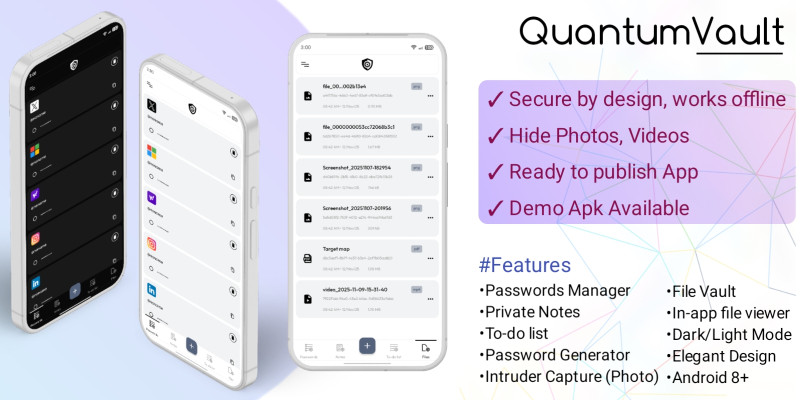
Description
QuantumVault is a professional-grade cryptographic vault app designed to keep your digital life safe, simple, and stylish. Built using the powerful AES encryption algorithm, it ensures all stored data remains private and inaccessible to anyone but the user.
⚙️ Why You Will Love It
Well-structured and easily customizable source code. Not just template, fully working app.
Written with clarity and modular design principles.
Perfect for developers building vault, password manager, or privacy-based Android apps.
Ready to publish app — Edit app name, icons, build the project, then publish!
🚀 Ideal Use Cases
Security-focused personal vault apps.
Password manager projects.
Privacy or productivity tool apps.
Educational projects showcasing AES encryption and local data storage.
💡 Tech Highlights
AES encryption implementation for maximum data protection.
Fully offline architecture — no external dependencies for data security.
Intruder detection system with camera capture integration.
Beautiful material-inspired UI with smooth animations.
Features
Password Manager
Secrets Notes keeper
Private to-dos list
File Manager
Password Generator
Intruder Capture (Photo)
Dark/Light Mode
Robust AES encryption algorithm
Modern & Clean UI
Well documented
No backend dependency
Androidx modern architecture
Requirements
Android Studio (version Arctic Fox or higher)
Java Development Kit (JDK 8 or above)
Gradle 7.0+
Instructions
1. Extract the Files
Download the provided .zip package from your Codester account.
Extract it using WinRAR, 7-Zip, or any archive tool of your choice.
2. Open the Project in Android Studio
Launch Android Studio (Arctic Fox or newer).
Click “Open Project” and select the extracted QuantumVault folder.
Wait for Gradle to finish syncing all dependencies.
3. Configure App Details
Open app/build.gradle and change:
applicationId to your own package name.
versionName and versionCode if you wish.
Update app name from “QuantumVault” to your preferred name in
res/values/strings.xml → app_name.
4. Customize UI (Optional)
Modify colors, icons, and layouts inside the res/ folder.
Add or replace branding elements like logos in res/mipmap or res/drawable.
Adjust typography and theme in themes.xml.
5. Enable or Disable Intruder Vision
If you wish to use the Intruder Vision feature (photo capture after failed login):
Make sure your app has Camera Permission enabled in AndroidManifest.xml.
To disable it, simply comment out or remove the related function calls in the LockScreenActivity.java.
Remove the option from settings.xml UI
6. Build and Run
Connect your Android device or start an emulator.
Click Run ▶️ in Android Studio.
Your app is now ready — fully functional and secure with AES encryption and offline data storage.
| Author | ashfaqsourav |
|---|---|
| Category | App Templates / Android / Applications / Utility |
| Price | $35 |
| Extended License | $105 |
| Likes | 2 |
| First Release | Nov 12, 2025 |
| Last Update | Nov 12, 2025 |
| Files included | .java, .xml |
| Operating systems | Android 7.0, Android 8.0, Android 9.0, Android 10.0, Android 11.0, Android 12.0, Android 5.0, Android 6.0 |
Categories
Tags
External listing. code.market does not sell this product and does not process payment for it. Pricing, payment, delivery, licensing, refunds, and support are handled by the third-party merchant on its own website. We may earn an affiliate commission from a referral. Details.
Products of the Week.
Submit🥇

Perceptle
Perceptle is a daily browser-based game that challenges you to test your sensory intuition through five quick estimation and rhythm-based rounds.
Other · 1,800 views · 11 clicksOther · Week 47 · 1,800 views · 11 clicks
🥈

Free LinkedIn Likes From Real
Get free LinkedIn likes on your posts from real members who react by hand. No
SaaS · 1,935 views · 11 clicksSaaS · Week 47 · 1,935 views · 11 clicks
🥉

STOP GUESSING WHAT TO POST
AI that learns your brand voice and builds a month of consistent, on-brand social content: carousels, posts and hooks that sound like you, not like everyone else's AI.
SaaS · 9,478 views · 76 clicksSaaS · Week 47 · 9,478 views · 76 clicks
#4

aaas.market
407 reliable micro tools for solo founders, marketers and creators. They work in your browser
SaaS · 1,899 views · 5 clicksSaaS · Week 47 · 1,899 views · 5 clicks