
QR Scanner - Create, Color & Scan QR codes | SwiftUI
Description
Did you know that the QR Code Reader by TinyLab earned $1,000,000 in revenue? The QR Scanners are getting more popular every single year. This is a great opportunity for you to add a QR reader app to your portfolio and stand out with features like QR code colors, automatically open and compose emails, and open URLs.
WHAT DOES THIS PRODUCT OFFER YOU
The app as shown in the video demo. Feel free to ask questions before buying.
Assistance will be provided for any code-related questions.
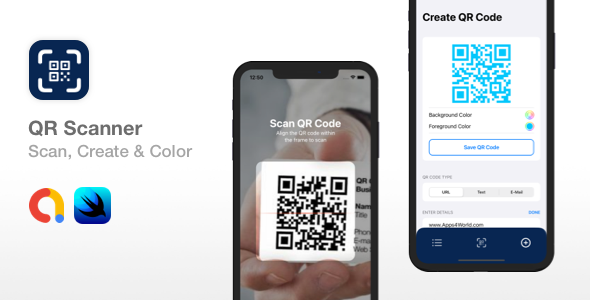
The app has 3 main screens: History, which shows all QR codes scanned. Scan, which is the main scanning feature. Create, which allows you to create your own QR codes for URLs, text, and E-mail. QR Codes that contain email information, will compose an email automatically as soon as the code is scanned with this app.
WHAT DO I NEED TO GET STARTED
You will need a Mac computer with Xcode 12 installed. This app requires iOS 14+.
The entire app is built using SwiftUI. You will need a Google AdMob account for Interstitial ads that are shown in the app.
HOW DOES IT WORK
- The app will start with a simple welcome/onboarding screen, that shows the main features of the app. You can add more screens to this onboarding screen by providing an image, title, and subtitle for your new screens, then handle the ‘Continue’ button action. This onboarding screen will be displayed only 1 time.
- The history screen will display a list of previously scanned QR codes. You can tap on any item on the list to see more details about the scanned QR code. You will be able to delete or copy the QR code text from the scanned result screen.
- The scanner screen will scan QR codes only. You can modify the scan overlay in order to make the app stand out even more. As soon as the QR code is scanned, the app will show the Scanned Result screen which will display the text from the QR, the option to copy this text or delete this scanned result. The app will automatically open the URL if the QR code contains an URL. Also, a great feature is the e-mail composer, which will open the e-mail app and pre-populate the e-mail address, subject, and message if these are provided in the QR code.
- The app supports background and foreground color changes for the QR code. Whenever the Scanned Result screen is dismissed, a full-screen Interstitial AdMob ad will be presented. The app supports dark mode as well. See the video demo for more details.
NOTE
The app uses a private framework that controls the scanning feature and QR code generator. You must configure the app with your own CodeCanyon license code, this means that the app requires an internet connection in order to verify your purchase code. We are doing this to avoid fraud and allow only legit buyers to use this app template. If you want a version without the framework, internet connection requirement, and license code validation, then make sure you contact us before buying this product.
Please ask questions if necessary before purchasing. If you need any help or a price for custom work, don’t hesitate to contact us.
As always, we wish you good luck with this product and don’t forget to subscribe to our YouTube channel, so you could be the first one to know when a new app template is released.
CONTACT US
Skype: Apps4World
E-Mail: support@apps4world.com
| Type | iOS App |
|---|---|
| Author | Apps4World |
| Price | $99 |
| Sales | 8 |
| Rating | 0 (0) |
| Published | Jan 7, 2021 |
| Last Update | Apr 10, 2023 |
| Compatible Software | iOS 12 |
| Compatible With | Swift |
| Mobile Files Included | .xib/.nib |
Categories
Tags
External listing. code.market does not sell this product and does not process payment for it. Pricing, payment, delivery, licensing, refunds, and support are handled by the third-party merchant on its own website. We may earn an affiliate commission from a referral. Details.
Products of the Week.
Submit🥇

STOP GUESSING WHAT TO POST
AI that learns your brand voice and builds a month of consistent, on-brand social content: carousels, posts and hooks that sound like you, not like everyone else's AI.
SaaS · 7,353 views · 67 clicksSaaS · Week 46 · 7,353 views · 67 clicks
🥈

Conversational Backlinks for Busy Founders
Place Backlink Relevant Conversation for your domain across Forums and Conversations
Website · 46,633 views · 232 clicksWebsite · Week 46 · 46,633 views · 232 clicks
🥉

upvote.club
Free Social Media Engagement that Helps Boost Your Content. Upvote Club supports 19 social networks with 100+ engagement actions in one dashboard. Add links to your posts and get free engagement from real users.
SaaS · 44,575 views · 127 clicksSaaS · Week 46 · 44,575 views · 127 clicks
#4

Substack Posting API
Onboard your Agent to Substack. Write Publish on Substack via API
SaaS · 63,461 views · 206 clicksSaaS · Week 46 · 63,461 views · 206 clicks
#5

Seenshot App
Free, Fast, MacOS Screenshot app. Make Screenshot cmd+shift+2 and send it via link
Desktop App · 32,711 views · 127 clicksDesktop App · Week 46 · 32,711 views · 127 clicks
#6

Hand-Placed Backlinks $9.99 per link. Flat rate.
Buy hand-placed forum, Q-A and directory backlinks. Flat $9.99 per link, no subscriptions — you only pay for approved listings.
Website · 8,333 views · 19 clicksWebsite · Week 46 · 8,333 views · 19 clicks
#7

Free Invoice Generator - PDF Invoices in Your Browser, No Sign-Up
A free invoice maker for freelancers and small businesses: fill in the invoice, check the live preview, and download a PDF that looks exactly like it. Any currency, tax per item, three templates, no sign-up, and nothing leaves your device.
6,959 views · 29 clicksWeek 46 · 6,959 views · 29 clicks
#8

Merge PDF Files Free - Combine PDFs in Your Browser, No Upload
A free PDF merger for office workers, students, and freelancers: combine PDFs and images into one file in the browser, reorder files and pages, pick page ranges, keep bookmarks, and open password-protected PDFs. Nothing is uploaded, no sign-up, no watermark.
6,440 views · 18 clicksWeek 46 · 6,440 views · 18 clicks