
PWA – Plugin For PlayHub Video CMS
Description


PWA – Plugin for PlayHub
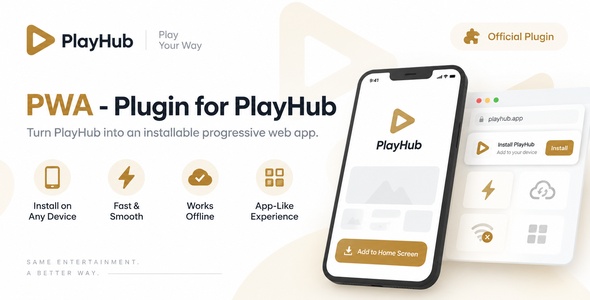
PWA – Plugin for PlayHub transforms your PlayHub website into a modern Progressive Web App, allowing users to install your platform directly on supported mobile and desktop devices for a faster and more app-like experience.
Give your PlayHub platform the feeling of a native application without requiring a separate Android or iOS app. Users can access PlayHub directly from their home screen while keeping the same familiar PlayHub experience.
Important: This is an official plugin for PlayHub – Video CMS & Live Streaming Platform and cannot be used as a standalone application. A working PlayHub installation is required.
Turn PlayHub Into an Installable Web App
The PWA plugin extends PlayHub with Progressive Web App functionality and makes your platform installable directly from compatible web browsers.
Once installed, users can launch PlayHub from their device just like a regular application, without manually opening the browser and entering the website address every time.
Main Features
- Progressive Web App Support – Adds PWA functionality directly to PlayHub.
- Installable Experience – Allow users to install your PlayHub website on supported devices.
- Add to Home Screen – Users can quickly access PlayHub from their device home screen.
- Desktop Installation – Supported desktop browsers can install PlayHub as an application.
- Mobile Installation – Provides an app-like experience on compatible smartphones and tablets.
- Standalone App Experience – PlayHub can launch in its own application-style window.
- Custom App Name – Configure the name displayed when your PWA is installed.
- Custom App Icons – Configure icons used for the installed application.
- Theme Configuration – Configure the PWA theme and application appearance.
- Manifest Integration – Automatically integrates the required PWA manifest configuration.
- Service Worker Integration – Provides the service worker functionality required by the PWA system.
- Responsive Experience – Works with PlayHub’s responsive interface across supported devices.
- Native PlayHub Integration – Designed specifically for the PlayHub ecosystem.
App-Like Experience
The PWA plugin makes PlayHub feel more like a dedicated application while continuing to use the same web platform and backend.
- Launch PlayHub directly from the home screen
- Use PlayHub in a standalone application-style window
- Reduce the steps required to return to your platform
- Provide users with a more convenient mobile experience
- Keep the same PlayHub account, content and functionality
No Separate Mobile App Required
You do not need to maintain an entirely separate application just to give your users an installable experience.
The PWA plugin uses your existing PlayHub installation and turns the supported website experience into an installable Progressive Web App.
Install on Supported Devices
Depending on browser and operating system support, users can install your PlayHub platform on:
- Android smartphones and tablets
- Desktop computers
- Laptops
- Other devices and browsers supporting Progressive Web Apps
Installation behavior and available PWA capabilities may vary depending on the user’s browser, device and operating system.
Customizable PWA Configuration
Configure the Progressive Web App specifically for your PlayHub website and brand.
- Application name
- Short application name
- Application icons
- Theme configuration
- Background configuration
- PWA manifest settings
Seamless PlayHub Integration
PWA is built specifically for PlayHub and integrates directly with the existing platform. Your users continue using the same accounts, videos, live streams, profiles and other PlayHub features after installing the web application.
There is no separate user database or additional application for users to manage.
Designed for Performance
The plugin is designed to provide a clean PWA integration without replacing the existing PlayHub frontend or backend architecture.
Users receive the convenience of an installable application while you continue managing your platform through your existing PlayHub installation.
Responsive & Mobile Friendly
The PWA plugin works together with PlayHub’s responsive interface, providing a consistent experience across supported desktop and mobile devices.
Easy Installation
PWA is built for the PlayHub plugin system and can be installed on a compatible PlayHub installation.
Installation and configuration instructions are included with the plugin package.
Requirements
- A working installation of PlayHub
- A PlayHub version compatible with this plugin
- HTTPS/SSL enabled on your website
- A modern browser with Progressive Web App support
- Server environment compatible with your PlayHubi nstallation
PlayHub is sold separately and is not included with this plugin.
Why Add PWA to PlayHub?
- Give users faster access to your platform
- Create a more app-like user experience
- Allow installation directly from supported browsers
- Keep users connected to your PlayHub brand
- Avoid maintaining a completely separate application
- Expand PlayHub without modifying the core platform
Part of the PlayHub Plugin Ecosystem
PlayHub plugins allow you to extend your platform with additional functionality while keeping the main PlayHub core clean and maintainable.
Install only the functionality your platform needs and continue expanding PlayHub as your website and community grow.
Support
If you experience an issue with the PWA plugin, our support team can assist with plugin-related installation, configuration and functionality.
Before requesting support, please make sure you are running a compatible version of PlayHub and that your website is correctly configured with HTTPS.
Changelog
Version 1.1.2
- Initial release
- Added Progressive Web App support for PlayHub
- Added web app manifest integration
- Added service worker integration
- Added installable application support
- Added Add to Home Screen functionality
- Added PWA application configuration
- Added application icon configuration
- Added theme and appearance configuration
- Added mobile and desktop PWA support
PWA – Plugin for PlayHub
Install. Experience. Engage.
| Author | kontackt |
|---|---|
| Price | $58 |
| Sales | 0 |
| Rating | 0 (0) |
| Published | Sep 9, 2026 |
| Last Update | Sep 9, 2026 |
| Compatible Software | ReactJS, MySQL 8.x, PHP 8.4.x, PHP 8.3.x |
| Demo Url | https://demo.playhubscript.com |
| High Resolution | No |
| Source Files Included | JavaScript JS, JavaScript JSON, HTML, CSS, PHP, SQL, SQL, JavaScript JS, JavaScript JSON, HTML, CSS |
Categories
Tags
External listing. code.market does not sell this product and does not process payment for it. Pricing, payment, delivery, licensing, refunds, and support are handled by the third-party merchant on its own website. We may earn an affiliate commission from a referral. Details.
Products of the Week.
Submit🥇

STOP GUESSING WHAT TO POST
AI that learns your brand voice and builds a month of consistent, on-brand social content: carousels, posts and hooks that sound like you, not like everyone else's AI.
SaaS · 6,693 views · 64 clicksSaaS · Week 46 · 6,693 views · 64 clicks
🥈

Conversational Backlinks for Busy Founders
Place Backlink Relevant Conversation for your domain across Forums and Conversations
Website · 45,719 views · 230 clicksWebsite · Week 46 · 45,719 views · 230 clicks
🥉

upvote.club
Free Social Media Engagement that Helps Boost Your Content. Upvote Club supports 19 social networks with 100+ engagement actions in one dashboard. Add links to your posts and get free engagement from real users.
SaaS · 43,698 views · 125 clicksSaaS · Week 46 · 43,698 views · 125 clicks
#4

Substack Posting API
Onboard your Agent to Substack. Write Publish on Substack via API
SaaS · 62,625 views · 204 clicksSaaS · Week 46 · 62,625 views · 204 clicks
#5

Seenshot App
Free, Fast, MacOS Screenshot app. Make Screenshot cmd+shift+2 and send it via link
Desktop App · 31,869 views · 125 clicksDesktop App · Week 46 · 31,869 views · 125 clicks
#6

Hand-Placed Backlinks $9.99 per link. Flat rate.
Buy hand-placed forum, Q-A and directory backlinks. Flat $9.99 per link, no subscriptions — you only pay for approved listings.
Website · 7,558 views · 19 clicksWebsite · Week 46 · 7,558 views · 19 clicks
#7

Free Invoice Generator - PDF Invoices in Your Browser, No Sign-Up
A free invoice maker for freelancers and small businesses: fill in the invoice, check the live preview, and download a PDF that looks exactly like it. Any currency, tax per item, three templates, no sign-up, and nothing leaves your device.
6,172 views · 21 clicksWeek 46 · 6,172 views · 21 clicks
#8

Merge PDF Files Free - Combine PDFs in Your Browser, No Upload
A free PDF merger for office workers, students, and freelancers: combine PDFs and images into one file in the browser, reorder files and pages, pick page ranges, keep bookmarks, and open password-protected PDFs. Nothing is uploaded, no sign-up, no watermark.
5,702 views · 16 clicksWeek 46 · 5,702 views · 16 clicks