ProtaskMS - Project Management System in Django by Oszi
Description
Project and Task Management

ProtaskMS allows you to efficiently manage projects and tasks. You can create, read, update, and delete projects and tasks, as well as update their information. Each task can belong to one or several projects, providing flexibility in organizing your work. The system also allows you to manage the list of customer companies, making it easier to keep track of your clients.


Dashboard Display

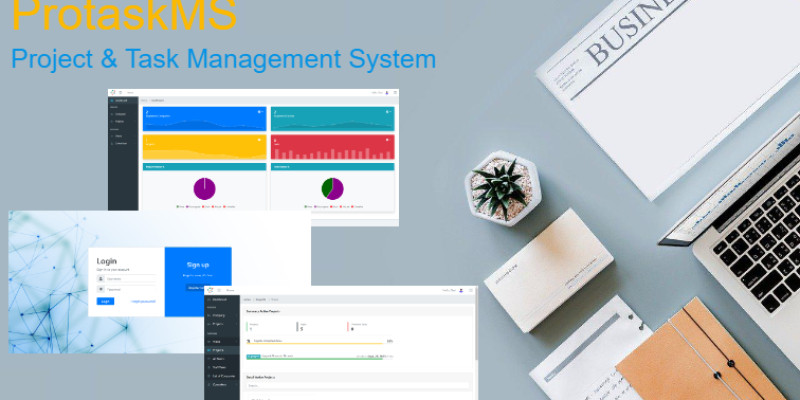
The system provides a comprehensive summary of projects and tasks on its dashboard display. This gives you a quick overview of the status of your projects and tasks, allowing you to prioritize and allocate resources effectively.


Project Status

ProtaskMS displays a list of projects and their status, giving you real-time visibility into the progress of each project. This helps you identify potential bottlenecks and take necessary actions to keep your projects on track.


Task Reports

Generating task reports is made easy with ProtaskMS. The system can generate task reports in the form of Excel files, providing a convenient way to share information with stakeholders. This feature saves you time and effort in creating manual reports.


User Management

ProtaskMS offers a range of user management features. Users can create their profiles and update their profile pictures, personalizing their experience within the system. The system also allows users to interact with each other by sending friendly requests and adding or removing friends. This fosters collaboration and enhances team dynamics.


Security and Authentication

ProtaskMS ensures the security of your data with its robust authentication system. Users can securely log in and log out, and the system provides features such as forgot password and reset password to help users regain access to their accounts. This ensures that your data remains protected at all times.


Integration with Amazon AWS S3

ProtaskMS seamlessly integrates with Amazon AWS S3 for static file storage. This ensures reliable and scalable storage for your files, allowing you to easily manage and access your project-related documents and assets.


Value Proposition


ProtaskMS offers a comprehensive solution for project and task management, specifically tailored for technical departments. By using ProtaskMS, you can:


Efficiently manage projects and tasks, improving productivity and reducing manual effort.

Gain real-time visibility into project status, enabling better decision-making and resource allocation.

Generate task reports effortlessly, saving time and ensuring accurate information sharing.

Enhance team collaboration and communication, fostering a positive work environment.

Ensure the security of your data with robust authentication and access control features.

Seamlessly integrate with Amazon AWS S3 for reliable and scalable file storage.


With its user-friendly interface and powerful features, ProtaskMS empowers technical departments to effectively manage their projects and tasks, leading to improved efficiency and better project outcomes.
Features
* Interfaces to Create, Read, Update, and Delete your Company, and User.
* Create, Read, Update, Delete, Projects, and tasks, and update info.
* Views by Users, Tasks and Projects.
* Login and log out, forget password, reset password.
* Create your Profile, and update your Profile picture.
* Interact with other users by sending friendly requests, and adding and removing friends.
* Integration with Amazon AWS S3 for static files
Requirements
Python 3.10
Django 4.x
Instructions
–        Extract the files on the server where you are going to host the system.
–        Database configures the type of database to be used (MySQL, PostgreSQL, etc)
–        Find your configuration at (https://docs.djangoproject.com/en/4.1/ref/databases/) and then modify the "settings.py" file inside the " project_task-manager/ project-management-system/manager" folder.
–        Don’t forget to setting email config for reset password function.
–        Requirements install the required system modules by executing through a command console on your server the command: pip install -r requirements.txt
Inside folder “project_task-manager/ project-management-system”
–        Once you have configured the database and installed the necessary modules to run the system, you must migrate the models to the database, to do this you must execute the following commands
–        python manage.py makemigrations
–        python manage.py migrate
–        Once you have migrated the models, you must create a superuser, to do this you must execute the following command
–        python manage.py createsuperuser youruser
–        you must complete the data that the console will inform you such as user, password, email, etc.
–        After creating your user you will be able to run your server by executing the following command
–        python manage.py runserver
–        You can access their website through the following link http://yourhost:8000/
–        The system will allow you to log in with your user
–        First, you should create a company and project before you create a task.
–        The system is now ready to use!
| Author | oszi |
|---|---|
| Category | Scripts & Code / Django |
| Price | $107 |
| Extended License | $321 |
| Likes | 1 |
| First Release | Jan 5, 2024 |
| Last Update | Jan 10, 2024 |
| Files included | .py, .css, .html, .db, .xml, JavaScript .js |
| Javascript framework | jQuery, Node.js |
Categories
Tags
External listing. code.market does not sell this product and does not process payment for it. Pricing, payment, delivery, licensing, refunds, and support are handled by the third-party merchant on its own website. We may earn an affiliate commission from a referral. Details.
Products of the Week.
Submit🥇

STOP GUESSING WHAT TO POST
AI that learns your brand voice and builds a month of consistent, on-brand social content: carousels, posts and hooks that sound like you, not like everyone else's AI.
SaaS · 4,276 views · 38 clicksSaaS · Week 45 · 4,276 views · 38 clicks
🥈

Conversational Backlinks for Busy Founders
Place Backlink Relevant Conversation for your domain across Forums and Conversations
Website · 41,985 views · 223 clicksWebsite · Week 45 · 41,985 views · 223 clicks
🥉

upvote.club
Free Social Media Engagement that Helps Boost Your Content. Upvote Club supports 19 social networks with 100+ engagement actions in one dashboard. Add links to your posts and get free engagement from real users.
SaaS · 40,028 views · 117 clicksSaaS · Week 45 · 40,028 views · 117 clicks
#4

Substack Posting API
Onboard your Agent to Substack. Write Publish on Substack via API
SaaS · 59,037 views · 198 clicksSaaS · Week 45 · 59,037 views · 198 clicks
#5

Seenshot App
Free, Fast, MacOS Screenshot app. Make Screenshot cmd+shift+2 and send it via link
Desktop App · 28,409 views · 122 clicksDesktop App · Week 45 · 28,409 views · 122 clicks
#6

Hand-Placed Backlinks $9.99 per link. Flat rate.
Buy hand-placed forum, Q-A and directory backlinks. Flat $9.99 per link, no subscriptions — you only pay for approved listings.
Website · 4,247 views · 19 clicksWebsite · Week 45 · 4,247 views · 19 clicks
#7

Free Invoice Generator - PDF Invoices in Your Browser, No Sign-Up
A free invoice maker for freelancers and small businesses: fill in the invoice, check the live preview, and download a PDF that looks exactly like it. Any currency, tax per item, three templates, no sign-up, and nothing leaves your device.
2,927 views · 17 clicksWeek 45 · 2,927 views · 17 clicks
#8

Merge PDF Files Free - Combine PDFs in Your Browser, No Upload
A free PDF merger for office workers, students, and freelancers: combine PDFs and images into one file in the browser, reorder files and pages, pick page ranges, keep bookmarks, and open password-protected PDFs. Nothing is uploaded, no sign-up, no watermark.
2,703 views · 13 clicksWeek 45 · 2,703 views · 13 clicks