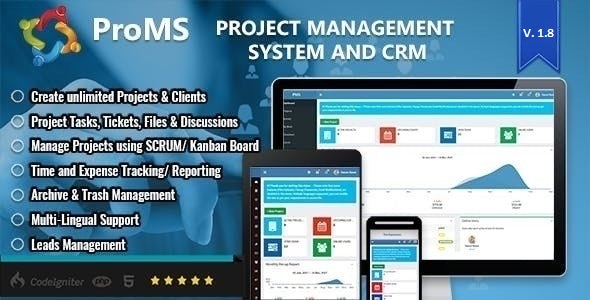
ProMS - Premium Project Management System
Description
A Very Powerful Project Management System For Freelancer Office
Manage your projects, clients and team members. You can collaborate with your team and monitor your work using powerful tools. Please review all the features with owner, admins, members and clients accounts and see the difference of quality!
For any help or suggestions, please send email to aamirpitafi@hotmail.com




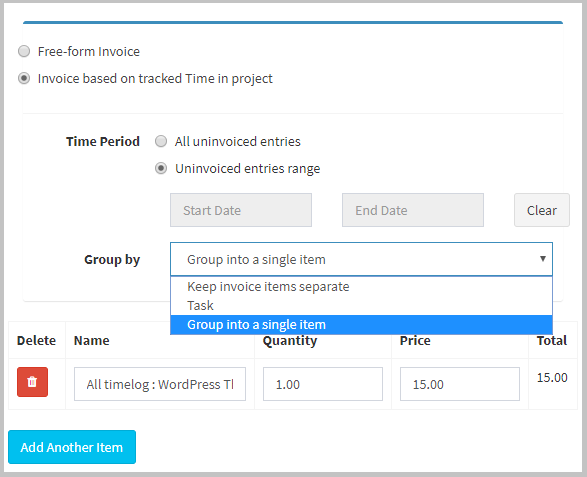
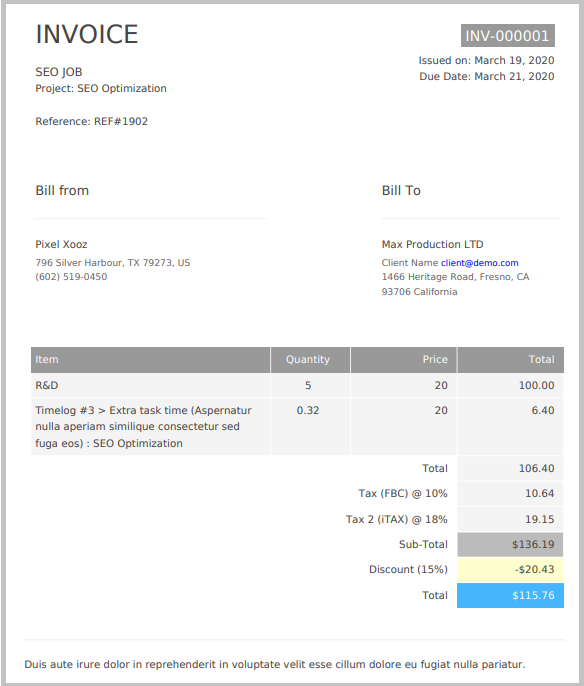
Invoice your work
Make sure to invoice all billable hours and ensure you’re getting paid for your work.
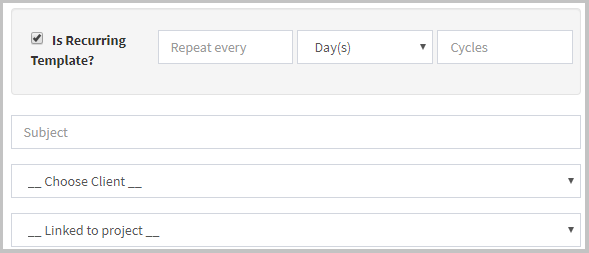
Recurring Invoice Template
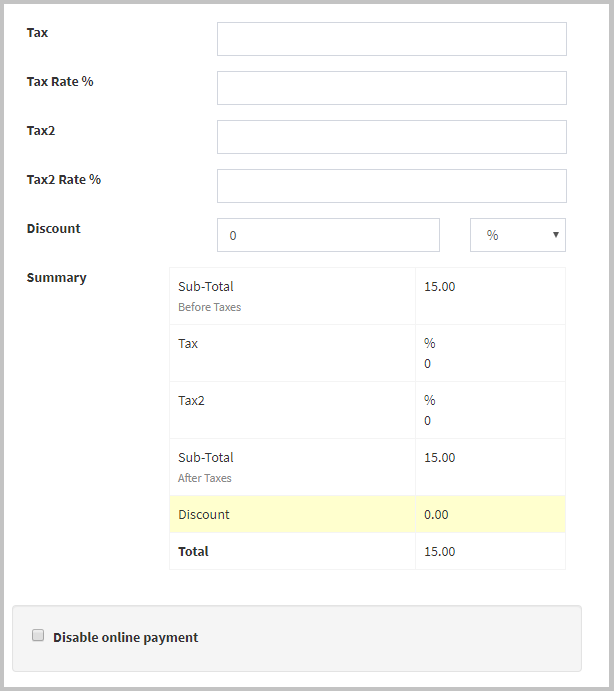
Multiple Tax options, discount and enable/disable online payment
Download or preview a customer invoice
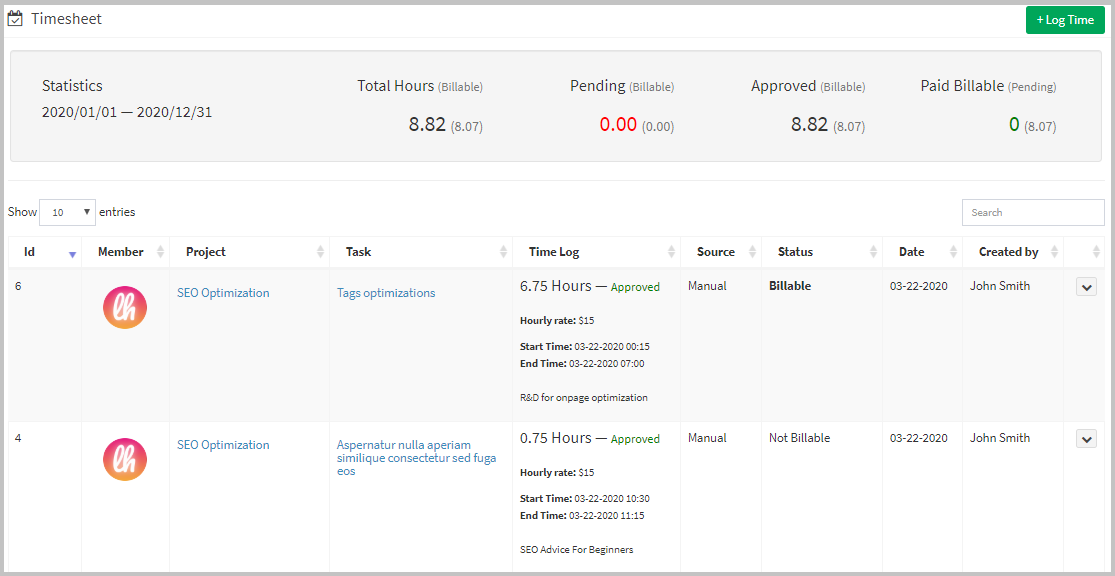
Timesheet
Measure precisely how much time your team is spending on tasks with PROMS timer and enjoy a visual overview of all time records.
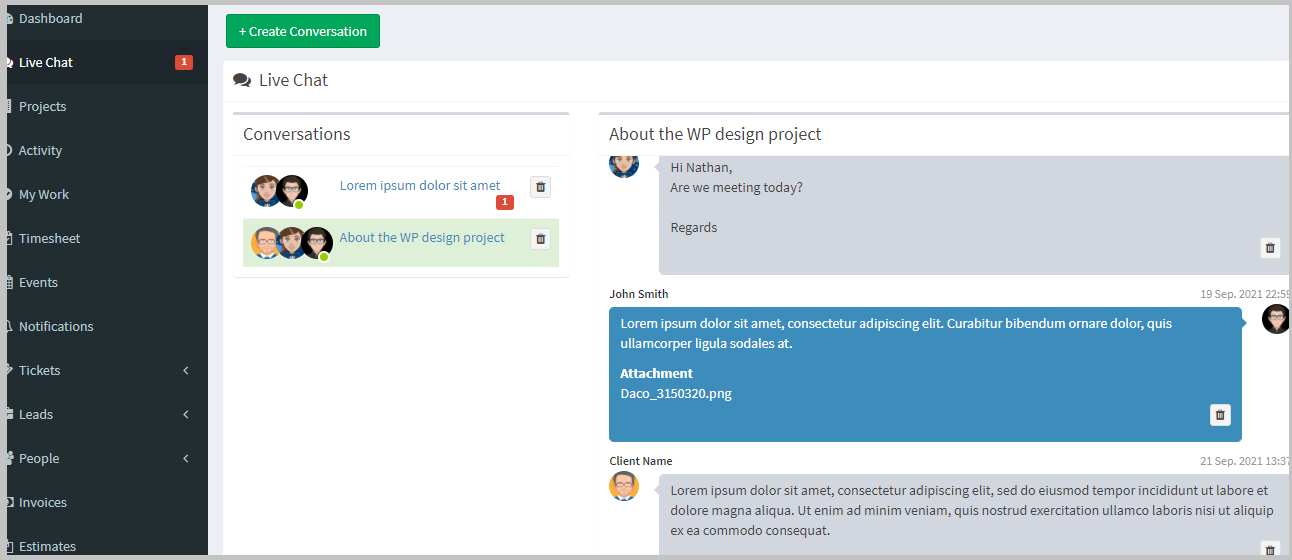
Live Chat with customers and team members
Create multiple conversations based on different topics. Reduce waiting time for feedback and make project management more faster. Get notified with push notifications on new conversation or message. It supports both pusher and in-house service.
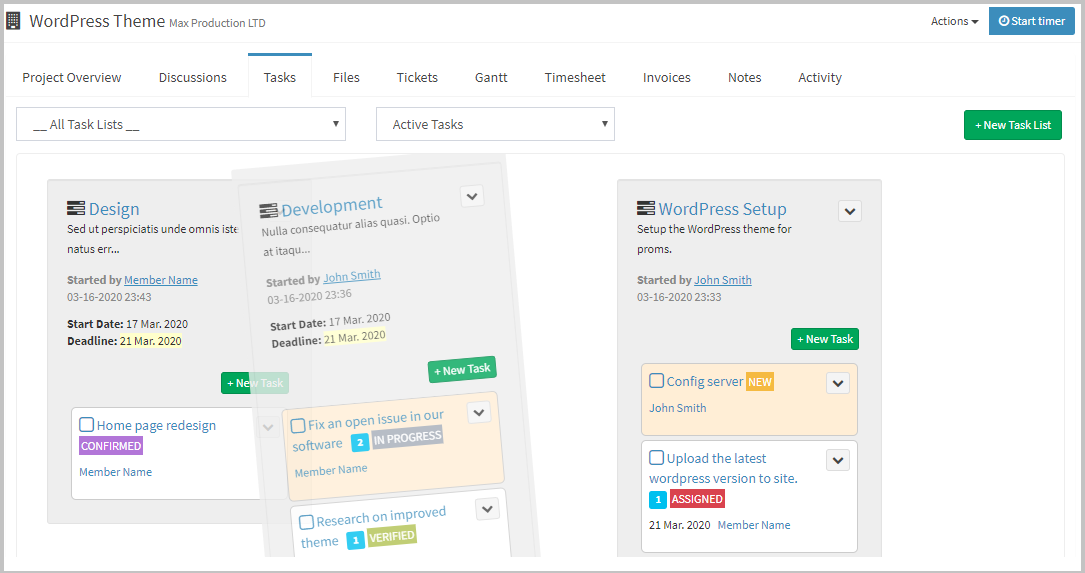
Task Management with Drag & Drop Interface
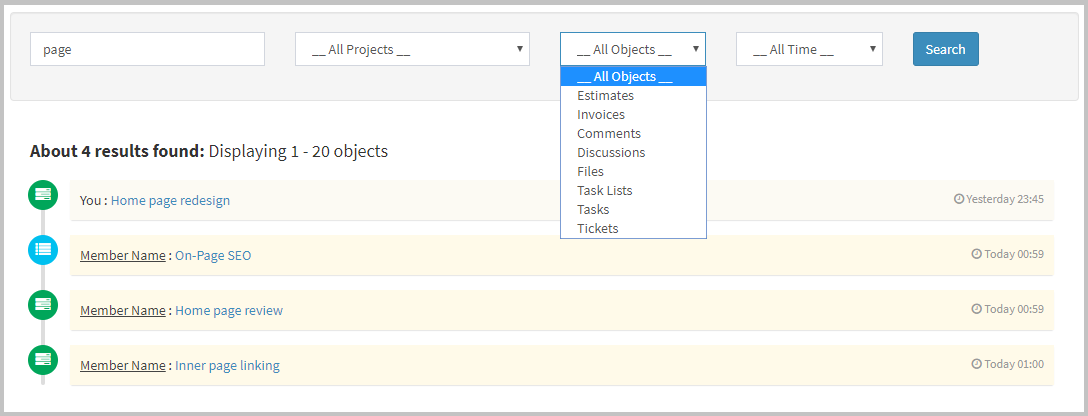
Search Everything
Our Guarantee
- Provide excellent support with a fast response rate.
- Patch and fix any bugs or broken content.
- Help get you setup and installed.
- Answer any questions you may have.
ProMS is also very secure!
- Secure Database that uses prepared statements so no SQL Injection
- Protects against CSRF attacks
- HTML Filter to protect against XSS attacks
- Built using the latest CodeIgniter Framework Version 3.1 that has been tried and tested by millions of developers
- Passwords are encrypted, standard bcrypt encryption.
Who can see what in the application
1. Owner
The owner of the application can see every project and every person.
2. Admins
Admins can see every users in the application but can only see the projects which they are added.
3. Members and Clients
- Non-admin users and clients can see the projects to which they’ve been added.
- They can only see the people in the application with whom they share a project.
Predefined Permissions within your projects
It helps to know who has the ability to perform certain actions in your projects!
> Create
Any project member can add new items.
> Access
Client projects can help you restrict items from project members.
> Manage
- Admins can edit or trash any project item.
- Non-admins will only be able to edit or trash the discussions, files and comments they have created.
- Non-admins users can complete any task in a project and modify any private notes they created.
Core Features
- Informative dashboard
- Project management
- Projects Timeline
- Timesheet Management
- Client management
- Team management
- Manage project tasks, discussions and files
- My work (Assigned tasks and tickets)
- Project Notifications
- Tasks and Projects Deadline Alerts
- Manage private notes
- Gantt Chart: To show the breakdown of tasks
- Tickets management
- Manage Ticket Departments
- Live Chat module
- Invoice management
- Estimate management
- Expense Tracking and Payment Management
- Pay invoice via Paypal and Stripe
- Predefined permissions for all users
- Resource management
- Manage event calendar
- Announcements
- Dynamic graph and visual report
- Financial reports
- Time Tracking
- Kanban board
- Activity logs for projects
- Trash management
- Application settings
Other Features
- Install application on clicks
- Easily accessible UI
- Responsive design
- Codeigniter 3.1.11
Test Drive before you buy!
The details below can be used to login to the demo: Demo Link: Online Demo Here
To login as Owner:Email: owner@demo.com Password: demo1234To login as Admin:
Email: admin@demo.com
Password: demo1234
To login as Staff:
Email: member@demo.com
Password: demo1234
To login as Client:
Email: client@demo.com
Password: demo1234
Changelog
Version 1.8.1 – 25/07/2022Small fixesVersion 1.8 – 11/10/2021
 RTL Feature added
 Arabic Language added
 Default language option added in settings
 Small fixes
Version 1.7 – 23/09/2021
 Live Chat module (It supports both pusher and in-house service)
 Small fixes
Version 1.6 – 16/08/2021
 Upgrade to PHP 8.x
 Import LEADS into a LEADFORMULAR
 Documents uploading feature on client profile page
 Small fixes
Version 1.5.4 – 6/03/2021
PHP version to 7.4Version 1.5.3 – 17/09/2020
Small issues are fixedVersion 1.5.2 – 08/06/2020
 Leads linked to Projects
 Export options for leads (PDF, Excel)
 Manage people issue resolved for admin account
 VAT field in company details
 VAT information on invoices/estimates
 Client Ref.no on invoices/estimates
Version 1.5.1 – 9/04/2020
Small issues are fixedVersion 1.5 – 17/03/2020
 Search feature added
 Recurring invoice implemented
 Time tracker added
 Default letter avatars for users
 Timelog stats on timesheet
 Datetime filter on timesheet
 Project progress bar based on completed tasks vs remaining
 Project listing page UI
 Project page layout
 Comment box UI
 Task field in timelog section
 Filters (all, active, completed) on project tasks page
 Billable option in tracked time for generating invoice
 Generate invoice from tracked timelogs of the project
 Group by tracked items in invoice generation
 Fixed the gantt chart on project page
 Invoice template updated
 Drag task into empty task list issue fixed
 Task assigned notification template modified
 Invoice/Estimate listings page columns fixed
 Overdue issues in estimates/invoices/projects/tasks fixed
 Two taxes options tax1, tax2 added on invoices/estimates
 Discount added (fixed/percentage%) on invoices/estimates
 Client note and private note sections added on invoices/estimates
 Enable/Disable online payment option added on invoice
 Cancel invoice implemented, once invoice cancelled all payments removed from transactions log
 Invoice filters fixed on client side
 Client address, phone info added on invoices/estimates
 New PDF template added for invoice/estimate download
 Invoice color code option added in settings
 Hourly rate option added for members on timesheet
 Add notification of invoice/estimate to client
 Clone invoice
 Recurring invoice cron job added
 Invoice reminders added (Create recurring invoice for owner and client, Invoice due reminder, Invoice overdue reminder)
 Cron job instructions added on recurring templates
 Overdue alerts fixed
 Activity pagination added
 User card (projects, tasks, tickets, leads) is added on owner account
 All languages added (Czech, Dutch, French, German, Greek, Italian, Norwegian, Polish, Portuguese, Russian, Spanish)
 All small issues are fixed
Version 1.4.2 – 17/02/2020
Test mail settings tool addedVersion 1.4.1 – 10/02/2020
UI FixesVersion 1.4 – 06/02/2020
Upgraded CodeIgniter from 3.1.0 to 3.1.11
Performance improved
Version 1.3.3 – 24/09/2018
Time-log option now in 15-minute intervals
PHP 7.x compatibility small issues fixed
Version 1.3.2 – 17/08/2018
Data design model updated
Performance improved
Version 1.3.1 – 12/02/2018
Avatar issue fixed
Gantt charts encoding issue fixed
Move task to empty task list issue fixed
Version 1.3 – 8/11/2017
Added Stripe Payment Gateway
Added Leads System
Version 1.2 – 1/10/2017
Added Paypal Payment Gateway
Changed Layout
Some bugs are fixed
Version 1.1 – 2/08/2017
Added Kanban Board
Added Multi Language Support
Added Gantt Charts
Added Timesheet
Changed Layout
Some bugs are fixed
Version 1.0 – 7/07/2017
* ProMS Version 1.0 released
Envato Refund Policy
We strongly recommend buyers to thoroughly check the item description, comments and demo (PROMS Demo Link) to see if it works for your situation because it’s impossible to solve ‘all’ needs. If you have not downloaded the product you are entitled for a refund.
Neither Envato nor authors are obliged to give policy refunds in any of the situations listed below.
- You don’t want it after you’ve downloaded it
- The item did not meet your expectations
- You simply change your mind
- You bought an item by mistake
- You do not have sufficient expertise to use the item
- You claim that you are entitled to a refund but do not provide sufficient information as to why you are entitled to a refund.
More info about the refund policy can be found on Envato Policy here
Categories
Tags
External listing. code.market does not sell this product and does not process payment for it. Pricing, payment, delivery, licensing, refunds, and support are handled by the third-party merchant on its own website. We may earn an affiliate commission from a referral. Details.
Products of the Week.
Submit#1

wanapi.app
Wan API is a developer platform for the Wan video model family. Compare Wan 3.0, Prime and Pro specifications and prices, then prepare a request in the preview playground.
Other · 8,120 views · 21 clicksOther · Week 42 · 8,120 views · 21 clicks
#2

wanapi.ai
Wan API is a developer platform for the Wan video model family. Compare Wan 3.0, Prime and Pro specifications and prices, then prepare a request in the preview playground.
Other · 7,469 views · 12 clicksOther · Week 42 · 7,469 views · 12 clicks
#3

yee.site
Your link in bio, but a real website. Start from beautiful templates and ready-made sections, then add a shop, bookings, a blog and as many pages as you need. Perfect for your link in bio, portfolio or personal site.
Other · 13,548 views · 22 clicksOther · Week 42 · 13,548 views · 22 clicks
#4

upvote.club
Free Social Media Engagement that Helps Boost Your Content. Upvote Club supports 19 social networks with 100+ engagement actions in one dashboard. Add links to your posts and get free engagement from real users.
SaaS · 34,445 views · 104 clicksSaaS · Week 42 · 34,445 views · 104 clicks
#5

Seenshot App
Free, Fast, MacOS Screenshot app. Make Screenshot cmd+shift+2 and send it via link
Desktop App · 22,937 views · 114 clicksDesktop App · Week 42 · 22,937 views · 114 clicks
#6

Conversational Backlinks for Busy Founders
Place Backlink Relevant Conversation for your domain across Forums and Conversations
Website · 34,711 views · 204 clicksWebsite · Week 42 · 34,711 views · 204 clicks
#7

Substack Posting API
Onboard your Agent to Substack. Write Publish on Substack via API
SaaS · 53,578 views · 190 clicksSaaS · Week 42 · 53,578 views · 190 clicks
#8

codester.com
SocialDesk+: Omnichannel Social Commerce & Business Management Platform This is stronger than simply “Social Commerce and Messaging” because it tells buyers this is a complete business platform, not just a messaging script. Turn Social Conversations Into Sales SocialDesk+ is a complete omnichannel social commerce and business management platform built for businesses that sell and communicate with customers through social media. Instead of switching between WhatsApp, Facebook, Instagram and TikTok, businesses can manage customer conversations, comments, products, leads, follow-ups, automation, teams and business reports from one professional workspace. And because the full source code is included, developers, agencies and entrepreneurs can customize, rebrand and launch SocialDesk+ as their own business solution or SaaS platform. 🚀 Build Your Own Social Commerce Business SocialDesk+ gives you the foundation to launch: - Your own SaaS platform - A white-label social CRM - A social-commerce management system - A customer communication platform - A business messaging solution - A custom solution for clients - A multi-business subscription platform 💬 Connect Your Customers Supported social channels include: WhatsApp • Facebook • Instagram • TikTok Bring supported conversations into one centralized workspace and help businesses respond faster without constantly switching between platforms. 🛍️ More Than a Messaging Platform SocialDesk+ combines communication with the tools businesses need to manage customer opportunities: Inbox Manage customer conversations from connected channels. Comments Monitor and respond to social-media comments. Customers & Leads Organize customer information and potential buyers. Products & Catalog Manage products and give your team quick access to product information. Follow-Ups Make sure potential customers don't get forgotten. Automation Automate repetitive customer questions and responses. AI Assistant Provide AI-assisted communication when configured. Team Management Give managers and staff access to the business workspace. Reports & Analytics Track activity using business reports and analytics. The current product listing already includes these capabilities. 🔥 Why Buyers Will Want It Launch Faster Start with an already-built business platform instead of developing the entire system from zero. Customize Everything The full source code is included, allowing developers to change branding, features, workflows and integrations. Build a SaaS Create multiple business workspaces and offer SocialDesk+ as a subscription-based service. Sell to Businesses Offer it to retailers, restaurants, service businesses, online sellers, agencies and other businesses that communicate with customers through social media. Mobile + Web + Backend This isn't just a mobile UI template. It includes: - Flutter mobile application - Python / FastAPI backend - Web interface - Administration tools - Database infrastructure - API-based architecture - SQLite / PostgreSQL support - Android and iOS project structure 💼 One Platform. Multiple Business Opportunities. For SaaS Entrepreneurs Launch your own subscription platform and allow multiple businesses to operate inside separate workspaces. For Software Agencies Customize and rebrand the platform for clients instead of building an omnichannel business system from scratch. For Developers Use the complete source code as a foundation for your own social-commerce or customer-management product. For Businesses Deploy a dedicated version for your own customer-service and social-commerce operations. 🧩 What's Included Mobile - Flutter / Dart - Android - iOS project Backend - Python - FastAPI - SQLAlchemy - Alembic Database - SQLite - PostgreSQL Web - HTML5 - CSS3 - JavaScript Deployment - Docker - Docker Compose - Production configuration Business Platform - Multi-workspace architecture - Authentication - Teams - Customers - Products - Messaging - Comments - Automation - Reports - Subscriptions - Administration The current listing also documents third-party integrations such as Meta, TikTok, Stripe, Firebase, SMTP and optional OpenAI configuration. ⚡ What Makes SocialDesk+ Different? You're not buying a simple: ❌ Chat UI ❌ WhatsApp clone ❌ Flutter template ❌ Admin dashboard ❌ Basic CRM You're getting a complete business platform foundation that can be customized, branded and commercialized. Connect. Automate. Manage. Grow. SocialDesk+ Omnichannel Social Commerce & Business Management Platform One important change I'd make to the current listing The current page starts with: “A simple guide to managing your social conversations, customers, products and business activity.”
Other · 20,949 views · 35 clicksOther · Week 42 · 20,949 views · 35 clicks
#9

sandbook.app
Sandbook reads EPUB, PDF, web pages and scanned pages aloud with Kokoro TTS, an open neural voice model that runs on your iPhone, free and offline. Choose from 41 natural voices in English, Spanish, French, Italian, Brazilian Portuguese and Hindi and follow each word as it is spoken. Try the same voices in your browser first with the free Kokoro TTS online demo.
Other · 20,857 views · 17 clicksOther · Week 42 · 20,857 views · 17 clicks