
Project Roadmap - Advanced Reporting & Workflow module for Perfex CRM Projects

Description
Latest Release ⚡ NEW – Gantt Chart with Dependencies and Subtasks NEW – Kanban Board (Drag & Drop) NEW – Calendar View (iCal, Google Calendar, Outlook) NEW – List View (Overview, Charts, Members, Milestones, Tasks) NEW – Main Dashboard Widget NEW – Export PDF & Excel NEW – Sprint Planning (Backlog, Board, Burndown, Velocity) NEW – Earned Value Management (EVM) NEW – Retainer Burn Tracking NEW – Invoice Integration NEW – Budget vs. Actual NEW – Critical Path Analysis NEW – Task Dependencies & Subtasks NEW – Task Progress Indicators NEW – Task Bookmarks NEW – Task Templates NEW – Custom Fields (Project & Task) NEW – Timesheet Approvals NEW – Resource Allocation & Utilization Report NEW – Analytics Page NEW – Custom Report Builder NEW – Project Baseline NEW – Issue/Bug Tracking NEW – AI Suggestions (OpenAI/Anthropic) NEW – Automated Workflows NEW – Team Communication Hub NEW – Activity Feed NEW – Centralized File Storage & Versioning NEW – Real-Time Notifications NEW – Email Digest NEW – Client Portal (Milestone Approvals) NEW – Branded Portal Settings NEW – Role-Based Permissions
Transform Your Perfex CRM Projects Into a Command Center – Gantt Charts, Kanban Boards, Sprints, AI Suggestions & So Much More
Stop juggling spreadsheets and scattered tools. Project Roadmap turns your Perfex CRM into a professional-grade project management powerhouse – right inside the CRM you already use. Visual timelines, drag-and-drop boards, agile sprints, earned value tracking, timesheet approvals, AI-powered task suggestions, and a unified hub for your entire team.
See your projects the way you’ve always wanted to. Switch between List, Gantt, Kanban, and Calendar views with one click. Manage dependencies, subtasks, and milestones. Track budget vs. actual. Approve timesheets. Get daily or weekly digest emails. Let AI suggest the best assignee and due date for new tasks. All without leaving Perfex.
Whether you run software sprints, deliver client projects, or coordinate internal initiatives – Project Roadmap gives you the visibility, control, and automation to deliver on time and on budget.
Demo & Documentation


Four Ways to View Your Projects
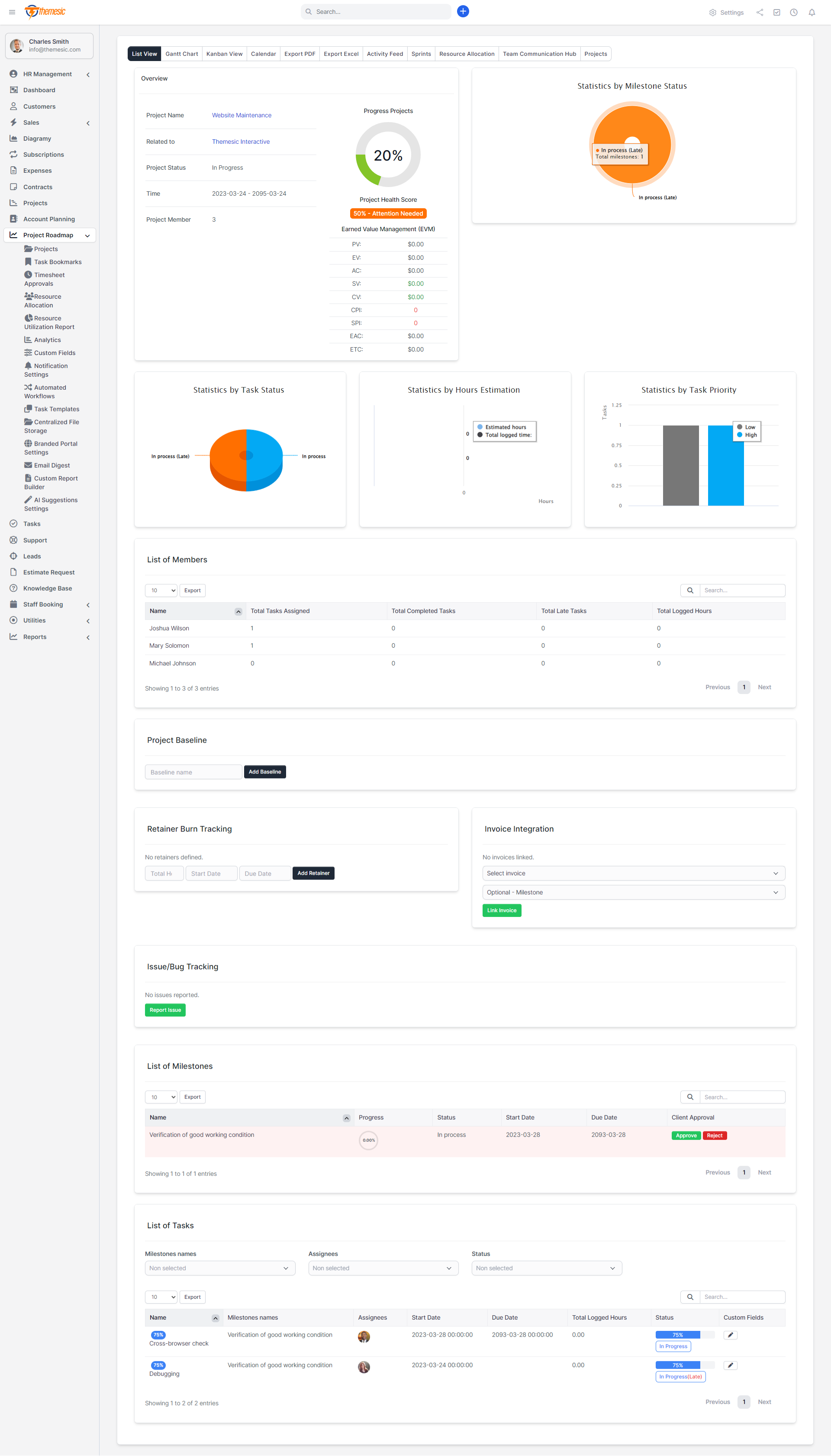
✅ List View – Your central command post. Overview with project health, progress circles, budget vs. actual, EVM metrics (PV, EV, AC, CPI, SPI, EAC, ETC), milestone status, member workload, and a filterable task table. Export to PDF or Excel with one click.
✅ Gantt Chart – Visual timeline with task dependencies and subtasks. Add finish-to-start dependencies, link parent-child tasks, and see the critical path. AI suggestions for assignee and due date right in the Gantt toolbar.
✅ Kanban Board – Drag-and-drop tasks between columns by status. Move a card, update the task. Simple, fast, visual.
✅ Calendar View – Month, week, or list. Tasks and milestones as events. Export iCal or subscribe via URL to Google Calendar or Outlook – your project schedule stays in sync everywhere.
Agile Sprints – Built In
✅ Run sprints without leaving Perfex. Add sprints with name, dates, and goals. Use the Sprint Backlog to plan which tasks go in. Use the Sprint Board (Kanban-style) to move work through. Burndown Chart shows remaining work over time. Velocity Chart shows tasks completed per week – estimate future capacity with real data.
Budget, EVM & Invoicing
✅ Earned Value Management (EVM) – PV, EV, AC, SV, CV, CPI, SPI, EAC, ETC. Color-coded (green = on track, red = behind). Know exactly where you stand.
✅ Retainer Burn Tracking – Track prepaid or fixed-fee hours. Total, used, remaining, and a visual progress bar.
✅ Invoice Integration – Link invoices to projects (and optionally to milestones). See linked invoices from the dashboard.
✅ Budget vs. Actual – Estimated hours vs. logged hours at a glance.
✅ Critical Path Analysis – When you have dependencies, see which tasks affect the project end date. Delays here = deadline impact.
Timesheet Approvals
✅ Timesheet Approvals – Staff log time via Perfex task timers. Lets you approve or reject each record. Sync to pull in any missing entries. Filter by Pending, Approved, or Rejected. No more chasing timesheets in email.
AI Suggestions – Assignee & Due Date
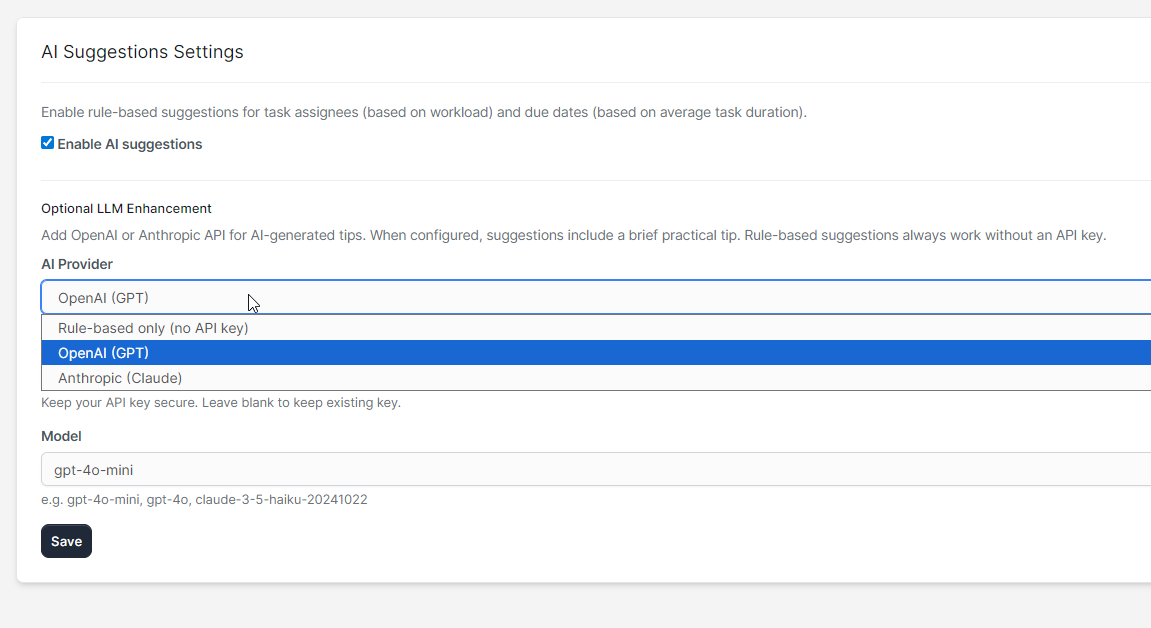
✅ Rule-based suggestions – Work out of the box – no API key. Suggests assignees by workload balance and due dates by project averages.
⚡ Optional LLM enhancement – Connect OpenAI or Anthropic for AI-generated insights. Get a brief practical tip for each new task based on project context. Still optional – rule-based mode is powerful on its own.
Resource Allocation & Utilization
✅ Resource Allocation – Hours and task count per staff per project. Global view or project-specific. See who’s on what.
✅ Resource Utilization Report – Total hours logged per staff across all projects. Workload and availability at a glance.
Analytics, Custom Reports & Export
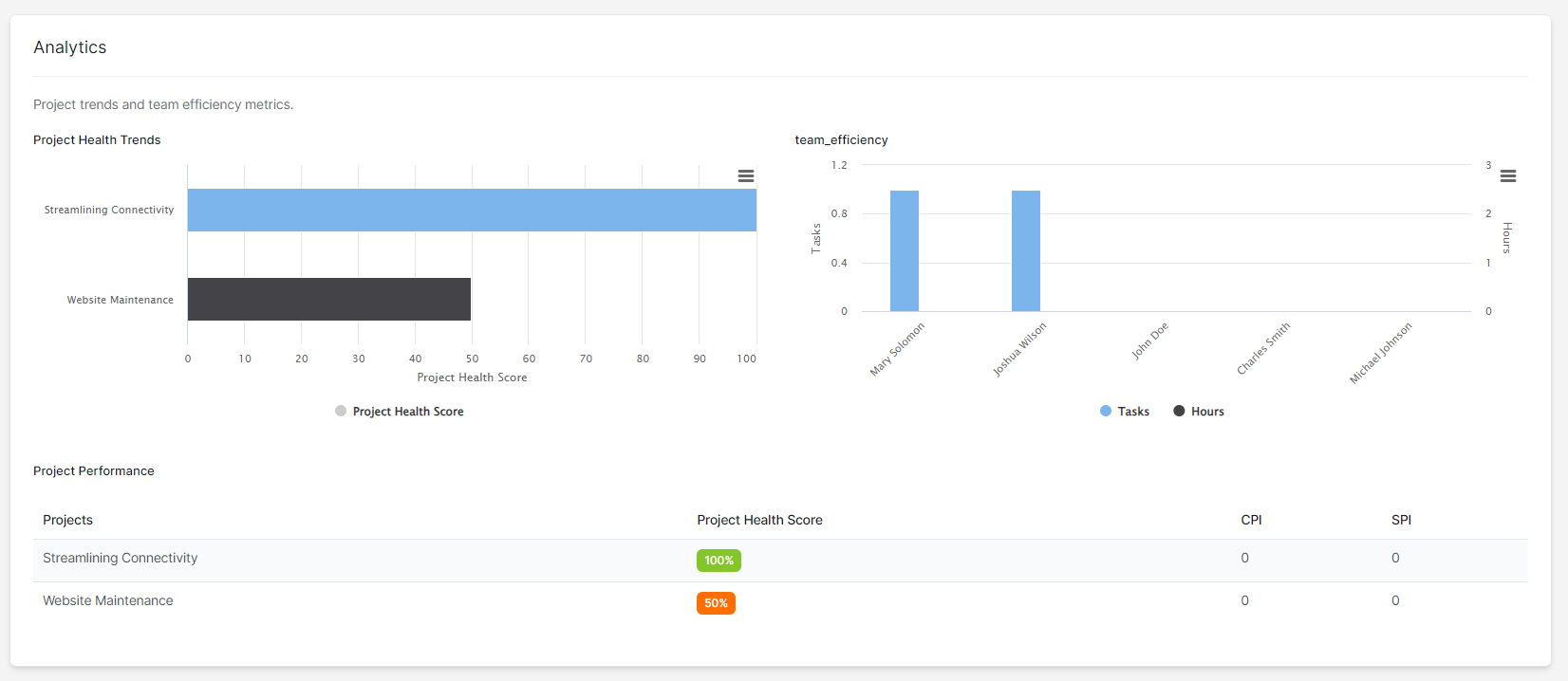
✅ Analytics Page – Project health trends, team efficiency, completion rates, velocity.
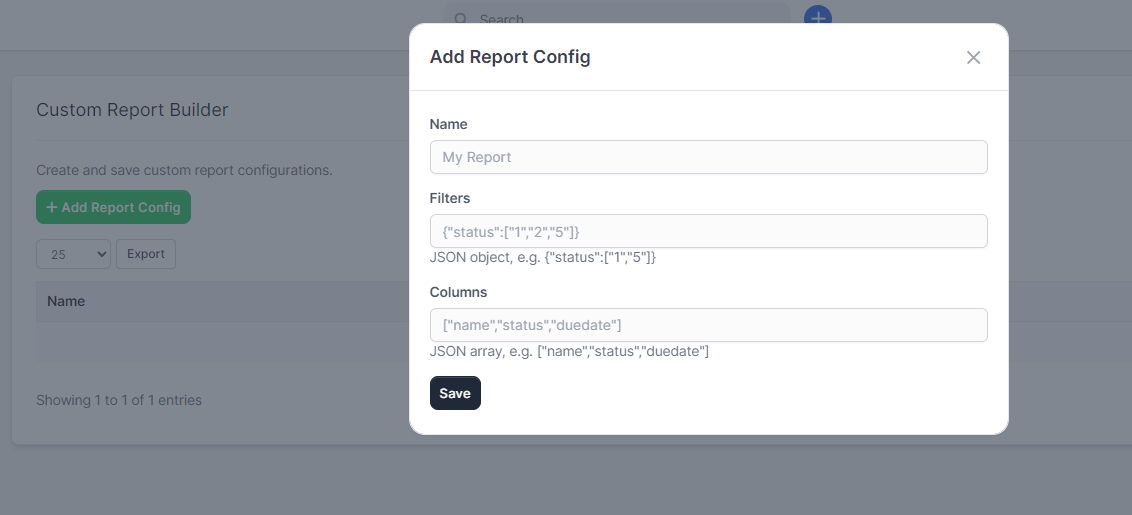
✅ Custom Report Builder – Define saved report configs (filters + columns). Run them on task data. First 100 results in a table. Perfect for recurring reports.
✅ Export PDF / Excel – One-click from the project toolbar. Project overview, milestones, tasks, key metrics.
Task Bookmarks, Templates & Custom Fields
✅ Task Bookmarks – Star tasks for quick access. View all bookmarks in one place.
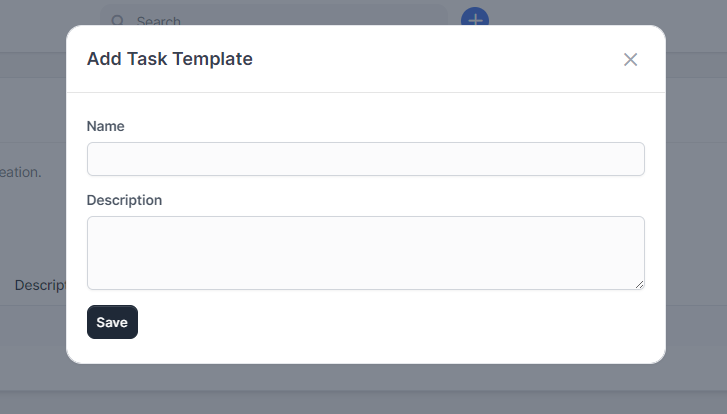
✅ Task Templates – Create reusable task structures. Apply to any project. No more copy-pasting the same task list.
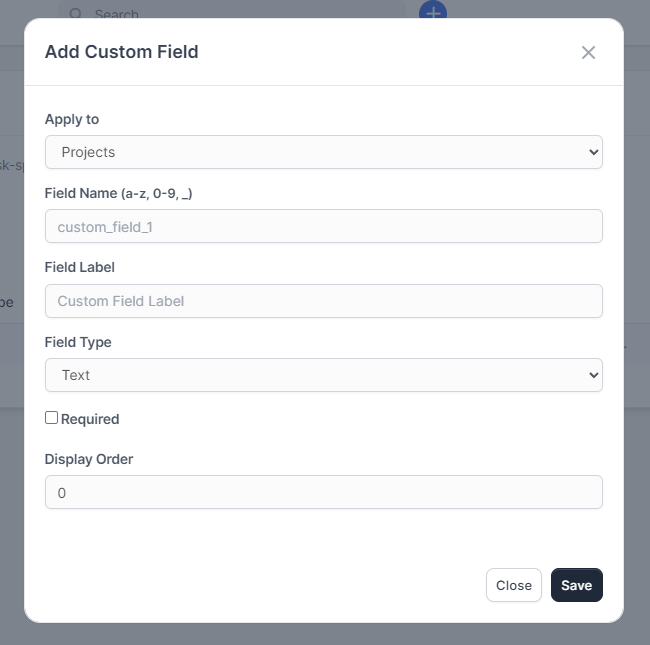
✅ Custom Fields – Add text, textarea, select, number, or date fields to projects and tasks. Define once, use everywhere. Edit from the task table with a pencil icon.
Collaboration & Communication
✅ Team Communication Hub – Discussions with comments, @mentions (notifies staff), and file attachments. One place per project.
✅ Activity Feed – Automatic logging (task added, task updated, project created, etc.) plus manual activity entries.
✅ Centralized File Storage – All project files in one place across all projects. Download, view version history.
✅ File Versioning – Automatic version tracking when files are uploaded. View history per file.
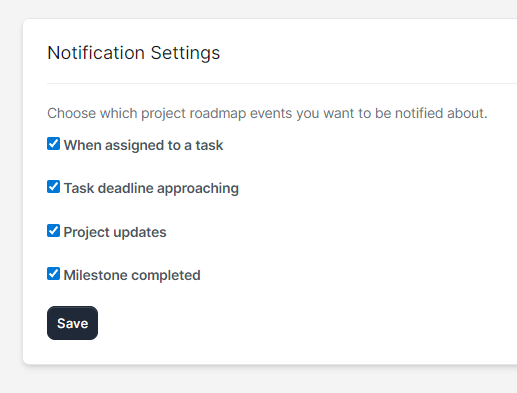
✅ Real-Time Notifications – Per-user settings. Get notified for task assigned, deadline approaching, project updates, milestone completed.
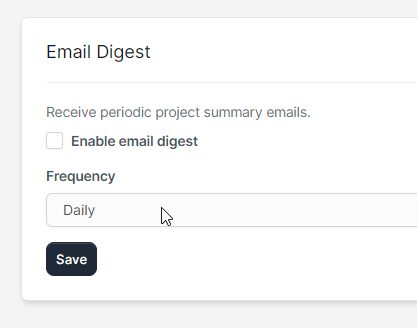
✅ Email Digest – Daily or weekly project summary emails. Set up a cron job and never miss an update.
Automated Workflows
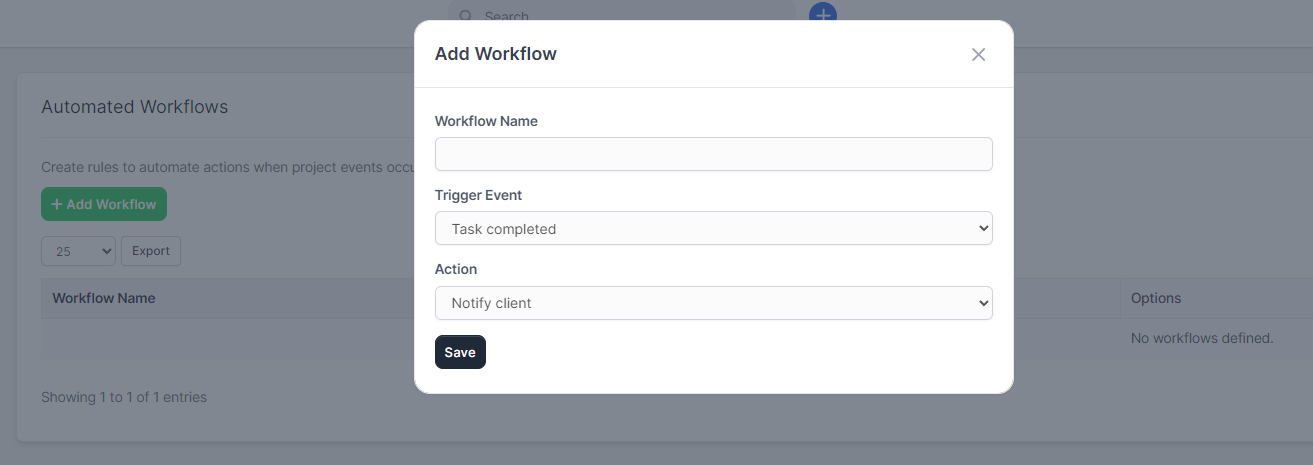
⚡ Automated Workflows – Trigger actions when events happen. Triggers: task_completed, task_assigned, milestone_completed, project_updated. Actions: notify_client, notify_team, add_activity. Example: When a task is completed, automatically notify the client. No coding required.
Client Portal – Milestone Approvals & Branding
✅ Project Updates – Clients see recent activity and pending milestone approvals in the portal.
✅ Milestone Approval Workflow – Clients approve or reject milestones with one click. Optional feedback on rejection. Admins can also approve from the admin area.
✅ Branded Portal Settings – Customize primary and secondary colors for the project updates and milestone sections. Match your brand.
Complete Feature Overview
Views & Dashboard
- List View with Overview, Charts, Members, Milestones, Tasks
- Gantt Chart with Dependencies & Subtasks
- Kanban Board (Drag & Drop)
- Calendar View (Month/Week/List)
- Main Dashboard Widget
- Export PDF & Excel
- iCal Subscribe (Google Calendar, Outlook)
Sprints
- Sprint List (Add, Edit, Delete)
- Sprint Backlog
- Sprint Board
- Burndown Chart
- Velocity Chart
Budget & EVM
- Earned Value (PV, EV, AC, SV, CV, CPI, SPI, EAC, ETC)
- Retainer Burn Tracking
- Invoice Integration
- Budget vs. Actual
- Critical Path Analysis
Task Management
- Task Dependencies (Finish-to-Start)
- Subtasks (Parent-Child)
- Task Progress Indicators
- Task Bookmarks
- Task Templates
- Task & Project Custom Fields
Timesheet & Resources
- Timesheet Approvals (Approve/Reject/Sync)
- Resource Allocation (Per Project)
- Resource Utilization Report
AI & Automation
- AI Suggestions (Assignee, Due Date)
- Rule-Based (No API Key)
- Optional OpenAI / Anthropic
- Automated Workflows
Collaboration
- Team Communication Hub
- @Mentions & Attachments
- Activity Feed
- Centralized File Storage
- File Versioning
- Real-Time Notifications
- Email Digest (Daily/Weekly)
Client Portal
- Project Updates
- Milestone Approval Workflow
- Branded Portal (Colors)
Reporting
- Analytics Page
- Custom Report Builder
- Project Baseline
- Issue/Bug Tracking
Why Project Roadmap?
Everything in One Place – No more switching between Perfex, spreadsheets, and external tools. Your projects, tasks, timesheets, budgets, and team communication live in Perfex.
Built for Perfex – Native integration. Uses Perfex projects, tasks, milestones, timers, and clients. No duplicate data. No sync issues.
Flexible Views – List for detail, Gantt for timeline, Kanban for flow, Calendar for schedule. Choose what fits the moment.
Professional Metrics – EVM, critical path, retainer burn, resource utilization. Speak the language of project management.
Agile Ready – Sprints, backlog, board, burndown, velocity. Run agile without leaving your CRM.
AI That Helps – Smart assignee and due date suggestions. Optional LLM for deeper insights. No API key required for the basics.
Client-Facing – Milestone approvals and project updates in the client portal. Branded. Professional.
Role-Based Permissions – View, Edit, Manage. Control who sees and changes what.

Documentation & Support
Included documentation covers installation, activation, and every feature. A detailed Menu Guide explains each submenu item, what it does, and what (if anything) you need to configure. Our support team is always around to help. Feel free to raise a support ticket at our support area. The support department will get back to you as soon as possible with a reply, guiding you through any issues.




Version 1.1.0
-Gantt Chart view with dependencies and subtasks
-Kanban Board view with drag-and-drop
-Calendar view with iCal export and subscription (Google Calendar, Outlook)
-List view with overview, charts (milestone status, task status, task priority, estimate hours), members table, milestones table, tasks table
-Main dashboard widget for project roadmaps
-Export PDF and Excel from project toolbar
-Sprint planning: Sprints list, Sprint Backlog, Sprint Board, Burndown Chart, Velocity Chart
-Earned Value Management (EVM): PV, EV, AC, SV, CV, CPI, SPI, EAC, ETC with color coding
-Retainer Burn Tracking
-Invoice Integration (link invoices to projects and milestones)
-Budget vs. Actual (estimated vs. logged hours)
-Critical Path Analysis
-Task Dependencies (finish-to-start)
-Subtasks (parent-child)
-Task Progress Indicators
-Task Bookmarks
-Task Templates
-Custom Fields (project and task)
-Timesheet Approvals (approve/reject time from task timers)
-Resource Allocation (hours and tasks per staff per project)
-Resource Utilization Report
-Analytics Page (project health, team efficiency)
-Custom Report Builder (saved filters and columns)
-Project Baseline
-Issue/Bug Tracking
-AI Suggestions (assignee, due date) – rule-based and optional OpenAI/Anthropic
-Automated Workflows (triggers: task_completed, task_assigned, milestone_completed, project_updated; actions: notify_client, notify_team, add_activity)
-Team Communication Hub (discussions, comments, @mentions, attachments)
-Activity Feed (automatic and manual)
-Centralized File Storage (all project files in one place)
-File Versioning
-Real-Time Notifications (per-user settings)
-Email Digest (daily/weekly project summary)
-Client Portal: Project Updates, Milestone Approval Workflow
-Branded Portal Settings (primary and secondary colors)
-Role-Based Permissions (View, Edit, Manage)
Version 1.0.0
-Initial version
-Minimum PHP version required: 7.4
| Type | PHP Script |
|---|---|
| Author | themesic |
| Category | Php Scripts / Add Ons |
| Price | $59 |
| Sales | 544 |
| Rating | 5.00 from 5 ratings |
| Published | May 19, 2020 |
| Last Update | Sep 10, 2026 |
| Compatible Software | PHP 7.x |
| Software Framework | CodeIgniter |
| Source Files Included | JavaScript JS, HTML, CSS, PHP |
| Video Preview Resolution | 1826x778 |
Categories
Tags
External listing. code.market does not sell this product and does not process payment for it. Pricing, payment, delivery, licensing, refunds, and support are handled by the third-party merchant on its own website. We may earn an affiliate commission from a referral. Details.
Products of the Week.
Submit🥇

STOP GUESSING WHAT TO POST
AI that learns your brand voice and builds a month of consistent, on-brand social content: carousels, posts and hooks that sound like you, not like everyone else's AI.
SaaS · 5,037 views · 47 clicksSaaS · Week 45 · 5,037 views · 47 clicks
🥈

Conversational Backlinks for Busy Founders
Place Backlink Relevant Conversation for your domain across Forums and Conversations
Website · 43,048 views · 226 clicksWebsite · Week 45 · 43,048 views · 226 clicks
🥉

upvote.club
Free Social Media Engagement that Helps Boost Your Content. Upvote Club supports 19 social networks with 100+ engagement actions in one dashboard. Add links to your posts and get free engagement from real users.
SaaS · 41,075 views · 122 clicksSaaS · Week 45 · 41,075 views · 122 clicks
#4

Substack Posting API
Onboard your Agent to Substack. Write Publish on Substack via API
SaaS · 60,027 views · 202 clicksSaaS · Week 45 · 60,027 views · 202 clicks
#5

Seenshot App
Free, Fast, MacOS Screenshot app. Make Screenshot cmd+shift+2 and send it via link
Desktop App · 29,392 views · 124 clicksDesktop App · Week 45 · 29,392 views · 124 clicks
#6

Hand-Placed Backlinks $9.99 per link. Flat rate.
Buy hand-placed forum, Q-A and directory backlinks. Flat $9.99 per link, no subscriptions — you only pay for approved listings.
Website · 5,176 views · 19 clicksWebsite · Week 45 · 5,176 views · 19 clicks
#7

Free Invoice Generator - PDF Invoices in Your Browser, No Sign-Up
A free invoice maker for freelancers and small businesses: fill in the invoice, check the live preview, and download a PDF that looks exactly like it. Any currency, tax per item, three templates, no sign-up, and nothing leaves your device.
3,820 views · 17 clicksWeek 45 · 3,820 views · 17 clicks
#8

Merge PDF Files Free - Combine PDFs in Your Browser, No Upload
A free PDF merger for office workers, students, and freelancers: combine PDFs and images into one file in the browser, reorder files and pages, pick page ranges, keep bookmarks, and open password-protected PDFs. Nothing is uploaded, no sign-up, no watermark.
3,528 views · 14 clicksWeek 45 · 3,528 views · 14 clicks