
Prodify | AI Habit and Productivity Tracker iOS Mobile App
Description
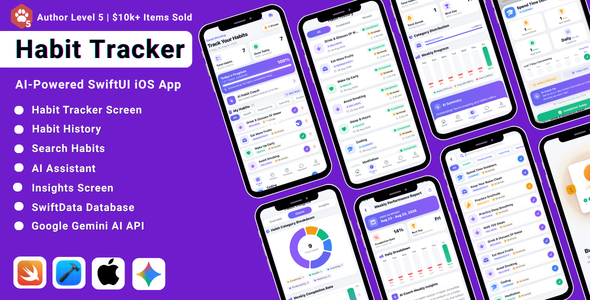
- This package provides a complete Prodify | AI Habit and Productivity Tracker iOS Mobile App built with modern UI/UX and intelligent AI-powered habit coaching features. The app allows users to build positive routines, track daily habit streaks, visualize progress with native Apple Charts, receive personalized habit insights and weekly performance executive summaries using Google Gemini AI, and chat with an interactive 24/7 AI productivity coach.
- The application includes essential modules such as Daily Habit Dashboard, Habit History & Calendar, In-Depth Habit Analytics, Weekly Performance Report, AI Habit Coach & Habit Stacking Analysis, Personalized Insights, and an interactive AI Productivity Assistant.
- Integrated SwiftData (SQLite) local database with robust recovery fallback to store habit logs, streak records, completion timestamps, and user preferences for 100% offline-first functionality and instant performance.
- Built with a clean, scalable, and modular SwiftUI architecture using reusable components, making it easy to customize and extend.
- Modern UI/UX design with smooth animations, responsive iPhone layouts, full Dark and Light Mode support, and fully customizable colors, categories, icons, and Apple Charts.
Demo Video:
Watch Demo Video From here
Artificial Intelligence (AI) Disclosure & Security
Explicit AI Disclosure: In accordance with Envato’s AI Policy, this application explicitly utilizes third-party Artificial Intelligence (AI) powered by Google Gemini API (Google AI Studio) to deliver smart productivity coaching, habit pattern recognition, and personalized behavioral recommendations.
Features Utilizing Google Gemini AI:
- AI Habit Coach & Habit Stacking Analysis: Analyzes user habits to suggest scientific habit stacking techniques, cue-routine-reward loop improvements, and targeted habit challenges.
- Weekly Performance Executive Summaries: Employs Google Gemini AI to analyze weekly completion rates, best-performing days, and generate structured executive productivity summaries.
- Personalized Habit Insights: Utilizes Gemini AI to detect behavioral patterns, identify streak drop-off risks, and suggest actionable habit adjustments.
- Interactive AI Habit Assistant (Chatbot): Provides 24/7 conversational coaching, motivational guidance, and productivity tips via Google Gemini.
Third-Party AI Service & Backend Proxy:
- This app requires a valid Google Gemini API Key to process AI requests.
- A free API key with generous usage limits can be obtained directly from Google AI Studio.
- A lightweight, hardened Node.js Express backend proxy is included with the project featuring secret-key header authentication (
x-app-secret), IP rate limiting, Helmet security headers, server-side payload validation, and request timeouts to securely protect upstream credentials.
User Data Privacy & Local Storage:
- All habit entries, completion logs, streaks, and user settings are stored 100% locally on the device using SwiftData (SQLite).
- User prompts and habit data are transmitted securely via HTTPS to the Gemini API solely for real-time analysis processing and are not stored or shared on external servers.
- Graceful Offline Fallback: If the backend proxy or network is offline, the app provides structured offline guidance without crashing.
Demo / Testing Instructions (No Login Required)
Instant Testing Access: This application is built with a privacy-first, offline-capable architecture using on-device SwiftData (SQLite) local storage. No account registration, login credentials, or demo credentials (email/password) are required to test or use the app. Reviewers, buyers, and end-users get full access immediately upon launch.
How to Test the Application & Backend Proxy:
- Instant Launch: Build and run the app in Xcode 16+ (Simulator or physical iOS device). It launches directly into the onboarding experience and the main Habit Tracker dashboard with zero authentication barriers.
- Starting the Included Backend Proxy: Open Terminal in the project code directory and run:
cd backend && npm install && npm start
The proxy server launches onhttp://localhost:3000. Verify health status by visitinghttp://localhost:3000/health. Complete instructions are provided inbackend/README.md. - Test Habit Tracking & SwiftData Persistence: Tap ”+” to create custom habits across 6 categories, toggle daily completions, check streak updates, and verify that changes persist instantly to local storage.
- Test Habit Analytics & Apple Charts: Navigate to the Analytics tab to view completion rate donut charts, weekly distribution bar charts, and consistency breakdowns.
- Test AI Productivity Coach & Assistant: Navigate to the AI Coach tab to test habit stacking analysis, personalized formation recommendations, and 24/7 conversational coaching powered by Google Gemini.
- Built-In Graceful Offline Fallbacks: If tested without a backend proxy or Gemini API key, the app gracefully presents informative guidance and structured offline tips without crashing or blocking core habit functionality.
App Screens & Modules
Daily Habit Tracker Module
- Interactive Daily Habit Dashboard with Progress Rings & Completion Rates
- Dynamic Category Filtering across 6 Categories (Health, Productivity, Learning, Wellness, Creativity, Social)
- One-Tap Quick Completion Toggles & Active Streak Counters
- Add / Edit Custom Habits with Frequency (Daily/Weekly), Target Days, and Daily Time Reminders
Habit History & Calendar Module
- Comprehensive Historical Logs with 4 Interactive Filters (All, Completed, Missed, Today)
- Interactive Monthly Completion Calendar
- Visual Time-Series Progress Tracking
- 100% Offline Local Persistence with SwiftData
Habit Search & Filter Module
- Real-Time Instant Search across Active Habits
- Multi-Criteria Filtering by Category and Status
Habit Details & Edit Module
- In-Depth Performance Metrics (Current Streak, Best Streak, Total Completions)
- Interactive 7-Day Consistency Charts
- Full Edit Sheet Flow (Modify Name, Category, Frequency, Weekly Targets, Difficulty, and Reminders)
- Native UserNotifications Reminder Integration
- AI Coach Recommendations Specific to Each Habit
Weekly Performance Report Module
- AI-Generated Executive Summary & Motivation Insights
- Overall Completion Rate & Efficiency Breakdown
- Deterministic Best-Performing Days & Peak Consistency Analysis
Personalized Habit Insights Module
- AI Pattern Recognition for Habit Formation
- Behavioral Trend Analysis & Drop-off Prevention Tips
- Actionable Daily & Weekly Suggestions
AI Habit Coach Analysis Module
- Scientific Habit Stacking (Anchor Habits + New Habits)
- Cue-Routine-Reward Loop Optimization
- Custom 7-Day & 30-Day Habit Challenges
AI Assistant Chatbot Module
- 24/7 Interactive Conversational Productivity Coach (Powered by Google Gemini 2.5 Flash)
- Quick Suggested Prompts (Habit Stacking, Morning Routine, Overcoming Procrastination)
- Rich Markdown Text Rendering
- Typing Indicator & Full Message History
User Profile & Interactive Preferences Module
- Personalized Productivity Statistics & Milestone Achievement Badges
- Interactive Preferences: Appearance Mode (System / Light / Dark), Daily Reminders Toggle, Haptic Feedback Toggle, AI Coach Toggle
- Data Management (Reset History & Delete All Habits)
Onboarding Flow (3 Screens)
- Engaging Step-by-Step Walkthrough introducing Habit Stacking, AI Coaching, and Personalized Goal Setting (Clean asset catalog images, no hardcoded paths)
Platform Compatibility
- iPhone Supported (iOS 17.0+)
- Portrait Orientation Locked
Project Requirements
- Xcode 16.0 or later (Tested on Xcode 16)
- iOS 17.0 or later
- Swift 5.9 / 6.0
- Google Gemini API key (Free tier available at Google AI Studio)
- Node.js v18.0 or later (for proxy server)
Note
This is a production-ready SwiftUI application with a clean MVVM architecture, modern UI with Light & Dark mode support, and SwiftData local persistence. The AI coaching features rely on Google Gemini API via the included secure backend proxy; all core habit tracking, charts, reminders, and database operations work fully offline.
| Type | iOS App |
|---|---|
| Author | CodentraTech |
| Price | $24 |
| Sales | 0 |
| Rating | 0 (0) |
| Published | Sep 14, 2026 |
| Last Update | Sep 14, 2026 |
| Compatible Software | iOS 15, iOS 14, iOS 13, iOS 12, Other |
| Compatible With | Swift |
| Mobile Files Included | .h, .m, .pch, .xib/.nib, HTML |
Categories
Tags
External listing. code.market does not sell this product and does not process payment for it. Pricing, payment, delivery, licensing, refunds, and support are handled by the third-party merchant on its own website. We may earn an affiliate commission from a referral. Details.
Products of the Week.
Submit🥇

STOP GUESSING WHAT TO POST
AI that learns your brand voice and builds a month of consistent, on-brand social content: carousels, posts and hooks that sound like you, not like everyone else's AI.
SaaS · 7,398 views · 67 clicksSaaS · Week 46 · 7,398 views · 67 clicks
🥈

Conversational Backlinks for Busy Founders
Place Backlink Relevant Conversation for your domain across Forums and Conversations
Website · 46,699 views · 232 clicksWebsite · Week 46 · 46,699 views · 232 clicks
🥉

upvote.club
Free Social Media Engagement that Helps Boost Your Content. Upvote Club supports 19 social networks with 100+ engagement actions in one dashboard. Add links to your posts and get free engagement from real users.
SaaS · 44,634 views · 127 clicksSaaS · Week 46 · 44,634 views · 127 clicks
#4

Substack Posting API
Onboard your Agent to Substack. Write Publish on Substack via API
SaaS · 63,519 views · 206 clicksSaaS · Week 46 · 63,519 views · 206 clicks
#5

Seenshot App
Free, Fast, MacOS Screenshot app. Make Screenshot cmd+shift+2 and send it via link
Desktop App · 32,769 views · 127 clicksDesktop App · Week 46 · 32,769 views · 127 clicks
#6

Hand-Placed Backlinks $9.99 per link. Flat rate.
Buy hand-placed forum, Q-A and directory backlinks. Flat $9.99 per link, no subscriptions — you only pay for approved listings.
Website · 8,385 views · 19 clicksWebsite · Week 46 · 8,385 views · 19 clicks
#7

Free Invoice Generator - PDF Invoices in Your Browser, No Sign-Up
A free invoice maker for freelancers and small businesses: fill in the invoice, check the live preview, and download a PDF that looks exactly like it. Any currency, tax per item, three templates, no sign-up, and nothing leaves your device.
7,014 views · 29 clicksWeek 46 · 7,014 views · 29 clicks
#8

Merge PDF Files Free - Combine PDFs in Your Browser, No Upload
A free PDF merger for office workers, students, and freelancers: combine PDFs and images into one file in the browser, reorder files and pages, pick page ranges, keep bookmarks, and open password-protected PDFs. Nothing is uploaded, no sign-up, no watermark.
6,488 views · 18 clicksWeek 46 · 6,488 views · 18 clicks