
Prestashop Multi Vendor Marketplace

Description









“Prestashop Multivendor Marketplace” module helps you to create any marketplace and allow vendors / store owners to sell or supply products from your site. It helps to set up your own marketplace fast, easy and reliable.
By this module, marketplace owner receive commissions on products they sell from vendor stores. Marketplace owner can setup the multi-store system to his site so that other store owner can sell their product from his site.
Only super admin has the ability to approve store from dashboard. Admin can set the commission rate or percentage with other information for a specific vendor store. He can also disable all market temporary. By this plugin admin can monitor all store sales performance.
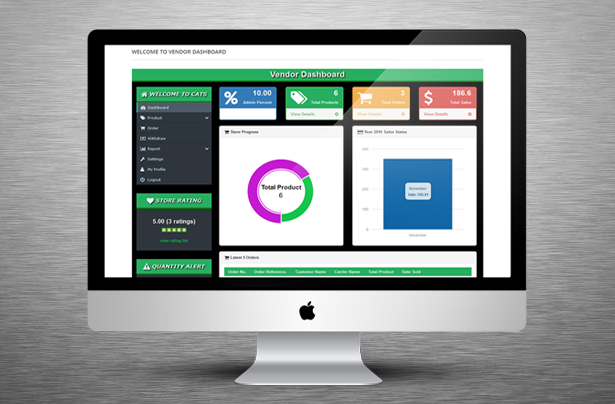
Each vendor (store owner) has individual Admin panel. Vendor can add standard or virtual products item with many other information. He can check his all orders. Vendor can withdraw any amount from his total sales and percentage will automatically add to the marketplace owner after his approve. It has powerful reporting system with order, product sell and withdraw report. Vendor can set store info, images, popup schedule, social links, store page content, grid box content with store design. Store owner can edit and update his profile from here. It has also Store rating and Quantity alert options.
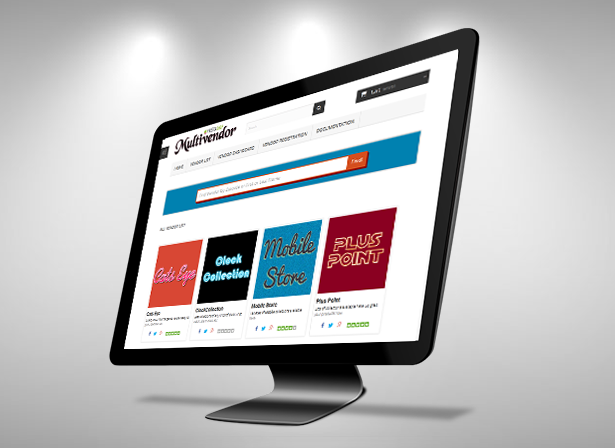
After install “Prestashop Multivendor Marketplace” module it will create three page links these are “Vendor Dashboard”, “Vendor Registration” and “Vendor List”. Dashboard contains Add/View product, Order, Withdraw, Report, Settings, Profile with other info, Vendor can login or registration from Registration page and all Vendor list will show at Vendor List page.
“Prestashop Multivendor Marketplace” module is a prestashop extension plugin which turns your Prestashop Site into a Multi-Store Marketplace.
“Prestashop Multivendor Marketplace” has some excellent features and easy to set up. It is more flexible and compatible with many existing module in the Prestashop repository. This module is fully customizable. Users can easily configure the module into the new or existing Prestashop store.



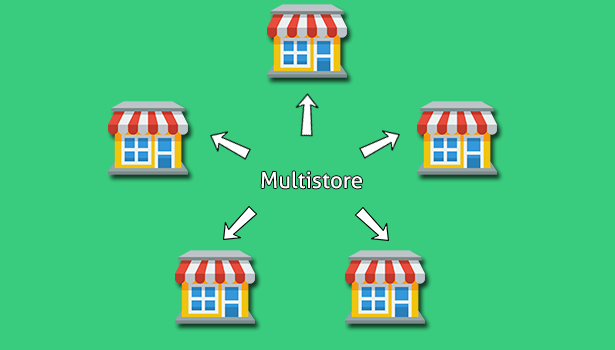


- Multi store system for Prestashop.
- In Dashboard Super Admin/Marketplace owner can view Total Stores (Vendor List), Total Products, Store Waiting for Approval, Total Store Orders, Withdraw Status, Sales Status etc.
- Marketplace owner can view Products info, Sale info, Profit and can set the Commission rate or percentage for a specific vendor store.
- Marketplace owner has the ability to approve store from dashboard with Enable, Disable, View or Delete a specific vendor store.
- Super Admin can Approve and View all requested product list.
- Only marketplace owner can send payment to store owner.
- Marketplace owner can view the vendor’s Store, Product and Order Report.
- Marketplace owner can monitor all store sales status.
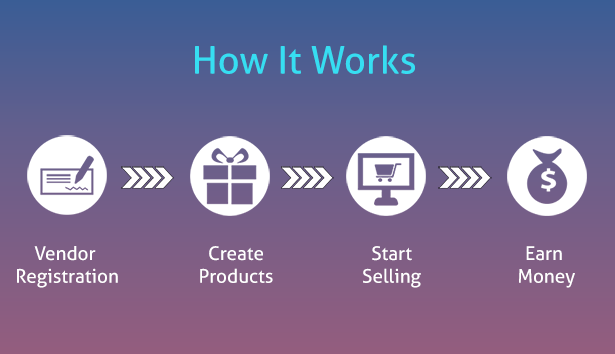
- Anyone can register for a store which goes to site admin for approval.
- Each Vendor/Store owner has individual Admin panel which contains Products, Order history, Total Sales, Admin Percent, Store Progress, Sales Status and other info.
- Vendor can add products with Information, Category, Price, SEO, Quantities, Combination, Image, Image Gallery and Special Price. He can view his entire products list in this section. Vendor can add/upload Standard and Virtual (services, booking, downloadable products, etc.) products.
- Restaurant owner can view his Order list with details.
- Vendor can withdraw any amount from his total sales balance and percentage will automatically add to the marketplace owner after his approve.
- It has powerful reporting system with orders, product sell and withdraw report.
- Vendor can set store information, upload stores logo and banner, popup schedule, social links, store page content, grid box content with stores color design.
- Store owner can edit or update his profile.
- Vendor can view Store Rating based on his products.
- There is a Quantity alert option where store owner can view less quantity products.
- The user or customer can view all store lists with logo. After click a store, customer can view stores Profile, Collections, Reviews and other info.
- Find / Search a vendor store by Zip code, Name or Address.
For installation process and other information please view our online  Documentation
 Documentation
| Type | PrestaShop Module |
|---|---|
| Author | wpproducts |
| Category | Plugins / Prestashop |
| Price | $149 |
| Sales | 76 |
| Rating | 3.63 from 8 ratings |
| Published | Jan 2, 2017 |
| Last Update | Apr 22, 2020 |
| Compatible Browsers | IE10, IE11, Firefox, Safari, Opera, Chrome, Edge |
| Compatible Software | PrestaShop 1.7.8.x, PrestaShop 1.7.7.x, PrestaShop 1.7.6.x, PrestaShop 1.7.5.x, PrestaShop 1.7.4.x, PrestaShop 1.7.3.x, PrestaShop 1.7.2.x, PrestaShop 1.7.1.x, PrestaShop 1.7.0.x, PrestaShop 1.6.1.x |
| Source Files Included | JavaScript JS, HTML, CSS, PHP |
Categories
Tags
External listing. code.market does not sell this product and does not process payment for it. Pricing, payment, delivery, licensing, refunds, and support are handled by the third-party merchant on its own website. We may earn an affiliate commission from a referral. Details.
Products of the Week.
Submit🥇

STOP GUESSING WHAT TO POST
AI that learns your brand voice and builds a month of consistent, on-brand social content: carousels, posts and hooks that sound like you, not like everyone else's AI.
SaaS · 4,282 views · 38 clicksSaaS · Week 45 · 4,282 views · 38 clicks
🥈

Conversational Backlinks for Busy Founders
Place Backlink Relevant Conversation for your domain across Forums and Conversations
Website · 41,992 views · 223 clicksWebsite · Week 45 · 41,992 views · 223 clicks
🥉

upvote.club
Free Social Media Engagement that Helps Boost Your Content. Upvote Club supports 19 social networks with 100+ engagement actions in one dashboard. Add links to your posts and get free engagement from real users.
SaaS · 40,034 views · 117 clicksSaaS · Week 45 · 40,034 views · 117 clicks
#4

Substack Posting API
Onboard your Agent to Substack. Write Publish on Substack via API
SaaS · 59,044 views · 198 clicksSaaS · Week 45 · 59,044 views · 198 clicks
#5

Seenshot App
Free, Fast, MacOS Screenshot app. Make Screenshot cmd+shift+2 and send it via link
Desktop App · 28,416 views · 122 clicksDesktop App · Week 45 · 28,416 views · 122 clicks
#6

Hand-Placed Backlinks $9.99 per link. Flat rate.
Buy hand-placed forum, Q-A and directory backlinks. Flat $9.99 per link, no subscriptions — you only pay for approved listings.
Website · 4,252 views · 19 clicksWebsite · Week 45 · 4,252 views · 19 clicks
#7

Free Invoice Generator - PDF Invoices in Your Browser, No Sign-Up
A free invoice maker for freelancers and small businesses: fill in the invoice, check the live preview, and download a PDF that looks exactly like it. Any currency, tax per item, three templates, no sign-up, and nothing leaves your device.
2,930 views · 17 clicksWeek 45 · 2,930 views · 17 clicks
#8

Merge PDF Files Free - Combine PDFs in Your Browser, No Upload
A free PDF merger for office workers, students, and freelancers: combine PDFs and images into one file in the browser, reorder files and pages, pick page ranges, keep bookmarks, and open password-protected PDFs. Nothing is uploaded, no sign-up, no watermark.
2,706 views · 13 clicksWeek 45 · 2,706 views · 13 clicks