
POSpro SaaS - POS & Inventory Management System | POS SaaS Solution
Description
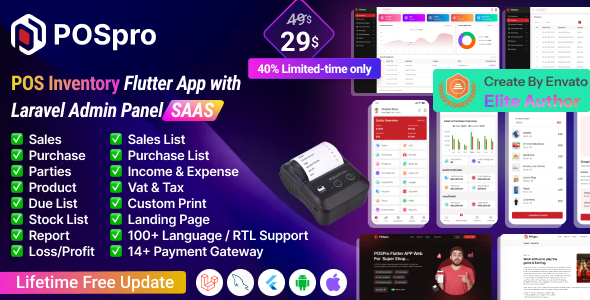
POSpro App – POS Inventory Flutter App with Laravel Admin Panel POSpro Web Add-on – POSpro Web Add-on is a cutting-edge Point of Sale (POS) solution delivered as a Software as a Service (SaaS) application. Developed using Flutter (App) and Laravel (Admin Panel) for a seamless cross-platform experience, it integrates effortlessly with existing POS systems to provide a robust and scalable backend.

POSpro works with Bluetooth POS printers and features a subscription system. The app boasts stunning screens covering the Mobile POS Inventory app. Additionally, it includes functionalities for managing products, sales, purchases, parties, loss/profit, stock, ledger, sales lists, purchase lists, due lists, reports, and expenses.


Offer: If you buy the extended license you will get free reskin service and full setup.
Envato suggests buying an extended license for a SaaS project.
Note: You can now print a sale invoice using any Bluetooth thermal printer. All new sales invoices will print automatically. You can also print previous sales invoices from the sales report.






Demo Url: https://pospro.app/ Admin Url: https://pospro.app/login
App Demo user: shopowner@acnoo.com Pass: 123456
Super Admin Credentials
superadmin@acnoo.com superadminAdmin Credentials
admin@acnoo.com superadminShop Owner Credentials
shopowner@acnoo.com 123456


Key Features
Admin Dashboard
- Dashboard: Overview of the system’s performance and key metrics.
- Advertising: Manage and track your advertising campaigns.
- Business List: View and manage all registered businesses/shops.
- Business Category: Organize businesses for better management.
- Subscription Plans: Create and manage subscription plans.
- Staff Management: Add, remove, and manage staff permissions.
- Reports: Generate various business operation reports.
- Messages: View messages sent from the website contact page.
- CMS Manage: Manage website content.
- Roles & Permissions: Define roles and assign permissions.
- Settings: Configure system settings.
App Features
- Product Catalog: Easily add, edit, and organize products.
- Sales Processing: Smooth POS transactions with receipt printing/digital sharing.
- Parties: Profiles for customers (dealers, retailers) and suppliers.
- Sales & Purchase List: Dynamic lists of completed transactions.
- Sales Edit: Easily edit sales.
- Reports: Overview of sales/purchases/due; print or share.
- Loss/Profit: Automated profit/loss statements and visual representation.
- Stock: Monitor product movement in real-time.
- Inventory Management: Real-time tracking and low stock alerts.
- User-Role: Assign roles and permissions.
- Subscription Plan: Select and upgrade plans.
- Multi-User Access: Team collaboration with security control.
- User-Friendly Interface: Intuitive design and customizable UI.
Benefits of POSpro
- Scalability: Grow your business effortlessly.
- Reliability: Robust and secure Laravel backend.
- Cost-Effective: SaaS model with no upfront infrastructure costs.
- Real-Time Insights: Informed decisions with real-time analytics.
- Efficiency Boost: Streamline operations from inventory to sales.
- Centralized Control: Super Admin capabilities over your entire business network.
POSpro is not just a POS system; it’s a comprehensive solution that empowers super admins and admins alike to streamline operations, enhance efficiency, and drive business growth.
Application Features
- SaaS Ready Application with Laravel backend
- Easy to modify subscription package
- Clean Code and well-structured project
- Single code base for both Android & iOS
- Thermal Bluetooth printer integration (automatic/manual printing)
- Fully responsive UI & Best UI/UX
- Great animation & Easy to customize
- Free lifetime updates & stunning customer support
Flutter and Android Studio Setup Guide
Follow these steps to set up your development environment for Flutter:
Step 1: Install Flutter
Step 2: Use Flutter version is 3.41.9
Step 3: Install Android Studio
Step 4: Set Up Android Studio
- Open Android Studio.
- Go to File > Settings (or Android Studio > Preferences on macOS).
- Navigate to Appearance & Behavior > System Settings > Android SDK.
- Ensure Android SDK and necessary tools are installed.
Step 5: Configure Flutter in Android Studio
- Open Android Studio.
- Go to Plugins and search for “Flutter”.
- Install the Flutter plugin and restart Android Studio.
- Open File > New > New Flutter Project to start.
Step 6: Set Up Your Device
- Enable Developer Mode and USB Debugging on your Android device.
- Connect your device via USB.




Changelog (Recent Versions)
Version: 6.10 ( 23 Sep 2026 )
Dark mode support added.
Sidebar design and user interface updated.
Fixed minor issues and improved overall stability.
Version: 6.9 ( 28 July 2026 )
Added an "Allow Existing Subscribers" option to the subscription plan edit page.
Refactored the plan management logic for better maintainability.
Fixed minor issues and improved overall stability.
Version: 6.8 ( 05 July 2026 )
Plan limit system added with centralized limit enforcement for users, products, customers, suppliers, warehouses, and branches.
Module-based plan limit fields now dynamically show or hide based on enabled modules.
Added Social Share Image support with improved Open Graph metadata and meta description.
Enforced subscription plan limits across controllers and API endpoints during resource creation.
Updated Business module role management to support the new permission set.
Version: 6.7 ( 25 June 2026 )
Added module selection options in plan create and edit forms.
Implemented plan-based module access control for Web and Mobile App.
Improved subscription orders and reports interface.
Added a database backup system for generating and managing backups.

Mobile App Change Logs
Updated subscription module for plan-based feature access control
Updated API client to standardize exception handling
Migrated deprecated codes for latest flutter version
Version: 6.6 ( 02 June 2026 )
Handled potential null values for gateway data.
Displayed product-wise tax in sales and purchases within the mobile app.
Fixed minor issues and improvements.
Version: 6.5 ( 20 May 2026 )
Fixed some minor issues.
Optimized the code.
Installation issues fixed.
Print label issues fixed.
Version: 6.4 ( 14 May 2026 )
Sidebar and design issues fixed.
License verification updated.
Version: 6.3 ( 12 May 2026 )
Cron job configuration added.
Minor bug fixes and improvements.
Improved theme settings configuration.
Version: 6.2 (17 April 2026)
- Language dynamic translation web added.
- Updated general & website settings.
- Integrated SerialCodeAddon, TaxInvoiceAddon, MarketingAddon, PawapayAddon, FedapayAddon.
- Instamojo payment gateway issue fixed.
- AWS issue fixed, app product search issue fixed.
- More details: https://doc.pospro.app/#change-logs

Version: 6.1 (10 January 2026)
- Fixed installation & subscription issues.
- Invoice settings updated in mobile app.
- Business profile update feature added.
- More details: https://posprodoc.acnoo.com/#change-logs
| Type | Flutter App |
|---|---|
| Author | Acnoo |
| Category | Mobile / Flutter |
| Price | $29 |
| Sales | 489 |
| Rating | 4.49 from 43 ratings |
| Published | Aug 5, 2024 |
| Last Update | Oct 16, 2026 |
| Compatible Software | Flutter 3.x |
| Mobile Files Included | Dart, YAML, JavaScript JSON, .java, .kotlin, .swift, JavaScript JS, PHP, HTML |
Categories
Tags
External listing. code.market does not sell this product and does not process payment for it. Pricing, payment, delivery, licensing, refunds, and support are handled by the third-party merchant on its own website. We may earn an affiliate commission from a referral. Details.
Products of the Week.
Submit🥇

Actionbook
It works inside the user's own browser with the accounts already signed in. The user describes the result they need, and the agent reads, clicks and types through the pages, then delivers a dashboard or report where each data links back to its source.
Other · 748 views · 10 clicksOther · Week 44 · 748 views · 10 clicks
🥈

Free social media tools for creators & solofounders
295 free tools for growing your social media: write, plan, grow on local AI models, 100% free forever, No sign-up required, No trial. Write, check and measure posts on LinkedIn, Instagram, TikTok, X, YouTube, Reddit, Product Hunt and more: a free social media scheduler for 17 networks, engagement rate calculators, character counters, best time to post, hook generators and follower growth calculators. No login anywhere, no API or credit usage.
715 views · 6 clicksWeek 44 · 715 views · 6 clicks
🥉

STOP GUESSING WHAT TO POST
AI that learns your brand voice and builds a month of consistent, on-brand social content: carousels, posts and hooks that sound like you, not like everyone else's AI.
SaaS · 1,961 views · 22 clicksSaaS · Week 44 · 1,961 views · 22 clicks
#4

Hand-Placed Backlinks $9.99 per link. Flat rate.
Buy hand-placed forum, Q-A and directory backlinks. Flat $9.99 per link, no subscriptions — you only pay for approved listings.
Website · 1,912 views · 17 clicksWebsite · Week 44 · 1,912 views · 17 clicks
#5

Conversational Backlinks for Busy Founders
Place Backlink Relevant Conversation for your domain across Forums and Conversations
39,372 views · 211 clicksWeek 44 · 39,372 views · 211 clicks
#6

Free Invoice Generator - PDF Invoices in Your Browser, No Sign-Up
A free invoice maker for freelancers and small businesses: fill in the invoice, check the live preview, and download a PDF that looks exactly like it. Any currency, tax per item, three templates, no sign-up, and nothing leaves your device.
651 views · 11 clicksWeek 44 · 651 views · 11 clicks
#7

Merge PDF Files Free - Combine PDFs in Your Browser, No Upload
A free PDF merger for office workers, students, and freelancers: combine PDFs and images into one file in the browser, reorder files and pages, pick page ranges, keep bookmarks, and open password-protected PDFs. Nothing is uploaded, no sign-up, no watermark.
597 views · 4 clicksWeek 44 · 597 views · 4 clicks