
POSHub | Offline-First POS Flutter App for Retail & Restaurant with Laravel SaaS Backend
Description
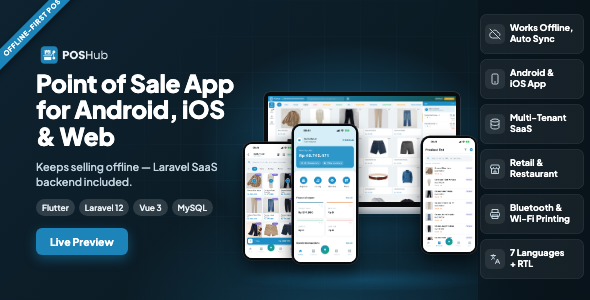
What you get in this purchase — everything needed to run it. This item contains both halves as full source code: the Flutter cashier app for Android and iOS, and the Laravel 12 web application that is its backend — REST API, merchant web panel, browser cashier screen and platform superadmin panel. Nothing is sold separately and nothing is missing: install the backend on your hosting, set your server address in one file of the app, build it, and sign in. The package also includes a small print bridge for the till computer and complete documentation.
Not included in the purchase price. Hosting (any PHP 8.2 + MySQL shared hosting or VPS), your domain and SSL certificate, and publishing the app under your own name — a Google Play developer account (one-time US$25) and an Apple Developer Program membership (US$99/year). Optional third-party services are separate accounts that you open and pay for yourself, under each provider’s own terms: payment gateways for collecting subscription fees (Stripe, PayPal, Midtrans, Razorpay, Paystack, Flutterwave, Mollie), Pusher for realtime kitchen updates, and an e-mail delivery service. None of those services are required: realtime falls back to polling without Pusher, and manual bank transfer works with no gateway at all. No Node.js, Redis, Docker or Composer is needed on your server.
Why POSHub
- It keeps selling when the internet drops. The cashier app stores products, prices, discounts, taxes and payment methods on the phone and saves every sale on the device first. Offline sales wait in a queue and send themselves when the connection returns — and sending the same sale twice can never create a duplicate, because every sale carries its own unique ID. Receipt numbers stay unique per outlet even when created offline.
- The phone and the server calculate the same total. Discount, then tax, then fees, then rounding — the same order, the same rules, in the app and on the server. The receipt printed offline matches the report afterwards.
- One system for shops and restaurants. Retail checkout with barcode scanning, and restaurant mode with tables, held orders and a live kitchen display — on the same sales records, so stock, cost and reports never have two versions.
- Profit numbers you can trust. Stock only ever moves through a stock ledger, and cost of goods (moving average, per product per outlet) is snapshotted onto every sale. A supplier raising prices today cannot rewrite last month’s profit. Voids and returns never delete anything.
- Sell it as a service. One installation serves many merchants, each with its own outlets, staff, catalogue and subscription, fully isolated from the others. Plans, limits, invoices and payment collection are already built.
- Installs where your customers already are. The backend runs on ordinary cPanel shared hosting with a browser installer and a single cron entry.
The cashier app (Flutter)
- Offline-first checkout. Local database, sync queue, a pending-sales counter and a “sync now” button. A session that expires never loses queued sales.
- Fast selling. Product grid with photos, categories and search, infinite scroll for large catalogues, variants and units, barcode scanning with the camera, and a hide-out-of-stock option that follows the outlet setting.
- Everything at checkout. Walk-in or named customers, automatic discounts, discounts from the catalogue, vouchers (with paste), service charges and other fees, held orders to resume later, split payment across methods, quick cash amounts and change.
- Loyalty at the till. Customers’ points balance, reward redemption, and free-gift promotions chosen at payment.
- Shifts. Open the register with starting cash, close it with a count; the summary shows payment methods and the products sold and returned, with images.
- Returns from the sales history, and cash in / cash out with categories, date range and search.
- Restaurant tables for waiters: pick a table, add rounds, send to the kitchen.
- Product management from the phone: a step-by-step form to add and edit products, variants and prices.
- 15 reports on the phone — sales by product and by transaction, returns, cash in and out, payments received and made, sales trend, sales summary, profit by product and cashier performance.
- Receipt printers over Bluetooth and Wi-Fi/LAN (ESC/POS, 58 and 80 mm): add several printers, test each one, and choose which print automatically after payment.
- Business owners sign in to a list of their businesses with each subscription’s status and expiry, and switch between them.
- Seven languages including full right-to-left Arabic, with onboarding slides, app name, icon and brand colour all easy to change.
Discounts — they apply themselves
Every discount is calculated in one place, in one fixed order (discount → tax → fees → rounding), identically on the phone and on the server. The receipt, the report and the API can never disagree about a price.
- Cashier discounts. A ready-made list the cashier picks from at the till, as a fixed amount or a percentage. Each cashier has a limit; going over it asks for a supervisor PIN instead of silently allowing it.
- Automatic product discounts. They attach themselves the moment the goods reach the cart — nobody has to remember them. Target everything, a category, a brand, or named products and variants; set a minimum item price so a rule skips the cheap end of a range; set a minimum quantity per target, so “buy 3 coffees or 5 teas” is one rule; let a fixed amount repeat in multiples; cap a percentage at a maximum amount. A line only ever takes the single largest discount, so the cashier can always explain the price.
- Automatic subtotal discounts. Spend this much, take that much off — a fixed amount or a capped percentage, optionally repeating for every multiple of the threshold (“Rp 10.000 off every Rp 100.000”).
Promotions
- Vouchers. A code the customer brings. Fixed or percentage with a cap, taken off the subtotal or off the delivery fee, with a redemption quota counted across every branch. A rejected code says why — expired, wrong branch, quota used up, not for this customer — because “invalid code” leaves the cashier with nothing to say. The app can paste a code straight from the clipboard.
- Free product (buy X, get Y). The requirement can be any product, a category, a brand or named variants, and the customer must buy all of them or just some. The gift can be given in full, or the customer chooses some — or exactly one — from a list at payment. Gifts enter the sale as zero-priced lines, so they leave the shelf and their cost shows in the profit report like anything else.
- Spend and get. Pass a subtotal threshold and a free product comes with it — one fixed gift, or a choice from a list.
- Bundles. Buy A + B together and take a fixed amount off. A bundle is a rule, not a new product: stock still moves per item, and the report shows each bundle’s estimated profit.
Every discount and promotion can be limited by date range, by weekday, by time of day (including windows that cross midnight, for late-night happy hours), by branch, and by audience — everyone, a customer level, or named customers. A promotion aimed at members never quietly applies to a walk-in, and the till shows which rules were applied and by how much.
Loyalty points
- Earned two ways. Per product — set per variant, because 10 kg deserves more points than 5 kg — and per order total, with a minimum subtotal and an optional multiplier so double the spend earns double the points.
- One programme per business. Branches are chosen as its scope, so the same customer never collects points by different rules depending on where they shopped.
- Points can expire after the number of days you choose — and expiry is written into the ledger as its own line, not quietly deducted.
- The points ledger is the balance. Earned, redeemed, expired and adjusted are rows; the balance is their sum. “Why do I have this many points?” always has an answer.
Redeeming points — a reward catalogue, not just a counter
- Four kinds of reward, each costing a number of points: a discount (percentage or fixed amount, with a cap), a free product, free delivery, or a reward of your own with its own name, picture and description (a tote bag, a free coffee refill, a service).
- Limited where you want: each reward can be restricted to certain branches and certain customer levels.
- Redeemed at the till — from the Points tab on the web cashier, or the Redeem points screen in the app, where the customer’s balance, what they can afford, and what is already applied to the sale are all on one page. A redemption can be cancelled before payment and the points go back.
Customer levels
- Tiered levels (Silver, Gold, Platinum…) are reached automatically the moment a customer’s points pass the threshold.
- Flat levels are given by hand, for the customers you decide about yourself — staff, VIPs, partners.
- Levels unlock things: discounts, vouchers, free-product promotions and rewards can each be limited to one or more levels.
- Price level is deliberately separate. A wholesale buyer who never collects a point still needs wholesale prices, and a loyal member can still be buying retail — so the price level sits on the customer, and the till switches prices the moment that customer is selected.
- The customer page shows transaction count, credit limit, points balance and points redeemed, above tabs for sales, returns, receivables and the full points ledger. Credit limits warn or block the cashier when an unpaid balance goes past what you allowed.
Pricing
- Tiered prices by quantity (1–9 at one price, 10+ at another).
- Price levels per customer — retail, member, wholesale, or your own.
- Different prices per branch and per selling unit (piece, pack, box).
- Whether a cashier may edit a price at the till is a setting, not a code change.
Everything else in the platform
Selling
- Browser cashier screen with barcode scanning and keyboard shortcuts, for counters that use a PC — alongside the mobile app.
- Held orders, split payment across methods, partial payment, and sales on account against a customer’s credit limit.
- Service charges and other fees, delivery fee, and automatic rounding.
- Shifts that compare the counted cash with what the system expected and record the difference, with a printable close-out. Shifts run per cashier or as one shared register per branch, can close themselves at a set time, or be switched off for a branch that does not need them.
- Voids and returns leave a full audit trail — a sale is never deleted; a void marks it and writes a new document. Returns can refund in cash, as store credit, or as an exchange.
- Receipt numbers run per branch and stay unique even when created offline.
Catalogue
- Variants (size, colour…), multiple selling units with conversions, composite products, and service items that do not track stock.
- Brands, categories and racks; per-branch assortment; hide out-of-stock items per branch.
- Barcode labels printed at any sticker size — on A4 sheets or straight to a roll-label printer, with as many copies as each item needs.
- CSV and Excel import and export.
Inventory
- Stock adjustments (breakage, loss, samples, opening balance), stock takes, and transfers between branches with separate send and receive steps.
- Low-stock alerts and a complete stock ledger — every row tied to the document behind it.
- Two tills selling the last unit at the same instant are handled with row locks, so stock never goes wrong.
Purchasing and suppliers
Purchase orders, partial receiving, returns to supplier, supplier payments, and payables with due dates and overdue flags. Receiving is what updates the moving-average cost, per product per branch.
Money
Cash in and cash out with your own categories, receivables and payables with ageing, and payment methods with their own service fees. Payment-method balances are computed from sales, purchases, cash entries and debt payments together — so the figure on screen is the figure in the drawer.
Tax and charges
Tax rates built from components, applied per item or on the order, inclusive or exclusive of the displayed price, compound where the law demands it, with country presets to start from. Service charges sit beside them, each taxable or not. Everything is snapshotted onto the document, so reprinting last year’s receipt prints last year’s rules.
Restaurant mode
Switched on per business, so retail shops never see it. Table map with zones, running orders, merging and moving tables, order rounds and modifiers, and a kitchen display with per-station ticket routing that updates live (Pusher, with automatic fallback to polling). Waiters can take orders at the table from the app. Restaurant orders use the same sales records as retail, so stock, cost, shifts and reports have one code path.
Printing
From the app: ESC/POS thermal printers over Bluetooth or Wi-Fi/LAN, 58 and 80 mm, with autoprint after payment. From the web: the browser print dialog, direct printing from the server to a network or USB printer, or a small print bridge on the till computer (included, PHP only, no dependencies) that prints silently and opens the cash drawer. The receipt layout — logo, footer, paper width — lives in POSHub, so every till follows one change.
People and access
Branches, staff and roles with permissions ticked one by one, owned by each merchant — merchants build their own roles instead of living with yours. A cashier tied to one branch sees the till and not the cost prices behind it; cashiers can switch in with a PIN.
Reports
29 reports on the web in six groups — sales, purchasing, finance, products, restaurant and branches — including profit & loss, sales trend, best sellers, stock movement, returns and shift reports. Filter by date and branch, export to Excel or PDF. 15 reports in the app.
For you, the platform owner
- Plans with your own duration tiers (monthly, half-yearly, yearly…), each with its own price and “save %” badge.
- Limits on users, products, branches and monthly transactions, plus extra-capacity purchases so merchants can grow without changing plan.
- Trials, grace periods and expiry run by themselves; an expired merchant can still read and export their data.
- Collect subscription fees by manual bank transfer with proof upload and approval, or through Stripe, PayPal, Midtrans, Razorpay, Paystack, Flutterwave or Mollie — each switched on from the panel, verified by the provider’s own webhook signature, never processed twice.
- Subscription vouchers for launch offers and win-backs.
- Merchant management with audited impersonation, a translation editor for every string, white-label branding (name, logo, colours), and a one-click updater that backs up the database first.
Languages, currencies and appearance
- Seven languages in the app and the web platform: English (default), Indonesian, Arabic, Dutch, Hindi, Spanish and French.
- Arabic is fully right-to-left in both, including directional icons.
- Multi-currency with the right decimals per currency (IDR 0, USD 2, KWD 3); money is never stored as a float.
- Dark mode in the web panel, cashier screen and kitchen display.
Built with
App: Flutter (Android 7.0+ and iOS 15.5+), Riverpod, Dio, SQLite. Backend: Laravel 12 on PHP 8.2+ with MySQL 8 or MariaDB 10.6+, Vue 3, Vite and Tailwind, Laravel Sanctum. Installs from the browser at a root domain, subdomain or subfolder.
Try the live demo
Web panel and browser cashier: https://poshub.manufacturdigitalhub.com/
Android demo app (APK): download link — it is already connected to the live demo server.
- Store owner —
owner@butikkenari.test/password123 - Manager —
manajer@butikkenari.test/password123 - Cashier —
kasir@butikkenari.test/password123(till PIN1234) - Platform superadmin (web only) —
admin@poshub.test/password123
The same accounts work in the app and in the browser. Try the cashier in the app, switch the phone to airplane mode, make a few sales, then turn the connection back on and watch them arrive in the web panel. The demo resets daily, so please do break things.
| Author | manufacturdigitalhub |
|---|---|
| Price | $49 |
| Sales | 1 |
| Rating | 0 (0) |
| Published | Oct 2, 2026 |
| Last Update | Oct 2, 2026 |
| Compatible Software | Flutter 3.x |
| Demo Url | https://poshub.manufacturdigitalhub.com/ |
| Mobile Files Included | Dart, YAML, JavaScript JSON, .kotlin, .swift, JavaScript JS, CSS, PHP, HTML |
Categories
Tags
External listing. code.market does not sell this product and does not process payment for it. Pricing, payment, delivery, licensing, refunds, and support are handled by the third-party merchant on its own website. We may earn an affiliate commission from a referral. Details.