
POSHub Commerce | Multi-Vendor Marketplace & eCommerce Platform
Description
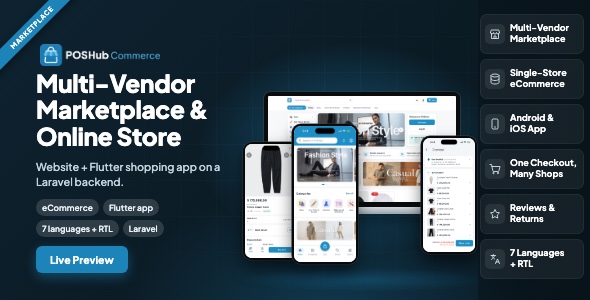
POSHub Commerce — your own multi-vendor marketplace or online store, with a Flutter shopping app
One product, two shapes. Run it as a multi-vendor marketplace — many shops, one website and one shopping app under your brand — or as a single-brand online store where every outlet of a business sells online. You choose in the installer and can switch later; the code is the same.
POSHub Commerce is the storefront website (Laravel) and the shopping app (Flutter, Android and iOS) that sell from a POSHub installation. Products, prices, stock, orders, customers and payments live in POSHub, so an online order lands in the same point of sale as a sale at the counter: stock moves through the same ledger, the same reports count it, and nothing is copied between two systems.
Before you buy: POSHub is required
This item does not work on its own. It needs a running POSHub installation — the POS with its Laravel backend — which is a separate item, sold separately:
POSHub | Offline-First POS Flutter App for Retail & Restaurant with Laravel SaaS Backend
- Minimum compatible versions: POSHub 1.2.0 or newer, and Flutter 3.44 or newer to build the shopping app. The README and the installation guide in the download always list the current requirements for each release.
- Buy POSHub first, install it, then connect POSHub Commerce to it with a key issued in the POSHub panel. Both can live on the same hosting or on different servers.
- The online store and marketplace features are switched on in POSHub; the guides show exactly where.
All of it was directed, reviewed, edited and tested by the author: the storefront ships with 319 feature tests and the shopping app with 687 tests.
Third-party services may cost money
The shopping app uses Firebase (push notifications) and offers Sign in with Google and Sign in with Apple. These are services of Google and Apple, not part of this item. Their free tiers cover a typical shop, but Firebase and Google/Apple sign-in may incur costs or require paid tiers as usage volume increases (for example a billing account on the Firebase Blaze plan), and their pricing can change. Any such fees are billed to you by the provider. Check each provider’s current pricing before you launch.
Demo Instructions
Marketplace website: https://poshub-store.manufacturdigitalhub.com/
POSHub panel (shop owners and platform operator): https://poshub.manufacturdigitalhub.com/
- Shopper (marketplace website) — email:
pembeli@butikkenari.test— password:password123— orders at several stages, points history, member card, saved addresses, a return request and notifications are already there. - Shop owner (POSHub panel) — email:
owner@butikkenari.test— password:password123— online orders, return requests, reviews, shipping methods, bank accounts, banners and pages of the shop. - Platform operator / superadmin (POSHub panel) — email:
admin@poshub.test— password:password123— marketplace settings, shop approval, add-on or commission, platform categories, banners and pages.
The demo is shared: please do not change passwords. Payments in the demo are bank transfer and pay-at-store, so no real money is involved.
What you get in this purchase
- Storefront website — full Laravel source, installs on shared hosting from a browser wizard (choose online store or marketplace).
- Shopping app — full Flutter source for Android and iOS, white-label: your app name, icon, colours and package ID, for a single store or for the marketplace.
- Documentation — four illustrated guides (HTML and PDF): installing the website, running an online store, running a marketplace, building and publishing the shopping app.
Not included in the purchase price: POSHub itself (see above), hosting, your domain and SSL certificate, and publishing the app under your own name — a Google Play developer account (one-time US$25) and an Apple Developer Program membership (US$99/year). Optional services such as Firebase (push notifications) and Google or Apple sign-in are accounts you open yourself under each provider’s terms.
Marketplace mode
- Many shops, one marketplace. Each shop is a business on your POSHub platform with its own products, stock, prices and orders. Shoppers browse every approved shop on one website and in one app.
- You approve the shops. Approve, reject or suspend shops; a shop chooses how it pays you — a monthly add-on or a commission on each order, at the rate you set.
- Platform catalogue. Your own category tree with uploaded icons; shops map their categories to it.
- Your home page. Slider and banners linking to categories or shops, welcome texts, and pages (About, Terms, Privacy and your own) with a visual editor or HTML.
- One checkout, one order per shop. Shoppers tick items from several shops in one cart, enter one address, and place everything with one button — each shop receives its own order, with its own shipping and payment.
- Membership stays with each shop. Points, levels, rewards and vouchers belong to the shop that gives them; the shopper sees all their member cards in one place.
Online store mode
- A store for your brand. Your domain, logo, colours and home page layout, set in the POSHub panel.
- Every outlet can sell. Publish the branches you want online; shoppers pick the branch they buy from, and see that branch’s prices and stock.
- Pick-up or delivery. Pick-up at the store and flat-rate delivery with a free-shipping threshold; payment by bank transfer (with proof upload), cash on delivery or paying at the store.
For shoppers — website and app
- Home with banners, category icons, shops, deals and new arrivals; search and filters.
- Product pages with photo gallery, variants, stock, the shop card, ratings and reviews from verified buyers, and “you may also like”.
- Cart with ticks per item and per shop; only ticked items are ordered, the rest stay in the cart.
- Orders with clear stages — to pay, to ship, shipping, to rate — order detail with tracking number, ratings from the order, and return requests with photos.
- Promo tab with vouchers, bundle deals and discounted products; member card with QR, points history and rewards.
- Push notifications, in-app inbox, sign in with email, Google or Apple, account deletion, and a language setting.
For shop owners — inside POSHub
- Online orders in the same panel and the same cashier app: confirm, pack, add the tracking number, deliver or cancel; transfer proof review with optional automatic confirmation.
- Return requests: approve or reject; an approved return goes through the POS sale return, so stock comes back through the ledger.
- Reviews: approve, hide or reply. Shipping methods, bank accounts, banners, home layout, pages, flash sales, vouchers and bundle deals.
- Per-product switches for the online store and the marketplace, in the panel and in the cashier app.
Languages, currency and appearance
Seven languages — English, Indonesian, Arabic (full right-to-left), Dutch, Hindi, Spanish and French — on the website and in the app. Prices are formatted for each currency. White-label colours and logos; dark mode on the website.
Built with
Website: Laravel, Blade with small Vue 3 islands, Vite and plain CSS with design tokens; no database of its own — it reads POSHub over its API. App: Flutter (Android and iOS), Riverpod, go_router, Dio, Firebase Cloud Messaging HTTP v1. Server: POSHub. Exact version requirements are in the documentation.
AI disclosure
Yes, AI tools were used in making this item. The same statement is included in the documentation (every guide and the index), both README files and Licensing/third-party-licenses.txt.
- Code: written with the assistance of an AI coding tool (Anthropic Claude).
- Documentation: the guides, the READMEs and this description were drafted with the assistance of Anthropic Claude.
- Graphics: the POSHub Commerce logo was generated with Google Gemini and then edited by hand. Screenshots are real captures of the running software.
Changelog
1.0.0 — First release.
| Author | manufacturdigitalhub |
|---|---|
| Price | $39 |
| Sales | 0 |
| Rating | 0 (0) |
| Published | Nov 2, 2026 |
| Last Update | Nov 2, 2026 |
| Compatible Software | Flutter 3.x |
| Demo Url | https://poshub-store.manufacturdigitalhub.com/ |
| Mobile Files Included | Dart, YAML, JavaScript JSON, .java, .kotlin, .h, .plist, .swift, JavaScript JS, CSS, PHP, HTML |
| Video Preview Resolution | 1920x1080 |
Categories
Tags
External listing. code.market does not sell this product and does not process payment for it. Pricing, payment, delivery, licensing, refunds, and support are handled by the third-party merchant on its own website. We may earn an affiliate commission from a referral. Details.
Products of the Week.
Submit🥇

Perceptle
Perceptle is a daily browser-based game that challenges you to test your sensory intuition through five quick estimation and rhythm-based rounds.
Other · 1 views · 0 clicksOther · Week 47 · 1 views · 0 clicks
🥈

Free LinkedIn Likes From Real
Get free LinkedIn likes on your posts from real members who react by hand. No
SaaS · 124 views · 2 clicksSaaS · Week 47 · 124 views · 2 clicks
🥉

STOP GUESSING WHAT TO POST
AI that learns your brand voice and builds a month of consistent, on-brand social content: carousels, posts and hooks that sound like you, not like everyone else's AI.
SaaS · 7,686 views · 71 clicksSaaS · Week 47 · 7,686 views · 71 clicks
#4

aaas.market
407 reliable micro tools for solo founders, marketers and creators. They work in your browser
SaaS · 122 views · 0 clicksSaaS · Week 47 · 122 views · 0 clicks