
Portfolico - PHP personal portfolio script
Description
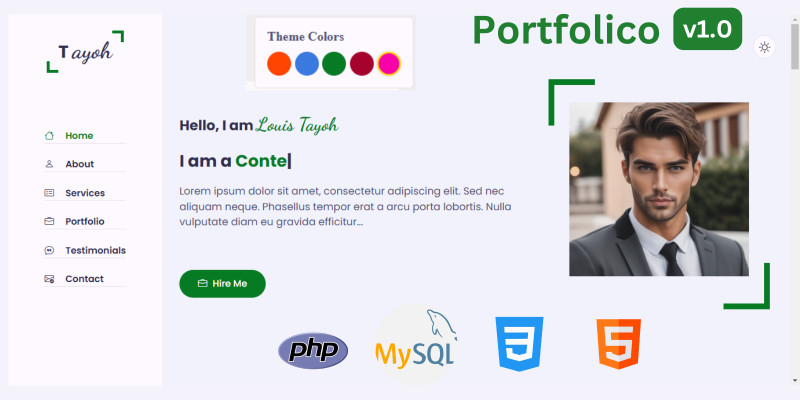
Portfolico is a dynamic PHP portfolio script designed to help professionals showcase their work through an elegant and customizable online presence. This comprehensive solution features a robust MySQL database backend and an intuitive admin panel that allows seamless content management, including the ability to edit information and customize theme colors to match your brand identity.
Built with modern web standards, Portfolico comes complete with essential sections including an engaging intro, detailed about section with education and skills, services showcase, portfolio gallery, client testimonials, and a fully functional contact form powered by PHPMailer. The script includes built-in Schema.org markup for enhanced SEO performance, ensuring your portfolio gains maximum visibility. Whether you're a freelancer, creative professional, or agency, Portfolico provides all the tools to create a compelling online portfolio that truly represents your work and expertise.
DEMO URL https://portfolio.237coders.si...
ADMIN: https://portfolio.237coders.si...
Demo login: Username: admin@example.com; password: admin123
Features
- Clean UI
- Bootstrap icons
- Light and dark mode
- Responsive
- Schema markup integration
- Multiple theme options
- Admin panel with light and dark mode
- Easy to install
Requirements
- PHP 8.2 or above
- cURL extension
- PDO PHP extension
- Composer (installed globally)
- Hosting access (e.g., cPanel)
Instructions
- Upload the Portfolico ZIP file to your server's root directory.
- Extract the files.
- Verify PHP version and Composer installation.
- Create a database and a database user using the cPanel Database Wizard:
- Log in to your cPanel account and navigate to MySQL Database Wizard.
- Enter a name for your database and click Next Step.
- Create a database user by entering a username and a secure password. Click Create User.
- Assign the user to the database and select All Privileges. Click Next Step to complete.
- Edit the
.envfile to configure database and SMTP details. - Navigate to
<a href="http://example.com/install">http://example.com/install</a>to run the installation wizard.
| Author | 237Coders |
|---|---|
| Category | Scripts & Code / PHP Scripts / Website Builders |
| Price | $10 |
| Extended License | $30 |
| Likes | 3 |
| First Release | Dec 29, 2024 |
| Last Update | Dec 29, 2024 |
| Files included | .php, .css, .sql, JavaScript .js |
| Software version | PHP 8.2, PHP 8.3 |
Categories
Tags
External listing. code.market does not sell this product and does not process payment for it. Pricing, payment, delivery, licensing, refunds, and support are handled by the third-party merchant on its own website. We may earn an affiliate commission from a referral. Details.
Products of the Week.
Submit🥇

Perceptle
Perceptle is a daily browser-based game that challenges you to test your sensory intuition through five quick estimation and rhythm-based rounds.
Other · 1,489 views · 9 clicksOther · Week 47 · 1,489 views · 9 clicks
🥈

Free LinkedIn Likes From Real
Get free LinkedIn likes on your posts from real members who react by hand. No
SaaS · 1,632 views · 10 clicksSaaS · Week 47 · 1,632 views · 10 clicks
🥉

STOP GUESSING WHAT TO POST
AI that learns your brand voice and builds a month of consistent, on-brand social content: carousels, posts and hooks that sound like you, not like everyone else's AI.
SaaS · 9,176 views · 75 clicksSaaS · Week 47 · 9,176 views · 75 clicks
#4

aaas.market
407 reliable micro tools for solo founders, marketers and creators. They work in your browser
SaaS · 1,597 views · 5 clicksSaaS · Week 47 · 1,597 views · 5 clicks