
Point of Sale System for WooCommerce (POS Plugin)

Description


WooCommerce POS for In-Store Checkout, Offline Selling & Multi-Outlet Retail
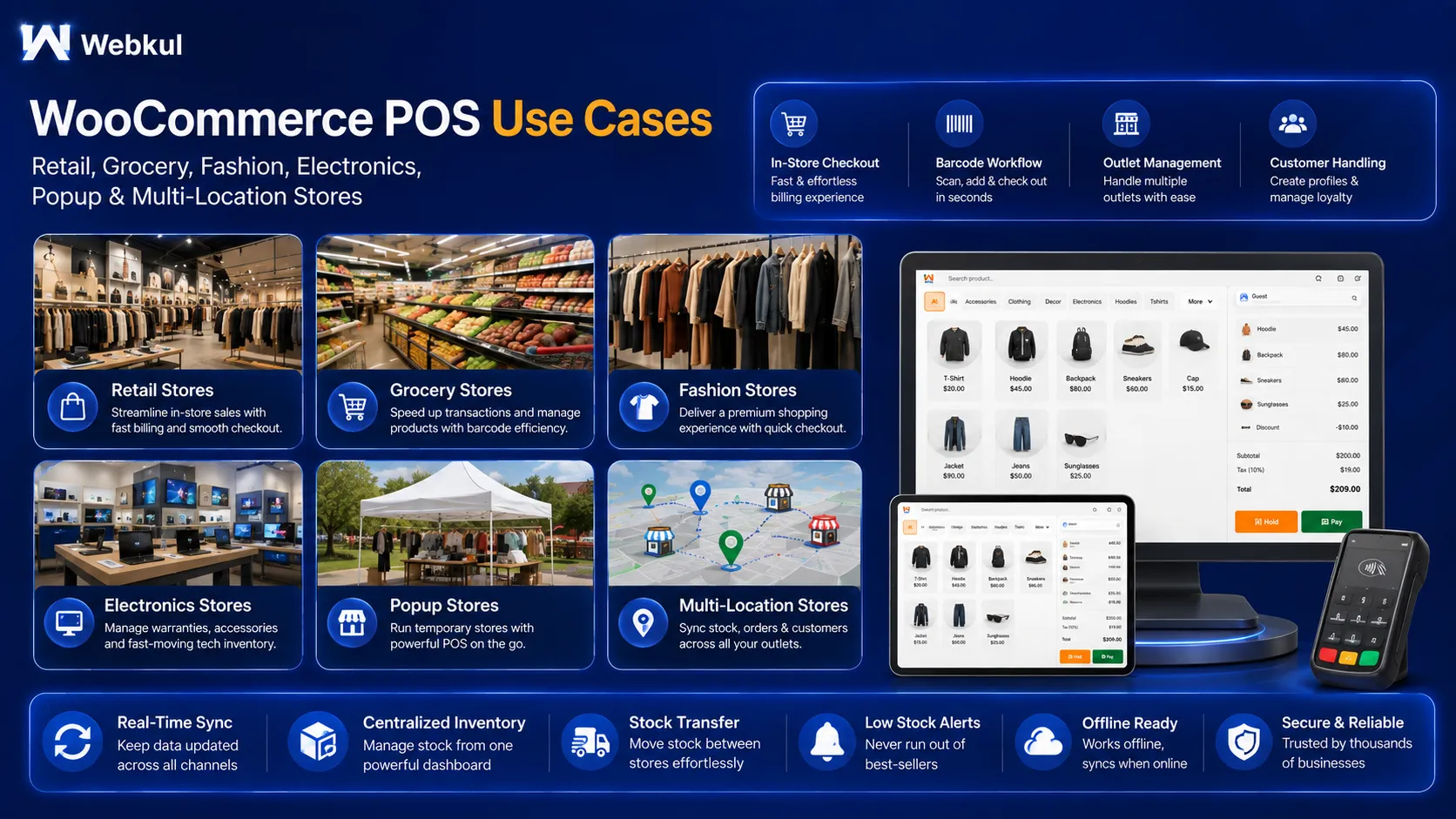
Point of Sale System for WooCommerce by Webkul adds a full retail checkout to your WooCommerce store. Your cashiers sell at the counter while products, stock, customers and orders stay connected to your online shop.
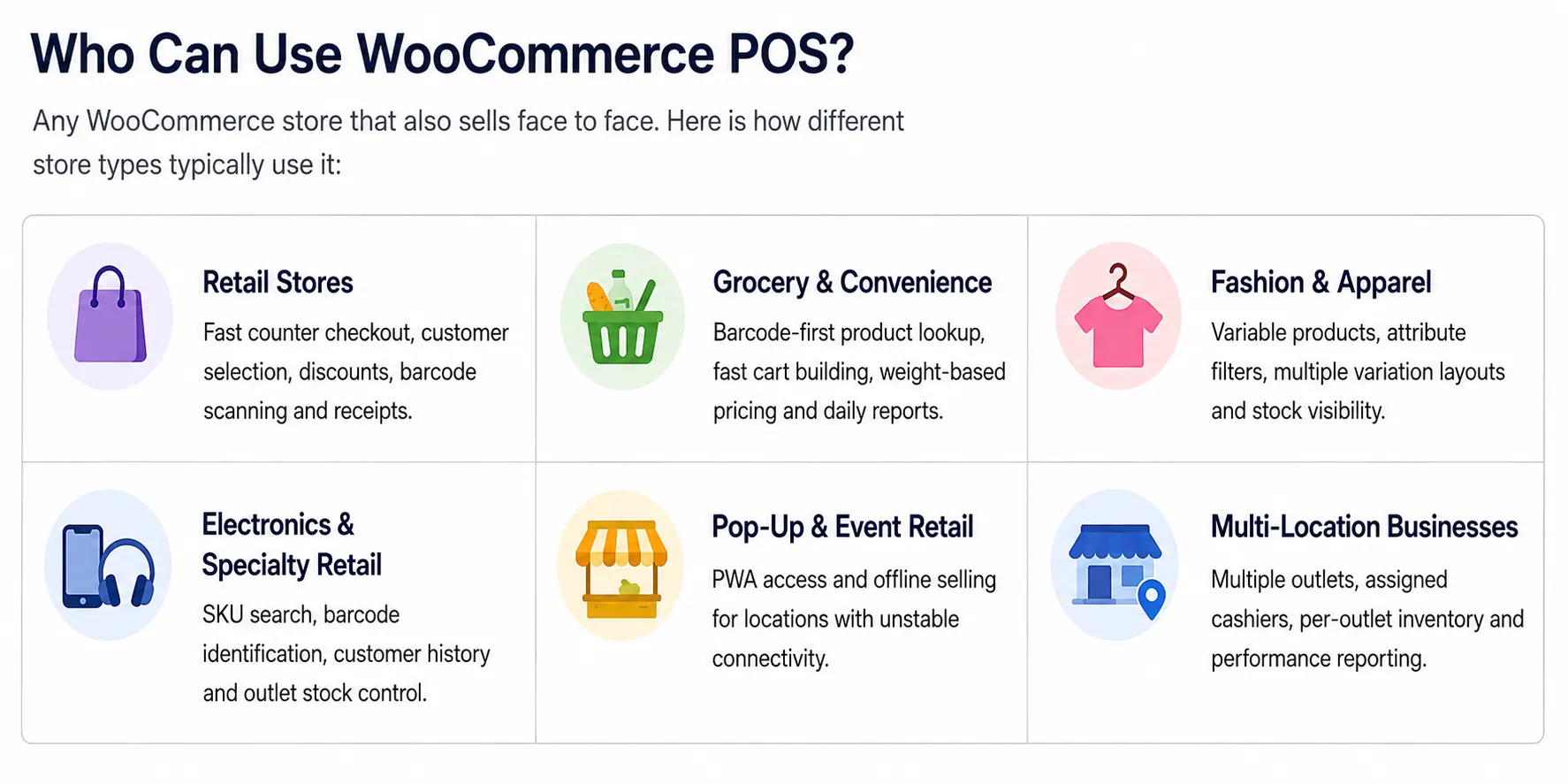
It is built for physical stores that already run on WooCommerce — retail shops, grocery stores, fashion outlets, electronics stores and businesses with more than one location.
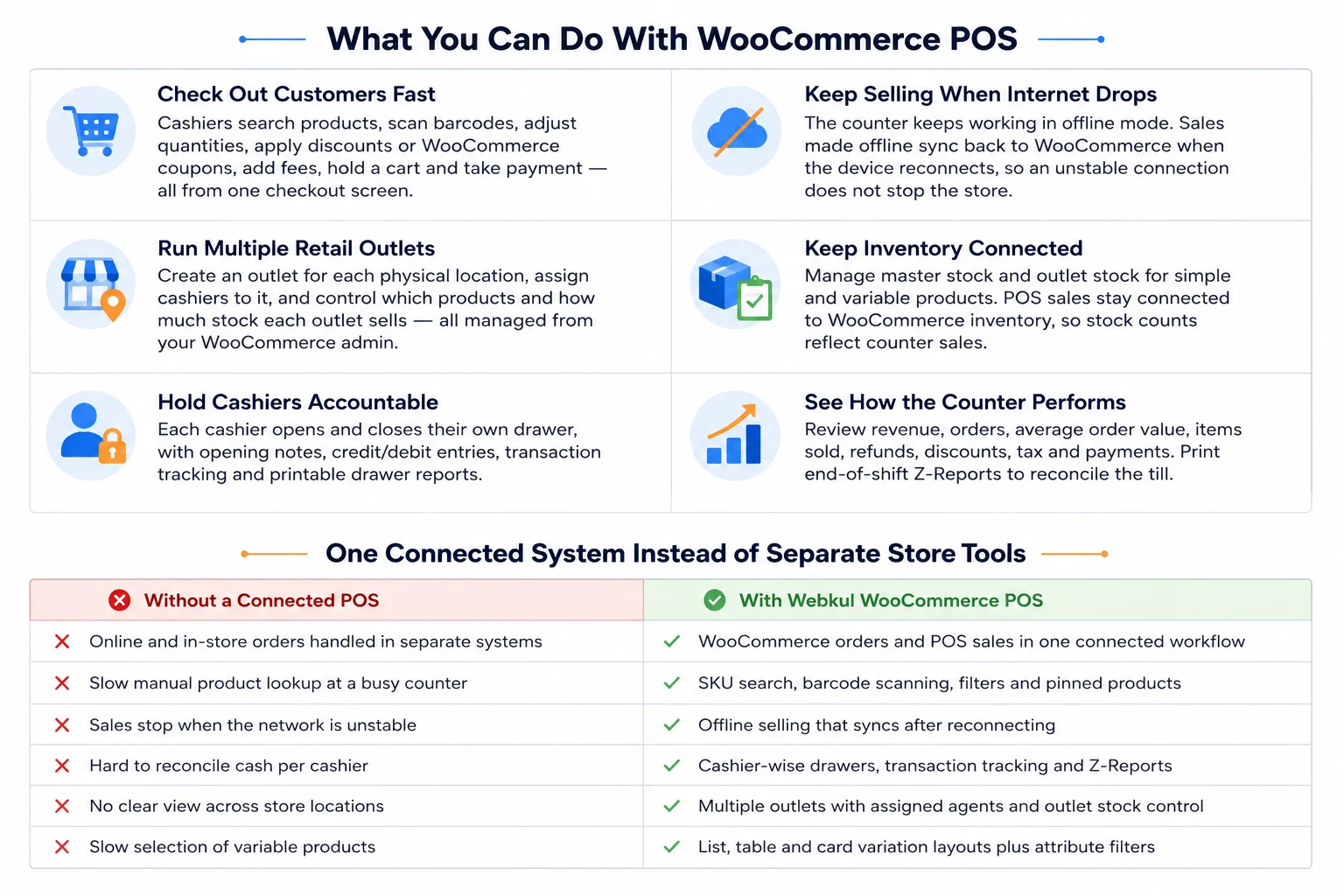
The POS keeps working when the internet drops. Cashiers can keep ringing up sales offline, and the POS syncs that activity back to WooCommerce once the connection returns.
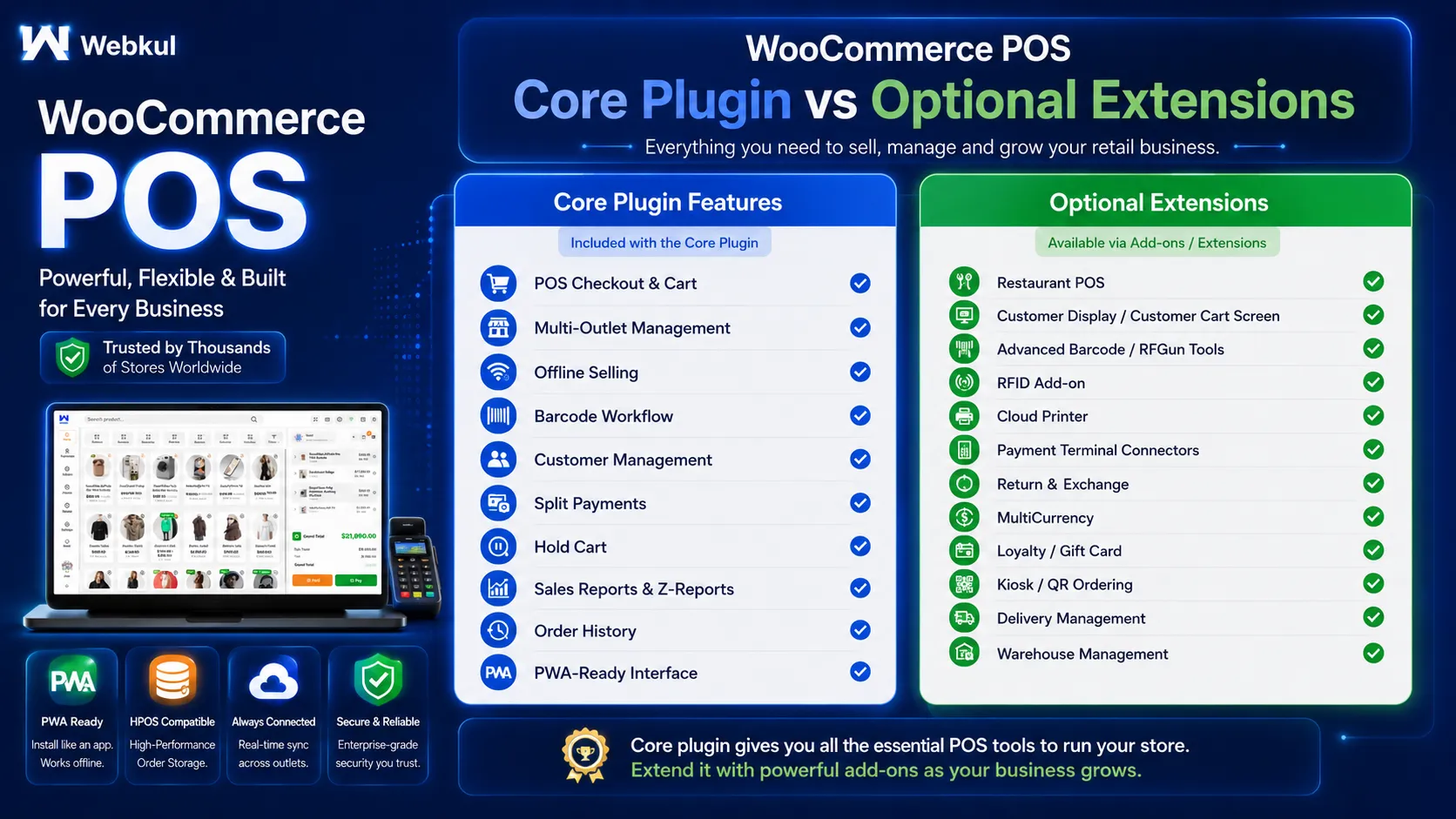
The core plugin covers multi-outlet management, online and offline selling, barcode scanning, split payments, cash drawer tracking, PWA support, sales reports and Z-Reports, product and customer management, multi-pricing, variation layouts, dark/light mode and HPOS compatibility.
You pay once on CodeCanyon — there is no monthly subscription for the core POS plugin. The listing includes 6 months of item support from Webkul, and item updates follow the applicable Envato license terms.
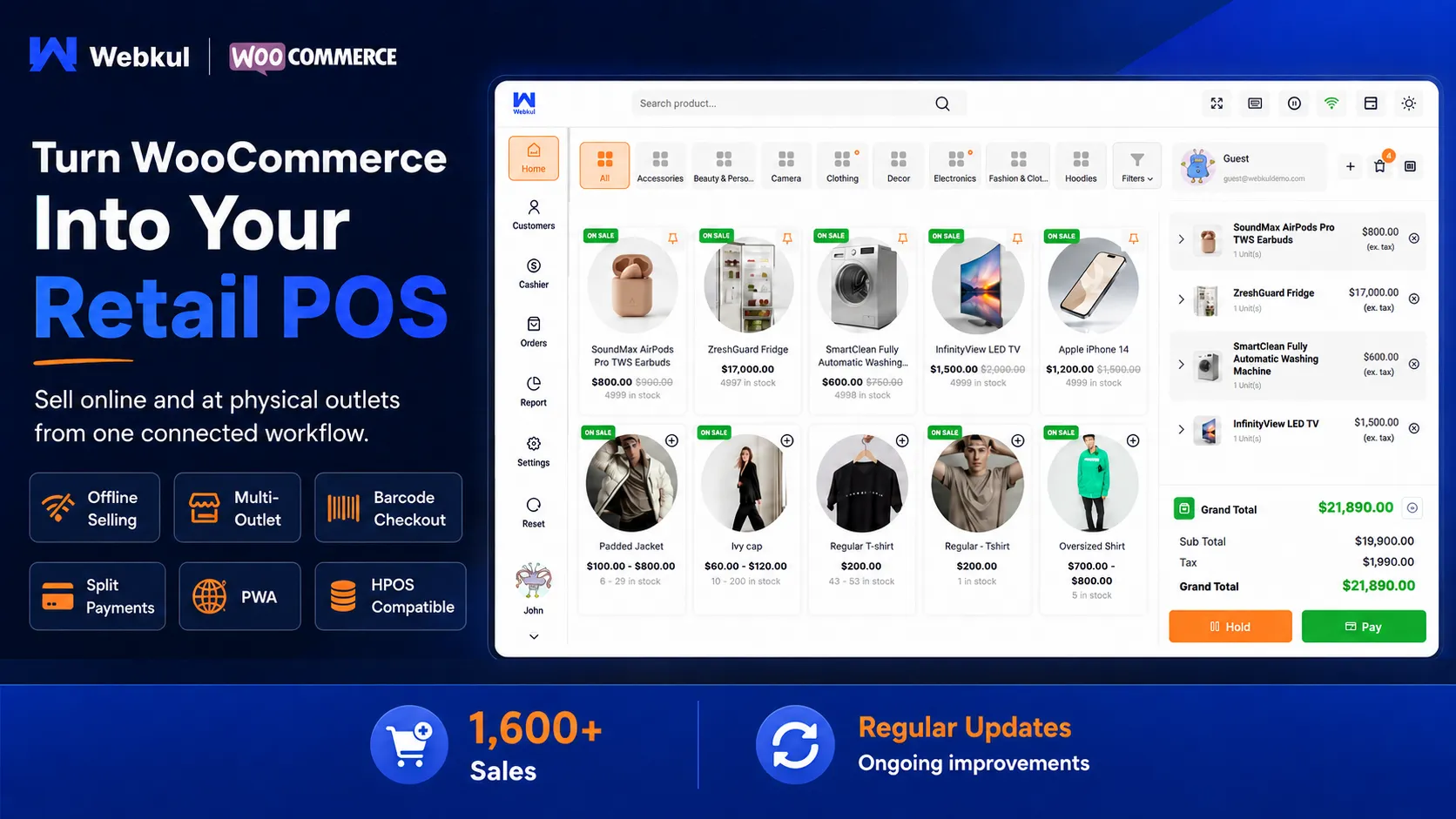
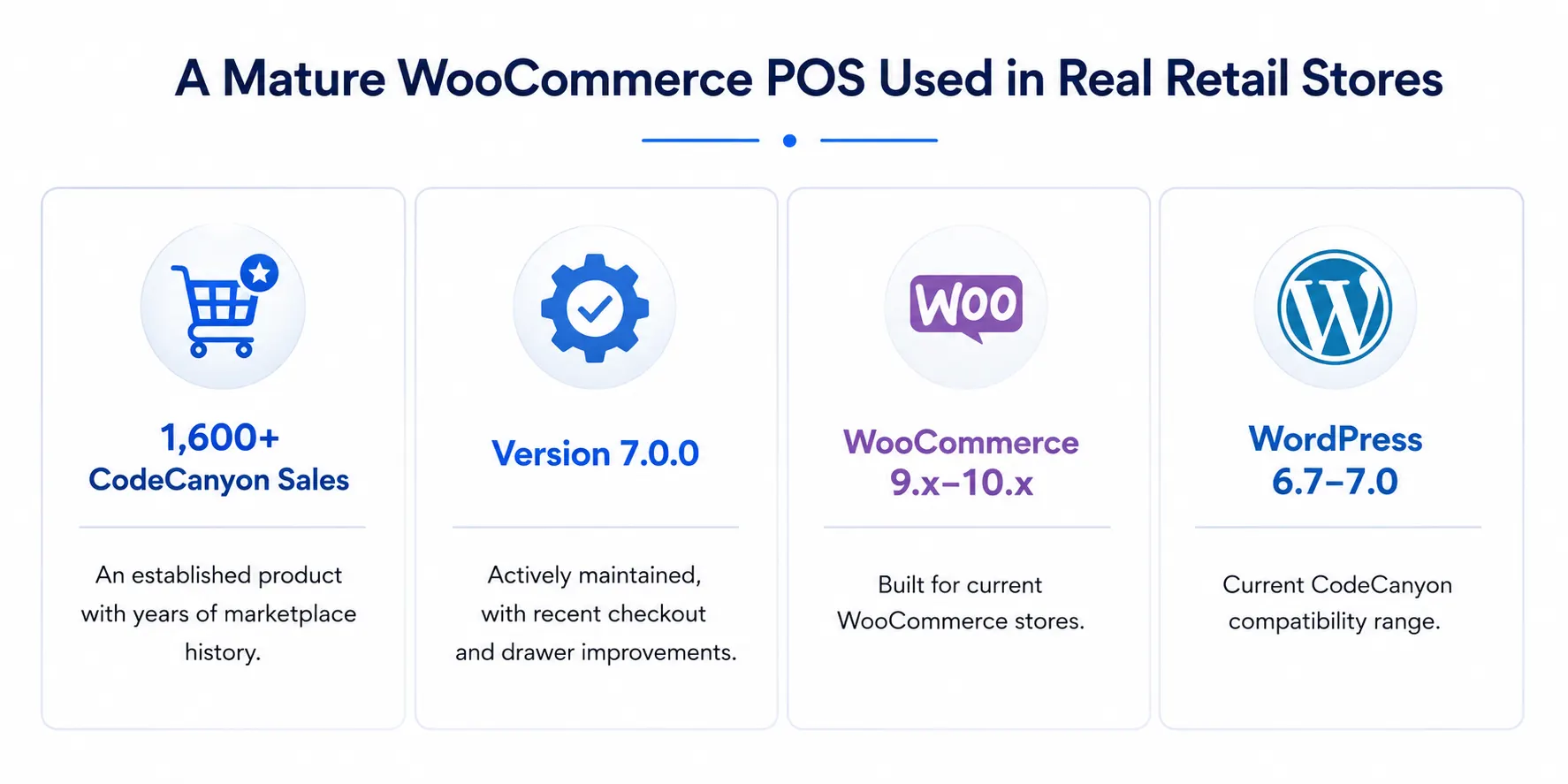
✓ HPOS Compatible ✓ Online + Offline Selling ✓ Multi-Outlet ✓ PWA ✓ Multisite Compatible
See the POS Before You Buy


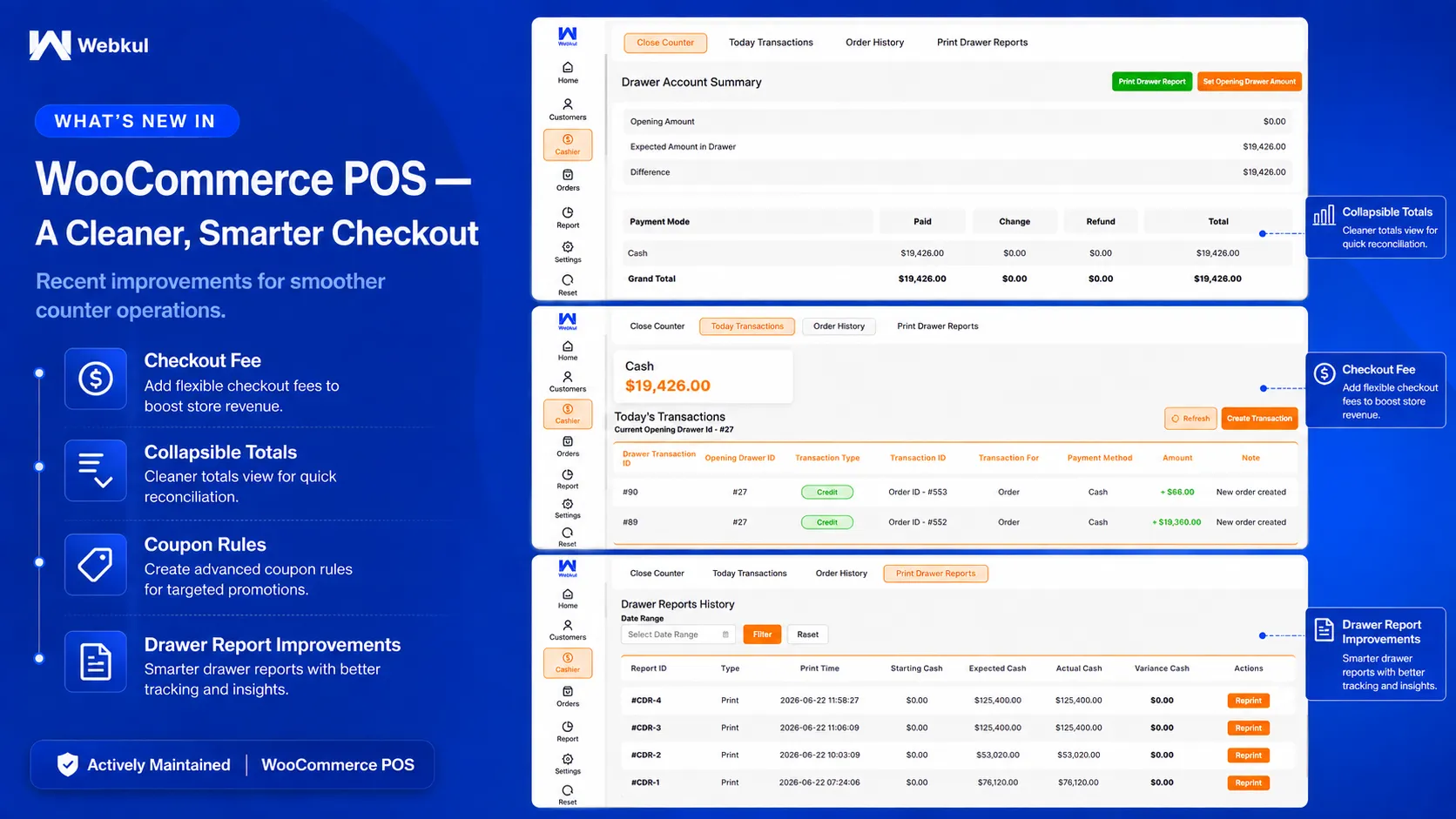
What’s New in Version 7.0.0
Version 7.0.0 focuses on a cleaner checkout flow and more reliable counter operations. It adds new checkout controls and improves drawer reports and transaction handling.
- Percentage or fixed checkout fee: add a configurable fee during checkout.
- Collapsible cart totals: expand or collapse the totals section for a cleaner checkout view.
- WooCommerce coupon restrictions: coupon restriction rules now apply at the POS as well.
- Checkout-first discount flow: discount and coupon actions now sit inside the checkout workflow.
- Drawer report improvements: fixes for report data mismatch and close-drawer printing.
- Refund and counter handling: improved transaction and counter-closing behavior around refunds.
Recent Feature Additions You Also Get
- Z-Report generation and printing on both the admin and POS sides.
- Multi-pricing for products.
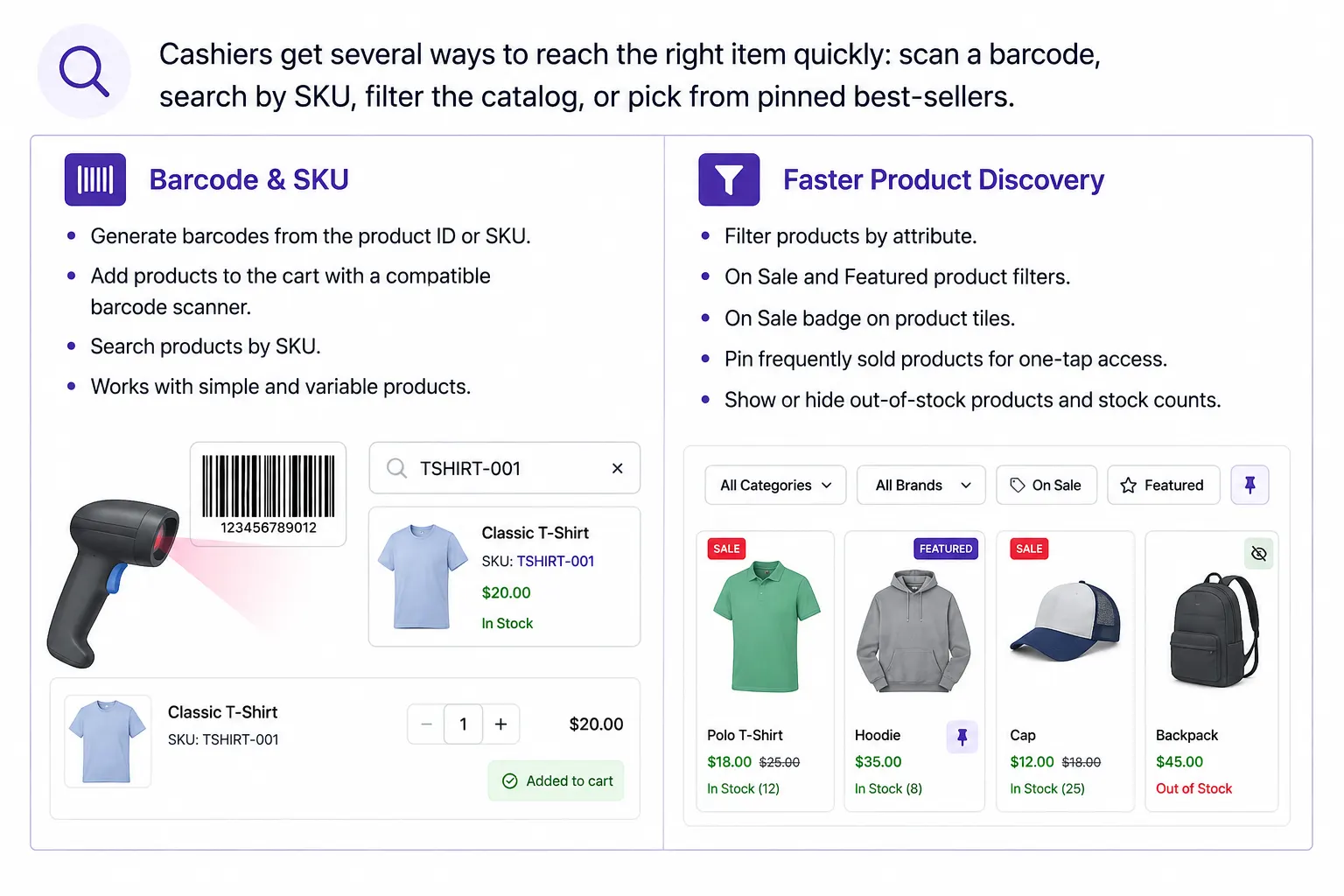
- Attribute-based product filters plus On Sale and Featured filters.
- Notification tones for product selection, keypad input, payment confirmation and drawer actions.
- Three variation layouts: List View, Table View and Card View.
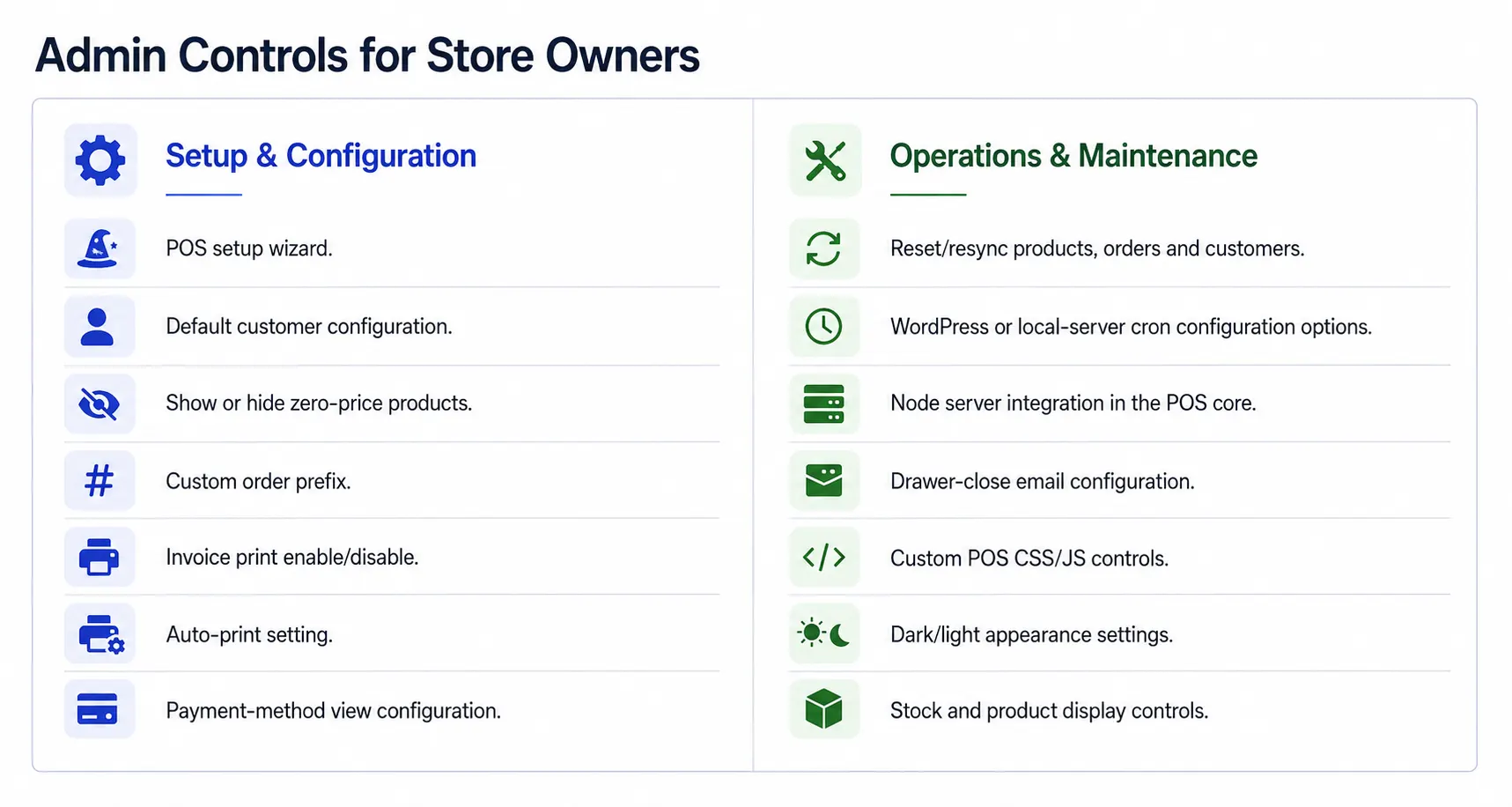
- Stock visibility controls based on your display settings.
- Cashier-wise drawer opening and closing with notes and credit/debit entries.
- Faster product loading through improved APIs and POS performance work.
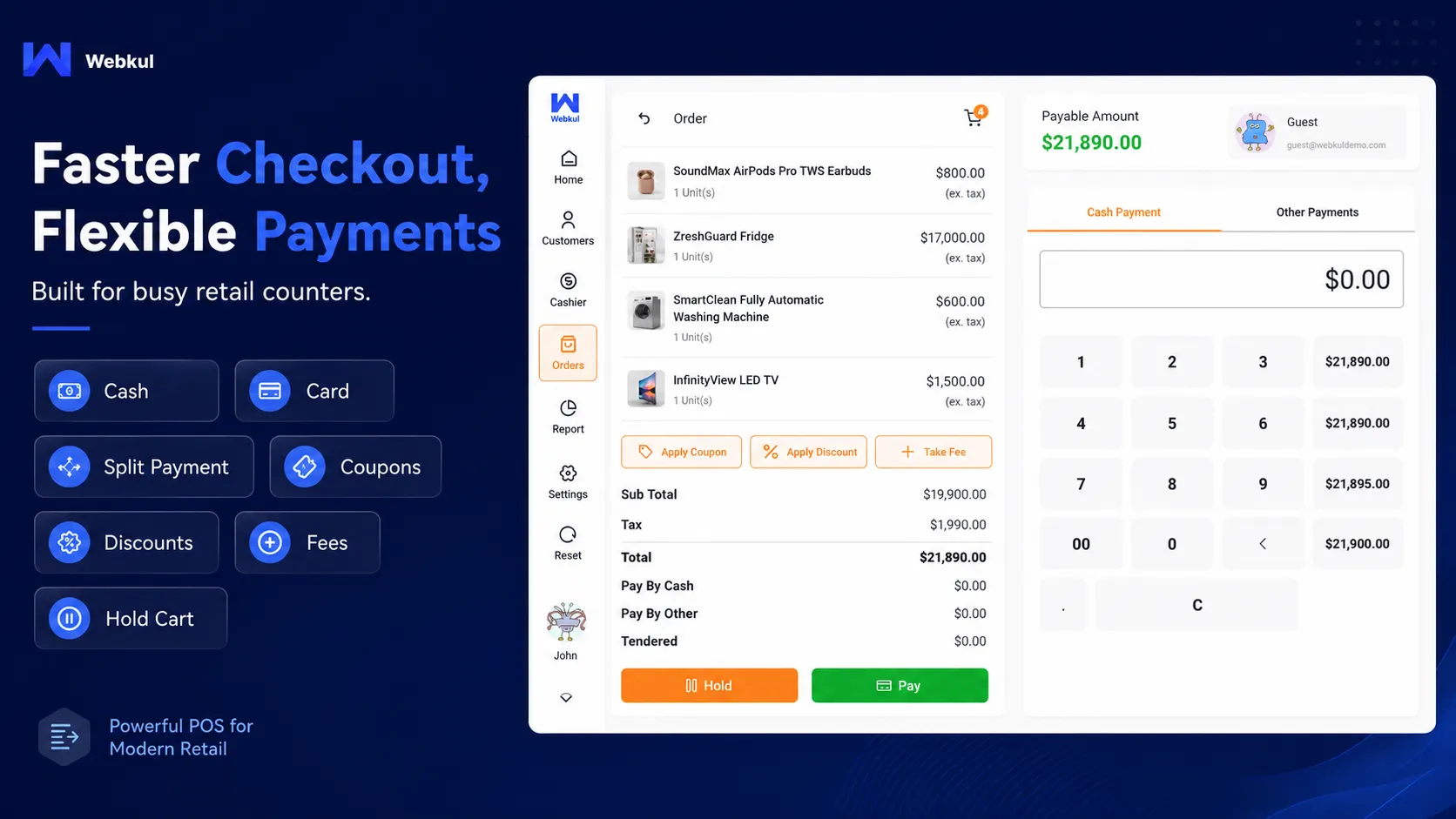
Fast Checkout for a Busy Sales Counter
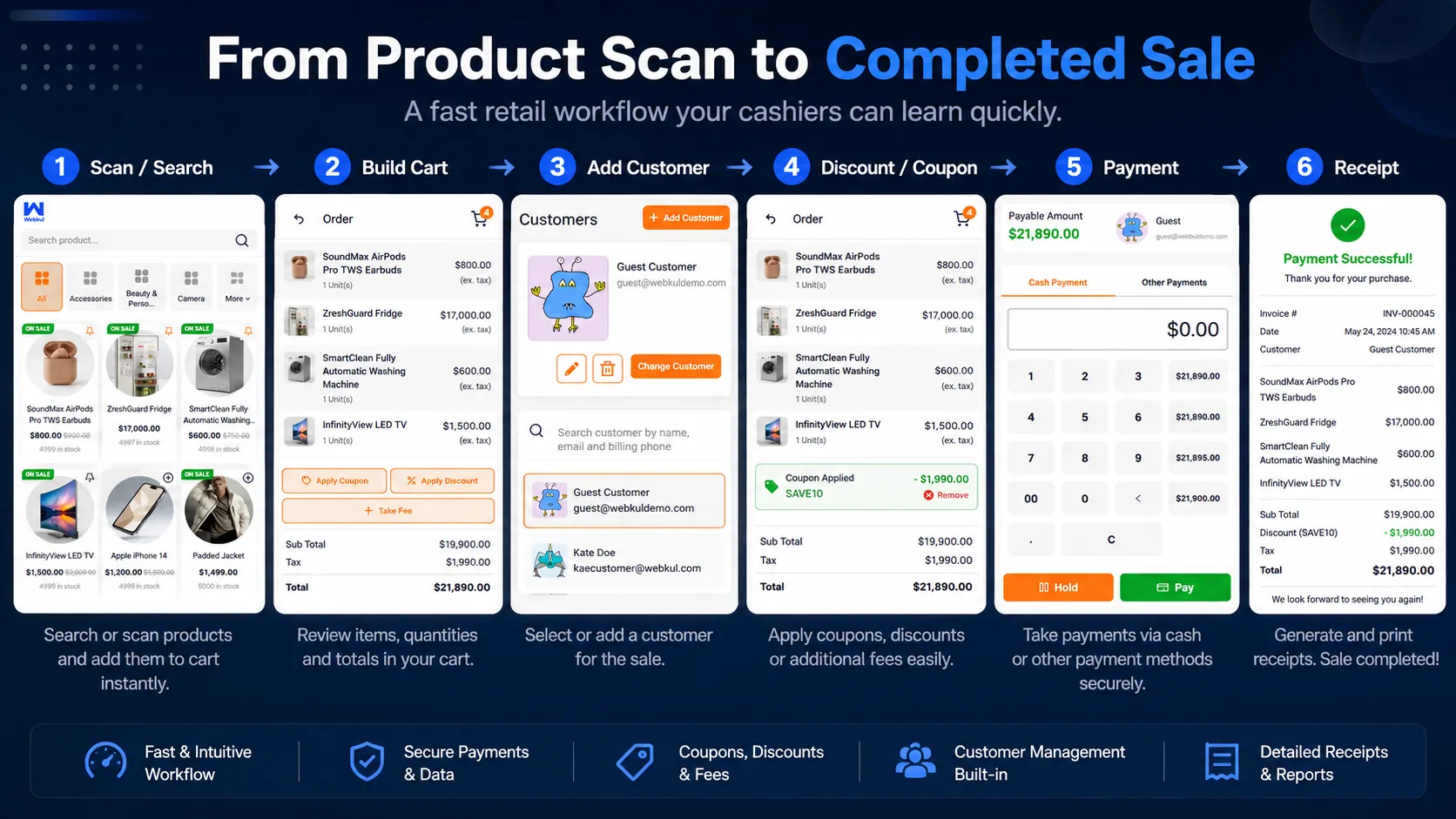
Fewer steps at the counter means shorter queues. A cashier builds the cart by search, SKU or barcode, adjusts quantities and applies any discounts or coupons the store allows.
They can then select the customer, add a fee if needed, and take payment with the POS payment methods you have configured — including splitting one bill across several methods.
Checkout Features
- Cash, card-recording and split-payment checkout options.
- Split one transaction across multiple configured payment methods.
- Apply WooCommerce coupons at the POS checkout.
- WooCommerce coupon restriction rules respected at the POS (new in v7).
- Fixed or percentage discounts.
- Fixed or percentage cart fee at checkout (new in v7).
- Collapsible cart totals section.
- Edit an item’s price in the cart where the store allows it.
- Weight-based unit pricing support.
- Hold a cart and resume it later.
- Create a custom POS product that does not exist on the website.
- Custom POS order prefix so counter orders are easy to spot.
- Enable or disable invoice printing, with an auto-print option.
- Payment-method display options: grid, grid with currency, or dropdown.
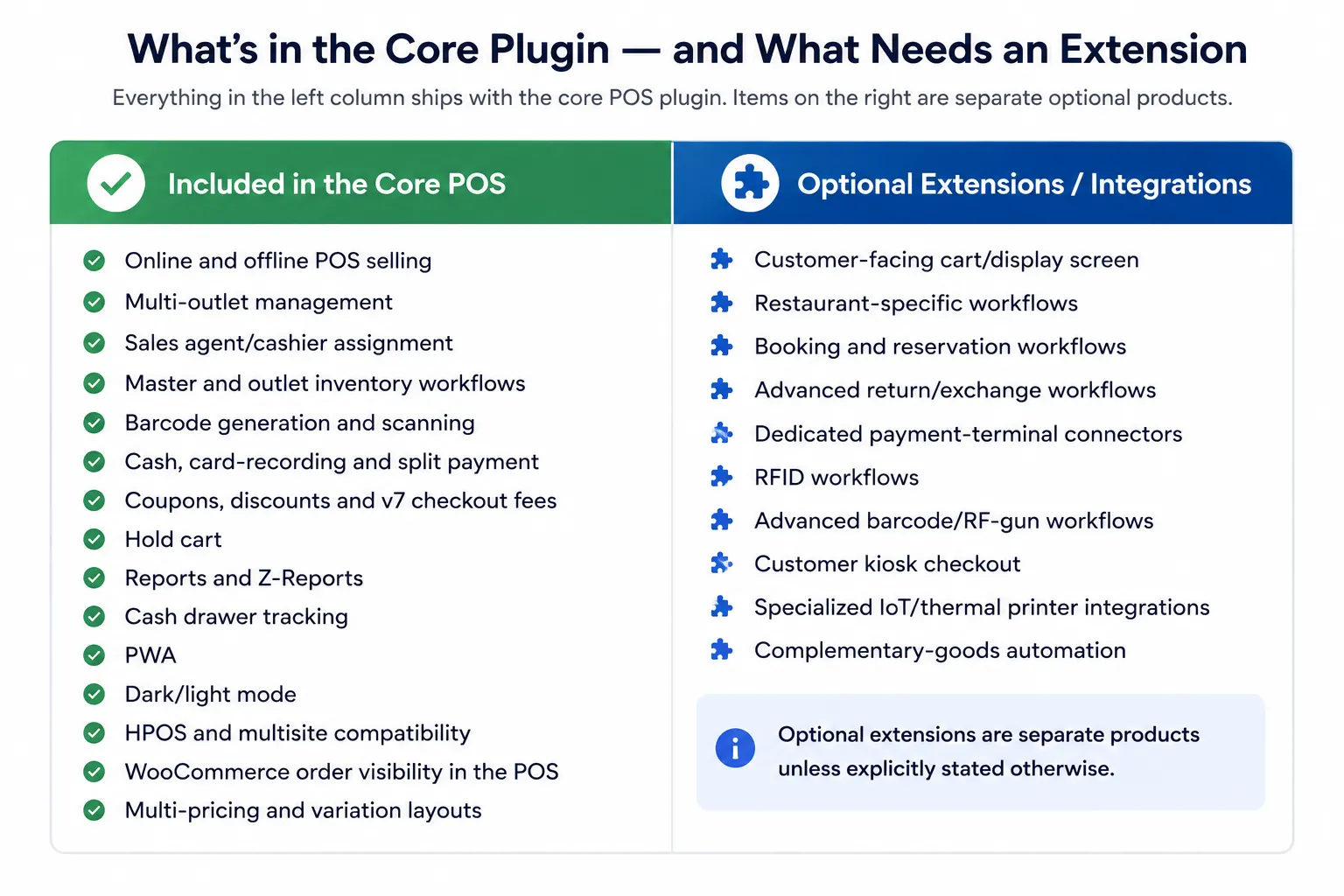
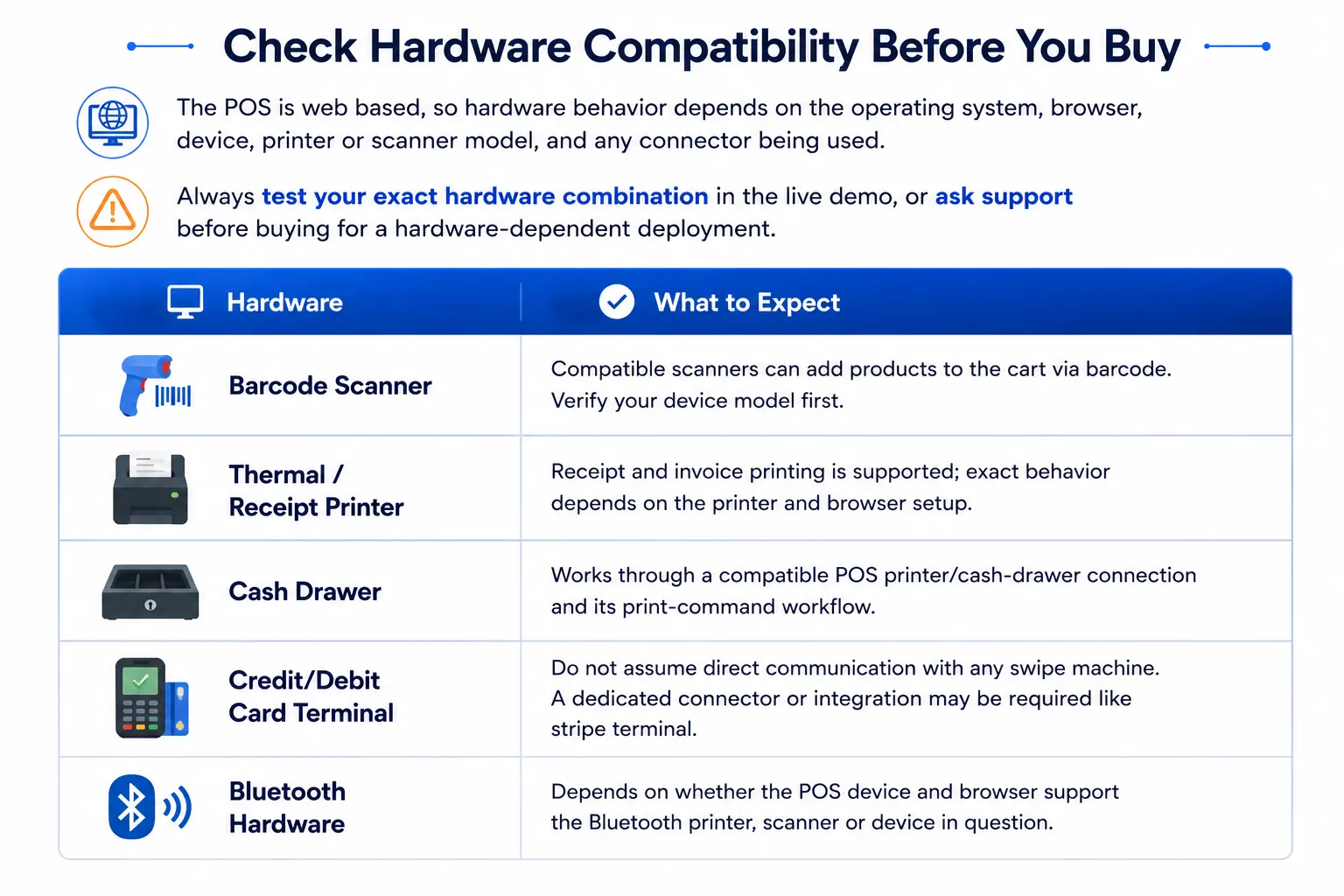
Important card-terminal note: the core POS runs in the browser. Do not assume any credit/debit swipe terminal can talk to it directly. Dedicated payment-terminal integrations may need a compatible connector or a separate extension.
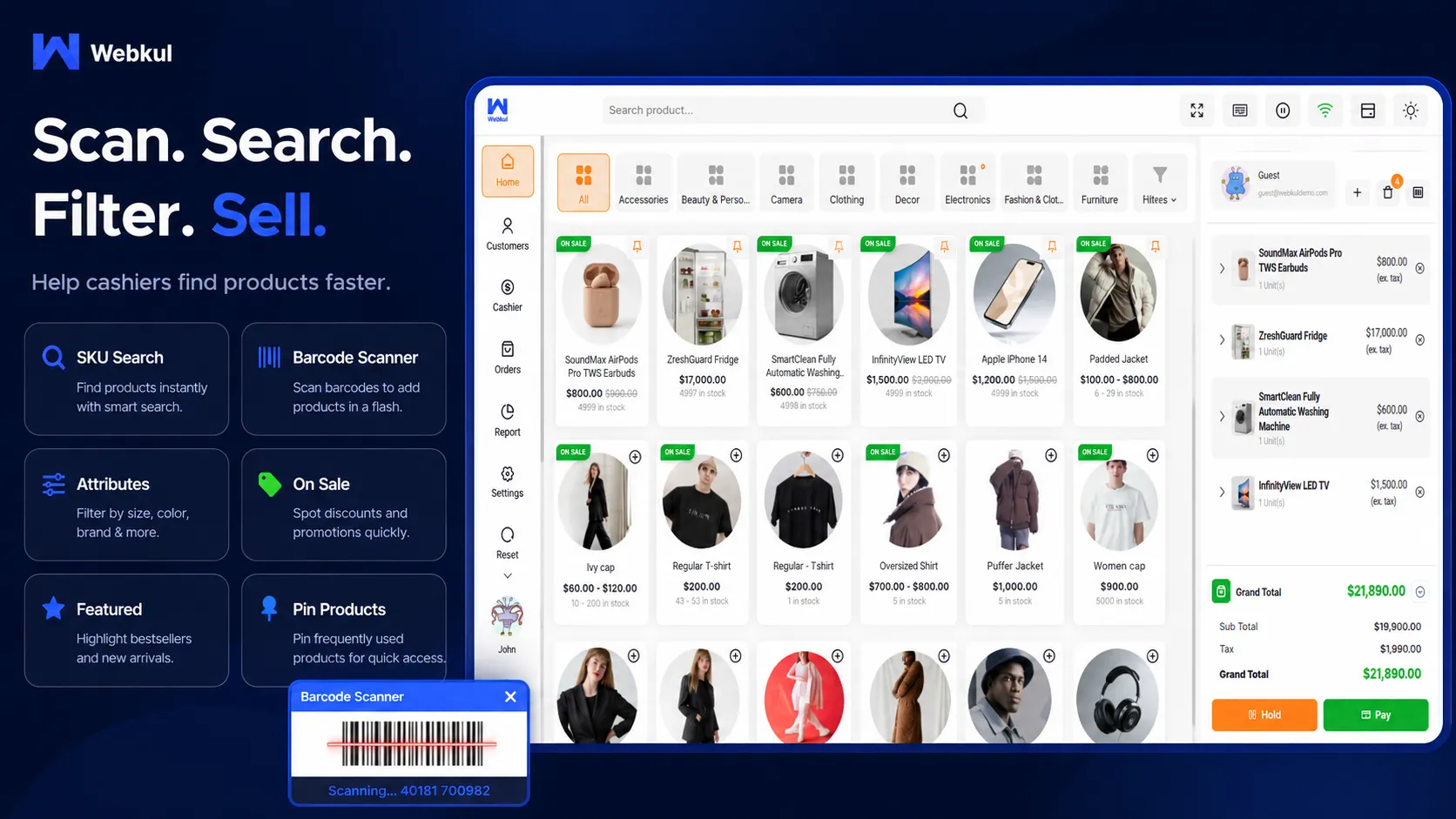
Find Products Fast With Barcodes, SKU Search & Filters
Variable Product Layouts
Pick List View, Table View or Card View for variable products. A fashion store with many sizes and colors can use a different layout than a grocery counter with fast-moving items.
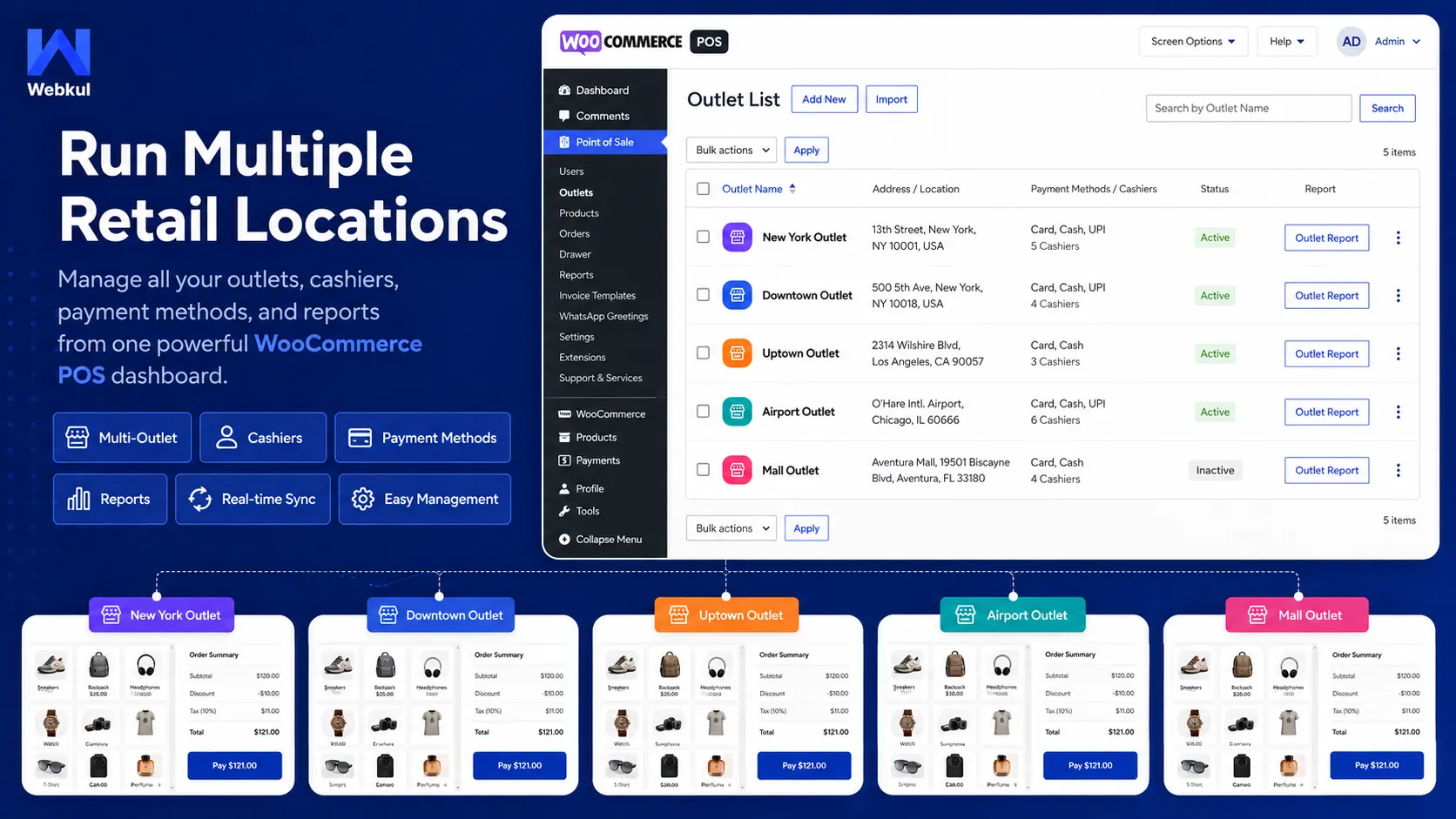
Manage Multiple Retail Outlets From One WooCommerce Store
Create an outlet in the admin for each physical location and assign one or more sales agents to it. Each outlet sells the products and stock you give it, while everything stays managed from WooCommerce.
- Create and manage multiple POS outlets.
- Assign multiple sales agents/cashiers to an outlet.
- Assign products and categories to outlet workflows.
- Control product availability and stock per outlet.
- Use centralized/master-stock management.
- Bulk-manage master stock.
- Set multiple prices for a product with multi-pricing.
- Track cashier and outlet performance through reports.
- Configure outlet preferences such as display and audio behavior.
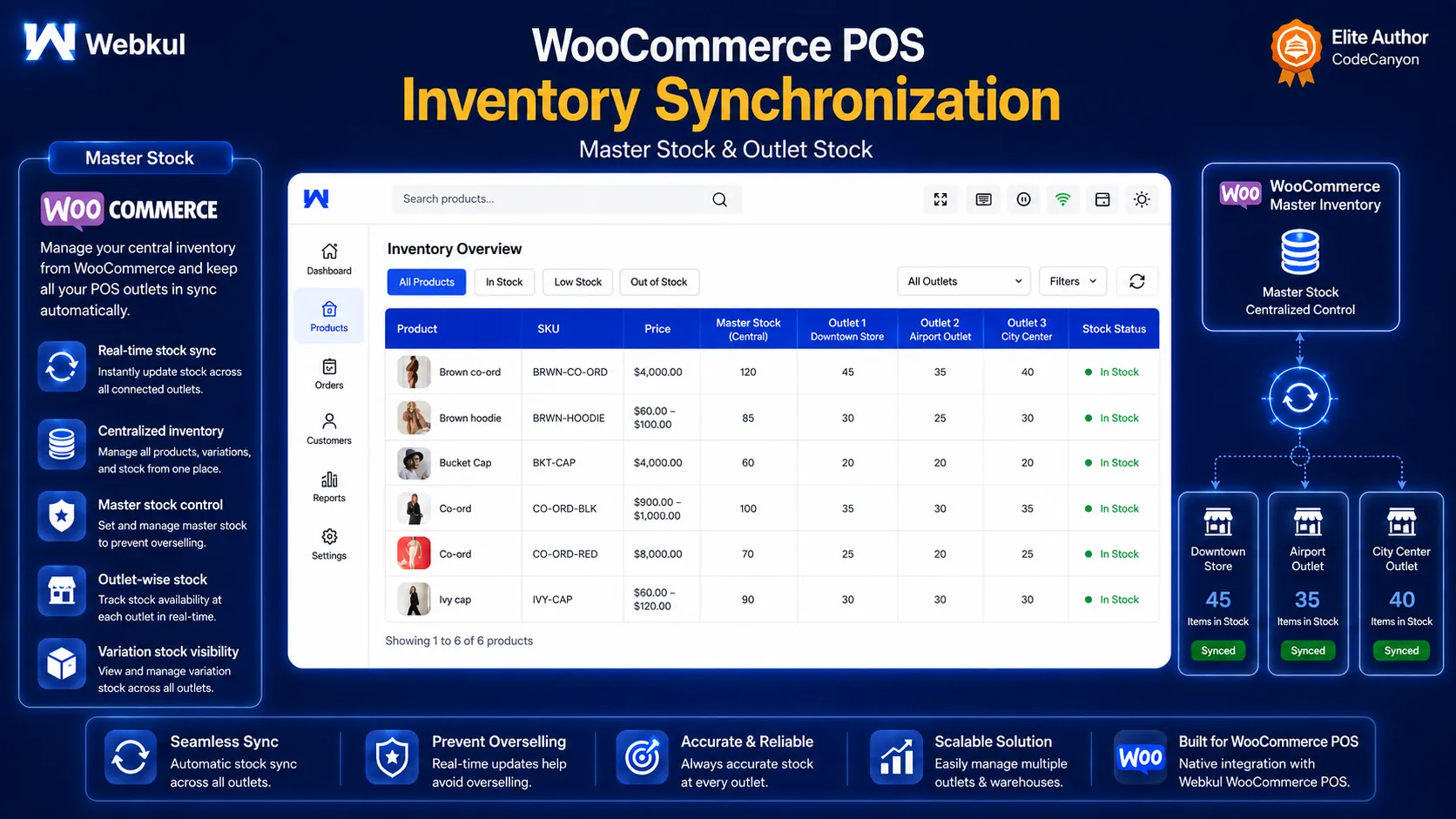
Keep POS & WooCommerce Inventory Connected
The POS checkout stays connected to your WooCommerce product and stock data. You manage master inventory and outlet assignments in the admin, and counter sales update the connected stock workflow.
Staff at the counter see the stock available to their own outlet while they sell, so they are not guessing what is on the shelf.
- Master-stock management for POS products.
- Bulk master-stock assignment.
- Centralized inventory option.
- Outlet-level product stock assignment.
- Variation-wise quantities for variable products.
- Low-stock, out-of-stock and high-stock reporting.
- Show or hide out-of-stock products at the POS.
- Stock updates tied to order status behavior.
- Resync controls for products, orders and customers.
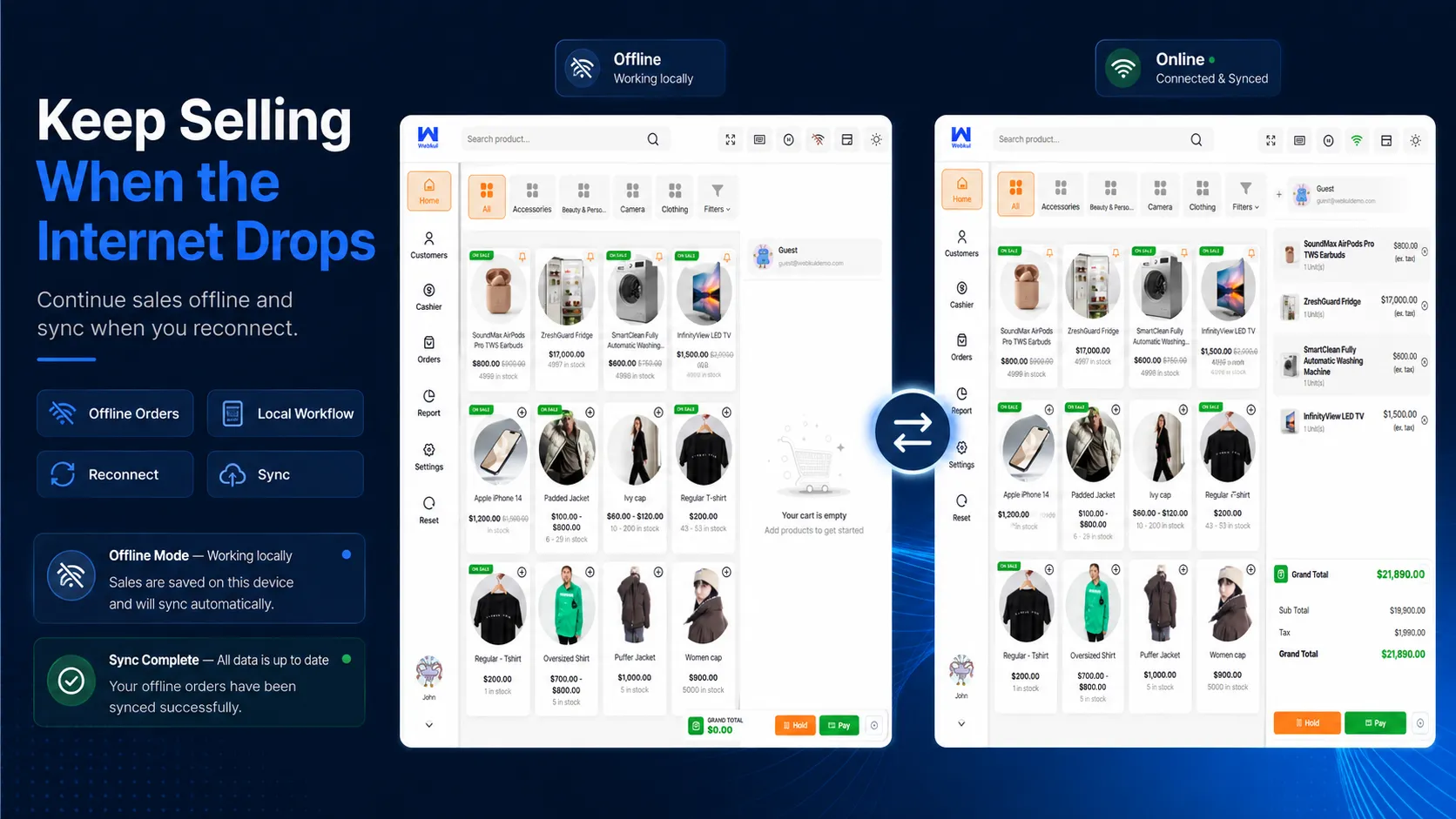
Keep Selling During Internet Interruptions
A checkout counter should not stop because the connection drops for a few minutes. The POS stores the data it needs locally, so cashiers can keep processing eligible sales offline.
When the device reconnects, offline sales and related data sync back to WooCommerce.
- Online and offline POS modes.
- Process eligible counter sales while disconnected.
- Required POS data is stored locally for offline use.
- Offline sales sync when connectivity returns.
- Manual resync and reset controls when needed.
- Offline receipt printing has received ongoing compatibility fixes across releases.
Recommended: test your exact offline workflow — catalog, browser, payment process and hardware — before going live, especially if your store runs custom plugins or complex checkout rules.
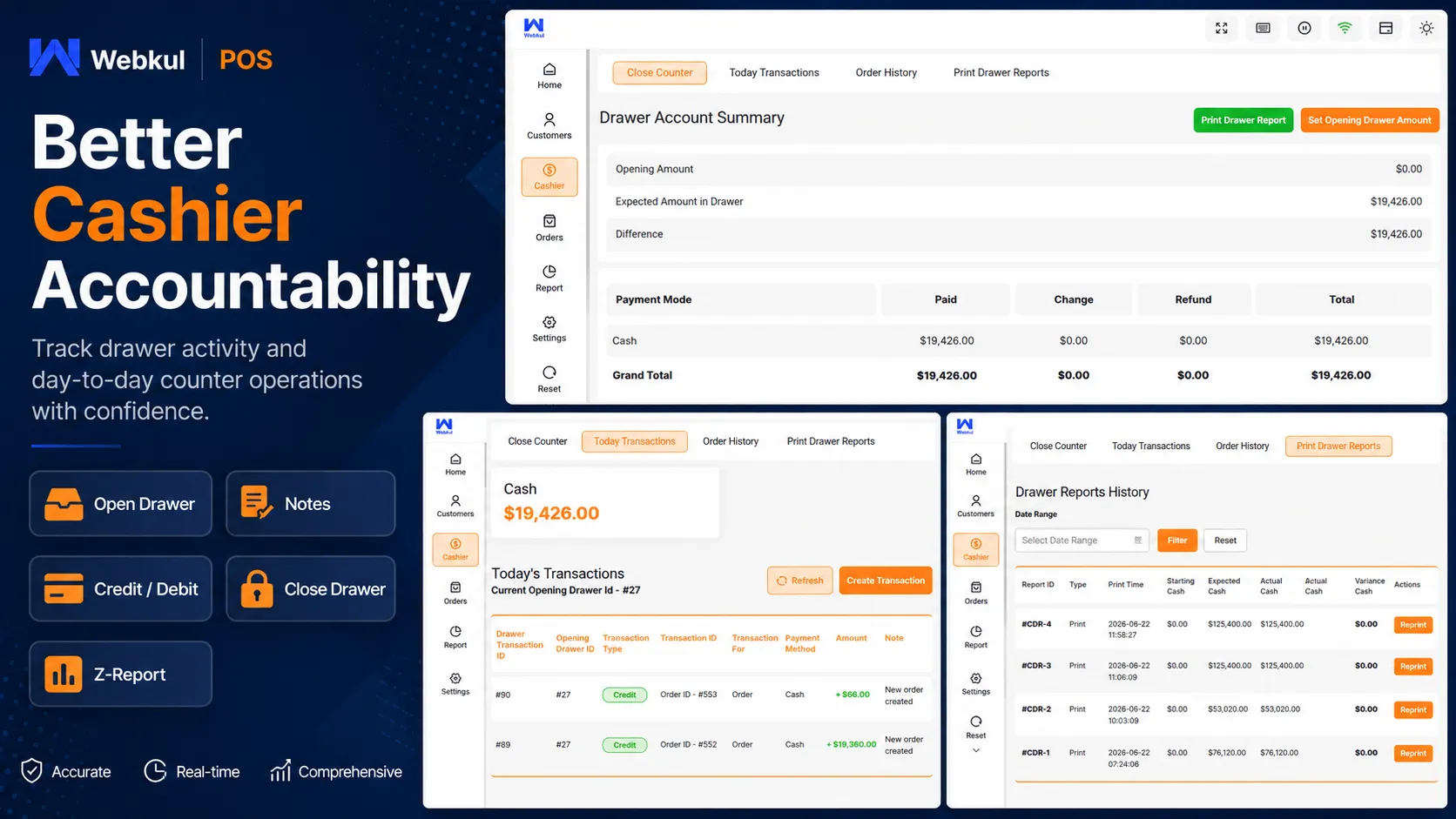
Track Cashiers & Cash Drawers Shift by Shift
Every cashier opens and closes their own drawer, so end-of-day cash reconciliation is tied to a person, not a guess. Drawer notes and credit/debit entries record what happened during the shift.
- Create sales agents and assign them to retail outlets.
- Run multiple agents at the same location.
- Cashier-wise drawer opening and closing.
- Add an opening-drawer note.
- Open the drawer later from the cashier section when required.
- Manage drawer activity from transaction workflows.
- Record credit/debit cash movements in the drawer.
- Email the admin when a drawer closes.
- Generate and print drawer reports.
- Generate and print Z-Reports for end-of-shift reconciliation.
Cash Drawer Hardware
A physical cash drawer can be used when it is connected through a compatible POS/receipt printer workflow. Actual behavior depends on the printer, device, browser and hardware setup.
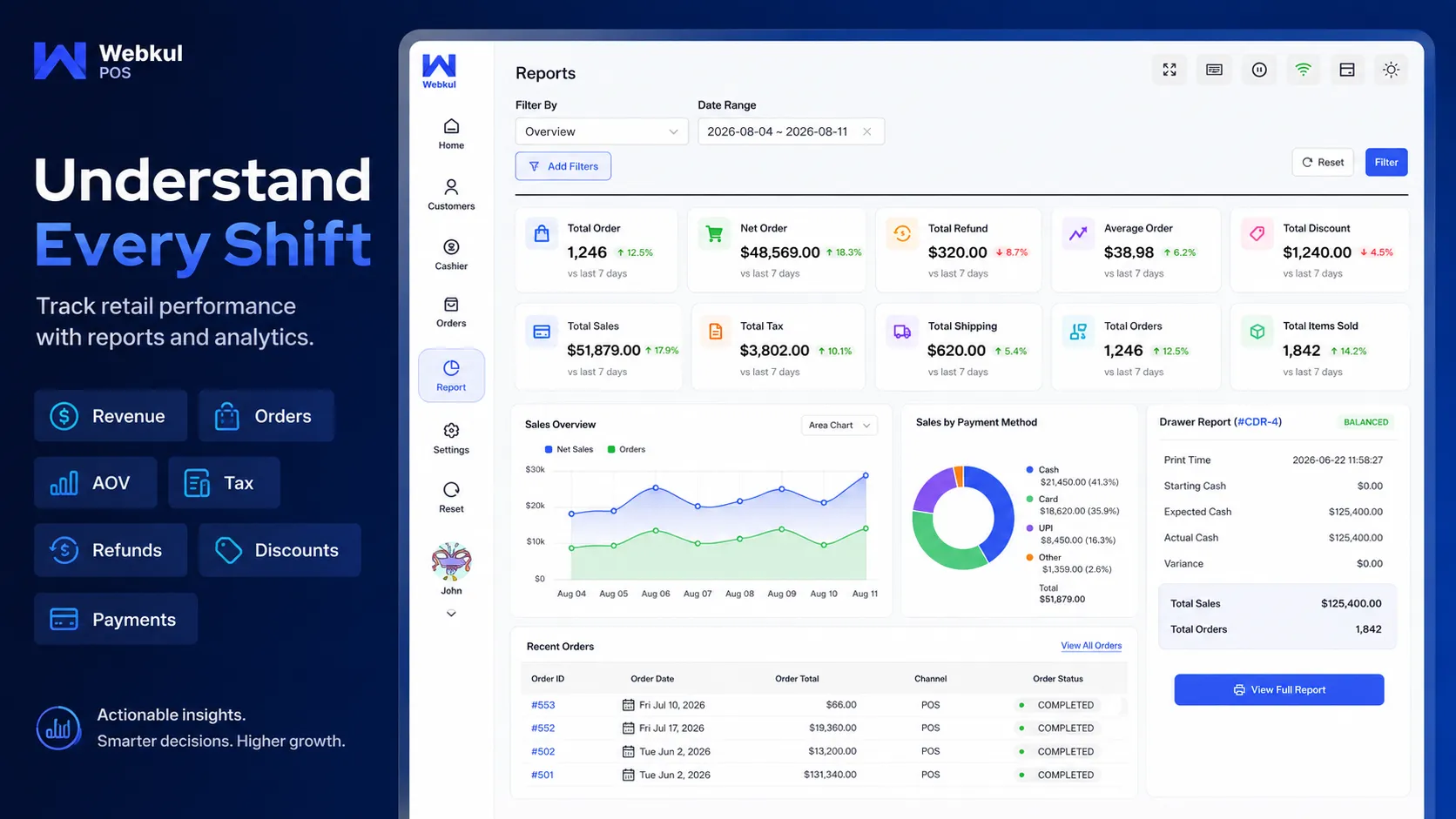
Reports That Show How Your Counter Is Doing
Admins and POS agents can review sales over any date range and see the numbers that matter for daily retail: what sold, what was refunded, what was discounted and how customers paid.
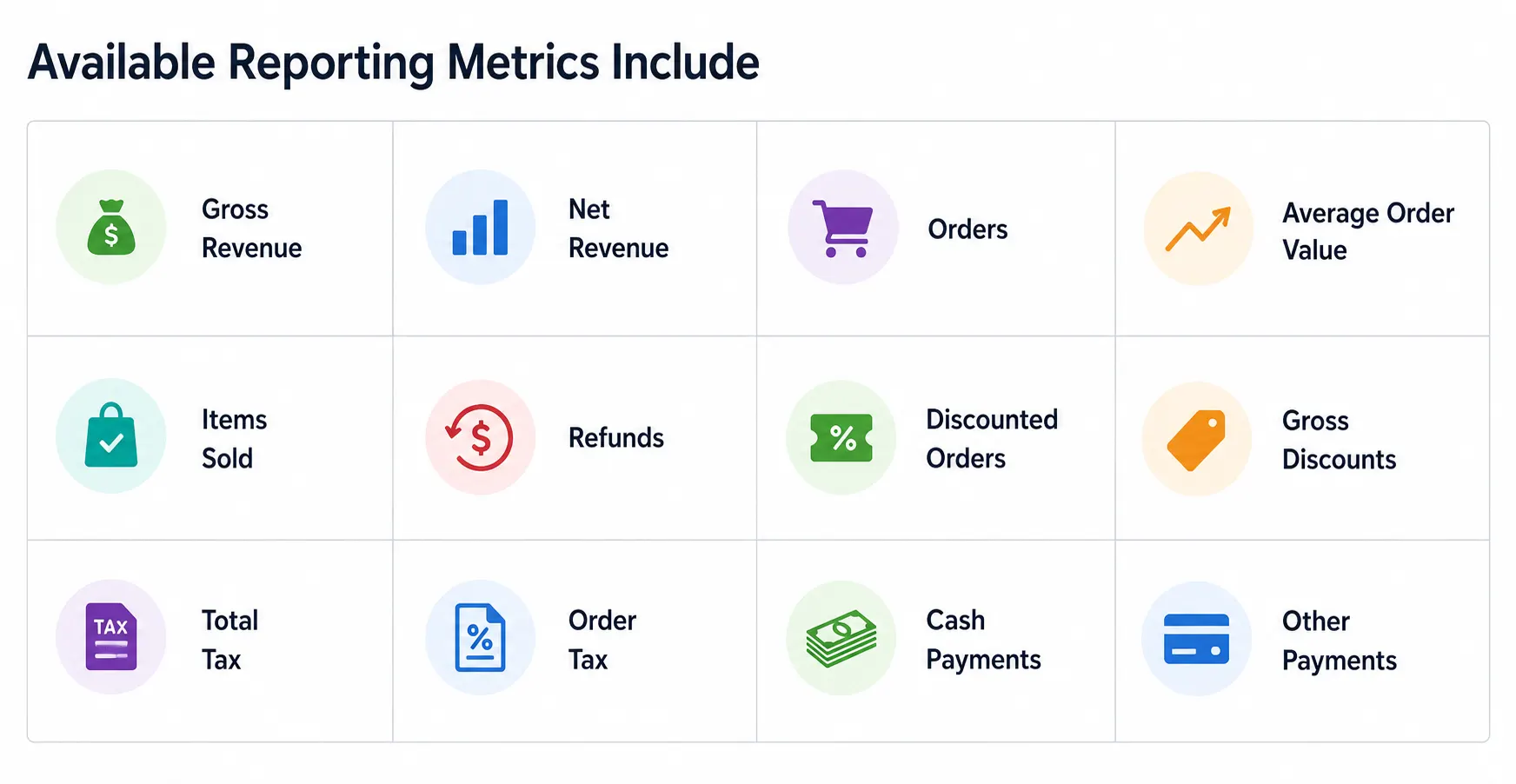
- Date ranges such as Today, Yesterday, Week to Date, Last Month, Last Year and custom periods.
- Report views and filtering by date, product, category and coupon code where supported.
- Stock reporting: low-stock, out-of-stock and high-stock products.
- POS tax reporting.
- Customer reports with values such as total spend and order count.
- Cashier-based filtering in supported report views.
- Printable Z-Reports for shift and counter reconciliation.
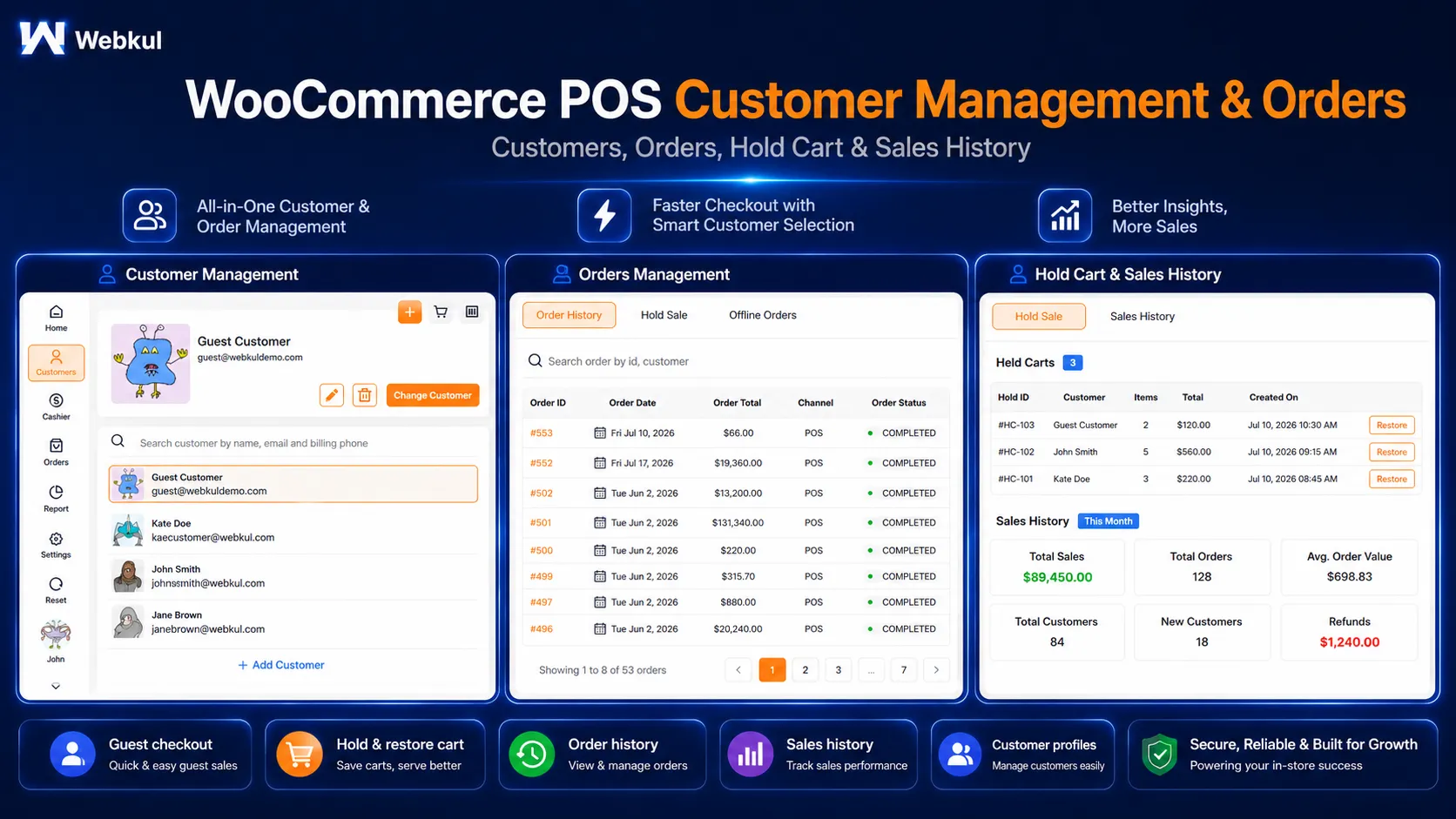
Manage Customers, Orders & Hold Carts From the POS
Cashiers can attach a sale to an existing WooCommerce customer, look up past orders, or put a cart on hold while they serve the next person in line.
- Select an existing WooCommerce customer during checkout.
- Set a default customer for faster walk-in sales.
- Search customer records from the POS, including by billing phone in recent releases.
- Review customer information and order-related history.
- List WooCommerce website orders inside the POS.
- Review sales history, held sales and offline sales.
- Hold a cart and continue it later.
- Order-list pagination for larger stores.
- Change order status from the POS when enabled in configuration.
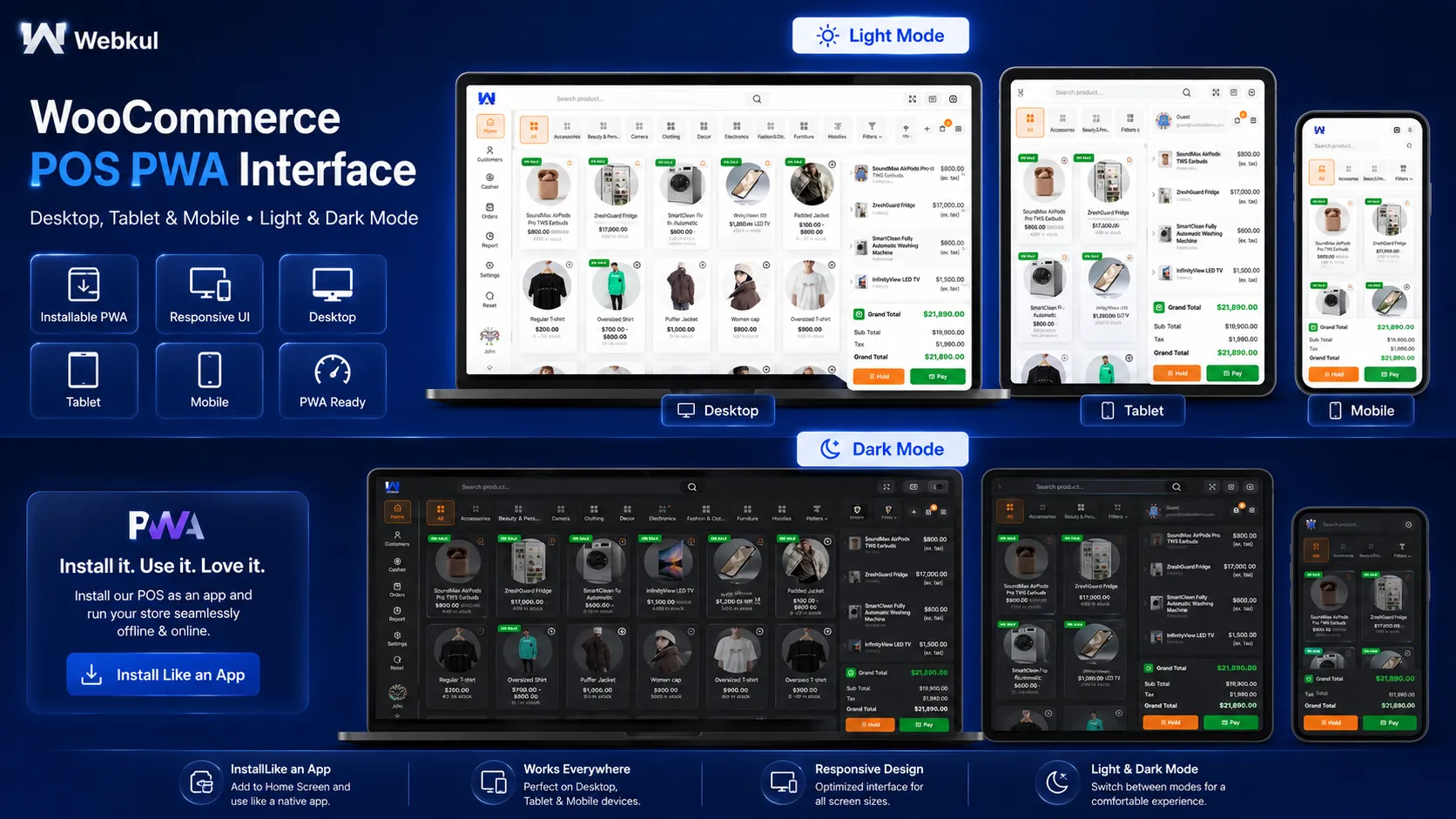
Run the POS on Desktop, Tablet or Mobile as a PWA
The POS includes Progressive Web App support, so you can install it on supported devices and use it like an app — no separate native POS application needed for the core web terminal.
The interface is built for fast cashier work, with keyboard shortcuts, dark and light modes, and appearance settings you can adjust per store.
- PWA desktop application support.
- PWA mobile/home-screen support.
- Dark and light interface modes.
- Keyboard shortcuts for faster operation.
- Configurable POS appearance and colors in supported settings.
- Custom CSS and JavaScript fields for advanced POS-side customization.
- Notification sounds for scanning, keypad, payment and drawer actions.
- Outlet-wise default sound configuration with POS-side audio settings.
- Responsive product grid for different device widths.
Restaurant note: the core POS handles general counter sales, so a food outlet can use it at the till. Restaurant-specific workflows such as table management require the optional restaurant extension — they are not part of the core plugin.
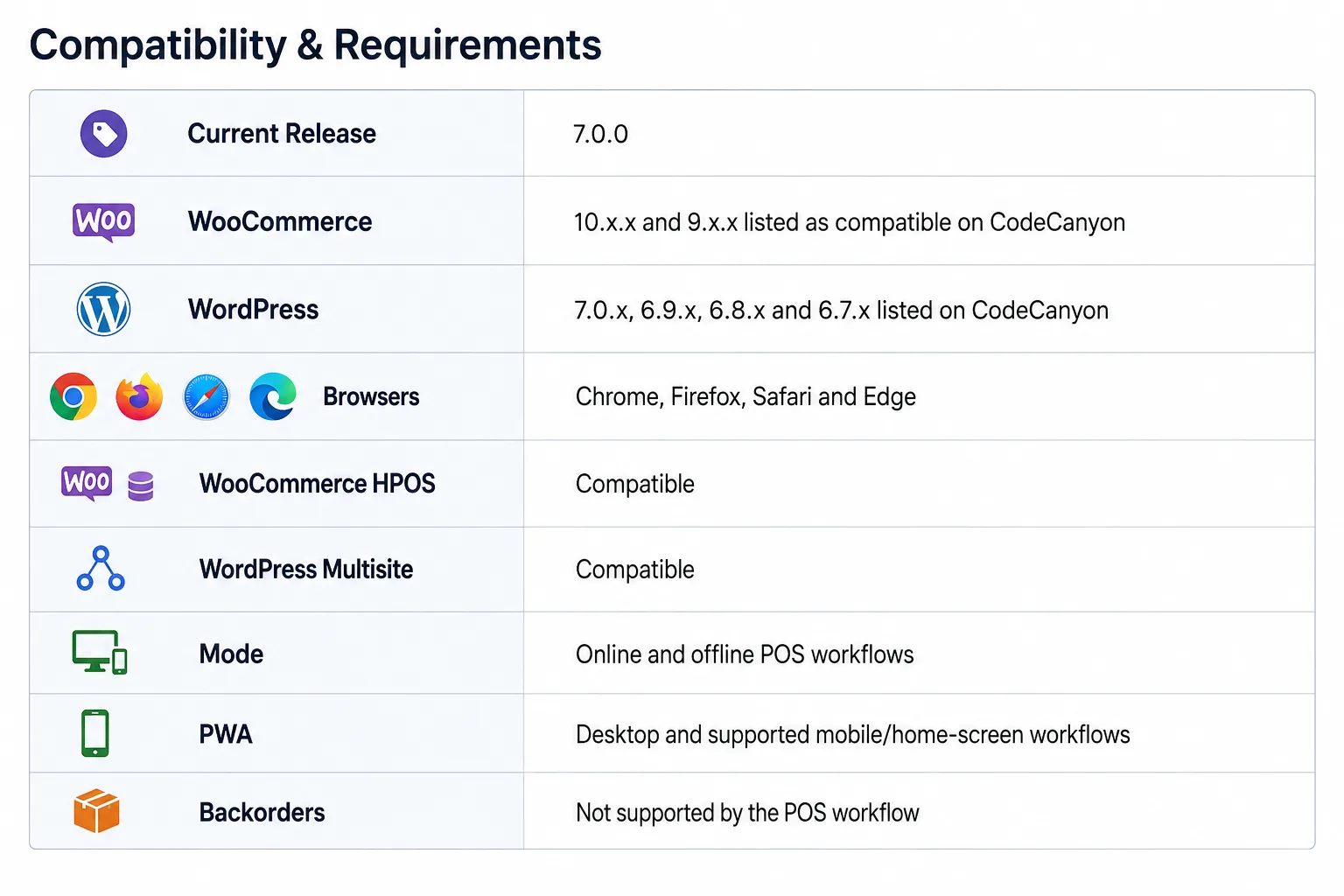
Please note: WordPress and WooCommerce compatibility changes over time. If you run a newer version than those listed, check the CodeCanyon item metadata and changelog before purchase.
Frequently Asked Questions
1. Does WooCommerce POS work offline?
Yes. Cashiers can keep processing eligible sales while disconnected, and the POS syncs offline data when the connection returns. Test your specific payment, printing and custom-plugin workflow before relying on offline mode in production.
2. Can I manage more than one physical store?
Yes. The admin can create multiple outlets and assign one or more sales agents/cashiers to each location.
3. Can multiple cashiers work at the same location?
Yes. Multiple sales agents can be assigned to a single outlet, and each cashier can open and close their own drawer.
4. Does it support simple and variable products?
Yes. Variable products get variation-wise stock handling and three selection layouts: list, table and card views.
5. Can the plugin generate barcodes?
Yes. The core plugin generates barcodes from the product ID or SKU. More advanced barcode workflows are available through separate extensions.
6. What payment methods are available?
The core checkout supports cash, card-recording and split payments, along with the payment methods you configure. Direct communication with a physical card terminal is a separate hardware and integration consideration.
7. Can I use a cash drawer?
Yes, when it is connected through a compatible POS printer setup. The drawer is triggered as part of the relevant print/hardware workflow.
8. Can I use a thermal receipt printer?
Receipt and invoice printing is supported, but compatibility varies by operating system, browser, device and printer model. Verify your target hardware before deployment.
9. Can I hold a customer’s cart?
Yes. A cashier can put a cart on hold, serve the next customer, and return to the held sale later.
10. Can I apply WooCommerce coupons?
Yes. Coupons can be applied at checkout, and version 7.0.0 also applies WooCommerce coupon restriction rules on the POS side.
11. Can I sell an item that does not exist on my website?
Yes. A cashier can create a custom product for a POS sale when the item is not in the website catalog.
12. Does it support HPOS?
Yes. WooCommerce High-Performance Order Storage (HPOS) compatibility is listed for the plugin.
13. Is WordPress Multisite supported?
Yes. Multisite compatibility is part of the current functionality.
14. Can I install it like an app?
Yes. The POS supports Progressive Web App installation on supported desktop and mobile devices, so you get an app-like experience without a separate native POS application.
15. Are backorders supported?
No. The current POS workflow does not support WooCommerce product backorders. Consider this before purchase if backorder selling is essential to your in-store workflow.
Documentation, Demo & Support
A POS becomes a business-critical system, so evaluate the workflow before you deploy it. Try the live demo, read the documentation, and ask Webkul support about any unusual hardware, third-party checkout rules or custom WooCommerce configuration before purchasing.
TRY LIVE DEMO | READ DOCUMENTATION | CONTACT SUPPORT
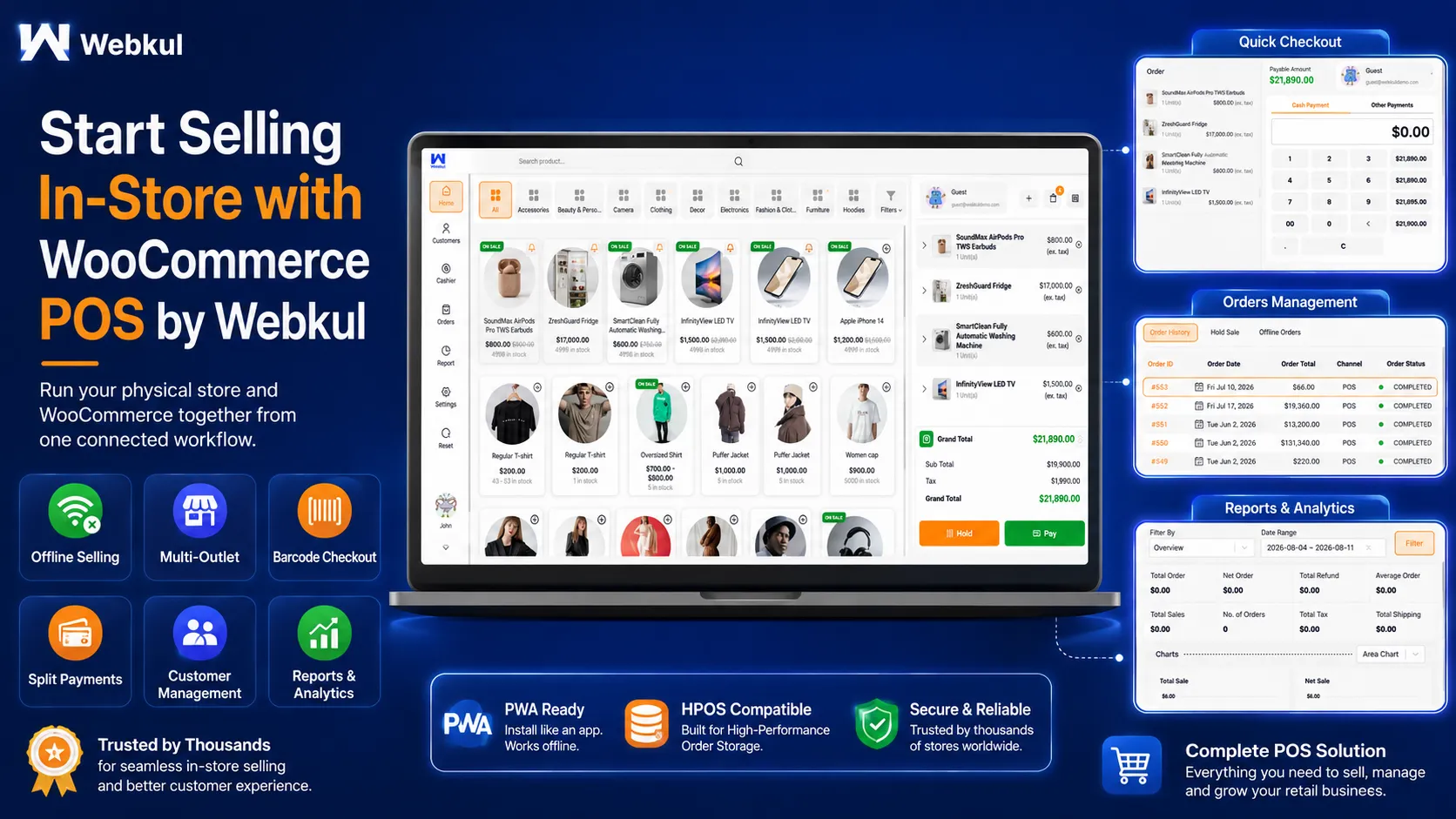
Start Selling In Store With WooCommerce POS
Connect your physical outlets to WooCommerce — products, inventory, customers, orders, cashiers and reports in one place, with offline selling, barcode checkout and PWA access.
GET WOOCOMMERCE POS ON CODECANYON | OPEN LIVE DEMO
Preview asset notice: if any third-party photos, mockups, fonts or other assets appear in the promotional images and are not included with the plugin, they are preview-only assets, and the appropriate commercial preview license must be held for them.
ChangeLog
"Initial release v 1.0.0" "Current release v 7.2.0"
v7.2.0 (2026-09-16)
Added: Bulk Assignment screen to set per-outlet stock, price and status for every product and variation from one spreadsheet, with search, keyboard navigation, copy/paste and bulk save.
Added: Per-outlet product price. When set, it is the selling price at that outlet and the POS charges it.
Added: Custom per-outlet columns in Bulk Assignment, defined by the administrator as Text, Long text or Number.
Added: "Show Out of Stock Products" setting in POS General to show out-of-stock products at the till with an Out of stock badge. They can never be sold.
Fixed: POS product and variation lists no longer hidden by the WooCommerce "Hide out of stock items from the catalog" setting, so outlet stock can be set on an item that has run out.
Fixed: Saving an outlet stock of 0 no longer switches the product to Disabled.
Fixed: A POS session that can no longer be refreshed now logs the cashier out and says so on the login screen, instead of leaving the till retrying a rejected request.
Security: The outlet stock AJAX endpoint now requires a nonce and the Outlets capability, and is no longer available to logged-out visitors.
v7.1.1 (2026-09-09)
Fixed: Invoice template structure and width issues.
Added: Set the thermal paper width and height in mm, from the admin and the POS end.
Improved: Loader shown while an invoice template is saving on admin end.
v7.0.1 (2026-08-11)
Added: Setting to enable/disable submit button on expand cart items.
v7.0.0 (2026-07-20)
Added: Take parecentage/fixed fee on the cart at checkout page.
Added: Collapse/Expand cart total section.
Added: Applied the woocommerce coupon restrictions feature on the POS end as well.
Fixed: Print drawer report data mismatch issue.
Fixed: Close drawer with print drawer report issue.
Fixed: Transaction/Close counter issue in case of refund by someone else.
Improved: Ui of Print Drawer Reports list as per POS theme.
Moved: Apply discount at checkout page from cart page.
Moved: Apply coupon at checkout page from cart page.
v6.7.7 (2026-06-25)
Fixed: Fixed the tax calculation issue for variation products in table and card views introduced in version 6.7.5.
v6.7.6 (2026-03-19)
Fixed : Update the submodule to the latest version.
Added : z-Report generation and printing functionality on both admin and pos end.
v6.7.5 (2026-06-02)

Added: Multi-Pricing of products
Added: Implemented attribute-based filtering for multiple attribute types, along with support for On Sale and Featured product filters.
Added: “On Sale” badge for products currently on sale.
Added: Implemented notification tones for product selection, drawer close actions,keypad tone and payment confirmation to enhance POS user interaction and feedback experience.
Added: Outlet-wise default tone configuration at the admin end and audio settings at the POS end when tones are enabled.
Added: Multiple variation card layouts — List View, Table View, and Card View.
Added: Stock visibility based on the configured Display Stock settings.
Added: Pin icon visibility settings with options to display the pin Always Visible or On Hover.
v6.7.3 (2026-03-19)
Fixed: variation related concern in case of product atributes
v6.7.2 (2026-03-10)

Improved: Security at POS end.
Improved: Create Order Api Response time.
v6.7.1 (22026-02-02)

Fixed: Drawer balance debit issue.
Added: Hooks for modify balance and type.
Added: Hooks at pos frontend.
v6.7.0 (2026-01-16)

Fixed: Table creation issue and managed it on plugin_loaded hook.
Fixed: Get product variation issue with some other languages like irish.
Fixed: Get product ids ( excluded product variation id ) on the pos to load products on the POS end.
Fixed: Managed search while switching the category.
Fixed: Category update in redux store while switching from other category tab to all category tab.
Fixed: Category product display issue after clearing the search.
Fixed: Search box clear issue with clear ( cross icon ) search.
Fixed: Hold cart not visible issue when hold cart id and current cart id is same.
Fixed: Fixed product filter issue using outlet at the admin end.
Enhancement: Get product list api and reduced product load time.
Enhancement: Added border to single cart item while expanding for edit product price and quantity for better visibility.
Enhancement: Updated background of date selection in report section in dark mode for better visibility.
Enhancement: Improved UI of resync data and scroller in dark mode.
Added: Opening and closing drawer feature cashier wise ( user wise ).
Added: Opening drawer note.
Added: Open drawer later from the cashier section.
Added: Managed drawer from the transaction.
Added: Credit/Debit amount from the cash drawer.
v 6.6.0 (2025-10-14)
Added: Multisite Compatibility into POS.
v 6.5.2 (2025-09-15)
Fixed: Variation selection issue when searching variations by SKU or barcode.
Fixed: Currency formatting issue for Euro.
v 6.5.1(2025-08-08)
Fixed: env file creation .
Fixed: Product custom variation selection and slug.
v 6.5.0(2025-07-25)
Fixed: Out-of-stock products are now hidden from the POS interface unless explicitly configured otherwise.
Fixed: Resolved a console error that occurred during POS loading.
Fixed: Discounted prices in the POS cart now accurately reflect in the WooCommerce backend.
Fixed: The default customer is now automatically reselected after order completion.
Fixed: Enhanced currency fallback logic — the system now defaults to the website’s base currency when none is specified.
Fixed: Resolved an issue where variation names were not displaying correctly in the POS interface.
Improvement: Refined the menu structure to ensure POS addon submenus are accurately positioned and well-organized.
Added: Introduced auto-print enable/disable setting for POS users.
Added: POS now updates product stock when order status is updated.
See Full Change Log
| Type | WooCommerce Plugin |
|---|---|
| Author | Webkul |
| Category | Wordpress / Ecommerce / Woocommerce |
| Price | $86 |
| Sales | 1,627 |
| Rating | 4.23 from 100 ratings |
| Published | Jan 22, 2018 |
| Last Update | Oct 5, 2026 |
| Compatible Browsers | Firefox, Safari, Chrome, Edge |
| Compatible Software | WordPress 7.0.x, WordPress 6.9.x, WordPress 6.8.x, WordPress 6.7.x |
| Compatible With | WooCommerce 10.x.x, WooCommerce 9.x.x |
| Gutenberg Optimized | No |
| Source Files Included | JavaScript JS, HTML, CSS, PHP |
| Video Preview Resolution | 1280x720 |
Categories
Tags
External listing. code.market does not sell this product and does not process payment for it. Pricing, payment, delivery, licensing, refunds, and support are handled by the third-party merchant on its own website. We may earn an affiliate commission from a referral. Details.
Products of the Week.
Submit🥇

STOP GUESSING WHAT TO POST
AI that learns your brand voice and builds a month of consistent, on-brand social content: carousels, posts and hooks that sound like you, not like everyone else's AI.
SaaS · 4,290 views · 38 clicksSaaS · Week 45 · 4,290 views · 38 clicks
🥈

Conversational Backlinks for Busy Founders
Place Backlink Relevant Conversation for your domain across Forums and Conversations
Website · 42,001 views · 223 clicksWebsite · Week 45 · 42,001 views · 223 clicks
🥉

upvote.club
Free Social Media Engagement that Helps Boost Your Content. Upvote Club supports 19 social networks with 100+ engagement actions in one dashboard. Add links to your posts and get free engagement from real users.
SaaS · 40,042 views · 117 clicksSaaS · Week 45 · 40,042 views · 117 clicks
#4

Substack Posting API
Onboard your Agent to Substack. Write Publish on Substack via API
SaaS · 59,052 views · 198 clicksSaaS · Week 45 · 59,052 views · 198 clicks
#5

Seenshot App
Free, Fast, MacOS Screenshot app. Make Screenshot cmd+shift+2 and send it via link
Desktop App · 28,427 views · 122 clicksDesktop App · Week 45 · 28,427 views · 122 clicks
#6

Hand-Placed Backlinks $9.99 per link. Flat rate.
Buy hand-placed forum, Q-A and directory backlinks. Flat $9.99 per link, no subscriptions — you only pay for approved listings.
Website · 4,261 views · 19 clicksWebsite · Week 45 · 4,261 views · 19 clicks
#7

Free Invoice Generator - PDF Invoices in Your Browser, No Sign-Up
A free invoice maker for freelancers and small businesses: fill in the invoice, check the live preview, and download a PDF that looks exactly like it. Any currency, tax per item, three templates, no sign-up, and nothing leaves your device.
2,937 views · 17 clicksWeek 45 · 2,937 views · 17 clicks
#8

Merge PDF Files Free - Combine PDFs in Your Browser, No Upload
A free PDF merger for office workers, students, and freelancers: combine PDFs and images into one file in the browser, reorder files and pages, pick page ranges, keep bookmarks, and open password-protected PDFs. Nothing is uploaded, no sign-up, no watermark.
2,713 views · 13 clicksWeek 45 · 2,713 views · 13 clicks