
PlugHub Inventory Management System
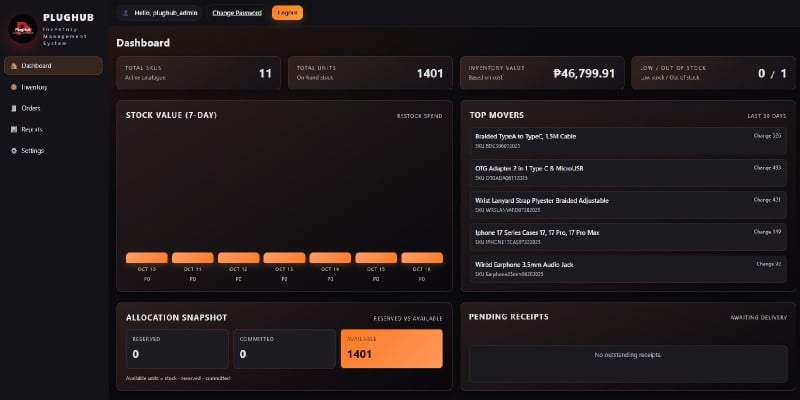
Description
🧾 PlugHub Inventory Management System — Django-Based Web Application
PlugHub Inventory Management System (PlugHub IMS) is a powerful and production-ready web application built with Python (Django Framework), designed to help businesses manage products, stock, sales, and expenses in one organized platform.
It’s perfect for small to medium enterprises (SMEs), retail stores, wholesalers, and online sellers who want to automate and track their inventory without needing expensive SaaS subscriptions.
Features
🚀 Key Features
- 📦 Product Management — Add, edit, and categorize products with complete details such as SKU, cost, price, and stock level.
- 📊 Dashboard Analytics — Get a clear overview of your total sales, expenses, and inventory performance.
- 💰 Sales & Expenses Tracking — Record transactions and monitor business growth with real-time updates.
- 👥 User Management — Role-based access control for admin and staff accounts.
- 📈 Reports & Insights — Generate sales and expense summaries for smart business decisions.
- ⚙️ Fully Configurable — Edit business details, logo, and system name right from the dashboard.
- 🌐 Secure & Scalable — Built on Django with PostgreSQL, ready for deployment on Ubuntu or any VPS.
Requirements
⚙️ System Requirements
🧱 Server Requirements
- Python: 3.10 or higher
- Django: 4.0 or higher
- Database: PostgreSQL (recommended) or SQLite (for testing/demo)
- Web Server: Nginx or Apache (for production)
- Application Server: Gunicorn or uWSGI
- Operating System: Ubuntu 22.04 LTS or any Linux-based system
- Storage: Minimum 512 MB free disk space
- Memory: 1 GB RAM or more (recommended 2 GB+)
💻 Local Development Requirements
- Python 3.10+ installed
- Git (for version control)
- Virtual environment (venv or pipenv)
- PostgreSQL or SQLite
- Text editor or IDE (VS Code, PyCharm, Sublime Text, etc.)
Instructions
PlugHub Inventory Management System — How to Use
Setup & usage for both developers and end-users. Save this as your project’s README.md if you like. For Developers (Local & Server) (recommended) /srv/plughub/ ├─ app/ # Django project root (manage.py lives here if you prefer) ├─ venv/ # Python virtualenv ├─ staticfiles/ # Collected static files (prod) ├─ media/ # User uploads (images, docs, etc.) ├─ .env # Environment variables (DO NOT COMMIT) └─ requirements.txt If your repo’s root already has manage.py, treat that folder as your in commands below. 2) Prerequisites
- Python 3.10+
- PostgreSQL (prod recommended; SQLite OK for dev)
- Git
- Ubuntu 22.04 LTS (or any Linux) for server
- Optional (production): Nginx, Gunicorn, Certbot, systemd
3) Clone & Virtual Environment # Local (or on server) cd /srv sudo mkdir -p /srv/plughub && sudo chown -R "$USER":"$USER" /srv/plughub cd /srv/plughub # Clone your code git clone app cd app # Create & activate venv python3 -m venv ../venv source ../venv/bin/activate # Install deps pip install -U pip wheel pip install -r requirements.txt 4) Environment Variables (.env) Create /srv/plughub/.env (production) or .env in project root (dev). Example: # Django DEBUG=True SECRET_KEY=replace-with-a-strong-secret ALLOWED_HOSTS=localhost,127.0.0.1,plughub-ims.com # Database (PostgreSQL) DB_NAME=plughub DB_USER=plughub DB_PASSWORD=yourpassword DB_HOST=127.0.0.1 DB_PORT=5432 # Static/Media (prod) STATIC_ROOT=/srv/plughub/staticfiles MEDIA_ROOT=/srv/plughub/media # Branding / Business (optional examples) BUSINESS_NAME=PlugHub Gadgets & Accessories CURRENCY=PHP In settings.py, ensure you load .env (via python-dotenv) and map these to DATABASES, STATIC_ROOT, MEDIA_ROOT, etc. 5) Database Setup (PostgreSQL) # On Ubuntu server sudo -u postgres psql CREATE DATABASE plughub; CREATE USER plughub WITH ENCRYPTED PASSWORD 'yourpassword'; GRANT ALL PRIVILEGES ON DATABASE plughub TO plughub; q 6) Migrations & Superuser # From project root (where manage.py is) source ../venv/bin/activate # if not already python manage.py migrate python manage.py createsuperuser 7) Run Locally (Dev) python manage.py runserver 0.0.0.0:8000 Visit: http://localhost:8000/ 8) Collect Static (Prod) # Make sure these exist and are writable by the app user mkdir -p /srv/plughub/staticfiles /srv/plughub/media chmod -R u+rwX,go+rX /srv/plughub/staticfiles /srv/plughub/media # Collect python manage.py collectstatic --noinput 9) Production with Gunicorn + Nginx (Quick Start) Gunicorn test run: # From project root ../venv/bin/gunicorn --bind 0.0.0.0:8001 your_django_project.wsgi:application systemd service /etc/systemd/system/plughub.service: Description=Gunicorn for PlugHub (Django) After=network.target User=plughub Group=plughub WorkingDirectory=/srv/plughub/app EnvironmentFile=/srv/plughub/.env ExecStart=/srv/plughub/venv/bin/gunicorn your_django_project.wsgi:application --bind 127.0.0.1:8001 --workers 3 --timeout 120 Restart=always WantedBy=multi-user.target sudo systemctl daemon-reload sudo systemctl enable plughub sudo systemctl start plughub sudo systemctl status plughub --no-pager Nginx site /etc/nginx/sites-available/plughub: server { server_name plughub-ims.com; client_max_body_size 20M; location /static/ { alias /srv/plughub/staticfiles/; } location /media/ { alias /srv/plughub/media/; } location / { proxy_pass http://127.0.0.1:8001; proxy_set_header Host $host; proxy_set_header X-Forwarded-Proto $scheme; proxy_set_header X-Forwarded-For $proxy_add_x_forwarded_for; } } sudo ln -s /etc/nginx/sites-available/plughub /etc/nginx/sites-enabled/plughub sudo nginx -t sudo systemctl reload nginx HTTPS (Let’s Encrypt): sudo apt-get update && sudo apt-get install -y certbot python3-certbot-nginx sudo certbot --nginx -d plughub-ims.com 10) Deployment & Updates (Zero-fuss rsync approach)
- Upload new build to /tmp/plughub_staging//
- Sync to /srv/plughub/app/ (exclude env, venv, media, staticfiles):
sudo rsync -a --delete --exclude '.env' --exclude 'venv/' --exclude 'media/' --exclude 'staticfiles/' /tmp/plughub_staging// /srv/plughub/app/
- Migrate, collect static, restart:
cd /srv/plughub/app source ../venv/bin/activate python manage.py migrate python manage.py collectstatic --noinput sudo systemctl restart plughub 11) Backups # DB PGPASSWORD=yourpassword pg_dump -U plughub -h 127.0.0.1 plughub > /srv/backups/plughub-$(date +%F).sql # Media rsync -a /srv/plughub/media/ /srv/backups/media-$(date +%F)/ 12) Troubleshooting Quickies
- Static 404s: run collectstatic and ensure Nginx alias paths and permissions.
- Permission denied: align ownership (e.g., sudo chown -R plughub:plughub /srv/plughub).
- Bad Request (400): add your domain/IP to ALLOWED_HOSTS.
- White/500 page: check journalctl -u plughub -f and /var/log/nginx/error.log.
For End-Users (How to Operate the System) 1) Sign In & Roles
- Admin: full access to settings, users, and all records.
- Staff: limited to daily operations (products, sales, expenses).
- Login with the account provided by your admin.
2) Dashboard
- At a glance: Total Sales, Total Expenses, Net, and Low Stock alerts.
- Use the date filter to view metrics for Today / This Week / This Month.
3) Products
- Add Product: SKU, name, category, cost, price, initial stock.
- Edit to update pricing or details.
- Low Stock badge appears when quantity dips below your threshold.
- Bulk Import/Export (if enabled): upload CSV to add or update items.
4) Inventory (Stock)
- Stock In: record incoming items (purchase or restock).
- Stock Out: manual adjustments (damaged, lost, etc.) with reason.
- Movement History: audit log of all stock changes.
5) Sales
- New Sale: select products, quantities, and apply discounts (if available).
- Payment: record payment method (cash, transfer, etc.).
- Receipt/Invoice: download or print (if template provided in app).
- Sales List: filter by date, customer (if enabled), or status.
6) Expenses
- Add Expense: category (shipping, rent, utilities, marketing, etc.), amount, date, and notes.
- Reports: filter expenses by date range and category.
7) Reports
- Sales Summary: totals by day/week/month.
- Expense Summary: totals by category/date range.
- Profit Snapshot: Sales – Expenses (simple net).
- Export as CSV/PDF if available.
8) Customers & Suppliers (if enabled)
- Manage contact info and basic ledgers for frequent partners.
- Attach notes or documents (e.g., invoices, receipts) if the module supports uploads.
9) Settings (Admin)
- Business Profile: logo, name, address, currency, timezone.
- Users & Roles: create staff accounts, reset passwords, assign permissions.
- Inventory Rules: low-stock threshold, categories, tax/VAT toggle (if available).
- Branding: update the system name/logo for your business.
10) Media & Files
- Upload product images (optimize for web).
- Keep file names clean (no spaces/special chars) for easy search.
11) Backup & Restore (Operator Basics)
- Export Data regularly (CSV/JSON) via the admin/report pages (if provided).
- Ask your server admin to back up database + media weekly.
12) Daily Workflow (Suggested)
- Morning: check Dashboard & Low Stock; plan restocks.
- ###strong/strong### record Sales and any Expenses.
- End of day: review Reports; export if needed.
- Weekly: reconcile stock, back up data, archive reports.
| Author | mikeangelofranco |
|---|---|
| Category | Scripts & Code / Django |
| Price | $84 |
| Extended License | $252 |
| Likes | 3 |
| First Release | Oct 26, 2025 |
| Last Update | Oct 26, 2025 |
| Files included | .py, .css, .html, .dll, .xml, JavaScript .js |
Categories
Tags
External listing. code.market does not sell this product and does not process payment for it. Pricing, payment, delivery, licensing, refunds, and support are handled by the third-party merchant on its own website. We may earn an affiliate commission from a referral. Details.
Products of the Week.
Submit🥇

STOP GUESSING WHAT TO POST
AI that learns your brand voice and builds a month of consistent, on-brand social content: carousels, posts and hooks that sound like you, not like everyone else's AI.
SaaS · 4,708 views · 45 clicksSaaS · Week 45 · 4,708 views · 45 clicks
🥈

Conversational Backlinks for Busy Founders
Place Backlink Relevant Conversation for your domain across Forums and Conversations
Website · 42,604 views · 225 clicksWebsite · Week 45 · 42,604 views · 225 clicks
🥉

upvote.club
Free Social Media Engagement that Helps Boost Your Content. Upvote Club supports 19 social networks with 100+ engagement actions in one dashboard. Add links to your posts and get free engagement from real users.
SaaS · 40,650 views · 120 clicksSaaS · Week 45 · 40,650 views · 120 clicks
#4

Substack Posting API
Onboard your Agent to Substack. Write Publish on Substack via API
SaaS · 59,606 views · 200 clicksSaaS · Week 45 · 59,606 views · 200 clicks
#5

Seenshot App
Free, Fast, MacOS Screenshot app. Make Screenshot cmd+shift+2 and send it via link
Desktop App · 28,984 views · 124 clicksDesktop App · Week 45 · 28,984 views · 124 clicks
#6

Hand-Placed Backlinks $9.99 per link. Flat rate.
Buy hand-placed forum, Q-A and directory backlinks. Flat $9.99 per link, no subscriptions — you only pay for approved listings.
Website · 4,776 views · 19 clicksWebsite · Week 45 · 4,776 views · 19 clicks
#7

Free Invoice Generator - PDF Invoices in Your Browser, No Sign-Up
A free invoice maker for freelancers and small businesses: fill in the invoice, check the live preview, and download a PDF that looks exactly like it. Any currency, tax per item, three templates, no sign-up, and nothing leaves your device.
3,434 views · 17 clicksWeek 45 · 3,434 views · 17 clicks
#8

Merge PDF Files Free - Combine PDFs in Your Browser, No Upload
A free PDF merger for office workers, students, and freelancers: combine PDFs and images into one file in the browser, reorder files and pages, pick page ranges, keep bookmarks, and open password-protected PDFs. Nothing is uploaded, no sign-up, no watermark.
3,172 views · 14 clicksWeek 45 · 3,172 views · 14 clicks