
Pixie - Image Editor

Description
Pixie is a fully customizable and high performance photo editor that works on every device and can be easily integrated into existing projects or used as a stand-alone application.
Features
- Integration – Easily integrate pixie into any existing project or application.
- Extensible – Pixie interface and API can be extended with new functionality.
- Mobile – Pixie has full mobile support and adapts its interface to fit size of any device automatically.
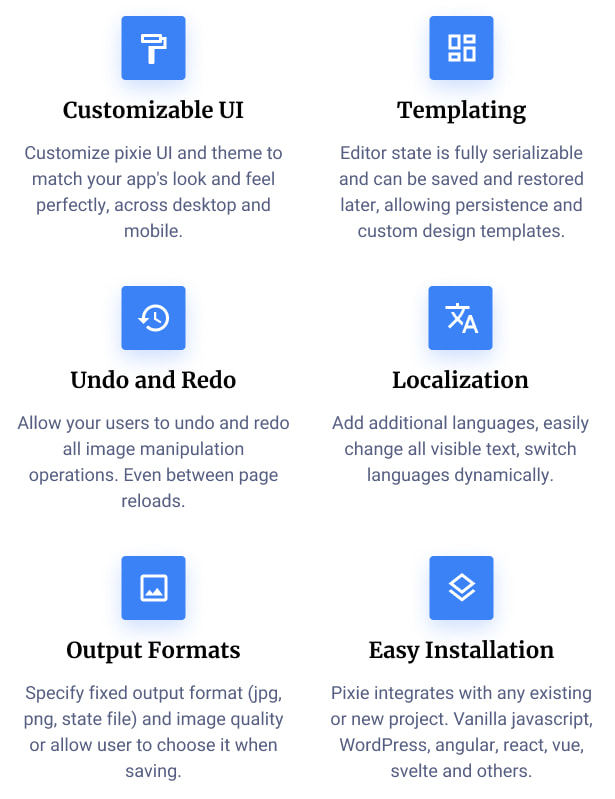
- Theming – Easily change all editor colors to match it to your existing site or application design.
- Customizable UI – Customize UI by showing, hiding or adding new menu items, changing toolbar positions or using a different theme.
- Translatable – Pixie’s interface is fully translatable via configuration.
- Watermark – Saved photos can be easily watermarked with specified text.
- Modes – Choose between overlay(modal), inline or full screen modes.
- Tools API – Use all pixie tools (resize, crop, frame etc) via API without opening pixie interface.
- Customizable Tools – All tools are fully customizable, you can remove or modify and add custom stickers, shapes, fonts, frames and more.
- Saving State – Save current editor state in json format, allowing for functionality like pre-built templates.
- Loading State – Load previously saved state including images and all changes that were made.
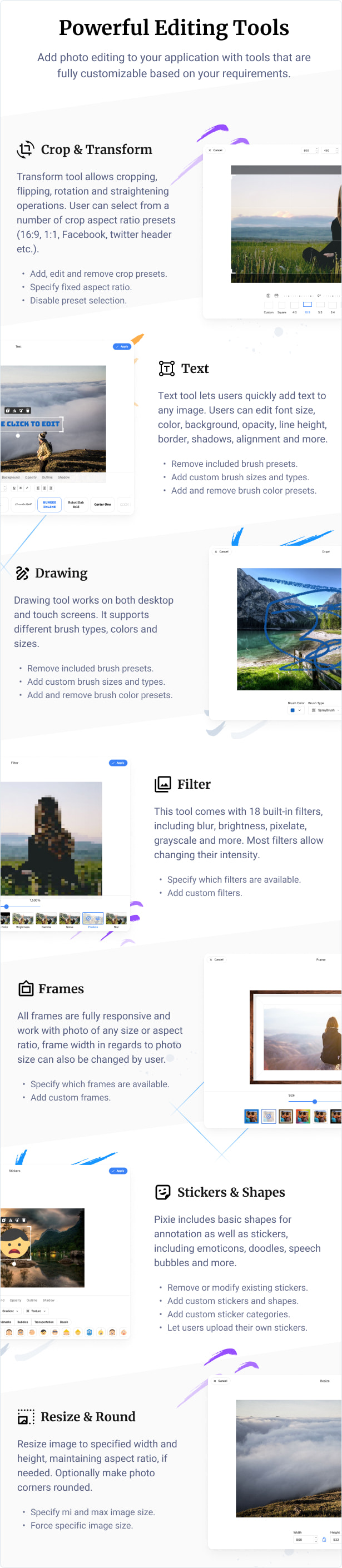
- Photo Manipulation – Resize, crop, transform and more via interface or API.
- Filters – Pixie comes with many built in filters like grayscale, blur, black & white, vintage and more. More filters can be added via API..
- Frame – Add built-in responsive frames to photo of any size or add your own frames.
- Crop – Crop photo to one of specified aspect ratios or let user select custom crop zone via UI.
- Draw – Powerful free drawing tool supports both mouse and touch, has multiple brush types, colors and more.
- Text – Full support for adding text to images. Several hundred of google fonts can be used or only custom added fonts.
- Shapes – Custom shapes can be easily added by simply specifying svg image path.
- Stickers – Custom stickers can be added or removed. Any type of image can be used as a sticker.
- Corners – Image corners can be rounded with one simple click or API call.
- Empty canvas – Pixie does not have to edit existing photo, custom images can easily be created from scratch as well.
- History – All editor actions are non destructive and can be easily undone and redone via history tool.
- Objects – All objects like stickers, shapes and text are on their own layer and can be easily moved, resized, deleted and modified by changing their color, adding shadow, background and more.
- Patterns and Gradients – All objects can be filled in with many built in or custom patterns and gradients.
- Saving – Modified image can be easily saved on local device or on the server via API or interface..
- Zoom & Pan – Canvas can be zoomed and panned using mouse, mouse wheel, or touch and pinch gestures on mobile devices.
- HTML5 – Pixie uses native HTML5, which means it works on every device.
Documentation
Online documentation can be found at our help center here.
Latest version | Changelog
| Type | JavaScript Script |
|---|---|
| Author | Vebto |
| Category | Javascript / Images And Media |
| Price | $45 |
| Sales | 3,627 |
| Rating | 4.72 from 123 ratings |
| Published | Mar 10, 2015 |
| Last Update | Jul 8, 2024 |
| Compatible Browsers | IE11, Firefox, Safari, Opera, Chrome, Edge |
| Source Files Included | JavaScript JS, HTML, CSS |
Categories
Tags
External listing. code.market does not sell this product and does not process payment for it. Pricing, payment, delivery, licensing, refunds, and support are handled by the third-party merchant on its own website. We may earn an affiliate commission from a referral. Details.
Products of the Week.
Submit🥇

STOP GUESSING WHAT TO POST
AI that learns your brand voice and builds a month of consistent, on-brand social content: carousels, posts and hooks that sound like you, not like everyone else's AI.
SaaS · 4,285 views · 38 clicksSaaS · Week 45 · 4,285 views · 38 clicks
🥈

Conversational Backlinks for Busy Founders
Place Backlink Relevant Conversation for your domain across Forums and Conversations
Website · 41,995 views · 223 clicksWebsite · Week 45 · 41,995 views · 223 clicks
🥉

upvote.club
Free Social Media Engagement that Helps Boost Your Content. Upvote Club supports 19 social networks with 100+ engagement actions in one dashboard. Add links to your posts and get free engagement from real users.
SaaS · 40,037 views · 117 clicksSaaS · Week 45 · 40,037 views · 117 clicks
#4

Substack Posting API
Onboard your Agent to Substack. Write Publish on Substack via API
SaaS · 59,047 views · 198 clicksSaaS · Week 45 · 59,047 views · 198 clicks
#5

Seenshot App
Free, Fast, MacOS Screenshot app. Make Screenshot cmd+shift+2 and send it via link
Desktop App · 28,419 views · 122 clicksDesktop App · Week 45 · 28,419 views · 122 clicks
#6

Hand-Placed Backlinks $9.99 per link. Flat rate.
Buy hand-placed forum, Q-A and directory backlinks. Flat $9.99 per link, no subscriptions — you only pay for approved listings.
Website · 4,255 views · 19 clicksWebsite · Week 45 · 4,255 views · 19 clicks
#7

Free Invoice Generator - PDF Invoices in Your Browser, No Sign-Up
A free invoice maker for freelancers and small businesses: fill in the invoice, check the live preview, and download a PDF that looks exactly like it. Any currency, tax per item, three templates, no sign-up, and nothing leaves your device.
2,933 views · 17 clicksWeek 45 · 2,933 views · 17 clicks
#8

Merge PDF Files Free - Combine PDFs in Your Browser, No Upload
A free PDF merger for office workers, students, and freelancers: combine PDFs and images into one file in the browser, reorder files and pages, pick page ranges, keep bookmarks, and open password-protected PDFs. Nothing is uploaded, no sign-up, no watermark.
2,709 views · 13 clicksWeek 45 · 2,709 views · 13 clicks