
Picture Puzzle Cube Game – Android Source Code
Description
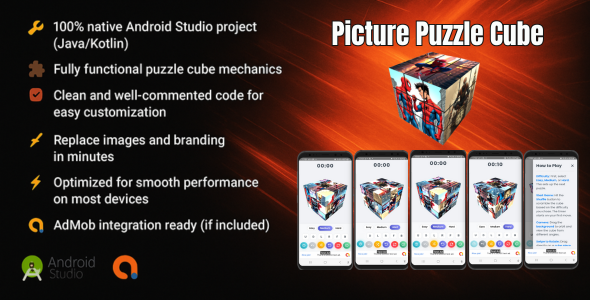
- 100% native Android Studio project (Java/Kotlin) - Fully functional puzzle cube mechanics - Clean and well-commented code for easy customization - Replace images and branding in minutes - Optimized for smooth performance on most devices - AdMob integration ready (if included)
Adaptive UI: The user interface adjusts dynamically to different screen sizes and orientations, providing an optimized experience on both small phone screens and larger tablet/TV displays.
Gamepad/D-pad Support: For devices without touchscreens (e.g., Fire TV, Android Automotive), the application now fully supports navigation and interaction using D-pad and gamepad inputs.
D-pad: Corresponds to U/D/L/R cube moves.
Button: Shuffle the cube.
Button: Reset the cube.
L1/R1 Button: Undo last move.
Start/Select Button: Open instructions.
L2 Button: Toggle Prime moves.
R2 Button: Show hint.
Thumb L/R Buttons: Set difficulty to Medium (example, can be extended for cycling difficulties).
Manifest Declarations: The AndroidManifest.xml includes necessary declarations to ensure the app is discoverable and functions correctly on Android TV (Leanback launcher) and Android Automotive OS.
Instructions
1. Requirements - Android Studio (latest stable version recommended) - Basic knowledge of Java/Kotlin development - Android device or emulator for testing
2. How to Open the Project - Download and extract the ZIP file. - Open Android Studio. - Click File → Open and select the project folder. - Let Gradle finish syncing automatically.
3. How to Customize Change game images: - Replace puzzle images inside the /res/drawable folder. - Keep the same file names or update references in the code.
Change app name and icon: - Update app_name in res/values/strings.xml. - Replace the launcher icon in /mipmap folders. - Change package name (optional): - In Android Studio, right-click your package → Refactor → Rename. - Update the applicationId in app/build.gradle.
4. Add AdMob (if using ads) - Open AndroidManifest.xml and insert your AdMob App ID. - Open the code file where ads are loaded and replace the test ad unit IDs with your own. - Test ads before publishing to Google Play to ensure proper integration.
5. Build & Run - Connect your Android device or start an emulator. - Click Run ▶ in Android Studio. - Your app should launch automatically.
6. Support - This is a self-contained project designed for developers. - Ensure you meet all requirements above before starting customization.
APK: https://www.mediafire.com/file/wvm3xwf6j8e9dwk/PPCUBE.apk/file
| Type | Android App |
|---|---|
| Author | DevWizard24 |
| Price | $16 |
| Sales | 3 |
| Rating | 0 (0) |
| Published | Sep 1, 2025 |
| Last Update | Sep 1, 2025 |
| Compatible Software | Android 15.0, Android 12.0, Android 11.0, Android 10.0, Android 9.0, Other |
| Demo Url | https://www.mediafire.com/file/wvm3xwf6j8e9dwk/PPCUBE.apk/file |
| Mobile Files Included | .java, .xml, HTML |
Categories
Tags
External listing. code.market does not sell this product and does not process payment for it. Pricing, payment, delivery, licensing, refunds, and support are handled by the third-party merchant on its own website. We may earn an affiliate commission from a referral. Details.
Products of the Week.
Submit🥇

Perceptle
Perceptle is a daily browser-based game that challenges you to test your sensory intuition through five quick estimation and rhythm-based rounds.
Other · 1 views · 0 clicksOther · Week 47 · 1 views · 0 clicks
🥈

Free LinkedIn Likes From Real
Get free LinkedIn likes on your posts from real members who react by hand. No
SaaS · 124 views · 2 clicksSaaS · Week 47 · 124 views · 2 clicks
🥉

STOP GUESSING WHAT TO POST
AI that learns your brand voice and builds a month of consistent, on-brand social content: carousels, posts and hooks that sound like you, not like everyone else's AI.
SaaS · 7,686 views · 71 clicksSaaS · Week 47 · 7,686 views · 71 clicks
#4

aaas.market
407 reliable micro tools for solo founders, marketers and creators. They work in your browser
SaaS · 122 views · 0 clicksSaaS · Week 47 · 122 views · 0 clicks