
Pewora | Flutter Church Member App With Laravel Admin
Description
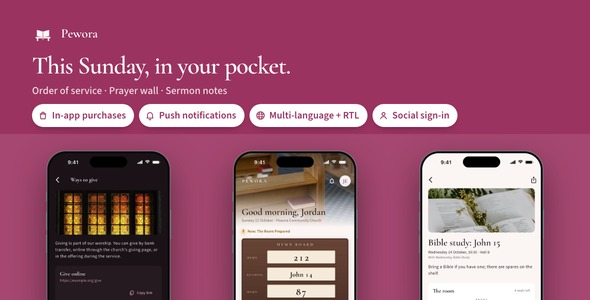
Pewora is the app a church hands its members: this Sunday’s hymn board and order of service, every sermon with its passage and the member’s own notes, a prayer wall where people light a candle for each other, events with seats saved from the front, and the church office behind all of it through a Laravel admin panel. 25 finished screens, Google and Apple sign-in, in-app purchases, push notifications, three languages and a landing page are in the download. Light and dark themes throughout.
Demo Instructions
The Live Preview starts on a small menu of four demos (the app, the documentation, a snapshot of the admin panel and the landing page); the section Open it all before you buy says what each one shows. The app’s sign-in form comes prefilled with the demo member below, and because the preview runs on the bundled sample congregation, any email and password get through, empty fields included. The sample clock sits at 10:25 on a Sunday with the sermon under way, so the board, the order of service, the wall, the groups and the events are all populated; a switch in Settings moves the clock to Wednesday evening. Installed with the included back end, sign-up and Forgot password work by a six-digit code sent by email; under Docker the codes arrive in the bundled Mailpit inbox at http://127.0.0.1:8025.
- Member sign-in in the app — Email: demo@pewora.app · Password: demo1234
- Church office sign-in to the admin panel, after you install the back end — Email: admin@pewora.test · Password: password
Costs not included in the price
Google Sign-In, Sign in with Apple, push notifications, analytics and in-app purchases each run on a developer account or service you hold yourself (the Apple Developer Program, a Google Play Console account, a Firebase project), as does publishing the app to the stores. Sign-up and password-reset codes go out through your own SMTP email provider. A server to host the back end and the giving provider whose details the office enters are paid to those providers as well. These charges are not included in the purchase price; each provider bills you on its own terms.
What a church gets on day one
- The whole Sunday, kept by the office: the church office types each part of the service into the admin panel once; the board at the front, the order of service and the hymn words on every member’s phone follow from it, with the part under way carrying a small flame.
- Members who take part, not just read: a prayer wall with candles, sermon notes that stay with the member, seats saved for a party of up to four and a request to join a group, each stored on the server with its rules enforced there: one candle per member per request, and a request meant for the pastor reaches no one else.
- Proof it holds together: 25 screens with empty states, light and dark, in English, Spanish and Arabic; 98 app tests pass and the back end carries 146 of its own.
Nine things you will not have to build
- Google and Apple sign-in: a member taps Continue with Google or Apple and the back end turns the token into a session; a provider you have not configured never shows its button.
- In-app purchases with a paywall: Pewora Pro unlocks notes on every sermon through App Store and Play products, priced by the store, restored with one tap and remembered offline.
- Push notifications: the office sends a message to every phone now or at a set time, pointing it at Sunday, a sermon, the wall or an event; the member is asked for permission from Settings.
- Analytics and crash reports: screen views and the errors a member actually hits, collected only after the consent switch is turned on.
- Face ID or fingerprint lock: a member can ask Pewora to lock itself on launch; a phone with nothing enrolled simply hides the switch.
- Three languages with RTL: English, Spanish and Arabic ship, the Arabic screens mirrored; a fourth language is one file, and the server replies in whichever the phone sent.
- Update prompts: announce a release from the App updates page of the admin panel and members see a gentle nudge, or a required update when you say so.
- Share sheet: the words of a hymn, a sermon with the member’s notes or an event’s details go out through the system share sheet as plain text.
- Remote images: sermon series, group and event pictures load from your server’s uploads, with a placeholder while they arrive and a fallback when they do not.
Open it all before you buy
Every piece of the download has a demo in the Live Preview, not only the app. The preview starts on a menu of four, and a link at the top of each demo brings you back to that menu:
- The app: Pewora compiled for the browser inside a phone frame, with the sample congregation loaded and the sample clock on a Sunday morning.
- The documentation: the 40-chapter HTML manual, identical to the copy in the download.
- The admin panel: read-only pages captured from a running install, from the dashboard through every sidebar entry to an order of service open for editing.
- The landing page: the one-page product site from the download, already in Pewora’s palette and type.
The full source code is included with every license type, Regular and Extended alike.
What members will open every week
- The hymn board: Sunday opens on a dark wood board with paper number cards sliding into their slots, the board that hangs at the front of a church, built from the order of service the office posted; tap a card and the hymn’s words or the reading open.
- The order of service: each part with its time down a dotted line, the part under way marked by a small flame; tapping one opens its hymn, its passage, the sermon or a note on what the part is.
- The prayer wall: a row of candles above the wall, one lit for every request someone prayed for this week; I prayed lights a candle on the card, once per person, and the author sees how many prayed.
- Requests to everyone, or to the pastor alone: a request goes to the whole congregation, named or not, or to the pastor only, and its author marks it answered when it is.
- Sermons with notes: the passage set like a printed Bible with a dropped first letter, the outline point by point, and a notes page that stays with the member.
- Seats saved from the front: an event’s room is drawn as rows of pews; save seats for one to four people and they fill from the front, and a full room still welcomes a party with standing room.
Around them sit the screens a member expects: onboarding, sign-in, sign-up and its code, the hymn book, readings, groups with Ask to join, ways to give, the church page with service times and directions, notifications, settings, about and Pewora Pro.
Landing page included
Under landing/ sits a one-page website for the app: a hero with two phone mock-ups, three feature tiles, a gallery of screens, a FAQ and store buttons, set in Pewora’s palette and type. Change the copy and the store links and put it on any static host.
Laravel back end included
backend/ is the church office’s side of Pewora: a Laravel REST API and a Filament admin panel holding member accounts, orders of service built part by part, the hymn book, sermons with reading and outline, notices, groups, events with their rooms, prayer requests with a Pastor only filter, candles, saved seats and requests to join, plus the church’s address, service times and giving details under Settings. The server decides who may read a request and who may light a candle: one candle per member per request, and a request for the pastor is never handed to anyone else. It also exchanges social sign-in tokens, announces releases on an App updates page, sends notifications now or later and keeps a Push history, and starts from one Docker compose file. Build the app with --dart-define=API_BASE_URL and sign-in, the wall, seats and notes all go through it; it needs PHP 8.4 or Docker.
Under the hood, for the developer who takes it on
- Four small engines in plain Dart: the service clock, the prayer wall, the seats and the notes, each a file with its own tests and the same rules the server enforces.
- Screens never touch the network themselves: View, Controller and Service sit over one repository interface with a sample implementation and a Laravel one, so your own API is a third class rather than a rewrite.
- Every integration has one switch: product ids, client ids and on/off flags live together in
feature_config.dart. - One palette file recolors the app, and the launcher icon and the landing page are generated from the same values.
In the download: the Flutter source with the nine integrations above wired in, the Laravel back end and its admin panel, the landing page, a README, offline HTML documentation (40 chapters, 15 figures), the sample congregation, light and dark themes, and 12 licensed photographs.
AI disclosure
AI-assisted tools were used to help write and review the source code and the documentation of this item. The author reviewed, tested and finalized every part before release. The 12 photographs are licensed Pexels stock, each listed with its photographer in assets/images/church/LICENSES.txt; no image-generation model was used. Nothing in the running app calls an AI service.
Notes
Pewora serves one church with one office; a church with several campuses would run one install per campus. Ways to give shows the giving details the office enters, each with a copy button, and the app itself takes no payment and keeps no record of gifts. A sermon recording is offered as a link to copy rather than played inside the app, and the documentation marks where a player would go.
Out of the box the app runs on its bundled sample congregation and switches to the included back end once you deploy it. The sample readings come from the World English Bible and the sample hymns were written before 1910, all public domain; your church’s own translation and hymn book go in their place. The photographs are stock images under the Pexels license, listed in LICENSES.txt, and meant to be replaced with your own. Figma and Sketch files are not part of this item.
| Author | coderqh |
|---|---|
| Price | $79 |
| Sales | 0 |
| Rating | 0 (0) |
| Published | Oct 15, 2026 |
| Last Update | Oct 15, 2026 |
| Compatible Software | Flutter 3.x |
| Mobile Files Included | Dart, YAML, JavaScript JSON, .kotlin, .swift, JavaScript JS, CSS, PHP, HTML |
Categories
Tags
External listing. code.market does not sell this product and does not process payment for it. Pricing, payment, delivery, licensing, refunds, and support are handled by the third-party merchant on its own website. We may earn an affiliate commission from a referral. Details.
Products of the Week.
Submit🥇

Perceptle
Perceptle is a daily browser-based game that challenges you to test your sensory intuition through five quick estimation and rhythm-based rounds.
Other · 1 views · 0 clicksOther · Week 47 · 1 views · 0 clicks
🥈

Free LinkedIn Likes From Real
Get free LinkedIn likes on your posts from real members who react by hand. No
SaaS · 124 views · 2 clicksSaaS · Week 47 · 124 views · 2 clicks
🥉

STOP GUESSING WHAT TO POST
AI that learns your brand voice and builds a month of consistent, on-brand social content: carousels, posts and hooks that sound like you, not like everyone else's AI.
SaaS · 7,686 views · 71 clicksSaaS · Week 47 · 7,686 views · 71 clicks
#4

aaas.market
407 reliable micro tools for solo founders, marketers and creators. They work in your browser
SaaS · 122 views · 0 clicksSaaS · Week 47 · 122 views · 0 clicks