
Perchora | Flutter Coworking Space Member App With Laravel Admin
Description
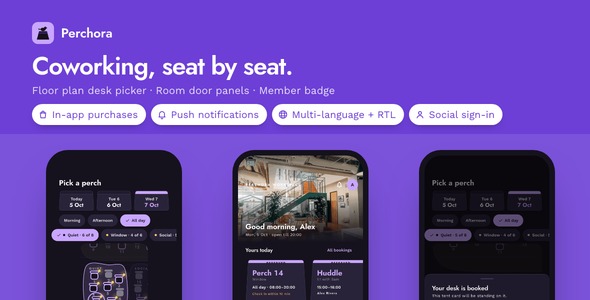
Perchora gives one coworking space a member app where the floor plan is the booking form: tap a chair on the Perch Map to hold a desk, read each meeting room off its door panel and book the gap it shows, and check in with a lanyard badge that only counts the days a pass was used. 20 screens in dark and light, three languages, a Laravel admin panel for the front desk and a product page already in Perchora’s colors.
Demo Instructions
The Live Preview starts on a hub with four doors, described further down under Walk the whole space before you buy. Pick Mobile app and the sign-in form is already filled with the demo member; on the bundled sample space any email and password get through, empty fields included. Demo mode is on from the first launch: Today shows a desk already held for the morning, the Perch Map, the door panels, the badge and the bookings all run on sample data, and a switch in Settings moves the sample day to the afternoon so you can watch the panels change.
- Member sign-in inside the app — Email: demo@perchora.app · Password: demo1234
- Front desk admin panel, once backend/ is installed on your own machine — Email: admin@perchora.test · Password: password
What the front desk gets on day one
- The booking rules are written once and enforced twice: availability, free gaps, passes and check-in are four small engines in Dart, and the Laravel server applies the same rules under a row lock, so a second claim on a desk or a slot is refused on both sides. 99 app tests pass; the server adds 122 of its own.
- Every sign-in, store and phone service is already wired: Google and Apple sign-in, in-app purchases, push, analytics and crash reports, biometric lock, update prompts, three languages, sharing and remote pictures each sit behind one interface and one config file. The Pro unlock opens every past month of the sign-in sheet; a push from the panel can land a member on Today, the map, the rooms, the badge or their bookings.
- The space is run from a panel, not from code:
backend/carries zones, desks with their positions on the plan, rooms and booths, events, bookings, passes and check-ins, and staff activate a pass, cancel a booking or sign a member out from it;landing/is the product page for the app, already in Perchora’s colors and type.
Nine things you will not have to build
- Sign in with Google and Apple: a member taps one button and the id token becomes a session on the included server; only the providers you give client ids for show on the sign-in screen.
- In-app purchases and a paywall: Perchora Pro is an App Store and Play product with the store’s own price on the paywall, one-tap restore, and an unlock that holds when the phone is offline.
- Push notifications: the panel’s Send notification page reaches every install now or at a time you set, and a route key opens Today, the map, the rooms, the badge or the bookings; the permission is asked from Settings, not at launch.
- Analytics and crash reports: which screens members open and which errors they hit, recorded only after the consent switch in Settings is on.
- Face ID / Touch ID / fingerprint lock: a member can lock Perchora on launch from Settings; a phone with nothing enrolled simply hides the switch.
- Three languages with RTL: English, Spanish and Arabic cover every door panel, tent card and settings row; a fourth language is one more file, and the server answers errors in the member’s language.
- Update prompts: publish a row on the panel’s App updates page and members see a gentle or a required update prompt with your store links from the moment the row goes live.
- Share sheet: a booking’s tent card and a month of the sign-in sheet go out as text through the system share sheet, anchored correctly on iPad.
- Remote images: zone and room photos come from the pictures your server stores or from bundled files, with a placeholder while loading and a fallback when a URL fails.
Walk the whole space before you buy
The Live Preview is more than the phone: it starts on a hub with four doors, and an All demos link on each one brings you back to the hub.
- Mobile app: Perchora itself, running in the browser inside a phone frame on the sample space of four zones, 26 desks, three rooms and three booths.
- Documentation: the 40-chapter HTML manual, the very file in the download, opened in a new tab.
- Admin panel: a read-only snapshot of the Filament panel taken from a live install: the dashboard, each sidebar page, and a desk booking open in its edit form.
- Landing page: the product page from
landing/, served exactly as it ships.
The full source code is included with every license type, Regular and Extended alike.
Four screens a member will recognize
- The Perch Map: a drawn floor plan of the space with a chair wherever a desk really stands; free desks have their lamp on, taken ones are gray, and your own carries a tiny tent card. Tap a zone to zoom in, tap a chair to hold it for the morning, the afternoon or the day.
- Door panels and free gaps: every meeting room and phone booth is a door panel with a status light and a plain sentence such as Free until 14:00; open one and its free gaps are listed, then pick 30 minutes, an hour or two and book the gap.
- The lanyard badge: the member’s badge hangs below its lanyard until they tap I’m here, then slides up into the clip and shows a four-letter door code; a day pass counts down on the spot, and the sign-in sheet below totals the hours by month.
- Tent card confirmations: every reservation is a folded tent card with RESERVED on its crease, and Today stands the day’s cards in a row like cards on a desk.
Around them sit the everyday screens: onboarding, sign-in, sign-up and the code screen, plans with a request flow, bookings split into upcoming and past, booking detail, notifications, the space’s hours and house rules, settings, about and the Pro screen.
Landing page included
The landing/ folder is a one-page product website for Perchora: a hero with two phone mock-ups, three feature tiles, a gallery of the screens, an FAQ and store buttons, set in the same colors and typefaces as the app. Edit the copy and the store links, then serve it from any static host alongside the app’s listing.
Laravel back end included
backend/ is a Laravel API with a Filament admin panel: member accounts, the space’s zones, desks with their floor-plan positions, rooms, booths and events, members’ desk and room bookings, passes and check-ins, a read-only floor plan page, opening hours and booking rules in settings, social sign-in exchange, an App updates page, Send notification now or later, Push history, a Pictures page and a Docker compose file. Bookings are taken under a lock and a second claim on the same desk or slot is refused, desks nobody claims are released on a schedule, and door codes and days used are worked out by the server. Point the app at it with one --dart-define=API_BASE_URL and sign-in, bookings, passes and check-ins all go through it. It needs PHP 8.4 or Docker.
For the developer who inherits it
- GetX, one layer at a time: a view, its controller,
SpaceService, and a repository interface with a sample implementation and a Laravel one; a screen never knows which is behind it. - Four pure Dart engines: availability, free gaps, passes and check-in, each tested on its own and matching the server’s front-desk rules line for line.
- Every key in one place: product ids, client ids and the on/off switches live in
feature_config.dart, and no screen holds configuration of its own. - Your own API is one class away: implement the repository interface and the floor plan, the door panels and the badge read from it unchanged.
- One color file for the whole brand: the app, the launcher icon and the landing page all draw from the same palette file.
What you get: the complete Flutter source with its nine built-in integrations, the Laravel back end and Filament admin panel, the landing page, a README, an offline HTML manual of 40 chapters with 15 figures, the sample space, dark and light themes, and 14 licensed photographs of desks, rooms and lounges.
AI disclosure
AI-assisted tools were used to help write and review the source code and the documentation of this item. The author reviewed, tested and finalized every part before release. The 14 photographs are licensed Pexels stock, each listed with its photographer in assets/images/space/LICENSES.txt. Perchora has no AI feature of its own at run time.
Notes
Perchora is built for a single space with a single front desk. Plans are paid for at the desk: the app sends a request and staff activate it from the panel, and the manual marks the spot where a payment provider would go. The four-letter door code is shown to the member for staff to read and is not tied to an electronic lock. The code screen after sign-up takes any six digits until an SMS or email service is connected.
Until a server address is set, the app works on the sample space it ships with; the included back end is what you deploy when the space goes live. The photographs are stock from Pexels and listed in LICENSES.txt, meant to be swapped for pictures of your own space. Design files for Figma or Sketch are not part of this item; the interface lives in the Dart source.
Third-party services and external costs: Google Sign-In, Sign in with Apple and push notifications only work with your own paid developer accounts and services (an Apple Developer Program membership, a Google Play Console account, a Firebase project), and so do analytics, in-app purchases and publishing to the stores. Hosting for the back end, a payment provider or an SMS service are separate services too. All of them bill you directly and are not included in the purchase price.
| Author | coderqh |
|---|---|
| Price | $79 |
| Sales | 0 |
| Rating | 0 (0) |
| Published | Oct 9, 2026 |
| Last Update | Oct 9, 2026 |
| Compatible Software | Flutter 3.x |
| Mobile Files Included | Dart, YAML, JavaScript JSON, .kotlin, .swift, JavaScript JS, CSS, PHP, HTML |
Categories
Tags
External listing. code.market does not sell this product and does not process payment for it. Pricing, payment, delivery, licensing, refunds, and support are handled by the third-party merchant on its own website. We may earn an affiliate commission from a referral. Details.
Products of the Week.
Submit🥇

Perceptle
Perceptle is a daily browser-based game that challenges you to test your sensory intuition through five quick estimation and rhythm-based rounds.
Other · 1 views · 0 clicksOther · Week 47 · 1 views · 0 clicks
🥈

Free LinkedIn Likes From Real
Get free LinkedIn likes on your posts from real members who react by hand. No
SaaS · 124 views · 2 clicksSaaS · Week 47 · 124 views · 2 clicks
🥉

STOP GUESSING WHAT TO POST
AI that learns your brand voice and builds a month of consistent, on-brand social content: carousels, posts and hooks that sound like you, not like everyone else's AI.
SaaS · 7,686 views · 71 clicksSaaS · Week 47 · 7,686 views · 71 clicks
#4

aaas.market
407 reliable micro tools for solo founders, marketers and creators. They work in your browser
SaaS · 122 views · 0 clicksSaaS · Week 47 · 122 views · 0 clicks