
Peptidly | Peptide Dose Calculator - UIKit
Description
Peptidly – Peptide Dose Calculator iOS App Template (UIKit)
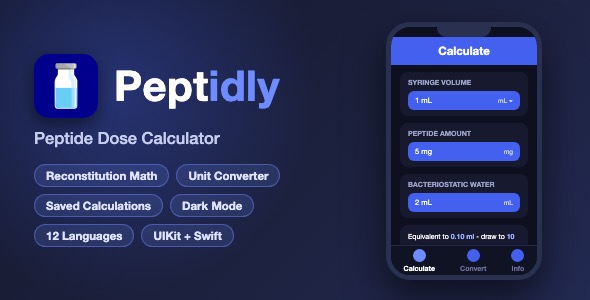
Peptidly is a complete, ready-to-publish iOS app template for peptide reconstitution and dose calculations. It is 100% offline – no server, no login, no API keys. Enter the vial size, bacteriostatic water and desired dose, and the app computes the exact draw-to amount in syringe units, the number of doses per vial, and a visual syringe + vial progress readout.
Demo Instructions
- This app is fully offline. There is NO login, NO demo account and NO demo credentials – simply build and run in Xcode and the app works immediately.
- On first launch an onboarding intro is shown. Tap “Skip” or complete the pages to reach the main app.
- Calculator tab: pick a syringe volume (0.3 mL, 0.5 mL, 1 mL or custom), enter the peptide amount in mg, pick the bacteriostatic water in mL, pick the desired dose in mcg, then tap Calculate to see the result and syringe visual.
- Convert tab: enter any microgram amount to instantly convert it to milliliters, milligrams and microliters.
- Info tab: calculation sources, medical disclaimer and step-by-step instructions, with an in-app language switcher (flag button in the header).
Everything the App Does
- Onboarding intro flow with multiple pages, Skip and Back buttons, remembered completion flag
- Peptide reconstitution calculator (vial mg, bacteriostatic water mL, desired dose mcg)
- Syringe volume picker: 0.3 mL, 0.5 mL, 1.0 mL plus custom amounts
- Peptide amount picker: 5 mg, 10 mg, 15 mg plus custom amounts
- Bacteriostatic water picker: 1, 2, 3, 5 mL plus custom amounts
- Desired dose picker in mcg plus custom amount input
- Result text explaining the equivalent mL volume and recommended syringe sizes
- Visual syringe and vial illustration with fill level
- Progress bar ruler with tick marks showing the exact draw-to position and “ticks” count
- Total doses per vial calculation (“20 Doses”)
- Save calculation with a custom name via a bottom sheet (FittedSheets)
- “Your Calculations” saved list with edit names, revisit and delete saved calculations
- Create New / Your Calculations segmented switch with animated underline
- Collapsible Calculate and Results sections
- Reset and Clear Results buttons with input validation and toast error messages (Loaf)
- Unit converter tab: mcg to mL, mg and microliters with live results
- Info tab with scientific sources, medical disclaimer and usage instructions
- In-app language switcher: English, German, Spanish, French, Italian, Japanese, Korean, Polish, Portuguese, Vietnamese, Chinese Simplified and Chinese Traditional – no phone restart needed
- Dark mode support throughout the interface
- Custom bottom tab bar with three tabs (Calculate, Convert, Info) and selected states
- Local SQLite database (no Core Data stack needed) for saved calculations
- In-app App Store rating prompt (SKStoreReviewController, politely throttled)
- Info alert buttons on every input card explaining each field
- Portrait-only, iPhone-optimized layout with safe-area handling
Technology
- Language: Swift 5, UIKit (programmatic views + XIBs and Storyboards)
- Minimum iOS: 17.0
- IDE: Xcode 15 or newer
- Storage: SQLite via a lightweight Objective-C helper (DbHandler) with bridging header
- Architecture: Simple MVC – one view controller per tab, easy to follow
- Dependencies (CocoaPods): IQKeyboardManager, Loaf, Toast-Swift, SwiftyJSON, FittedSheets
- Localization: 12 languages built in
- Third-party services: None – 100% offline, no API keys, no accounts, no analytics SDKs
What the Buyer Gets
- Full Xcode source code of the app (Swift files, XIBs, Storyboards, asset catalog, app icon set)
- Local SQLite database file and database helper source code
- documentation.html – step-by-step setup, rebranding, theme customization and App Store submission guide with screenshots
- Screenshots folder with all app screens
- Free future updates to this template
Development Disclosure
Portions of this template’s source code were developed with AI-assisted tools. Quality assurance for this template includes:
- All code reviewed by a human developer before packaging
- Consistent MVC architecture with single-responsibility files (the main calculator logic is split into seven focused extension files, each documented in the buyer documentation)
- Verified with a clean
xcodebuildbuild of the full workspace before submission - An exceptionally detailed documentation.html: project structure file by file, a change map for every customization, coding conventions, dependency table, and a troubleshooting/FAQ section
- Tested on Simulator across light and dark mode and all 12 languages
Important Note
This is a source code template, not a compiled app. You need a Mac with Xcode installed to build, customize and publish it to the App Store. Basic Xcode knowledge (opening a project, changing the bundle identifier, running on a simulator or device) is required. The included documentation.html covers every step.
| Type | iOS App |
|---|---|
| Author | mefjudevllc |
| Price | $14 |
| Sales | 0 |
| Rating | 0 (0) |
| Published | Sep 24, 2026 |
| Last Update | Sep 24, 2026 |
| Compatible Software | Other |
| Compatible With | Swift |
| Mobile Files Included | .h |
Categories
Tags
External listing. code.market does not sell this product and does not process payment for it. Pricing, payment, delivery, licensing, refunds, and support are handled by the third-party merchant on its own website. We may earn an affiliate commission from a referral. Details.