
Pennora | Flutter Banking and Wallet App with Laravel Admin
Description
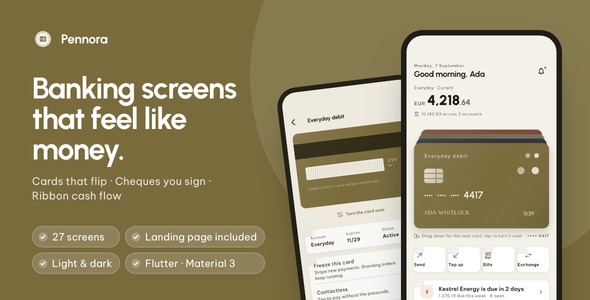
A banking app, its back office and its website, in one download. 27 finished Flutter screens with four interactions no other banking template has, a Laravel back end with an admin panel and a REST API over the same eight record types, and a one-page product website already in the app’s colors. Light and dark themes, GetX architecture, offline documentation, and one color file that re-skins every screen.

Demo Instructions: as this preview is built, the sign-in screen contacts no server, so any credentials are accepted. It is prefilled with demo@pennora.app and a password, so you can tap Sign in as it stands. The verification and passcode screens accept any six digits. There is no account to register, no API key to enter and no network needed: the app runs on the sample ledger it ships with, so every screen is populated the moment the preview opens.
Why this one
- Four screens buyers remember: a wallet you drag cards out of, a cheque you sign with a finger, cash flow drawn as ribbons, and savings counted in coins. Every other banking template ships a card carousel and a pie chart.
- Your brand in an afternoon: one color file, one text theme, one spacing file, and every screen follows. The launcher-icon script, the landing page and the admin panel each take the same hex in one line of their own — four places in total, listed in order in the documentation.
- Tested, not just screenshotted: 135 tests pass in the app and 60 in the back end, a driver walks all 27 screens in light and dark, and the app makes no network request on a cold start.
The screens people will remember
The wallet. Your cards sit in a stack with the front one lowest. Drag it down and it slides to the back; tap it and it turns over to show limits and a freeze switch. Every card face is drawn in Dart rather than exported, so restyling the deck is a few values, not a trip back to Figma.

The cheque. Type an amount and the written line fills itself in, in words, as you go. A finger signature arms the send button, and the receipt comes back stamped paid. The cheque, the stamp and the ink are all drawn.

Cash flow ribbons. Income on the left, spending on the right, ribbon width is the amount. Tap a ribbon and that category’s rows open underneath. Hand-drawn geometry, not a chart library.

The penny jar. A savings goal counted in coins instead of percent, so the screen can say you are twenty-one coins short. Coins drop into the glass when you add money.

Plus the screens a real account app needs: onboarding, sign-in, sign-up, verification code, passcode, home, cards, card detail, payee list, add payee, transfer, receipt, full ledger with search and filters, transaction receipt, statements, bills, top up, currency exchange, insights, savings, notifications, profile and settings.


Populated on day one
Out of the box the app reads a sample ledger that ships inside it: three accounts, four cards, sixty transactions, eight payees, three savings pots, six bills and eight exchange rates. No account, no key, no server and no network request on a cold start.

The Laravel back end
backend/ is a Laravel application with an admin panel and a REST API over the same eight record types the app reads: accounts, cards, transactions, transfers, payees, savings pots, bills and exchange rates. Its seeder holds the very same ledger the app ships with, value for value, so pointing the app at it changes where the data comes from and nothing else on screen. Sign-in goes through it too: POST /api/auth/login returns a token the app then carries, and a wrong password comes back as a message under the button. Eight entities, eight admin screens, 60 passing tests, and a deployment guide that covers the route through cPanel and phpMyAdmin for hosts with no terminal.

The app also runs completely without it, on the sample ledger it ships with — which is how this preview and every screenshot were made. Connecting the two is one setting: a build flag, or one line of Dart.
Landing page included
The download ships a one-page product website for your app (landing/): hero with a phone mock-up, three feature tiles, a swipeable screen gallery, a tech list, FAQ and store buttons, already set in the same colors and typefaces as the app and filled with its real screenshots. It is a single self-contained HTML file with no frameworks and no external requests, so you can put it on any static host in a minute and replace the copy, the store links and the legal links from the marked spots.

Built for developers
- Clean GetX architecture: View, Controller, Service, Model, with lazy bindings per route.
- Swap in your API without touching a screen: every screen reads one
Repositoryinterface. A mock implementation ships with the app; an HTTP implementation is included and takes over when you pass a base URL at build time. - Zero image assets: 13 painters draw the card faces, the cheque, the ribbons, the jar and the icons. Nothing to re-export when the brand changes, and nothing to license.
- Three packages beyond the SDK: get, cupertino_icons and http. Fonts are bundled, so the UI renders identically offline and on first launch.
- Every list handles loading and empty: skeleton loaders and empty states are already wired.
What you get: full Flutter source code, the Laravel back end with its admin panel and its own deployment guide, the one-page product website, a README with re-theming and API integration guides, offline HTML documentation (21 chapters, two interaction GIFs), the sample ledger in one file, and light and dark themes.

Notes
Third-party services and external costs: Pennora runs on its bundled sample ledger out of the box. Connecting it to a live back end other than the one included — a core banking API, Firebase, AWS, another REST service or a payment gateway — will involve those third-party services, which will incur their own separate costs and are not part of this item. What is inside moves no money: it does not process real payments, connect to any bank, verify anyone’s identity or fetch live exchange rates, and the rates on the exchange screen are fixed sample values. The verification and passcode screens are interface only and perform no authentication; the sign-in screen accepts anything until you point it at the included back end, and either way your own identity provider, and any compliance that comes with it, is part of the work of shipping. Regulatory compliance and licensing for any product you build with this are your responsibility. Running the back end needs PHP 8.4 or newer, or Docker, and a host with at least 2 GB of RAM to install it — 512 MB is enough to serve it once installed — and that hosting is yours. Push notifications, in-app purchase and a PDF statement writer are not wired in this version. Figma or Sketch source files are not included; the interface is defined in the Dart source.
| Type | Flutter App |
|---|---|
| Author | coderqh |
| Price | $53 |
| Sales | 1 |
| Rating | 0 (0) |
| Published | Sep 9, 2026 |
| Last Update | Sep 9, 2026 |
| Compatible Software | Flutter 3.x |
| Mobile Files Included | Dart, YAML, JavaScript JSON, JavaScript JS, CSS, PHP, HTML |
Categories
Tags
External listing. code.market does not sell this product and does not process payment for it. Pricing, payment, delivery, licensing, refunds, and support are handled by the third-party merchant on its own website. We may earn an affiliate commission from a referral. Details.