
PDF DeepSearch | Offline AI Document Intelligence and Semantic Finder Windows App
Description
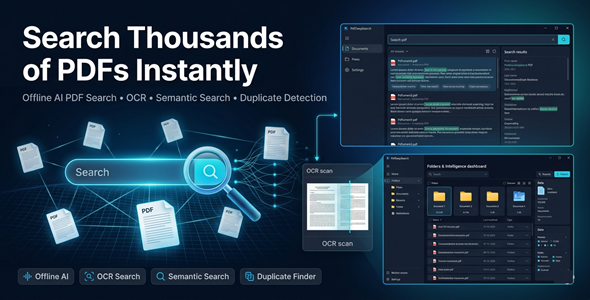
Search Thousands of PDFs in Seconds — Fully Offline
Stop wasting hours manually searching through PDF folders.
PdfDeepSearch turns your document library into a smart, searchable intelligence system.
Powered by AI, OCR, and semantic search — all running locally on your Windows PC.
No cloud. No subscriptions. No data leaks.



✅ Perfect For
✔ Researchers & students managing large document archives
✔ Lawyers & legal teams reviewing case files and contracts
✔ Marketing agencies organizing briefs, reports, and proposals
✔ Lead generation pros extracting emails, phones & URLs from PDFs
✔ Business teams handling hundreds of internal documents
✔ Anyone who works with large PDF collections daily
⚡ Features
 |
Ultra-Fast Full-Text Search Search thousands of PDFs instantly using Lucene.NET indexing. Find any word, phrase, or keyword across your entire library in seconds. |
|
Semantic AI Search Find what you mean — not just what you typed. Local ONNX embeddings understand context and intent, no internet needed. |
|
OCR for Scanned PDFs Extract text from image-based or scanned documents using Tesseract OCR. Make any PDF fully searchable instantly. |
|
Bulk Data Extraction Automatically pull emails, phone numbers, URLs, dates, currencies, and percentages. Ideal for lead generation and data mining workflows. |
|
Duplicate & Near-Duplicate Detection Instantly find and remove redundant files cluttering your archive. Keep your document library clean and organized. |
|
Document Clustering & Topic Grouping Automatically group similar documents by topic or content. Understand your document library at a glance. |
|
Side-by-Side PDF Comparison Compare two documents with a built-in text diff engine. Spot changes, additions, and differences in seconds. |
|
Advanced Filters & Saved Searches Filter by folder, date, size, page count, or custom tags. Save your most-used searches for instant recall. |
|
CSV, TXT & JSON Export Export search results and extracted data in your preferred format. Ready for spreadsheets, CRMs, or custom workflows. |
|
100% Offline & Private All processing happens on your machine — no API keys, no cloud uploads. Your documents never leave your PC. |
Why You Need This
❌ Manually opening PDFs one by one to find a single piece of information
❌ Losing hours searching through hundreds of scanned documents
❌ Paying for cloud services that upload your confidential files
❌ Missing critical data buried deep inside thousands of PDFs
❌ No way to compare, cluster, or extract data at scale
PdfDeepSearch solves all of this — in one offline desktop tool.
Index once. Search forever. Extract everything. Stay private.
How You Can Profit
✔ Extract leads (emails, phones) from PDF directories and sell to clients
✔ Offer document management services to law firms and agencies
✔ Speed up legal document review and charge premium hourly rates
✔ Automate data extraction workflows and sell as a service
✔ Save 10–20 hours per week and redirect that time to paid work
This is not just a search tool — it’s a productivity and profit machine.
⚡ Fast Results
Index your entire PDF library in minutes.
Search across thousands of documents instantly.
OCR scanned files and make them fully searchable in one click.
Extract bulk data — emails, phones, URLs — without opening a single file.
Example:
Search 10,000 PDFs and extract 500 email leads in under 5 minutes.
Simple 3-Step Setup
 |
Step 1 — Install Run the EXE file on Windows 10 or 11. |
 |
Step 2 — Index Your PDFs Point the app to your PDF folder and run the indexer. Supports thousands of files. |
 |
Step 3 — Search, Extract & Export Use full-text, semantic, or Boolean search instantly. Extract data in bulk and export to CSV, TXT, or JSON. |
Requirements
✔ Windows 10 / 11 (64-bit)
✔ .NET Desktop Runtime 8.0 or later
✔ 4 GB RAM minimum (8 GB recommended for large libraries)
✔ No internet connection required — fully offline
- Version 1.0.0 — Initial release with full feature set including full-text search, OCR, semantic AI, bulk extraction, duplicate detection, PDF comparison, and export tools.
 |
Does this require an internet connection? No. PdfDeepSearch is 100% offline. All AI, OCR, and search processing runs locally on your Windows PC. |
|
Does it support scanned PDFs? Yes. Built-in Tesseract OCR extracts text from image-based and scanned PDFs. They become fully searchable after indexing. |
|
How many PDFs can it handle? PdfDeepSearch is built for scale. It can index and search thousands of PDFs efficiently using Lucene.NET. |
|
Can I export extracted data? Yes. Export results in CSV, TXT, or JSON format. Perfect for CRMs, spreadsheets, or custom data workflows. |
|
What operating systems are supported? Windows 10 and Windows 11 (64-bit). Requires .NET Desktop Runtime 8.0 or later (free from Microsoft). |
| Type | Windows App |
|---|---|
| Author | GoGrowTools |
| Price | $29 |
| Sales | 1 |
| Rating | 0 (0) |
| Published | May 15, 2026 |
| Last Update | May 15, 2026 |
| Application Runtime | Native |
| Operating System Versions | Windows 11, Windows 10 |
Categories
Tags
External listing. code.market does not sell this product and does not process payment for it. Pricing, payment, delivery, licensing, refunds, and support are handled by the third-party merchant on its own website. We may earn an affiliate commission from a referral. Details.
Products of the Week.
Submit🥇

STOP GUESSING WHAT TO POST
AI that learns your brand voice and builds a month of consistent, on-brand social content: carousels, posts and hooks that sound like you, not like everyone else's AI.
SaaS · 7,359 views · 67 clicksSaaS · Week 46 · 7,359 views · 67 clicks
🥈

Conversational Backlinks for Busy Founders
Place Backlink Relevant Conversation for your domain across Forums and Conversations
Website · 46,642 views · 232 clicksWebsite · Week 46 · 46,642 views · 232 clicks
🥉

upvote.club
Free Social Media Engagement that Helps Boost Your Content. Upvote Club supports 19 social networks with 100+ engagement actions in one dashboard. Add links to your posts and get free engagement from real users.
SaaS · 44,581 views · 127 clicksSaaS · Week 46 · 44,581 views · 127 clicks
#4

Substack Posting API
Onboard your Agent to Substack. Write Publish on Substack via API
SaaS · 63,469 views · 206 clicksSaaS · Week 46 · 63,469 views · 206 clicks
#5

Seenshot App
Free, Fast, MacOS Screenshot app. Make Screenshot cmd+shift+2 and send it via link
Desktop App · 32,719 views · 127 clicksDesktop App · Week 46 · 32,719 views · 127 clicks
#6

Hand-Placed Backlinks $9.99 per link. Flat rate.
Buy hand-placed forum, Q-A and directory backlinks. Flat $9.99 per link, no subscriptions — you only pay for approved listings.
Website · 8,339 views · 19 clicksWebsite · Week 46 · 8,339 views · 19 clicks
#7

Free Invoice Generator - PDF Invoices in Your Browser, No Sign-Up
A free invoice maker for freelancers and small businesses: fill in the invoice, check the live preview, and download a PDF that looks exactly like it. Any currency, tax per item, three templates, no sign-up, and nothing leaves your device.
6,965 views · 29 clicksWeek 46 · 6,965 views · 29 clicks
#8

Merge PDF Files Free - Combine PDFs in Your Browser, No Upload
A free PDF merger for office workers, students, and freelancers: combine PDFs and images into one file in the browser, reorder files and pages, pick page ranges, keep bookmarks, and open password-protected PDFs. Nothing is uploaded, no sign-up, no watermark.
6,445 views · 18 clicksWeek 46 · 6,445 views · 18 clicks