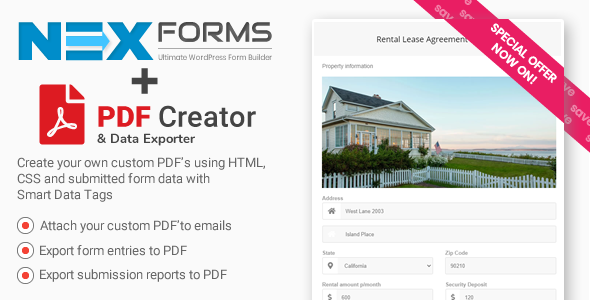
PDF Creator for NEX-Forms
Description
Have an Envato Elements subscription? Download from Elements

This add-on is also available in the NEX-Forms Add-on Bundle
PDF Creator & Export – An add-on for NEX-Forms – The Ultimate WordPress Form Builder
ADD-ON Features
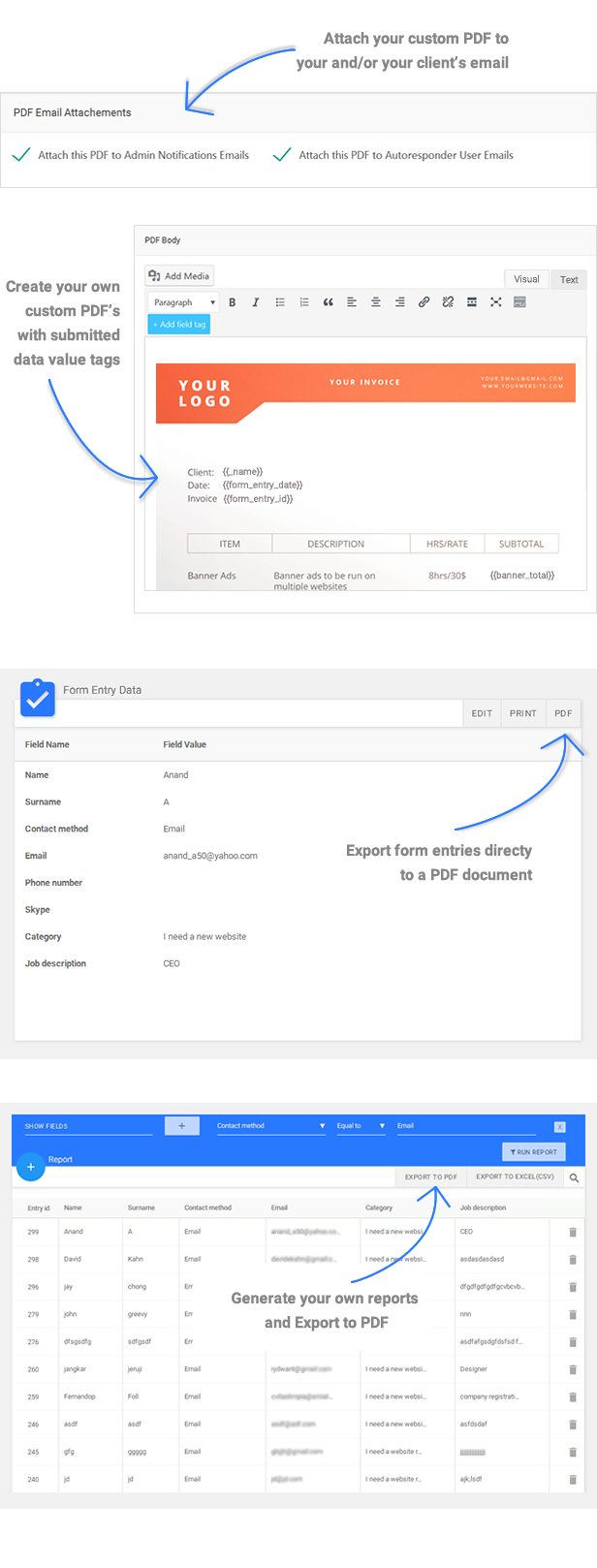
Export to PDF add-on for NEX-Forms will enable you to export form entries and form entry reports to PDF with a click of a button!
NEX-Forms Features



Change log
NEX Forms v7.5.12ENHANCED: Drag and drop grid system. Now even more responsive and easier to use! ENHANCED: Backend styling an usability. Basically refined the styling on some sections. ADDED: Multi-step breadcrumb styling section. FIXED: Multi-step alignment issue when re-calling in the backend FIXED: Multi-step color issue when re-calling in the backend for dotted counter top text. FIXED: Multi-step re-call issue for percentage bar. FIXED: Print option for submissions in the NEX-Forms Dashboard FIXED: Image Uploader Validation Issues
NEX Forms v7.5.11
NEW: New Percentage Progress Bar for Multi-Steps
NEW: Auto Advance to next step on single selection fields like radio buttons enabling quick forms for Multi-Steps
FIXED: Styling issues from various theme interference
NEX Forms v7.5.10
NEW: Use field data tags in your submission redirects as URL parameters.
UPDATED: Disabled double click on next and previous buttons.
FIX: Various 3rd party styling interference as reported.
FIX: Various 3rd party JavaScript interference as reported.
NEX Forms v7.5.9
UPDATED: NEX-Forms DB table - ENGINE MYISAM (resolves large forms saving issues)
UPDATED: NEX-Forms DB table - CHARACTER SET utf8mb4  (resolves large forms saving issues)
UPDATED: NEX-Forms DB table - COLLATION utf8mb4_unicode_ci  (resolves large forms saving issues)
FIXED: File uploader validation error messages
FIXED: Form Import 403 issue
FIXED: Various styling interference as reported
NEW: 18 NEW Built-in Templates
NEX Forms v7.5.8
FIXED: Fontawesome 5 missing icons
FIXED: Save Form Progress default field value conflict
ADDED: Using URL parameters to populate hidden fields and use in conditional logic
ADDED: Using hidden fields in conditional logic
NEX Forms v7.5.7
FIXED: File import Issue on some server configurations.
FIXED: Some Reported CSS Issues
NEX Forms v7.5.6
FIXED: Grid option hidden in backend.
FIXED: Some Reported bugs
FIXED: Font Awesome 5 icons not showing.
NEW: Extra Save Form Progress Settings
NEW: Use conditional logic to Skip to step, show/hide Entire Steps
NEX Forms v7.5.5.1
FIXED: Field Data Tags button on TinyMCE EditorNEX Forms v7.5.5
ENHANCED: Overall Back-end Usability
ENHANCED: Code Optimization on entire Back-end to increase speed and performance
ENHANCED: Front End output usability and styling
ADDED: Auto save form progress
ADDED: Super Selection Form Field Add-on Compatibility
ADDED: WPML Compatibility
FIXED: TinyMCE -> WP5.x -> Forms not saving issue
FIXED: Thumb Selection Styling Issue
NEX Forms v7.5.4
ADDED: 800+ New Font Awesome Icons. There are now 1500+ Icons to use in Fields and forms.
ADDED: New Icon Select Field compatibility
ENHANCED: Overall performance optimization
ENHANCED: Redesigned dashboard for better usability and control
ENHANCED: Reporting Section
REFINED: Overall front-end look and feel of forms
REFINED: Field Validation
FIXED: Multi-step height  issue
ENHANCED: Various field settings
NEX Forms v7.5.3
NEW: Interactive Tutorials! Building a Contact form, Using Conditional Logic, Using Math Logic, Creating Multi-step forms
NEW: Admin Tours: Every aspect of the admin side is now covered with tours to help you know exactly where and how to make use of the entire package.
NEW: Google analytics tracking for form submissions.
ENHANCED: Back-end builder overall usability, look and feel to a much more solid experience.
FIXED: Various reported styling compatibility with 3rd party plugins.
NEX Forms v7.5.2
FIXED: Some styling issues.
FIXED: Column layout for multiple checkboxes and radio buttons.
ADDED: File upload Settings for the server.
ADDED: File attachment Settings for emails.
ADDED: New Multi-step Settings.
ADDED: Extra security on form field validation.
NEX Forms v7.5.1
FIXED: More WP 5.x issues like plugin registration.
FIXED: Double image tags when using thumbnail fields
FIXED: Field Data tags in On-screen success messages
FIXED: Multi file uploader issues
FIXED: Plugin WP user rights
NEX Forms v7.5
FIXED: WP 5.0 tinyMCE Compatibility issueNEX Forms v7.4.1
NEW: Re-register license option. You can now re-register a license on any site without having to ask support to free up your license!
FIXED: Conditional Logic checkboxes issue
ENHANCED: Overall Multi-steps look and feel.
FIXED: Some styling issues
NEX Forms v7.4
ADDED: Automatic updates via WordPress Plugins Page. After this update, you can simply update from your WordPress plugins in the future. No need to go to Codecanyon Downloads making updating the plugin a breeze!NEX Forms v7.3
FIXED: Digital Signature issue
ENHANCED: Live field validation styling and overall usability
ENHANCED: Onscreen Success message styling
ENHANCED: Sticky Forms styling
ENHANCED: Popup Forms styling
ENHANCED: Thumb/Image Selection Styling and usability
ENHANCED: Overall Form design to a more modern look and feel
ENHANCED: Optimized Conditional Logic
ADDED: Compatibility for the NEW Short-code Processor Add-on
NEX Forms v7.2.3
FIXED: Chrome auto-fill for chrome version 65+
FIXED: Digital signatures in chrome
FIXED: Popup overlays
ADDED: Popups from any custom trigger. Just provide an element class name to make it a popup trigger.
ADDED: Show logged in WP User details in fields. Add the following to field values: {{nf_user_first_name}} , {{nf_user_last_name}} , {{nf_user_name}} , {{nf_user_email}} , {{nf_user_url}}
NEX Forms v7.2.1
FIXED: A few reported styling issues.
FIXED: Some JS issues.
UPDATED: Changed from the old legacy API to the new Envato API
FIXED: Digital Signatures drag and drop issue
FIXED: Digital Signatures PDF Export issue
FIXED: Digital Signatures PDF Email Attachment issue
ADDED: Width and Height settings for Digital Signatures
ADDED: Compatibility for new PayPal Pro Add-on
ADDED: Compatibility for new features in Form To POST. The feature enables form field values in POSTS or PAGES content body.
NEX Forms v7.1.5
FIXED: A few reported styling issues.
FIXED: Checkbox labels show instead of values in Interactive Forms
FIXED: Checkbox labels show instead of values in Emails
FIXED: Reported Divi theme compatibility issue returning 0 on submit.
NEX Forms v7.1.4
ADDED: Compatibility for new ADD-ON called Conditional Content Blocks
ADDED: Disabled field settings
ADDED: Thumb and multi-thumb selection size settings.
FIXED: Some Styling issues
FIXED: Submission Reporting Issues
NEX Forms v7.1.3
FIXED: 3rd party script interference.NEX Forms v7.1.2
FIXED: Saving Preferences issue
FIXED: Add media button on TinyMCE editors on Emails and PDF Creator
FIXED: Some Styling issue
FIXED: Input name change on check boxes
NEX Forms v7.1.1
FIXED: Registration issueNEX Forms v7.1
OVERALL: Basically a full redevelopment of the builder and still have backward compatibility on forms built with earlier versions.
NEW: Switch forms to Material Design
NEW: Switch forms to Bootstrap
NEW: Switch forms to jQuery UI
NEW: Switch forms to Browser Default (theme styling)
NEW: Multi-step Breadcrumb with 5 variations (Basic, Triangular, Rectangular, Dotted, Dot Counter)
NEW: Overall Form Styling
NEW: Overall back-end look and feel
NEX Forms v6.7.3
FIXED: Multiple forms on single page conditional logic
FIXED: Multiple forms on single page multi-step back button
ENHANCED: Overall performance
ENHANCED: Validation error messages styling
FIXED: Math logic JS error
FIXED: Headers already sent errors
FIXED: PHP 7.1+ compatibility issuesNEX Forms v6.1.5
FIXED: PHP 7.x compatibility issues
FIXED: PHP warnings when config.php wp_debug was set to true

ENHANCED: Optimised the plugin to half of the original size. Was 3.4mb and now only 1.7mb
NEX Forms v6.1.4
ADDED: Interactive FormsNEX Forms v6.1.3
ADDED: Compatibility for Form to Post add-on.NEX Forms v6.1.2
FIXED: Template forms saving and recall
ADDED: Popup form on Exit intent
ADDED: Time based popup - Have a form popup after a specified time
ADDED: Page scroll popup - Have a form popup when a users scrolls to a specified depth on your page
ADDED: Decimal math setting - Specify total decimal places for math logic
ADDED: {{nf_form_data}} to PDF Creator - Show data table as per in emails
ADDED: WP User levels - Specify what level of user can access NEX-Forms admin area
ADDED: Hidden fields were missing in dropdowns like mailchimp field mapping
CHANGED: License Deactivation - No longer will a license be freed up when deactivating the plugin on an unused site but from the push of a button found in the admin panel (Edit->License->Press button)
NEX Forms v6.1.1
ADDED: Multi-File Uploader.
ADDED: Max file size restriction per file and custom error message
ADDED: Max file size restriction for all files as a whole and custom error message
ADDED: Upload limit of total files allowed and custom error message
ADDED: New preferences for new validation messages
FIXED: Styling issues on a few installs.
NEX Forms v6.1
FIXED: Icons in fields
FIXED: Import/ Export forms
FIXED: Image upload settings
FIXED: Stylesheet troubleshooting option saving
ADDED: New dynamic hidden field selection
NEX Forms v6.0.9
ADDED: Integration for the new PDF Creator add-on (previously know as Export to PDF)
FIXED: Email port when using SSL + SMTP settings with PHPMailer
NEX Forms v6.0.8
ADDED: New field settings
ADDED: ADmin Color adaption
ADDED: New troubleshooting options for javascript
ADDED: New troubleshooting options for stylesheets
ADDED: GetResponse integration
ADDED: Ability to reset your license to re-use
FIXED: WP Mail method
FIXED: Mail format
FIXED: Import/Export for forms
NEX Forms v6.0.6
FIX: Activation problemNEX Forms v6.0.5
FIX: TinyMCE button in the WP editorNEX Forms v6.0.2
FIX: Various minor fixes
NEX Forms v6.1.6
Change log
NEX Forms v6.0.1FIX: Plugin Activation FIX: PHPMailer problemNEX Forms v6.0
NEW: Back end design
NEW: Conditional settings (includes advanced and simple logic switching for each rule)
NEW: Menu accessibility to easily navigate to anything for forms and global settings
NEW: Keyboard Shortcuts. For example, you can now save a form with CTRL+ALT+S and many more useful shortcuts.
NEW: Interactive backend tour
NEW: Built-in documentation
NEW: Built-in tutorial videos
NEW: Styling toolbar. Point and click to style form elements with the new styling tools.
NEW: Taskbar. Work on multiple forms at the same time!
NEW: Thumb rating Field
NEW: Smiley rating Field
NEW: Star rating field with icons and not images.
NEW: Tags input Field. Good for replacing comma-separated fields
NEW: Color picker Field.
NEW: Preset fields
NEW: Paragraph form element (HTML enabled)
NEW: Divider form element
NEW: Field replication by the user. Allows users to replicate a field to enter more of the same thing like, names of attendants, etc
NEW: Signature field (requires Digital signature for NEX-Forms) Signatures are sent in your emails and saved in your received form data.
NEW: Multi-Step settings. Switch between steps to focus your step design.
NEW: Full-screen mode.
NEW: Preferences. Setup your default field layouts, email setup, validation messages, and other overall settings.
NEW: Notification history.
NEW: Custom admin Layout. Create your own admin layouts that work best for you to create your forms.
NEW: Preset admin layouts.
NEW: Export forms. Forms are exported entirely with everything from conditional logic to email setup and not just the form HTML. This can also now be done from a Form menu.
NEW: Import Forms. Import the form entirely as per export. Not just the form HTML
NEW: Dynamic hidden fields. Now you can add server variables to hidden fields.
NEW: Overall field settings.
NEW: Maximum and minimum values for text fields and text areas
NEW: Form Validation redesign.
NEW: Grid settings
Hope that is all of it <img src="/images/smileys/happy.png" alt=" :)" title=" :)" />
NEX Forms v5.3
FIX: WordPress 4.5 compatibility
NEX Forms v5.2
FIX: NaN in email headings
FIX: Decimals with math logic problem
FIX: Emailer problems
FIX: #### Displaying after form submissions
FIX: Popup bottom position problem
FIX: Conditional logic save and recall
FIX: PayPal items save and recall
FIX: All Global settings
FIX: Various styling conflicts with some specific themes
NEW: Language settings for Image uploader
NEW: Math logic field (pre-populated math result tag)
ENHANCEMENT: Auto close sticky form when another sticky form opens
NEX Forms v5.1
FIX: The word "Array" displaying in emails
FIX: Export to CSV headings (comma problem)
FIX: Multi-step next and prev buttons
ADDED: Show/hide panels, html, paragraphs and headings with conditional logic
ADDED: Tags/value placeholders for emails
ADDED: New rich text editor for emails
ENHANCED: Namespaced AJAX calls to avoid 3rd party conflict.
NEX Forms v5
NEW: Total redesign of the backend
NEW: Total Code re-write. This optimisation of code increased load speed to under 1.5 sec!
NEW: Conditional logic. All new conditional logic enables you to have unlimited rules and each rule to have multiple conditions and actions. Logic is not set per field as in old versions but per form!
NEW: Color pickers. Easily set colors with the new color picker with new features like opacity!
NEX Forms v4.6.1
FIX: Scrolling problem
FIX: Height Problem with Multi-Steps
FIX: Array problem with CSV exports
FIX: wp_scripts error
FIX: z-index issue with color setting for spinner fields
ADDED: Ability to use placeholders in from address (reply-to address)
NEX Forms v4.6
NEW: 75 Animations for form elements!
NEW: Auto-fill fields from POST and GET
NEW: Set field Id's
NEW: Date file placeholder setting
FIX: Multi-step issues
FIX: Problems with autoresponder on some specific servers
FIX: Various small issues
NEX Forms v4.5
ADDED: New API mail method. This is a guarantied method to ensure mailing.
ADDED: New security measures throughout NEX-Forms for your ongoing full protection.
NEX Forms v4.4
READDED: WP Mail method for outgoing admin and confirmation mail
READDED: Normal PHP Mail method for outgoing admin and confirmation mail
NEW: Zero conflict admin panel. Script and styles from 3rd party plugin and themes will never again affect NEX-Forms admin panel!!!
NEW: WordPress Admin colors are adapted by NEX-Forms admin panel to fit your chosen color scheme for that personal touch.
FIXED: Emailing problems with some selective servers
NEX Forms v4.3
NEW: Import and Export Forms
NEW: PayPal Add-on compatibility
NEX Forms v4.2
FIXED: Various JavaScript issues
FIXED: Overall Styling Issues
FIXED: Recall settings for form fields
FIXED: Export to CSV
FIXED: Form saving issues
FIXED: Not able to edit field
FIXED: Not able to delete a field
FIXED: Not able to change default select option
FIXED: Admin menu display problems
FIXED: JavaScript bug with modernizer.js
ENHANCEMENT: Form field validation has been redone.
ENHANCED: Made admin interface responsive (scalable) to even use with a Tablet
ENHANCED: Overall speed and performance
ADDED: Preset fields with preset validation. Build a contact form literately under 10 seconds!
ADDED: New overall styling settings for field inputs
NEX Forms v4
ENHANCED: Overall redesign and reprogramming
NEW: Math Logic
NEW: Material Design Fields with different effects
NEW: Classic Fields
NEW: Overall Styling
NEW: Add custom CSS
NEW: Rich text editor for admin and user emails (TinyMCE)
NEW: Customize admin email
NEW: Placeholders for server data in user and admin emails
NEW: Save Forms as templates for re-use
NEW: Show/hide panel headings
NEW: Resize grid system (using bootstrap grid)
NEW: Resize field label and input containers (using bootstrap grid)
NEW: Start a new form instantly, no need to create it before you can add fields.
NEW: Live documentation from the nex-forms admin page
NEX Forms v3.4
FIXED: HTTPS problem with loading styles and scripts
FIXED: UTF-8 issue with mail methods that sent garbage characters in autoresponder emails and admin emails
FIXED: Autoresponder not retrieving saved data
ADDED: Password Field
ADDED: Date format settings for date-picker (save form or preview to see effect on field)
ADDED: Language selection for date-picker (save form or preview to see the effect on the field)
ADDED: Ability to have same name labels but different field names vie new field name setting
ENHANCED: Conditional logic. Panel/grid selection is now possible as well as single field selection for targeting
NEX Forms v3.3
NEW FEATURE: Export to PDF via new add-on
FIXED: Saving new form issue
FIXED: Saving Autoresponder issue
NEX Forms v3.2
NEW MAIN FEATURE: Sticky Forms - Add sticky paddels to hide and show forms (top, left, right and bottom) Found in widgets section.
NEW MAIN FEATURE: Thumbs Single Selection Field - Add images (ie: product) to be used to select in a form.
NEW MAIN FEATURE: Thumbs Multi Selection Field - Choose more than one thumbnail selection.
NEW MAIN FEATURE: Email Setup - Configure emailing with SMTP, PHP Mailer, WordPress Mailer or straight PHP mailing function. SMTP includes optional authentication settings
NEW MAIN FEATURE: Form entries page - View and export all form entries from all forms
NEW MAIN FEATURE: Global settings page - Configure various settings
NEW FEATURE: Add unlimited hidden fields
NEW FEATURE: Custom form action or ajax
NEW FEATURE: Custom form method
NEW FEATURE: Javascript Trouble Shooter - enqueue/dequeue scripts in case of javascript conflict with 3rd party plugins or themes.
NEW FEATURE: Styling Trouble Shooter - enqueue/dequeue styles in case of display interference from 3rd party plugins or themes.
NEW FEATURE: Admin Config - Includes settings involving nex-forms admin inclusions like widgets
NEW FEATURE: Form duplication with a single click
NEW FEATURE: Popup forms for widgets
NEW FEATURE: Popup forms button color selection (bootstrap style)
NEW FEATURE: Forms selection for view and export
NEW FEATURE: Ajax pagination for Form entries
NEW FEATURE: Ajax Column sorting for form entries
ADDED: Date Time display for forms entries - Shows date and time the form was submitted
ADDED: User field for form entries - show the username if logged in when completing a form
ADDED: User IP field for form entries - Shows IP address
ADDED: Page field for form entries - Shows where the form was submitted from
ADDED: Form name field for form entries - Shows the form name that was submitted
ADDED: Bath delete form entries
ADDED: Modal popup display for form entry data
ADDED: Tabbed selection for settings
ADDED: Ajax saving for global settings
ADDED: Thumb Size selection
ADDED: Icon selection for thumb selection
ADDED: Column selection for thumbs display
ADDED: Drag Handel to field on form canvas
FIXED: Popup displaying when tabbing on none required fields
FIXED: Overall grid-style display
ENHANCED: Optimised DOM to make use of minimum output
ENHANCED: Optimised scripts and styles for page load performance
ENHANCED: Page load - YSlow raking = 89/100 with 10+ forms on a single page!, YSlow raking = 94/100 with 1 form on a page!!
ENHANCED: Admin load speed - no external calls are made
NEX Forms v3.1
ADDED: Custom Background image up-loader for form fields and bootstrap panels
ADDED: Background settings: background-position, background-size, background-repeat
ADDED: Instant preview for form themes add-on to try before buy
ADDED: NEW HTML Field - Embed HTML into forms
ENHANCED: Back-end usability with a few styling changes
ENHANCED: Overall speed and performance and CSS.
FIXED: Multi-step forms functionality - next and previous buttons that sometimes skipped steps
FIXED: Multi-step forms styling - next and previous buttons that were vertically offline
FIXED: Auto-populate countries, USA states, and languages
FIXED: Auto-populate allowed file type extensions for file up-loaders
FIXED: Grid styling when it comes to panels, steps, and extreme nesting
FIXED: Label to top (bootstrap class col-sm-12 not col-sm-10)
FIXED: Checkbox issue only submitting one value instead of an array
FIXED: Some styling interference from themes
NEX Forms v3.0.1
FIXED: Default bootstrap styling issue regarding grids
NEX Forms v3.0
FIXED: "Form title can not be empty" bug
FIXED: Overcome styling interference from themes
FIXED: Styling issues relating to overall theme compatibility
ENHANCEMENT: Overall performance
ENHANCEMENT: Added compatibility backbone for "Form Themes for NEX-Forms" add-on
REMOVED: Splash screen...load time is fast enough now so no need for this
NOTE: Skipped to version 3 from 2.4 as NEX-Forms is in a new era now with add-on capability
NEX Forms v2.4
FIXED: Form entries CSV export path
NEX Forms v2.3
FIXED: Styling compatibility issues relating to a few reported themes
FIXED: a few JavaScript compatibility issues regarding a few themes
NEX Forms v2.2
FIXED: AJAX URL for form submissions
FIXED: a few JavaScript compatibility issues relating to a few reported themes
NEX Forms v2.1
ENHANCEMENT: Complete re-write of AJAX form submissions.
ENHANCEMENT: Form preview.
ENHANCEMENT: More code optimization to increase performance
ADDED: Multiple forms on a single page/post
NEX Forms v2.0
ENHANCEMENT: Includes a complete redesign of the back-end to increase usability
ENHANCEMENT: Overall code optimization to increase performance
ENHANCEMENT: Reduced plugin with more then a 3rd of version 1.2 making it feature-packed and yet light
ENHANCEMENT: Increased form load speed to be exponentially faster by rewriting user interface output
ADDED: Module popups for forms
ADDED: Multistep Forms and extra button control
ADDED: All new form manager to enhance user control over existing and new forms
ADDED: Field filters to ensure quick access to all fields
FIXED: Some JavaScript validation issues
FIXED: Reported back-end bugs
FIXED: Styling issues relating to overall theme compatibility
FIXED: Numerous small JS issues
FIXED: Numerous small styling issues
NEX Forms v1.2
FIXED: UTF8 Character encoding in emails
FIXED: Java-script validation issues
FIXED: Styling issues relating to ensure overall theme compatibility
ADDED: Extra control over field editing and deletion
NEX Forms v1.1
ADDED: New Feature - Conditional Logic
FIXED: Back-end styling issues
NEX Forms v1.0.6
Fixed: WordPress version 3.9 "insert into post" problem
NEX Forms v1.0.5
Fixed: Auto-responder single line placeholders
NEX Forms v1.0.4
Fixed: Styling issues in chrome/web-kit. All Cross browser styling now resolved!
NEX Forms v1.0.3
Fixed: Front end compatibility issues. forms are now not affected and do not affect any other styling on themes)
Fixed: Email autoresponder problems
Fixed: Back-end icons not showing
Added: Email Attachments: File uploads are now sent as attachments
Added: Default admin email: Specified email addresses receive a default email containing all form values as well as the attachments.
Added: Redirect to URL after form submission. Display message or redirect to a thank you page  (submission are saved and emails are sent either way)
Enhanced: User Confirmation mails to be sent to users after completing the form
Enhanced: Overall back-end details.
NEX Forms v1.0.2
Fixed: Safari compatibility issues
Fixed: Form visibility (in some cases did not display in relation to form animations)
NEX Forms v1.0.1
Fixed: Styling issues
Fixed: Check boxes (back-end)
Fixed: Multi-select (back-end)
Enhanced: Admin panel responsiveness
NEX Forms v1.0
First release

Categories
Tags
External listing. code.market does not sell this product and does not process payment for it. Pricing, payment, delivery, licensing, refunds, and support are handled by the third-party merchant on its own website. We may earn an affiliate commission from a referral. Details.
Products of the Week.
Submit#1

wanapi.app
Wan API is a developer platform for the Wan video model family. Compare Wan 3.0, Prime and Pro specifications and prices, then prepare a request in the preview playground.
Other · 8,039 views · 19 clicksOther · Week 42 · 8,039 views · 19 clicks
#2

wanapi.ai
Wan API is a developer platform for the Wan video model family. Compare Wan 3.0, Prime and Pro specifications and prices, then prepare a request in the preview playground.
Other · 7,388 views · 11 clicksOther · Week 42 · 7,388 views · 11 clicks
#3

yee.site
Your link in bio, but a real website. Start from beautiful templates and ready-made sections, then add a shop, bookings, a blog and as many pages as you need. Perfect for your link in bio, portfolio or personal site.
Other · 13,458 views · 22 clicksOther · Week 42 · 13,458 views · 22 clicks
#4

upvote.club
Free Social Media Engagement that Helps Boost Your Content. Upvote Club supports 19 social networks with 100+ engagement actions in one dashboard. Add links to your posts and get free engagement from real users.
SaaS · 34,360 views · 104 clicksSaaS · Week 42 · 34,360 views · 104 clicks
#5

Seenshot App
Free, Fast, MacOS Screenshot app. Make Screenshot cmd+shift+2 and send it via link
Desktop App · 22,852 views · 114 clicksDesktop App · Week 42 · 22,852 views · 114 clicks
#6

Conversational Backlinks for Busy Founders
Place Backlink Relevant Conversation for your domain across Forums and Conversations
Website · 34,630 views · 204 clicksWebsite · Week 42 · 34,630 views · 204 clicks
#7

Substack Posting API
Onboard your Agent to Substack. Write Publish on Substack via API
SaaS · 53,501 views · 190 clicksSaaS · Week 42 · 53,501 views · 190 clicks
#8

codester.com
SocialDesk+: Omnichannel Social Commerce & Business Management Platform This is stronger than simply “Social Commerce and Messaging” because it tells buyers this is a complete business platform, not just a messaging script. Turn Social Conversations Into Sales SocialDesk+ is a complete omnichannel social commerce and business management platform built for businesses that sell and communicate with customers through social media. Instead of switching between WhatsApp, Facebook, Instagram and TikTok, businesses can manage customer conversations, comments, products, leads, follow-ups, automation, teams and business reports from one professional workspace. And because the full source code is included, developers, agencies and entrepreneurs can customize, rebrand and launch SocialDesk+ as their own business solution or SaaS platform. 🚀 Build Your Own Social Commerce Business SocialDesk+ gives you the foundation to launch: - Your own SaaS platform - A white-label social CRM - A social-commerce management system - A customer communication platform - A business messaging solution - A custom solution for clients - A multi-business subscription platform 💬 Connect Your Customers Supported social channels include: WhatsApp • Facebook • Instagram • TikTok Bring supported conversations into one centralized workspace and help businesses respond faster without constantly switching between platforms. 🛍️ More Than a Messaging Platform SocialDesk+ combines communication with the tools businesses need to manage customer opportunities: Inbox Manage customer conversations from connected channels. Comments Monitor and respond to social-media comments. Customers & Leads Organize customer information and potential buyers. Products & Catalog Manage products and give your team quick access to product information. Follow-Ups Make sure potential customers don't get forgotten. Automation Automate repetitive customer questions and responses. AI Assistant Provide AI-assisted communication when configured. Team Management Give managers and staff access to the business workspace. Reports & Analytics Track activity using business reports and analytics. The current product listing already includes these capabilities. 🔥 Why Buyers Will Want It Launch Faster Start with an already-built business platform instead of developing the entire system from zero. Customize Everything The full source code is included, allowing developers to change branding, features, workflows and integrations. Build a SaaS Create multiple business workspaces and offer SocialDesk+ as a subscription-based service. Sell to Businesses Offer it to retailers, restaurants, service businesses, online sellers, agencies and other businesses that communicate with customers through social media. Mobile + Web + Backend This isn't just a mobile UI template. It includes: - Flutter mobile application - Python / FastAPI backend - Web interface - Administration tools - Database infrastructure - API-based architecture - SQLite / PostgreSQL support - Android and iOS project structure 💼 One Platform. Multiple Business Opportunities. For SaaS Entrepreneurs Launch your own subscription platform and allow multiple businesses to operate inside separate workspaces. For Software Agencies Customize and rebrand the platform for clients instead of building an omnichannel business system from scratch. For Developers Use the complete source code as a foundation for your own social-commerce or customer-management product. For Businesses Deploy a dedicated version for your own customer-service and social-commerce operations. 🧩 What's Included Mobile - Flutter / Dart - Android - iOS project Backend - Python - FastAPI - SQLAlchemy - Alembic Database - SQLite - PostgreSQL Web - HTML5 - CSS3 - JavaScript Deployment - Docker - Docker Compose - Production configuration Business Platform - Multi-workspace architecture - Authentication - Teams - Customers - Products - Messaging - Comments - Automation - Reports - Subscriptions - Administration The current listing also documents third-party integrations such as Meta, TikTok, Stripe, Firebase, SMTP and optional OpenAI configuration. ⚡ What Makes SocialDesk+ Different? You're not buying a simple: ❌ Chat UI ❌ WhatsApp clone ❌ Flutter template ❌ Admin dashboard ❌ Basic CRM You're getting a complete business platform foundation that can be customized, branded and commercialized. Connect. Automate. Manage. Grow. SocialDesk+ Omnichannel Social Commerce & Business Management Platform One important change I'd make to the current listing The current page starts with: “A simple guide to managing your social conversations, customers, products and business activity.”
Other · 20,873 views · 35 clicksOther · Week 42 · 20,873 views · 35 clicks
#9

sandbook.app
Sandbook reads EPUB, PDF, web pages and scanned pages aloud with Kokoro TTS, an open neural voice model that runs on your iPhone, free and offline. Choose from 41 natural voices in English, Spanish, French, Italian, Brazilian Portuguese and Hindi and follow each word as it is spoken. Try the same voices in your browser first with the free Kokoro TTS online demo.
Other · 20,785 views · 17 clicksOther · Week 42 · 20,785 views · 17 clicks