
Paywall for WooCommerce - WordPress Paywall Plugin

Description
Paywall is a WooCommerce extension that allows you to create and sell products with restricted access to content. When you install and activate the extension, you’ll be able to create and sell products with exclusive content and allow users to purchase them to “unlock” features.
Key Features:- Show specific content before purchase.
- Show specific content after purchase.
- Set global and customized expiration for the product’s access.
- Supports different types of media including YouTube URLs, Vimeo URLs, Direct links to media files, PDF URLs, Images, Audio URLs.
- Adds a new product type named Paywall.
- Different settings inside new section for paywall.
- Different shortcodes to use.
- shortcode for builders including Elementor Pro.
- Expiration terms messages.
How To Install
- Download the .zip file from your codecanyon account.
- Go to: WordPress Admin > Plugins > Add New and Upload Plugin with the file you downloaded with the Choose File button.
- Install Now and Activate the extension.

Frontend View
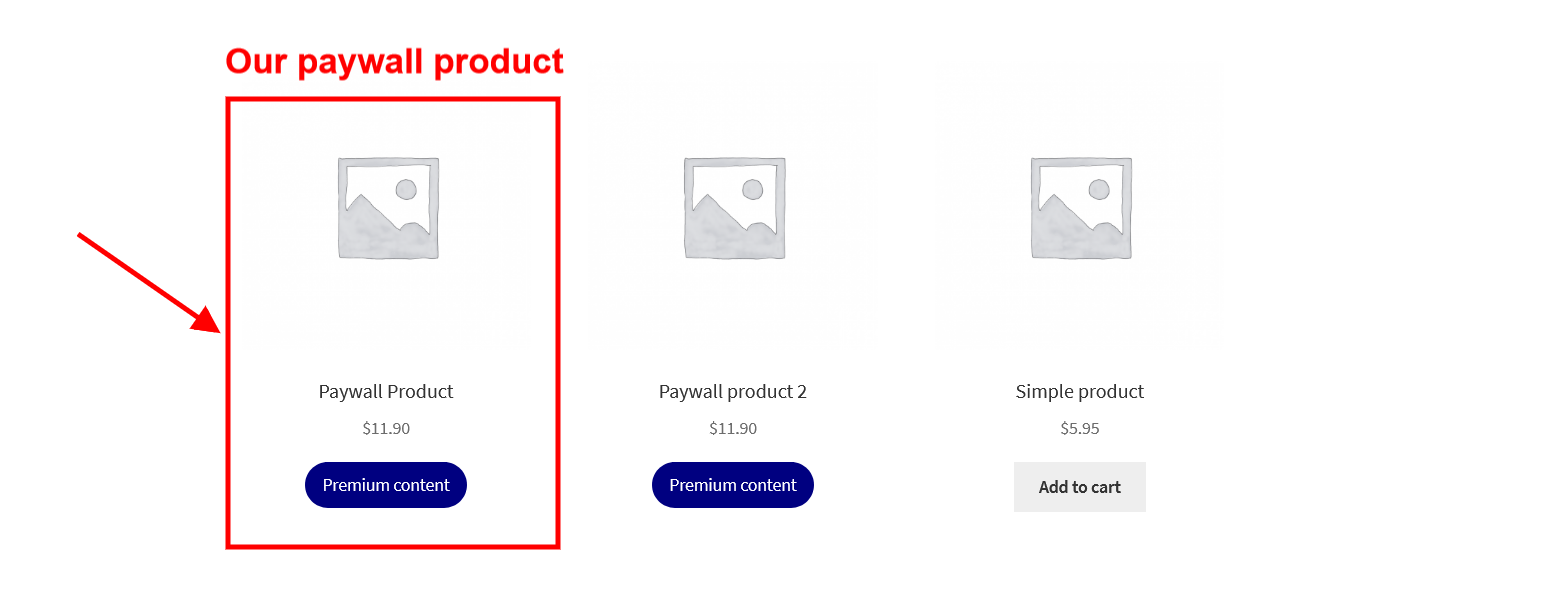
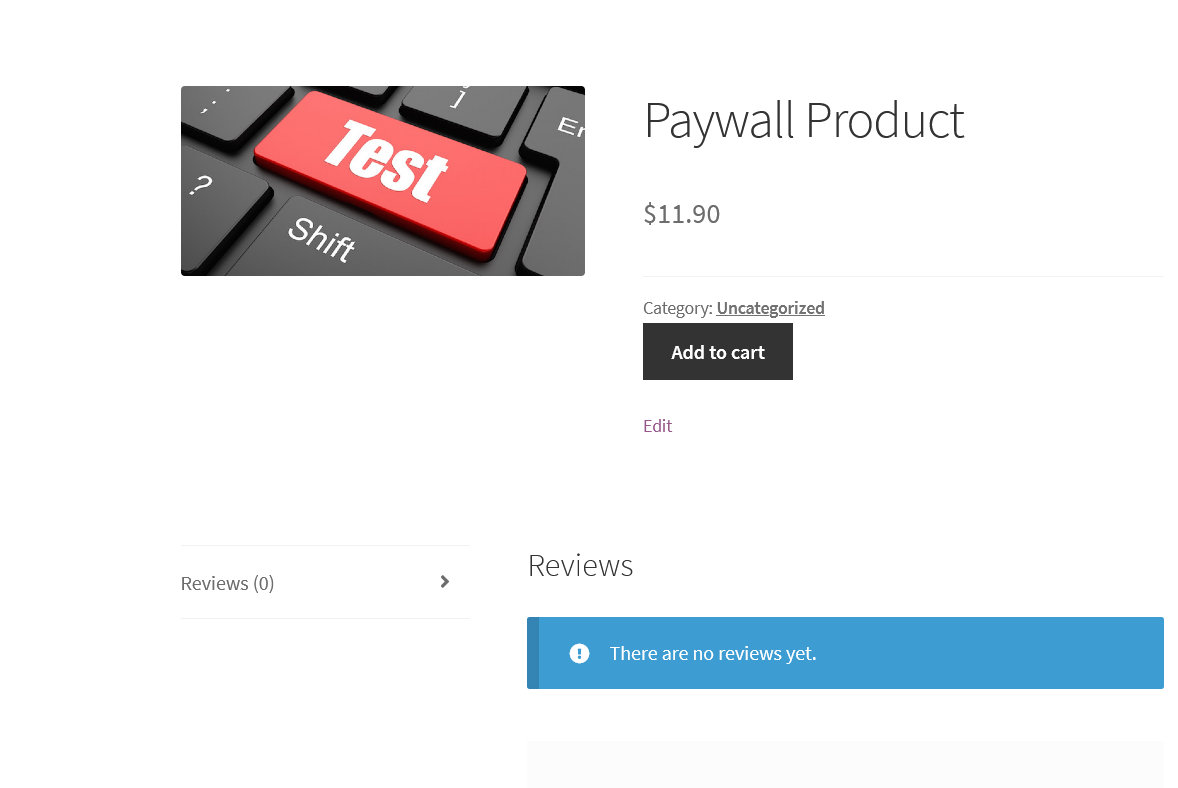
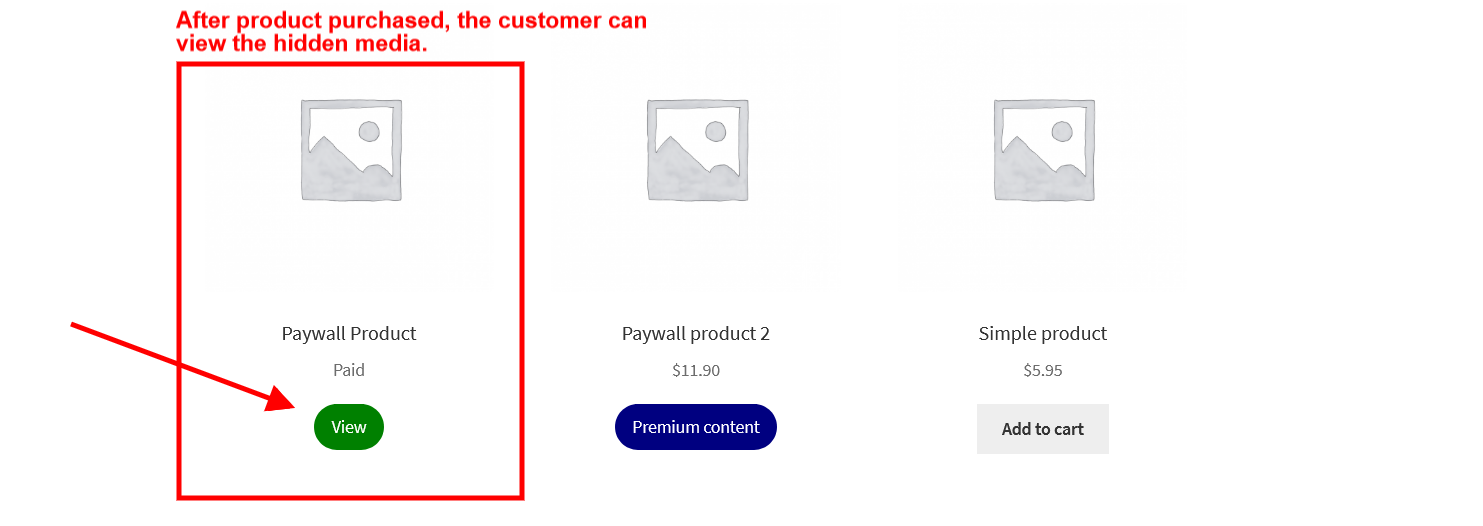
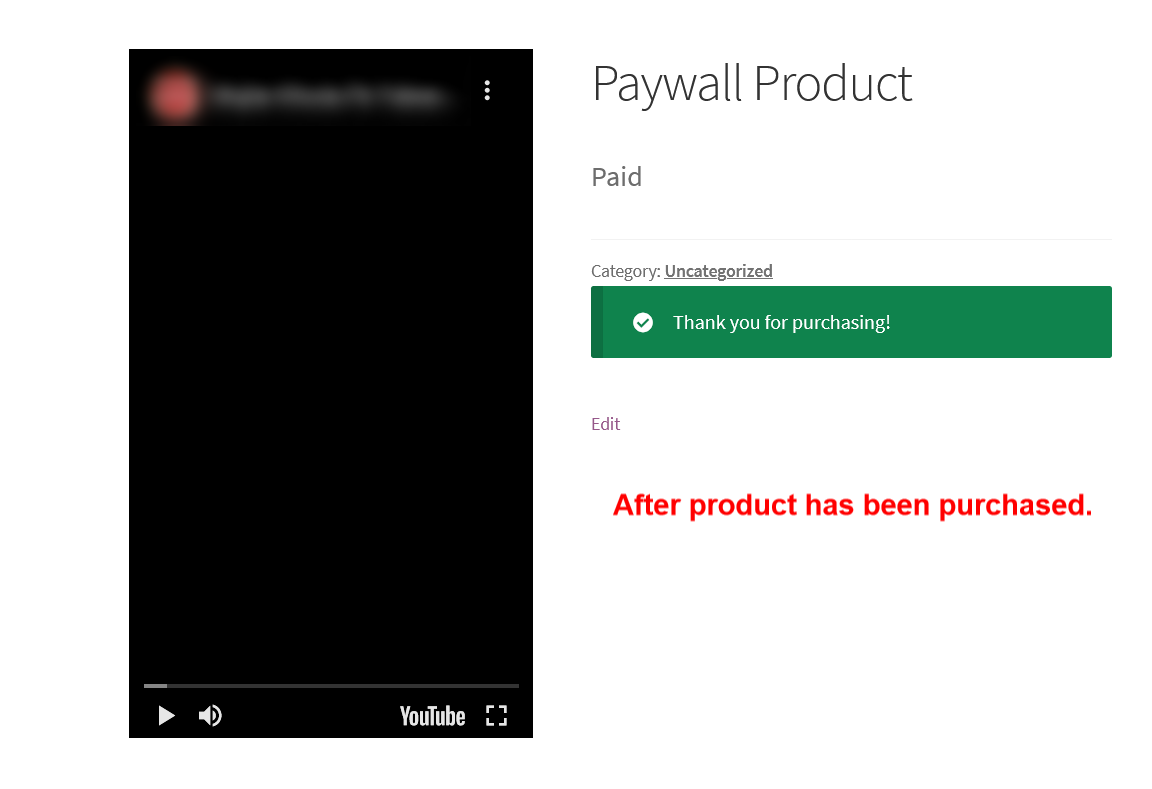
When a paywall product is published, the customers can purchase it as a normal WooCommerce product. The product could be only be purchased once by each customer. After the purchase has been expired, the customer can again purchase it. Before the purchase, the customer can only see the “visible media URL” and need to pay to view the “hidden media URL”. The access to the premium content starts right after the customer pays the price. See the below images for a better understanding:
Before the product has been purchased.
Before the product has been purchased (Single product page).
After the product has been purchased.
After the product has been purchased (Single product page).
What our customers say about the Paywall for WooCommerce plugin.

Backend Settings
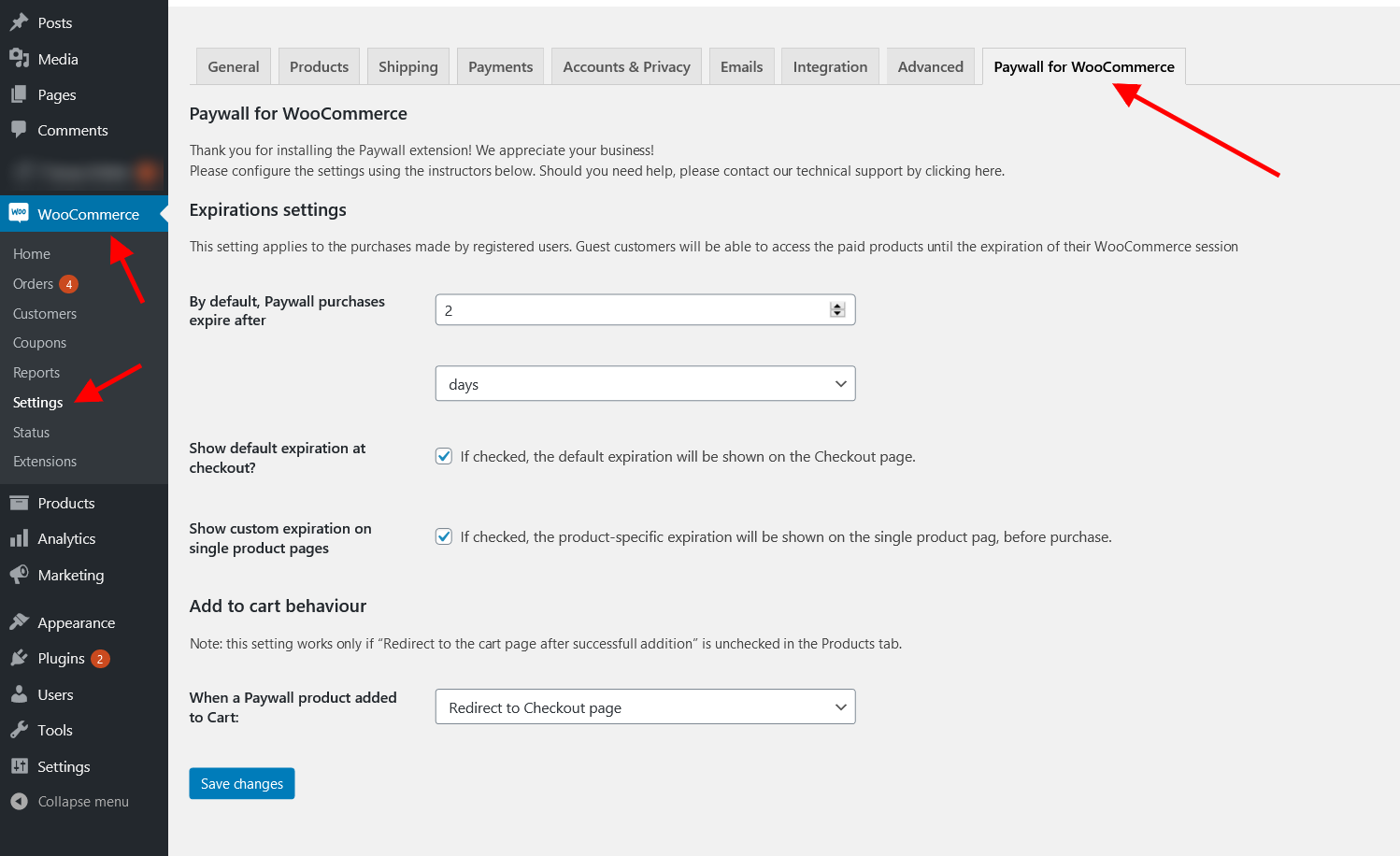
When you install the plugin, then a new section with the title “Paywall for WooCommerce” will appear inside the WooCommerce settings. This section has global settings for the plugin.
- By default, Paywall purchases expire after. -> Set the global expiration of the purchased products.
- Show default expiration at checkout. -> If checked, the default expiration will be shown on the Checkout page.
- Show custom expiration on single product pages. -> If checked, the product-specific expiration will be shown on the single product page, before purchase.
- When a Paywall product added to Cart. -> Redirect the user to the selected page after a paywall product is added to the cart.
Adding a paywall product
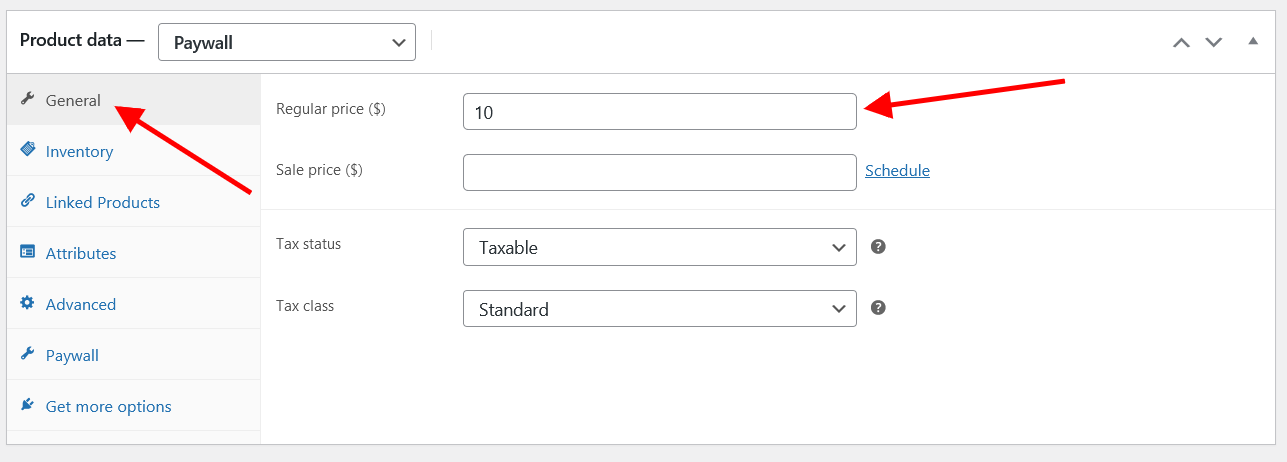
To add a paywall product, go to Products > Add new. Select the paywall option from the Product data section. Set the price of the product from the General tab. Click on the Paywall tab and set the desired options. Publish the product.
The Paywall for WooCommerce adds a new product type having some special features. You can see them in the picture below:
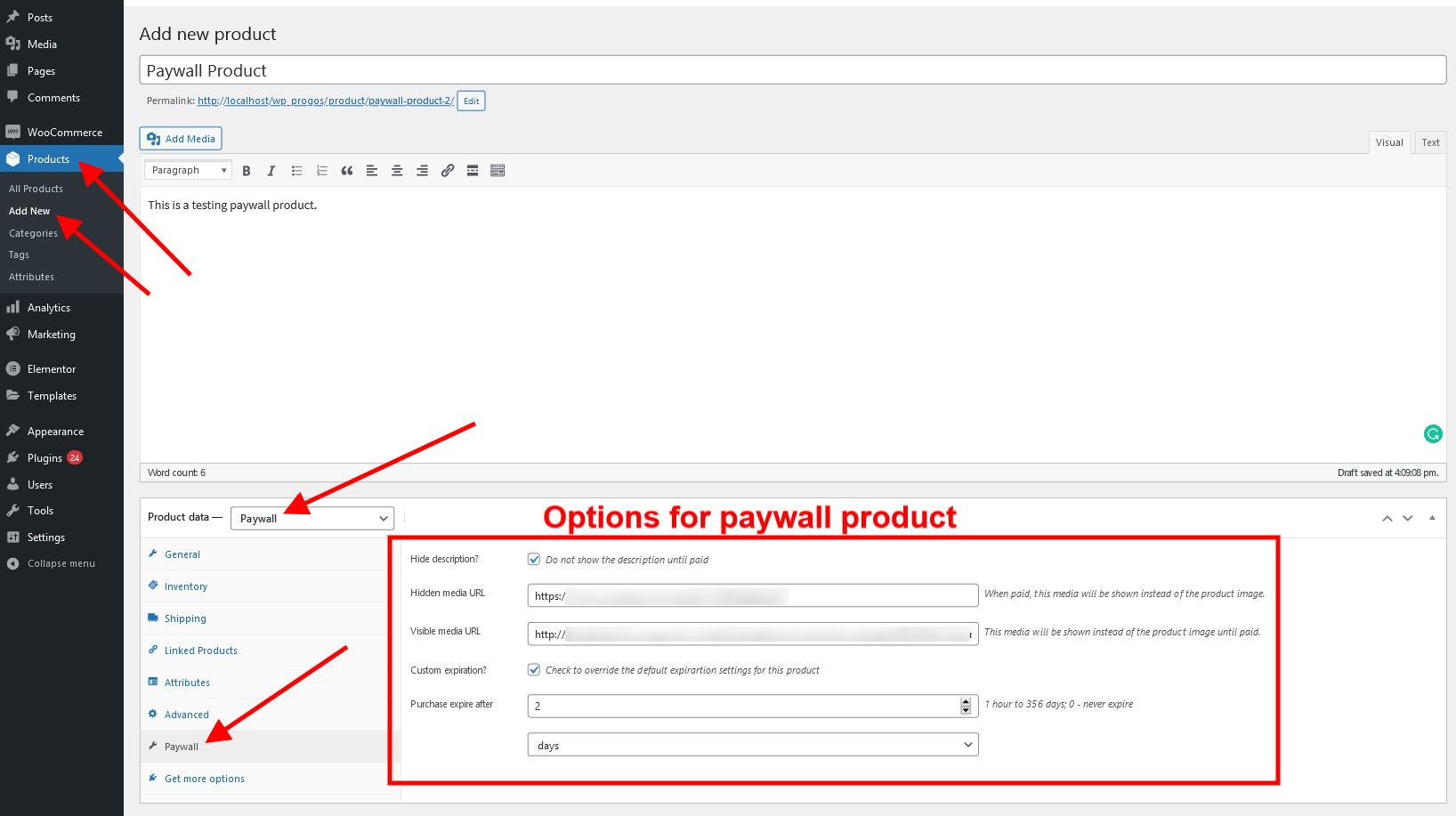
- “Hide description“: when checked, the full product description is hidden until the product is purchased. So, you can put a “teaser” text in the short description and show the full text only after the customer pays for the product.
- “Hidden media URL“: if you enter a URL here, the product image will be replaced with the media that the URL points to. It could be a video from YouTube, Vimeo, etc., a PDF file, another image – you can use practically any URL that WordPress recognizes as embeddable.
- “Visible media URL“: optionally, you can substitute the visible product image with embeddable media, too. For example:
- “visible” will show the video trailed and “hidden” – the full video;
- show the first page of the PDF in “visible” and the full PDF – in “hidden”;
- “visible” shows a low-resolution image with a watermark and “hidden” – the clean high-res photo.
- “Custom expiration”: you can specify the expiration time after which the customer will stop receiving access to the product. There are global and per-product settings.
In addition, there are special shortcodes that you can use to show or hide portions of the content.
This shortcode allows you to hide a part of the content (short or full description, for instance) and show it only with the client who purchased the product.
The content placed here is hidden until paid.
You can use the woopaywall_show_before_purchase shortcode to hide some parts of the content that have no value after the purchase:
            The content placed here is shown only until paid.

            Hey, here is a sales pitch! You definitely must buy this NOW!
Interface details
The Paywall product is based on the standard WooCommerce Simple product. Here are some differences:
- Paywall products are virtual and do not allow Stock management.
- Only one item of the product can be placed in the cart.
- AJAX adding to cart is disabled.
- Logged-in users can purchase each Paywall product only once. Then they can see the hidden content until access is expired.
- The Add to Cart buttons have different texts and different CSS classes depending on whether the product has been purchased already, or currently in the shopping cart.
Note about the hidden content
It is important to note that after the purchase, the customer can download, copy, and share the content. The Paywall extension does not offer any measures to prevent content duplication or sharing.
Request a Feature
Please contact our support team to request another feature or any customization at support@progos.org
Read our blog posts about this plugin here: Paywall
Changelog
Version 1.0.9
* Fixed - Block-based checkout issues with the paywall purchase record creation.
Version 1.0.9
* Fixed - Fatal error in the woocommerce single product image thumbnail html filter.
Version 1.0.8
* Added - Support for advance embedding.
* Fixed - Add to cart button style.
* Fixed - Missing translation.
Version 1.0.7
* Fixed - Added a check to remove paywall products from the cart if already purchased.
Version 1.0.6
* Improvement - Changed logic for hidden/visible URL checking.
Version 1.0.5
* Improvement Delete plugin data on plugin deletion rather than plugin deactivation.
Version 1.0.4
* Fixed Permission issue while updating paywall product fields.
Version 1.0.3
* Fixed PHP notice in case of no expiration for the registered user.
Version 1.0.2
* Fixed Rank Math SEO plugin sitemap generation issue.
Version 1.0.1
* Fixed hide description issue for paid users.
Version 1.0.0
* Initial Release.
| Type | WordPress Plugin |
|---|---|
| Author | Progos |
| Category | Wordpress |
| Price | $50 |
| Sales | 159 |
| Rating | 5.00 from 8 ratings |
| Published | Jun 28, 2021 |
| Last Update | Aug 12, 2026 |
| Compatible Browsers | IE9, IE10, IE11, Firefox, Safari, Opera, Chrome, Edge |
| Compatible Software | WordPress 6.8.x, WordPress 6.7.x, WordPress 6.6.x, WordPress 6.5.x, WordPress 6.4.x, WordPress 6.3.x, WordPress 6.2.x, WordPress 6.1.x, WordPress 6.0.x, WordPress 5.9.x, WordPress 5.8.x, WordPress 5.7.x, WordPress 5.6.x, WordPress 5.5.x, WordPress 5.4.x, WordPress 5.3.x, WordPress 5.2.x, WordPress 5.1.x, WordPress 5.0.x, WordPress 4.9.x |
| Compatible With | Elementor, Elementor Pro, Visual Composer, WooCommerce 9.x.x, WooCommerce 8.x.x, WooCommerce 7.x.x, WooCommerce 6.x.x, WooCommerce 5.x.x, WPBakery Page Builder, WPML |
| Source Files Included | JavaScript JS, CSS, PHP |
Categories
Tags
External listing. code.market does not sell this product and does not process payment for it. Pricing, payment, delivery, licensing, refunds, and support are handled by the third-party merchant on its own website. We may earn an affiliate commission from a referral. Details.
Products of the Week.
Submit🥇

STOP GUESSING WHAT TO POST
AI that learns your brand voice and builds a month of consistent, on-brand social content: carousels, posts and hooks that sound like you, not like everyone else's AI.
SaaS · 3,099 views · 28 clicksSaaS · Week 45 · 3,099 views · 28 clicks
🥈

Conversational Backlinks for Busy Founders
Place Backlink Relevant Conversation for your domain across Forums and Conversations
Website · 40,491 views · 216 clicksWebsite · Week 45 · 40,491 views · 216 clicks
🥉

upvote.club
Free Social Media Engagement that Helps Boost Your Content. Upvote Club supports 19 social networks with 100+ engagement actions in one dashboard. Add links to your posts and get free engagement from real users.
SaaS · 38,580 views · 110 clicksSaaS · Week 45 · 38,580 views · 110 clicks
#4

Substack Posting API
Onboard your Agent to Substack. Write Publish on Substack via API
SaaS · 57,621 views · 197 clicksSaaS · Week 45 · 57,621 views · 197 clicks
#5

Seenshot App
Free, Fast, MacOS Screenshot app. Make Screenshot cmd+shift+2 and send it via link
Desktop App · 27,054 views · 119 clicksDesktop App · Week 45 · 27,054 views · 119 clicks
#6

Hand-Placed Backlinks $9.99 per link. Flat rate.
Buy hand-placed forum, Q-A and directory backlinks. Flat $9.99 per link, no subscriptions — you only pay for approved listings.
Website · 2,991 views · 18 clicksWebsite · Week 45 · 2,991 views · 18 clicks
#7

Free Invoice Generator - PDF Invoices in Your Browser, No Sign-Up
A free invoice maker for freelancers and small businesses: fill in the invoice, check the live preview, and download a PDF that looks exactly like it. Any currency, tax per item, three templates, no sign-up, and nothing leaves your device.
1,685 views · 16 clicksWeek 45 · 1,685 views · 16 clicks
#8

Merge PDF Files Free - Combine PDFs in Your Browser, No Upload
A free PDF merger for office workers, students, and freelancers: combine PDFs and images into one file in the browser, reorder files and pages, pick page ranges, keep bookmarks, and open password-protected PDFs. Nothing is uploaded, no sign-up, no watermark.
1,579 views · 13 clicksWeek 45 · 1,579 views · 13 clicks