PayTime Flutter Payment UI Kit by Ptraxe
Description
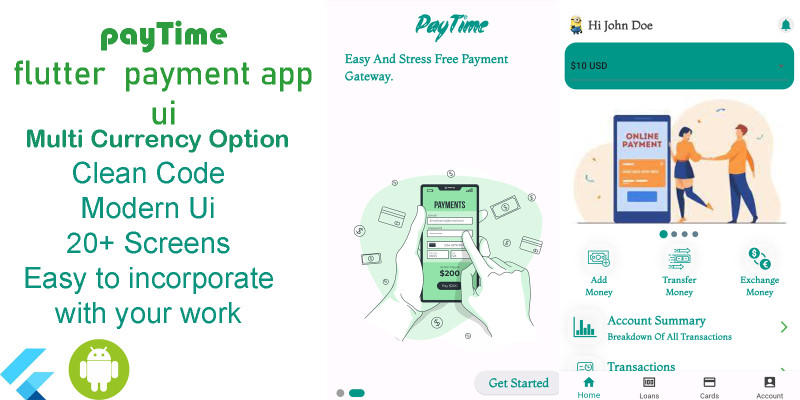
This is a Payment Template with unique user interface the UI meets the best when it comes to payments app in the 21st century. this app offers user the latest modern UI to Use. with this app template you are already half way pass your journey of building a payment app, as the codes are well structured to meet your every need.
Requirements
1. IDE 2. Flutter Sdk 3. Smooth Page Indicator 4. Google Fonts
Instructions
"PayTime" Documentation by "Ptraxe" v1.0"PayTime"
Created: 02/03/2024
By: ptraxe
Email: ptraxe@proton.me
Thank you for choosing the "PayTime" app. If you have any questions beyond the scope of this help file, please feel free to email me. Thanks so much!
Table of Contents
Flutter StructureThis Flutter app is a payment template built with Flutter and Dart code. The app follows a specific structure outlined below:
App Structure Overview
The app starts with a splash screen. Just click on the registration or login button to move to the next page.
Modification
Modify the code as you want:
Modification is as simple as ABC, thanks to the well-structured code.
Setup Instructions
To set up your Flutter app using this code:
- Clone or download the provided "PayTime" codebase from the repository.
- Open the project in your preferred Flutter development environment (e.g., Visual Studio Code, Android Studio). Ensure Flutter and Dart SDK are installed. If not, follow the official Flutter installation guide:
3. Dependencies Structure
When integrating dependencies in your Flutter app, use the pubspec.yaml file to manage dependencies. For example:
```yaml dependencies: flutter: sdk: flutter smoothPage_indicator: ^latest_version google_fonts: ^latest_version ```
Run flutter pub get to fetch the dependencies.
5. Sources and Credits
Special thanks for resources used in the app:
- Splash screen images: Storyset (
Setup Instructions
To set up your Flutter app using this code:
- Clone or download the provided "PayTime" codebase from the repository.
- Open the project in your preferred Flutter development environment (e.g., Visual Studio Code, Android Studio). Ensure Flutter and Dart SDK are installed. If not, follow the official Flutter installation guide:
Once again, thank you so much for considering this app. If you have any questions or need assistance, feel free to reach out via the provided email.
ptraxe
Link to demo apk https://mega.nz/file/4mskFYzQ#...
| Author | ptraxe |
|---|---|
| Category | App Templates / Flutter / UI Kits |
| Price | $18 |
| Extended License | $54 |
| Likes | 4 |
| First Release | Mar 2, 2024 |
| Last Update | Mar 2, 2024 |
| Files included | .apk, .dat, .xml |
| Operating systems | Android 9.0, Android 10.0, Android 11.0, Android 12.0 |
Categories
Tags
External listing. code.market does not sell this product and does not process payment for it. Pricing, payment, delivery, licensing, refunds, and support are handled by the third-party merchant on its own website. We may earn an affiliate commission from a referral. Details.
Products of the Week.
Submit🥇

STOP GUESSING WHAT TO POST
AI that learns your brand voice and builds a month of consistent, on-brand social content: carousels, posts and hooks that sound like you, not like everyone else's AI.
SaaS · 3,951 views · 35 clicksSaaS · Week 45 · 3,951 views · 35 clicks
🥈

Conversational Backlinks for Busy Founders
Place Backlink Relevant Conversation for your domain across Forums and Conversations
Website · 41,595 views · 222 clicksWebsite · Week 45 · 41,595 views · 222 clicks
🥉

upvote.club
Free Social Media Engagement that Helps Boost Your Content. Upvote Club supports 19 social networks with 100+ engagement actions in one dashboard. Add links to your posts and get free engagement from real users.
SaaS · 39,624 views · 114 clicksSaaS · Week 45 · 39,624 views · 114 clicks
#4

Substack Posting API
Onboard your Agent to Substack. Write Publish on Substack via API
SaaS · 58,654 views · 198 clicksSaaS · Week 45 · 58,654 views · 198 clicks
#5

Seenshot App
Free, Fast, MacOS Screenshot app. Make Screenshot cmd+shift+2 and send it via link
Desktop App · 28,038 views · 122 clicksDesktop App · Week 45 · 28,038 views · 122 clicks
#6

Hand-Placed Backlinks $9.99 per link. Flat rate.
Buy hand-placed forum, Q-A and directory backlinks. Flat $9.99 per link, no subscriptions — you only pay for approved listings.
Website · 3,894 views · 19 clicksWebsite · Week 45 · 3,894 views · 19 clicks
#7

Free Invoice Generator - PDF Invoices in Your Browser, No Sign-Up
A free invoice maker for freelancers and small businesses: fill in the invoice, check the live preview, and download a PDF that looks exactly like it. Any currency, tax per item, three templates, no sign-up, and nothing leaves your device.
2,574 views · 17 clicksWeek 45 · 2,574 views · 17 clicks
#8

Merge PDF Files Free - Combine PDFs in Your Browser, No Upload
A free PDF merger for office workers, students, and freelancers: combine PDFs and images into one file in the browser, reorder files and pages, pick page ranges, keep bookmarks, and open password-protected PDFs. Nothing is uploaded, no sign-up, no watermark.
2,395 views · 13 clicksWeek 45 · 2,395 views · 13 clicks