
ParkFlow | Parking Reservation and Operations Management System Laravel and React Native
Description
ParkFlow | Parking Reservation and Operations Management System Laravel and React Native
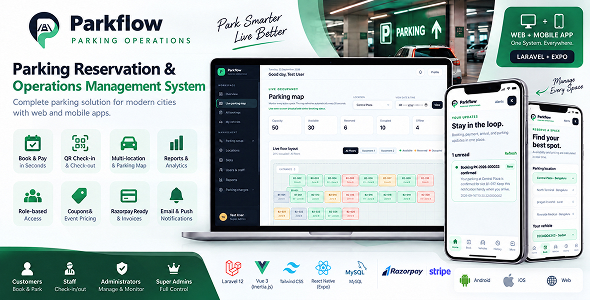
ParkFlow is a complete parking reservation and parking operations platform for parking owners, commercial buildings, hospitals, airports, offices, event venues, and multi-location parking businesses. It brings customer reservations, live availability, payments, QR access, staff operations, overstay collection, reporting, and administration into one professional product.
The package includes a responsive Laravel web application and one role-aware Expo React Native mobile application. Customers, staff, administrators, and super administrators use the same product with permission-based workflows. Both clients use the same Laravel API and server-side business rules, so bookings, inventory, pricing, payments, and operational statuses remain consistent.
Why Choose Parkflow
- Complete parking journey: Search, reserve, pay, receive a QR pass, check in, check out, collect overstay charges, and release the space.
- Multi-location support: Manage locations, cities, structures, floors, zones, and numbered parking spaces from one system.
- One product for every role: Customers, staff, administrators, and super administrators work in the same platform with role-aware access.
- Responsive web and mobile experience: Use the web panel on desktop or mobile browsers and use the Expo React Native app on Android, iOS, and web preview.
- API-first architecture: The web application and mobile application use shared Laravel API endpoints and shared validation rules.
- Production-minded foundation: Includes authentication, policies, database migrations, notifications, audit logging, queues, scheduled tasks, and automated tests.
Demo Account
Email: test@example.com
Password: password
Customer Web and Mobile Features
- Customer registration, secure login, logout, profile management, and password reset flow.
- Role-aware customer dashboard with upcoming reservations, saved vehicle count, monthly spend, quick actions, and account information.
- Save multiple vehicles, manage registration numbers, choose vehicle types, and use a vehicle while booking.
- Find parking by location, vehicle type, entry date, entry time, exit date, and exit time.
- View live vehicle-compatible spaces with floor, zone, space features, availability, and pricing information.
- Temporary space holds during the booking process to reduce double bookings.
- Server-calculated booking totals with parking rates, taxes, service fees, coupons, and event pricing.
- Booking confirmation with booking number, location, space, vehicle, schedule, totals, and payment status.
- My bookings list with booking history, upcoming reservations, status, payment information, pass, receipt, and invoice actions.
- QR parking pass for entrance validation and downloadable PDF parking pass.
- Downloadable invoice with invoice number and itemized amount breakdown.
- Cancellation flow with cutoff validation, clear refund eligibility, refund status, and no-refund messaging when payment cannot be returned.
- In-app notifications, notification read status, and device push notification registration.
Staff and Front-Desk Operations
- Operations dashboard with today arrivals, currently parked vehicles, expected departures, active queue, and completed checkout summary.
- Scan a customer QR pass with the device camera or enter a booking number, QR token, or vehicle registration.
- Validate the booking date and time before check-in or check-out and show a clear message for early, late, expired, or invalid actions.
- Check vehicles in and out with the authenticated staff member and audit trail.
- Calculate booked minutes, actual parked minutes, grace period, overstay minutes, extra charge, penalty, and final amount collected.
- Collect checkout charges using cash, UPI, or card and record a collection reference for digital payments.
- Complete checkout only after the required extra charge or penalty is collected.
- Automatically return a released space to the available inventory after successful checkout.
- Create walk-in parking bookings and assign the first compatible available space.
- Search, filter, paginate, refresh, and monitor the active operations queue.
- Use the same staff workflow from the responsive web panel or the role-aware mobile application.
Administrator and Super Administrator Features
- Dashboard with bookings, revenue, occupancy, arrivals, departures, and recent operational activity.
- Create, view, update, activate, deactivate, and remove parking locations with address, city, code, status, capacity, and booking summary.
- Create parking structures, floors, zones, and numbered slots with vehicle compatibility and operational metadata.
- Configure vehicle types, sedan or motorcycle compatibility, EV charging, accessibility, covered spaces, and maintenance or offline status.
- View a live parking map with available, reserved, occupied, and offline statuses, floor filters, structure details, and date-aware reservation overlays.
- Configure hourly, daily, flat, targeted, and event pricing rules for locations and vehicle types.
- Configure taxes, service fees, grace periods, overstay intervals, overstay rates, penalties, currency, and cancellation rules.
- Create and manage coupons with percentage or fixed discounts, minimum amount, maximum discount, validity window, usage limit, usage count, and active status.
- Create events with venue, event date, operating time, capacity, booking window, arrival rules, exit deadline, assigned locations, vehicle types, and event status.
- Manage customers, staff, administrators, roles, account status, and permissions from the Users and Staff page.
- Review all bookings with search, filters, status controls, pagination, booking details, payment status, and operational actions.
- Review booking reports with date range and location filters, search, pagination, revenue totals, booking totals, completion totals, average booking value, and CSV export.
- Edit notification templates, delivery channels, subjects, message bodies, variables, and active status.
- Review audit logs with actor, action, resource, old values, new values, timestamp, search, filters, and pagination.
- Manage application settings, parking rules, checkout rules, email delivery configuration, and payment configuration according to the enabled environment.
- Use duplicate-safe seeders and update-or-create configuration flows for repeatable local setup.
Payments, Checkout, and Communication
- Safe local payment adapter for demos and testing without charging real money.
- Payment gateway abstraction for integrating an approved live provider.
- Razorpay order and checkout foundation for web and mobile testing when the required credentials are configured.
- Server-side amount validation and payment verification before a booking becomes paid.
- Signed, rate-limited, and idempotent payment webhook handling.
- Payment records, refund records, booking payment statuses, and invoice generation.
- Checkout collection flow for additional overstay charges and penalties.
- Database notifications, email notification templates, queued delivery, and Expo push notification integration.
- Environment-based configuration for mail credentials, payment keys, webhook secrets, application URL, and mobile API URL.
Mobile Application
- One Expo React Native application for customers, staff, administrators, and super administrators.
- Role-aware navigation with compact mobile tabs and secondary management tools in a More menu.
- Branded Parkflow launch splash screen while restoring the secure session.
- Custom Parkflow logo, Android adaptive icon, monochrome icon, and web favicon.
- Responsive layouts for Android phones, iPhones, tablets, and web preview.
- Customer booking, date and time selection, vehicle management, booking history, cancellation, notifications, profile, and account screens.
- Staff QR scanning, check-in, check-out, overstay calculation, extra-charge collection, walk-in booking, and active queue screens.
- Administrator settings, parking slots, pricing, coupons, events, reports, users, and notification management screens.
- Loading, empty, validation, authentication, API failure, network failure, and offline-friendly states across live screens.
- Secure session storage with logout and session restoration support.
Technology Stack
- Backend: Laravel 12, PHP 8.2 or newer, Laravel Sanctum, Eloquent ORM, migrations, policies, services, jobs, notifications, and scheduled commands.
- Web frontend: Vue 3, Inertia.js, Vite, Tailwind CSS, responsive layouts, and Lucide icon components.
- Mobile frontend: Expo React Native with Android, iOS, and web support.
- Database: MySQL, MariaDB, PostgreSQL, or SQLite for local testing, depending on the deployment environment.
- Documents: PDF invoices, QR parking passes, and CSV report export.
- Quality: Laravel feature tests, API regression tests, native TypeScript validation, Expo web export, and Expo Doctor verification.
Requirements
- PHP 8.2 or newer with the Laravel-required PHP extensions.
- Composer 2 or newer.
- MySQL, MariaDB, PostgreSQL, or SQLite.
- Node.js and npm for frontend and mobile asset compilation.
- HTTPS, a queue worker, and a scheduler for production deployment.
- Expo CLI or EAS CLI only when building and distributing the mobile application.
- Camera permission for QR scanning and notification permission for push notifications.
Installation and Setup
- Copy the Laravel environment example to a private environment file and configure the application URL, database, mail, payment, queue, and notification values.
- Install backend dependencies with Composer and install web dependencies with npm.
- Generate the application key, configure the database, run migrations, and seed the demo parking data for local testing.
- Start the Laravel server and Vite development server, then open the web application in a modern browser.
- For mobile development, set the native environment API URL to a reachable LAN or public HTTPS API URL. Do not use localhost when testing on a physical phone.
- Run the Expo development server for Android, iOS, or web preview.
- Use the included release guide for APK creation, Play Store publishing, live deployment, payment credentials, mail credentials, push notifications, and troubleshooting.
Included Documentation
- Non-technical product and feature guide for customers, staff, and administrators.
- Step-by-step local setup and live server deployment guide.
- Environment variable and secret configuration reference.
- Payment gateway, mail, notification, webhook, and security configuration guidance.
- Role-based workflow guide for booking, check-in, checkout, overstay, refund, and cancellation.
- Android APK and Google Play Store release instructions.
- Mobile API, troubleshooting, testing, and production checklist.
- Visual documentation with screenshots of primary app screens and key user flows to help non-technical users.
- ThemeForest or Envato-ready product description and release changelog.
Production Notes
The included local payment adapter is intended for safe demonstrations and testing. Before accepting live payments, configure an approved gateway, real provider credentials, webhook signing secret, refund policy, mail provider, HTTPS, queue workers, scheduler monitoring, backups, and production database security. Google OAuth is not enabled by default and must be implemented and configured separately if required.
Disclaimer: Third-party services like Razorpay, Stripe, and Expo may charge their own separate fees for usage. These fees are not included in the purchase of this item.
Support and Customization
Mail: support@picode.in
Parkflow is structured for customization. Developers can extend payment gateways, notification channels, pricing rules, parking integrations, kiosks, partner applications, mobile workflows, and custom reports through the existing Laravel services, policies, and API foundation.
| Author | PaiTheme |
|---|---|
| Price | $43 |
| Sales | 0 |
| Rating | 0 (0) |
| Published | Oct 1, 2026 |
| Last Update | Oct 5, 2026 |
| Compatible Software | ReactJS, PHP 8.x, MySQL 8.x, CSS3, HTML5, PHP 8.4.x, Laravel, Other, Other, Other, Other, Other |
| Demo Url | https://parkflow.picode.in |
| Mobile Files Included | JavaScript JSON, JavaScript JS, CSS, PHP, HTML |
Categories
Tags
External listing. code.market does not sell this product and does not process payment for it. Pricing, payment, delivery, licensing, refunds, and support are handled by the third-party merchant on its own website. We may earn an affiliate commission from a referral. Details.
Products of the Week.
Submit🥇

STOP GUESSING WHAT TO POST
AI that learns your brand voice and builds a month of consistent, on-brand social content: carousels, posts and hooks that sound like you, not like everyone else's AI.
SaaS · 7,345 views · 67 clicksSaaS · Week 46 · 7,345 views · 67 clicks
🥈

Conversational Backlinks for Busy Founders
Place Backlink Relevant Conversation for your domain across Forums and Conversations
Website · 46,623 views · 232 clicksWebsite · Week 46 · 46,623 views · 232 clicks
🥉

upvote.club
Free Social Media Engagement that Helps Boost Your Content. Upvote Club supports 19 social networks with 100+ engagement actions in one dashboard. Add links to your posts and get free engagement from real users.
SaaS · 44,565 views · 127 clicksSaaS · Week 46 · 44,565 views · 127 clicks
#4

Substack Posting API
Onboard your Agent to Substack. Write Publish on Substack via API
SaaS · 63,450 views · 206 clicksSaaS · Week 46 · 63,450 views · 206 clicks
#5

Seenshot App
Free, Fast, MacOS Screenshot app. Make Screenshot cmd+shift+2 and send it via link
Desktop App · 32,701 views · 127 clicksDesktop App · Week 46 · 32,701 views · 127 clicks
#6

Hand-Placed Backlinks $9.99 per link. Flat rate.
Buy hand-placed forum, Q-A and directory backlinks. Flat $9.99 per link, no subscriptions — you only pay for approved listings.
Website · 8,323 views · 19 clicksWebsite · Week 46 · 8,323 views · 19 clicks
#7

Free Invoice Generator - PDF Invoices in Your Browser, No Sign-Up
A free invoice maker for freelancers and small businesses: fill in the invoice, check the live preview, and download a PDF that looks exactly like it. Any currency, tax per item, three templates, no sign-up, and nothing leaves your device.
6,950 views · 29 clicksWeek 46 · 6,950 views · 29 clicks
#8

Merge PDF Files Free - Combine PDFs in Your Browser, No Upload
A free PDF merger for office workers, students, and freelancers: combine PDFs and images into one file in the browser, reorder files and pages, pick page ranges, keep bookmarks, and open password-protected PDFs. Nothing is uploaded, no sign-up, no watermark.
6,432 views · 18 clicksWeek 46 · 6,432 views · 18 clicks