
Pantryly | Pantry & Food Expiration Tracker with Shopping List — SwiftUI Template
Description
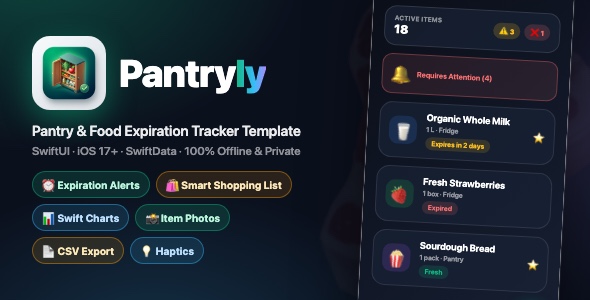
Pantryly – Pantry and Food Expiration Tracker With Shopping List, Charts, Alerts and Haptics (SwiftUI)
A complete, production-ready iOS food inventory app built entirely in SwiftUI with SwiftData persistence, Swift Charts analytics, a built-in smart shopping list, local expiration reminders, photo item images, CSV export, haptics and a premium glassmorphism dark UI. Zero dependencies, no accounts, 100% offline and privacy-first.
SwiftUI | iOS 17+ | SwiftData | Swift Charts | No Third-Party Libraries | Glassmorphism UI | Easy Re-skin
Demo Instructions – Login Credentials
Login email: none required. Login password: none required. Pantryly has no login screen, no accounts and no demo credentials because it is a 100% offline app – there is no backend and nothing to sign in to. There is simply nothing to enter: the full app is functional the moment you build it.
How to test the demo:
- Open
Pantryly.xcodeprojin Xcode 15+ - Select any iPhone simulator and press
Cmd + R– no signing, account or credentials needed for the simulator - The app launches straight into onboarding; every feature is unlocked and usable immediately, no login step exists anywhere in the app
A sample-data generator (Services/SampleData.swift) is included so you can populate 13 realistic grocery items instantly for testing and screenshots (see the included documentation).
What Pantryly Does
Pantryly helps households track groceries across the Pantry, Fridge and Freezer, see at a glance what’s fresh, expiring soon or already expired, get local reminders before food spoils, restock with one tap via a smart shopping list, and understand their kitchen with charts and a Freshness Index – all stored privately on device.
Everything the App Does
- Animated Splash Screen – glassmorphic logo card with spring scale-in, pulsing emerald and indigo ambient glows, auto-transition after 1.8s
- 3-Page Onboarding Flow – glass hero cards (“Organize Your Pantry”, “Reduce Food Waste”, “Never Miss Expirations”), animated capsule page dots, Skip / Continue / Get Started flow
- 4-Tab App Layout – Pantry, Shopping, Insights, Settings with emerald accent tint
- Inventory Summary Hero Card – live active item count plus Expiring Soon and Expired counter pills
- Smart Expiration Engine – automatic Fresh / Expiring Soon (3 days or less) / Expired statuses with color-coded icons and human-readable subtitles (“Expires tomorrow”, “Expired 2 days ago”)
- “Requires Attention” Banner – collapsible disclosure callout grouping all urgent items at the top of the list
- Search and Filters – live search across name, notes and category; 12-category filter menu; favorites-only toggle; Pantry / Fridge / Freezer segmented location filter
- 4 Sort Options – Expiration Date, Name, Recently Added, Quantity with live count header
- 12 Food Categories – Dairy, Produce, Meat and Seafood, Grains and Pasta, Snacks, Beverages, Frozen, Canned Goods, Bakery, Spices, Oils and Condiments, Other – each with its own SF Symbol icon and color
- 12 Quantity Units – pcs, kg, g, lbs, oz, L, ml, packs, cans, bottles, boxes, bags with smart singular/plural formatting
- Glassmorphic Item Cards – photo thumbnail or themed category icon badge, quantity, storage location, expiration subtitle, status pill, favorite star
- Context Menu Actions – long-press any item: Favorite, Archive / Consume, Delete (safely removes photo and cancels its reminder)
- Archive Mode – toolbar toggle between Active inventory and Archived (consumed) items with dedicated empty states
- Floating Add Button (FAB) – emerald gradient glow button with haptic feedback
- Full Add / Edit Editor – name validation, photo picker with change/remove, favorite toggle, quantity stepper, unit / category / storage pickers, purchase and expiration date pickers, quick expiration shortcuts (+3 Days, +1 Week, +1 Month, +3 Months, +1 Year), notes field, validation alerts
- Item Detail Screen – photo hero header or category gradient banner, floating favorite button, expiration status glass card, quick -1 / +1 quantity buttons, Mark as Consumed action, Add to Shopping List toggle, full info card, edit sheet, delete with confirmation
- Smart Shopping List – one-tap “Import Expired and Low Stock Items” auto-fills the list; add custom items; check off with spring animation and strikethrough
- One-Tap Restock – “Restock Checked” returns items to active inventory, resets purchase date, sets a new expiration +7 days and re-schedules reminders automatically
- Shareable Shopping List – export the list as formatted checklist text via the native share sheet
- Low-Stock Tracking – per-item low-stock threshold with automatic detection and import into the shopping list
- Insights Dashboard (Swift Charts) – 4 KPI glass metric cards (Freshness Index %, Expiring Soon, Expired Items, Total Active), Expiration Status donut chart with legend, Items by Category bar chart, Storage Breakdown bar chart
- Local Expiration Reminders – notifications at 9:00 AM before each item expires; configurable lead time (on the day, 1, 2, 3 days or 1 week before); in-app permission management; auto-scheduled on save/restock, cancelled on delete/reset
- CSV Data Export – one-tap full inventory CSV backup shared via the native share sheet
- Photo Item Images – photos saved to the app’s Documents directory, auto-cleaned on delete
- Haptic Feedback Everywhere – impact, selection, success and warning haptics via a central HapticsManager
- Settings Screen – notifications enable + reminder lead time picker, appearance mode (System / Light / Dark), CSV export, Clear Archived Items and Reset All Data with confirmation alerts
- Polished Empty States – dedicated designs for empty pantry, no search results, empty shopping list and no chart data
- SwiftData Persistence – on-device container; data survives restarts, no backend needed
- Premium Dark Glassmorphism Design – deep-slate OLED gradient background, frosted glass cards, emerald/cyan/purple gradients, spring animations throughout
- Sample Data Service – ready-made demo items generator for quick testing and screenshots
Technology
- Language: Swift 5, SwiftUI (100% native UI)
- Minimum iOS: iOS 17.0
- Data: SwiftData (PantryItem model, on-device container)
- Charts: Swift Charts (donut SectorMark + bar charts)
- Photos: PhotosUI picker + local Documents storage
- Notifications: UserNotifications (fully local expiration reminders)
- Haptics: UIKit feedback generators via HapticsManager
- Structure: Models / Views / Services (clean separation)
- Dependencies: None – zero third-party packages
- Backend: None – fully offline, privacy-first, no accounts
What the Buyer Gets
- Complete, ready-to-build Xcode project (iPhone app)
- Clean Swift source code organized in Models / Views / Services
- App icon and asset catalog
- Easy re-skin: all colors, gradients and glass card styles defined in a single design system file (
DesignSystem.swift) - Sample data generator for instant demo content
- Step-by-step HTML setup documentation with screenshots (bundle ID, icon, theming, categories, submission)
- Well-structured code, ready to extend with new categories, units or screens
Development Disclosure (AI Usage): AI-assisted tools were used to create portions of this item, including parts of the source code, parts of the written documentation, and the promotional graphics. All AI-generated content has been reviewed, tested and verified by the author, and the complete, human-curated source code is included in the download. No AI functionality is embedded in the app itself – Pantryly makes no network requests and calls no AI services at runtime.
Platform Note: Pantryly is an iOS-only template built with SwiftUI (iPhone, iOS 17.0+). It is a native Xcode project and does not include an Android version.
Note: This is native source code (a template), not a compiled binary. Basic Xcode knowledge is required to build and publish. Notifications and haptics are best tested on a real device (the simulator has limited support).
| Author | mefjudevllc |
|---|---|
| Price | $14 |
| Sales | 0 |
| Rating | 0 (0) |
| Published | Oct 26, 2026 |
| Last Update | Oct 26, 2026 |
| Compatible Software | Other |
| Compatible With | Swift |
| Mobile Files Included | .h |
Categories
Tags
External listing. code.market does not sell this product and does not process payment for it. Pricing, payment, delivery, licensing, refunds, and support are handled by the third-party merchant on its own website. We may earn an affiliate commission from a referral. Details.
Products of the Week.
Submit🥇

STOP GUESSING WHAT TO POST
AI that learns your brand voice and builds a month of consistent, on-brand social content: carousels, posts and hooks that sound like you, not like everyone else's AI.
SaaS · 7,398 views · 67 clicksSaaS · Week 46 · 7,398 views · 67 clicks
🥈

Conversational Backlinks for Busy Founders
Place Backlink Relevant Conversation for your domain across Forums and Conversations
Website · 46,699 views · 232 clicksWebsite · Week 46 · 46,699 views · 232 clicks
🥉

upvote.club
Free Social Media Engagement that Helps Boost Your Content. Upvote Club supports 19 social networks with 100+ engagement actions in one dashboard. Add links to your posts and get free engagement from real users.
SaaS · 44,634 views · 127 clicksSaaS · Week 46 · 44,634 views · 127 clicks
#4

Substack Posting API
Onboard your Agent to Substack. Write Publish on Substack via API
SaaS · 63,519 views · 206 clicksSaaS · Week 46 · 63,519 views · 206 clicks
#5

Seenshot App
Free, Fast, MacOS Screenshot app. Make Screenshot cmd+shift+2 and send it via link
Desktop App · 32,769 views · 127 clicksDesktop App · Week 46 · 32,769 views · 127 clicks
#6

Hand-Placed Backlinks $9.99 per link. Flat rate.
Buy hand-placed forum, Q-A and directory backlinks. Flat $9.99 per link, no subscriptions — you only pay for approved listings.
Website · 8,385 views · 19 clicksWebsite · Week 46 · 8,385 views · 19 clicks
#7

Free Invoice Generator - PDF Invoices in Your Browser, No Sign-Up
A free invoice maker for freelancers and small businesses: fill in the invoice, check the live preview, and download a PDF that looks exactly like it. Any currency, tax per item, three templates, no sign-up, and nothing leaves your device.
7,014 views · 29 clicksWeek 46 · 7,014 views · 29 clicks
#8

Merge PDF Files Free - Combine PDFs in Your Browser, No Upload
A free PDF merger for office workers, students, and freelancers: combine PDFs and images into one file in the browser, reorder files and pages, pick page ranges, keep bookmarks, and open password-protected PDFs. Nothing is uploaded, no sign-up, no watermark.
6,488 views · 18 clicksWeek 46 · 6,488 views · 18 clicks