
Palette Picker | Color Generator App for Windows

Description
Palette Picker | Color Generator App for Windows
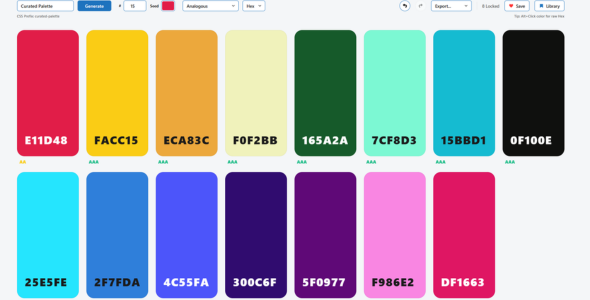
Palette Picker is a desktop color palette application for Windows, built for designers, developers, brand professionals, and UI makers who want a fast way to create, refine, save, and export professional color systems.
Generate color palettes instantly, explore harmony modes, check accessibility, copy values, save your favorite palettes, and export your work in practical formats for real design and development workflows.
Key Features
- Instant Color Palette Generation – Generate fresh color palettes quickly with a single click.
- Multiple Harmony Modes – Explore analogous, complementary, monochromatic, triadic, tetradic, split complementary, and more.
- Up to 15 Colors Per Palette – Create compact palettes or larger color systems depending on your project.
- One-Click Copy – Copy color values in Hex, RGB, and HSL formats.
- Accessibility Checks – View WCAG contrast guidance at a glance while building your palette.
- Reorder Colors – Adjust the visual balance of your palette by rearranging colors.
- Save Favorite Palettes – Build a reusable local library of your best color combinations.
- Multiple Export Options – Export palettes as CSS variables, Tailwind classes, JSON, PNG.
- Dark Mode Support – Work comfortably whatever your preference.
- Local Storage – Saved palettes are stored locally on your device.
Built For Practical Creative Workflows
Palette Picker helps reduce the need to jump between multiple browser tools when creating color systems. It brings generation, refinement, accessibility checking, saving, copying, and exporting into one focused Windows desktop app.
Whether you are designing a website, building a web app, preparing a brand concept, or creating UI assets, Palette Picker gives you a simple and reliable way to create usable color palettes.
Export Formats
- CSS Variables
- Tailwind Classes
- JSON
- PNG
- UI Snapshot
Technical Requirements
- Operating System: Windows 10 or Windows 11
- Architecture: 64-bit Windows
- Storage: 200MB available space recommended
- Memory: 4GB RAM minimum recommended
- Internet Connection: Not required for core app features
- Framework: Built with Electron. Electron desktop runtime included with the application package.
Included Files
- Palette Picker Windows application package
- User documentation
- License information
Demo Video
Watch the demo video here:
Palette Picker Demo Video
Ideal For
- Web designers
- UI designers
- Frontend developers
- Brand designers
- Template creators
- Digital product makers
Support
If you need help with Palette Picker, please use the item support section on CodeCanyon.
| Type | Windows App |
|---|---|
| Author | lukedunsmoto |
| Price | $7 |
| Sales | 0 |
| Rating | 0 (0) |
| Published | May 15, 2026 |
| Last Update | May 15, 2026 |
| Application Runtime | Native |
| Demo Url | https://cdn.lukedunsmore.com/palette-picker-demo/demo.html |
| Operating System Versions | Windows 11, Windows 10 |
| Video Preview Resolution | 1900x990 |
Categories
Tags
External listing. code.market does not sell this product and does not process payment for it. Pricing, payment, delivery, licensing, refunds, and support are handled by the third-party merchant on its own website. We may earn an affiliate commission from a referral. Details.
Products of the Week.
Submit🥇

STOP GUESSING WHAT TO POST
AI that learns your brand voice and builds a month of consistent, on-brand social content: carousels, posts and hooks that sound like you, not like everyone else's AI.
SaaS · 7,369 views · 67 clicksSaaS · Week 46 · 7,369 views · 67 clicks
🥈

Conversational Backlinks for Busy Founders
Place Backlink Relevant Conversation for your domain across Forums and Conversations
Website · 46,653 views · 232 clicksWebsite · Week 46 · 46,653 views · 232 clicks
🥉

upvote.club
Free Social Media Engagement that Helps Boost Your Content. Upvote Club supports 19 social networks with 100+ engagement actions in one dashboard. Add links to your posts and get free engagement from real users.
SaaS · 44,593 views · 127 clicksSaaS · Week 46 · 44,593 views · 127 clicks
#4

Substack Posting API
Onboard your Agent to Substack. Write Publish on Substack via API
SaaS · 63,480 views · 206 clicksSaaS · Week 46 · 63,480 views · 206 clicks
#5

Seenshot App
Free, Fast, MacOS Screenshot app. Make Screenshot cmd+shift+2 and send it via link
Desktop App · 32,730 views · 127 clicksDesktop App · Week 46 · 32,730 views · 127 clicks
#6

Hand-Placed Backlinks $9.99 per link. Flat rate.
Buy hand-placed forum, Q-A and directory backlinks. Flat $9.99 per link, no subscriptions — you only pay for approved listings.
Website · 8,349 views · 19 clicksWebsite · Week 46 · 8,349 views · 19 clicks
#7

Free Invoice Generator - PDF Invoices in Your Browser, No Sign-Up
A free invoice maker for freelancers and small businesses: fill in the invoice, check the live preview, and download a PDF that looks exactly like it. Any currency, tax per item, three templates, no sign-up, and nothing leaves your device.
6,977 views · 29 clicksWeek 46 · 6,977 views · 29 clicks
#8

Merge PDF Files Free - Combine PDFs in Your Browser, No Upload
A free PDF merger for office workers, students, and freelancers: combine PDFs and images into one file in the browser, reorder files and pages, pick page ranges, keep bookmarks, and open password-protected PDFs. Nothing is uploaded, no sign-up, no watermark.
6,458 views · 18 clicksWeek 46 · 6,458 views · 18 clicks