
Overload | Gym Workout Tracker and Strength Training Log Flutter App with Firebase
Description
A workout logger, not a workout library
Every fitness app on this marketplace is a workout library. Preset routines, hundreds of demo videos, “48+ workouts for men and women.” Nobody ships a logger.
Overload is the logger. It is built for someone who already knows what they are doing in the gym and wants to record it in one tap between sets — not to be told what to do.
It ships with zero media assets. No exercise videos, no GIFs, no photographs. That is not a shortcut; it is the entire cost and licensing risk of this category, and avoiding it is why you can publish this under your own brand without sourcing or licensing several hundred demonstration videos.
⚠️ Disclaimer: third-party services may require paid accounts or incur fees
This purchase is source code only. Overload connects to services that are not included in this item and that you set up in your own name. Some of them require a paid account, and some can charge you on an ongoing basis. Read this before you buy.
- Firebase — required. Auth and Firestore. The free Spark plan covers development and a small user base, but once your project exceeds the free tier limits Google charges you for usage on the Blaze pay-as-you-go plan. That is an ongoing cost and it is yours, not ours.
- RevenueCat — optional. Subscriptions. Free below a monthly tracked-revenue threshold, after which RevenueCat bills you based on your monthly tracked revenue. It is an ongoing cost that grows as your sales do.
- Google AdMob — optional. You must create and manage your own AdMob account — the app ships with Google’s public test ad unit IDs until you replace them with yours. Compliance with Google’s AdMob and Play ad policies is your responsibility, as are account approval, policy enforcement, payment thresholds and tax details. Approval is not guaranteed.
- Google Play Console and Apple Developer Program — required to publish. A one-time US$25 registration and a US$99/year membership respectively, at the time of writing, plus each store’s 15–30% commission on every subscription you sell.
You register for each service yourself and each provider bills you directly under its own terms; the prices are theirs to set and change. Item support covers this code, not your bills with Google, Apple or RevenueCat. A fuller breakdown is in Third-party services and costs below and in the documentation.
Try it
- Android APK — https://drive.google.com/file/d/1AX5NPse0WmPh4ERqk_dNdoS19Mgs4y_W/view?usp=sharing
- Documentation — https://devsnack.dev/products/overload/docs
No login required. The app is anonymous-first — it signs you
in on launch, so there is no demo account to type and no credentials to share.
To see it with realistic content, open Settings and use the demo
data seeder, which fills your account with about 13 weeks of plausible
training history.
What makes it different
- What you inherit: one public-domain JSON file — not hundreds of video and GIF assets with their licences.
- Media licensing risk: none, because there is no media. In a workout library, verifying it is your problem.
- Who it is for: lifters running their own programme — not beginners following a plan.
- Rebranding: one config file and one palette file. In a library product you replace the content too.
Features
️ Logging
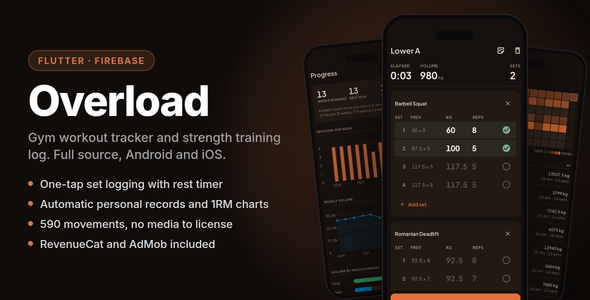
- One-tap set logging. Last session’s numbers show inline as ghost text; tapping the completion toggle on an empty row fills them in.
- Rest timer that survives backgrounding — the deadline is wall-clock, so a timer backgrounded for two minutes comes back correct, and a local notification fires if the app is suspended.
- Sessions survive force-quit. A workout in progress is always resumable.
- Warm-up, drop and failure sets; per-set and per-session notes; an optional RPE column.
- Supersets, reordering mid-workout, adding an exercise on the fly.
Personal records
- Automatic records on heaviest weight, best estimated 1RM (Epley) and session volume.
- Announced the moment they happen — not buried in a report.
Routines and exercises
- 590 exercises, searchable and filterable. Text-only and public domain.
- Custom exercises, merged into the same search as the bundled catalogue.
- Routine builder with drag reorder, supersets, folders and per-exercise targets.
- Three starter routines offered at onboarding, and obviously editable.
Progress
- Estimated 1RM over time, heaviest set, and per-session volume for any movement.
- Sessions per week, weekly volume, volume by muscle group, and a training streak.
- History with a calendar heatmap, editable past sessions, and repeat-a-workout.
- Body metrics — bodyweight and seven measurements, charted over real elapsed time.
- Plate calculator and warm-up ramp.
- CSV export of the full history.
Platform
- Offline-first. Firestore local persistence — logging works with no signal and syncs when one returns. A gym basement is the normal case, not an error state.
- Anonymous-first auth. The app signs in on launch, so there is always an account. Creating a real one links the credential and keeps the same uid, so data cannot be lost in a migration — there is no migration.
- Email/password, Google and Apple sign-in. In-app account deletion, which both stores require.
- Kilograms and pounds. Weights are always stored in kilograms; the setting changes display only.
- Light and dark themes, dark by default, plus six selectable accent colours.
For the developer
- Flutter 3.47.2, Riverpod 3, GoRouter, freezed, Firebase, fl_chart
- Feature-first structure. Widgets never touch Firestore — widget to provider to repository, one direction
-
Generated code is committed, so the project builds from a
fresh clone without anyone first discovering
build_runner - Restrictive Firestore security rules included, plus an emulator test harness and on-device integration tests that run against a real Firebase project
-
370 automated tests.
flutter analyzeclean — zero warnings, zero infos - Every hex value in one file. Every buyer-editable setting in one config file
- Subscriptions and ads both wired, both optional, both shipping with test credentials so the app runs before you configure anything
- Public documentation, not purchase-gated — devsnack.dev/products/overload/docs
Stack
- Framework — Flutter 3.47.2 / Dart 3.13.2
-
State — Riverpod 3 (
Notifier/AsyncNotifier) - Routing — GoRouter
- Models — freezed + json_serializable
- Backend — Firebase Auth and Cloud Firestore, offline persistence enabled
- Subscriptions — RevenueCat
- Ads — Google AdMob
- Charts — fl_chart
- Notifications — flutter_local_notifications (rest timer only — no FCM)
What’s included
- Full Flutter source, Android and iOS
- 590-exercise database, public domain, licence archived in the download
- Firestore security rules and index configuration
- RevenueCat and AdMob integration, shipping with test credentials
- Three starter routines as editable seed data
- Design system with hand-authored light and dark themes
- App icon and launch screen for both platforms — Android adaptive and monochrome layers included — plus the generator script that redraws them all in your colours
- A demo data seeder that fills a fresh install with 13 weeks of plausible history
- 370 automated tests
- Setup, rebranding and troubleshooting documentation
- Six months of item support
What is NOT included
Stated plainly, because a surprise here is a refund.
- No exercise videos, GIFs, images or illustrations. Text-only records. This is the defining decision of the product.
- No preset workout programmes. Three minimal starter routines are offered at onboarding and are plainly editable; there is no content library.
- No AI or automated coaching.
- No web or desktop build. Android and iOS only.
- No backend code. Firebase only — no Cloud Functions, no server to deploy.
- No trainer/client, gym management or admin roles.
- No Apple Health, Health Connect or wearable sync.
- No nutrition or calorie tracking.
- No social feed, following or sharing.
-
English only. There is no localisation layer, no
intland no ARB files. - No Firebase, RevenueCat, AdMob, Google Play or Apple Developer account. You supply your own, and some of them charge you — see Third-party services and costs below. Setup is documented step by step.
-
No design source files. The icon is a barbell drawn from
geometry by a Python script, not an Illustrator or Figma document. Change
the two colour constants and re-run it; there is nothing to open in a design
tool. An
.svgis emitted for reference, but the build does not read it.
Third-party services and costs
What you are buying is source code, and nothing else. Overload connects to services run by Google, RevenueCat and Apple. None of them is included in this purchase, none is resold here, and several of them can cost you money. You register for each one yourself, in your own name, and each provider bills you directly under its own terms. Two of them require a paid account before you can publish at all.
- Firebase (Auth + Firestore) — required. The free Spark plan is enough to build the app, evaluate it and serve a small user base. Firestore’s free tier is capped on daily reads, writes and stored data; a real audience will pass those caps, and going past them means moving to the Blaze pay-as-you-go plan, billed by Google on usage. Overload uses no Cloud Functions, so Auth and Firestore are the whole bill.
- RevenueCat — optional. Free below a monthly tracked-revenue threshold, then a paid tier charged as a percentage of the revenue it tracks. Confirm their current pricing before you rely on it.
- Google AdMob — optional. No fee — it pays out rather than charges. It does require your own approved AdMob account, and Google’s policies, payment thresholds, tax forms and approval decisions apply. Approval is not guaranteed.
- Google Play Console — required to publish on Android. A one-time registration fee, US$25 at the time of writing.
- Apple Developer Program — required to publish on iOS. An annual membership, US$99 per year at the time of writing.
- Store commission. Apple and Google each take a cut of every subscription you sell — commonly 15–30% depending on the programme you qualify for, charged before RevenueCat’s share rather than after.
Every figure above is set by its provider, not by us, and can change without notice — treat them as a starting point and check each provider’s own pricing page before you budget. Item support covers this code; it does not cover your bills. We will walk you through connecting each service, but we cannot supply the accounts, absorb their charges, or intervene in a billing or approval decision made by Google, Apple or RevenueCat.
Setup
About fifteen minutes, most of it waiting on Firebase.
- Install Flutter 3.47.2 and the Firebase CLI.
- Create a Firebase project. Enable Anonymous sign-in and create a Firestore database.
-
Run
flutterfire configureto generate your own Firebase config. -
Deploy the included security rules with
firebase deploy --only firestore:rules. flutter run.
One step a fresh clone cannot skip: Firebase configuration files are deliberately not included in the download. They carry a real project ID and API key, and shipping them would point every buyer’s app at the seller’s Firebase project. You generate your own in step 3.
Requirements
- Flutter 3.47.2 (pinned — this is what it is built and tested against)
- Android minSdk 24, target and compile SDK 37
- iOS 17.0 minimum
- JDK 17 for Android builds; Xcode for iOS builds
- A Firebase project — the free Spark tier is enough to build and evaluate; beyond its quotas Google bills you on usage
- To publish: a Google Play Console registration and/or an Apple Developer Program membership, both paid — see Third-party services and costs
Known limitations
Listed here rather than discovered later.
- English only. Localisation was considered and deliberately dropped. There is no translation layer to hook into.
- No post-workout summary screen. Finishing a workout returns you to your routines; records are announced during the session, as they happen.
- Subscriptions need your own store products. RevenueCat can only surface products that already exist in Play Console and App Store Connect — the paywall renders without them but has nothing to sell.
- No push notifications. The rest timer uses local scheduling only; there is no FCM and no server to send from.
Support
Six months of item support is included: how the item works, help with defects, and bug fixes.
- Email — devsnack26@gmail.com
- WhatsApp — +855967413911
Support does not include your Firebase, RevenueCat, AdMob or store accounts, the fees any of those services charge you, your hosting, or customisation work. We walk you through setup; we cannot supply the accounts or pay their bills.
Changelog
1.0.0 — 2026-09-07
- Initial release.
| Type | Flutter App |
|---|---|
| Author | DevSnack |
| Price | $19 |
| Sales | 0 |
| Rating | 0 (0) |
| Published | Sep 22, 2026 |
| Last Update | Sep 22, 2026 |
| Compatible Software | Flutter 3.x, Flutter 2.x, Flutter 1.x, Other |
| Mobile Files Included | Dart, YAML, .java, .kotlin, .h, .storyboard, .plist, .swift, HTML |
Categories
Tags
External listing. code.market does not sell this product and does not process payment for it. Pricing, payment, delivery, licensing, refunds, and support are handled by the third-party merchant on its own website. We may earn an affiliate commission from a referral. Details.