
Ordio - Complete Online Ordering Solution

Description
Ordio gives a business everything it needs to take and manage orders online - from a branded customer storefront through to payment, fulfilment and day-to-day order operations.
01 Customer orderingCustomers get a fast ordering experience.
Browse products, choose collection or delivery, pay and track orders.
02 Business operationsYour business gets the control centre.
Manage incoming orders, products, locations, ordering hours, payments, coupons, customers and fulfilment from one dashboard.
One business. One complete ordering system. Preview Product → Customer storefrontMake ordering simple for customers
Give customers a branded place to browse products, choose collection or delivery, pay and track their orders across mobile and desktop screens.
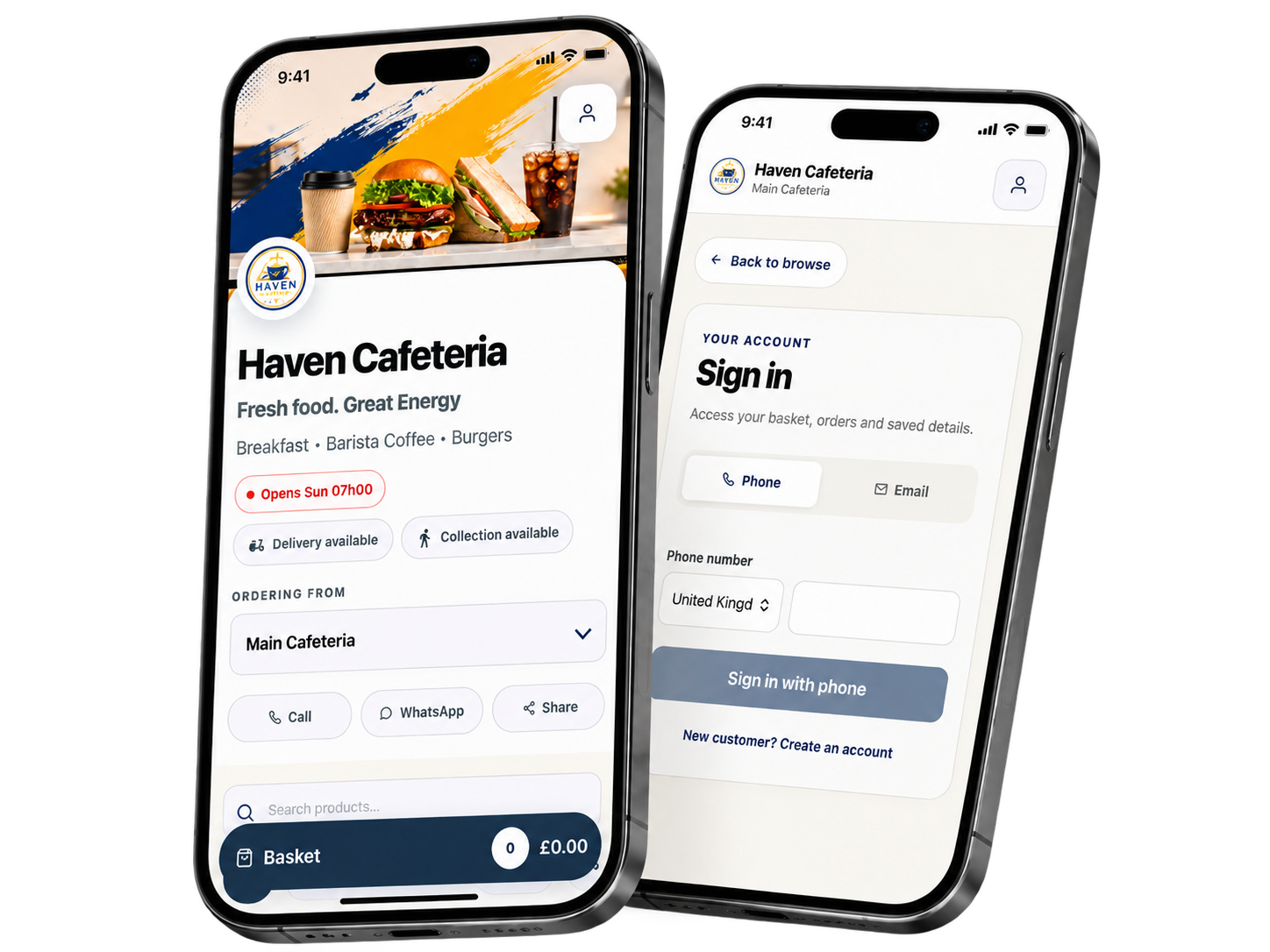 Business dashboard
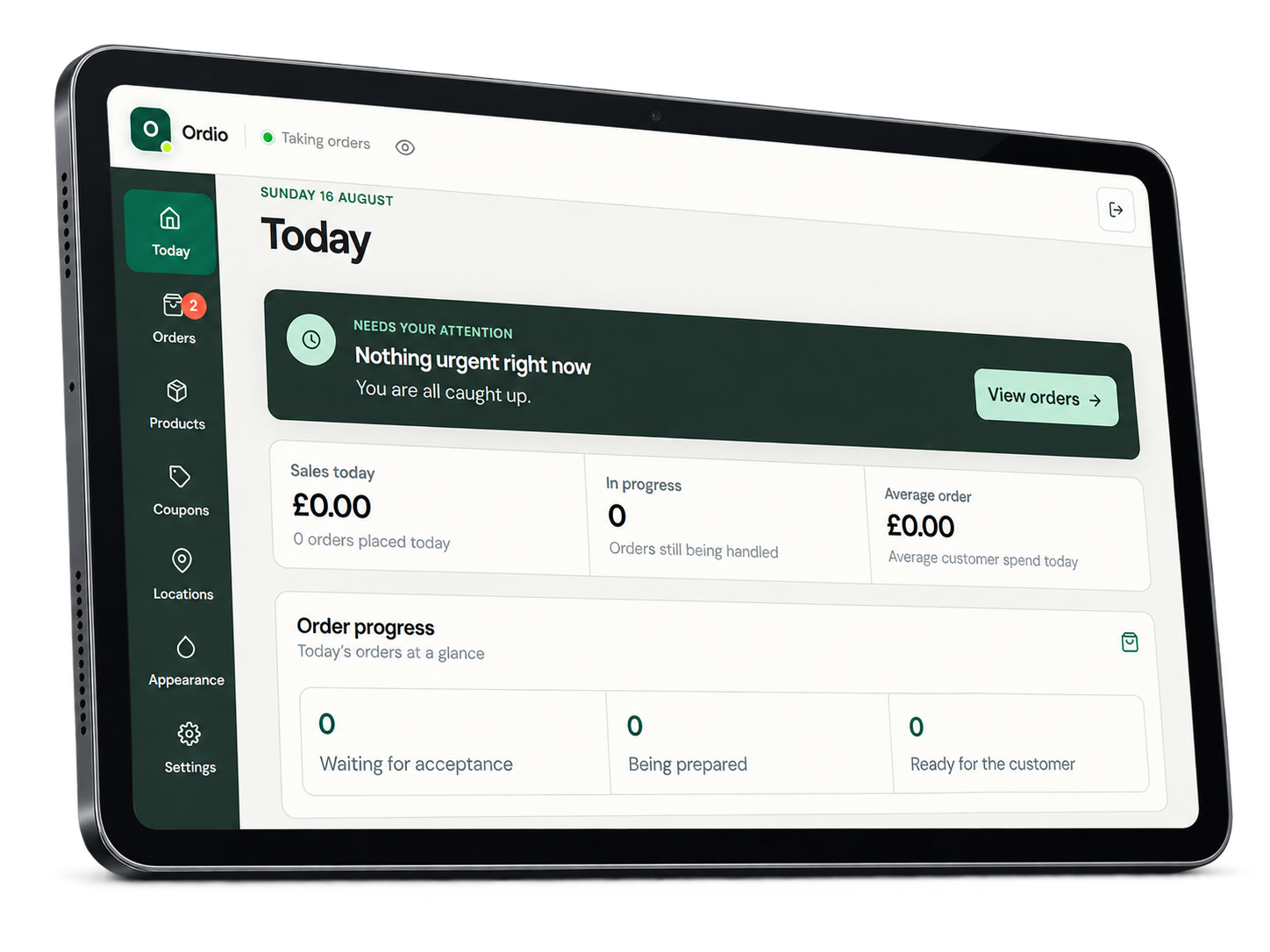
Stay on top of daily orders
Manage orders, products, locations, business hours, payments, coupons and storefront settings from one focused dashboard.
 Customer demos
Experience Ordio as a customer
Explore two storefronts and follow the customer journey from sign-in to ordering and order tracking.
Haven Cafeteria
A food-ordering storefront with collection, delivery and customer order tracking.
Email: customer@demo.com Password: customer@demo
Open Haven demoNovaCare Pharmacy
A retail ordering storefront for health, personal care and everyday products.
Email: nova@customer.com Password: nova@customer
Open NovaCare demoThese credentials provide customer access only.
Who Ordio is forBuilt for businesses that take orders
Ordio works especially well for businesses that want customers to order directly from their own branded storefront instead of relying only on phone calls, WhatsApp messages or third-party platforms.
01Restaurants & Takeaways
Accept collection and delivery orders, manage products, specials, payments and order progress from one dashboard.
02Cafés & Canteens
Ideal for cafés, staff canteens, corporate cafeterias and workplace food outlets that need fast repeat ordering.
03Bakeries & Food Shops
Sell baked goods, prepared meals, platters, daily specials and scheduled collections.
04Pharmacies & Health Retail
Create a branded ordering storefront for approved retail products, personal care items and everyday essentials.
05Grocery & Convenience Stores
Offer essential products, snacks, drinks and household items for collection or local delivery.
06Butcheries & Fresh Food Stores
Take direct orders for meat packs, fresh products, bundles and scheduled collections.
07Florists & Gift Shops
Manage product ranges, add-ons, seasonal offers and local delivery orders.
08Catering Businesses
Accept platter, meal and catering orders while managing products, locations and fulfilment centrally.
09Small Retail Businesses
Suitable for local businesses that want a focused direct-ordering experience without the complexity of a large e-commerce marketplace.
Features
What is included
Features for everyday online ordering
The tools a business needs to present its products, accept orders and manage fulfilment from one place.
01Product Management
Create products, categories, prices, descriptions, images, add-ons and availability. A CSV template is included for product imports.
02Order Management
Review incoming orders, customer contact details, payment status, fulfilment method and order progress. Export order data to CSV when needed.
03Collection & Delivery
Offer collection, delivery or both. Configure fulfilment options and supported delivery fees for each location.
04Flexible Payments
Accept supported online payments through Stripe, PayPal, Paystack or Yoco, and offer manual payment where suitable.
05Branded Customer Storefront
Apply the business logo, favicon, colours, hero image, storefront copy and footer content without editing source files.
06Location Management
Configure business locations and let customers choose where they are ordering from when more than one location is available.
07Ordering Hours
Set working hours by location and clearly show customers when ordering is open, closed or temporarily paused.
08Coupons & Promotions
Create percentage or fixed-value coupon codes with practical usage controls for customer orders.
09Customer Communication
Call or message customers from the order workflow and provide clear Call, WhatsApp and Share actions on the storefront.
10Responsive Ordering
Give customers a mobile-first storefront with layouts designed for phones, tablets and desktop screens.
A focused product for one business
Each installation serves one business, keeping branding, locations, settings and business data under that business's control.
Requirements
Before installation
Requirements
Prepare these accounts and services before following the installation guide.
1. Node.jsNode.js 22.12 or newer from a currently supported release line. 2. Firebase projectA Firebase project on the Blaze plan so Cloud Functions and the required backend services can be deployed. 3. Firebase servicesAuthentication, Firestore, Storage and Cloud Functions enabled in the Firebase project. 4. Web hostingAn HTTPS-enabled host for the built storefront and business dashboard. Netlify is covered in the documentation. 5. Sign-in methodEnable Email/Password authentication. Enable Phone authentication as well if customers will sign in with a mobile number. 6. Local accessA terminal, permission to install npm packages and access to the Firebase and hosting accounts used for the installation.Optional provider accounts
Provider accounts are only required for the services you choose to use: Stripe, PayPal, Paystack or Yoco for online payments; Meta WhatsApp Cloud API for WhatsApp notifications; and Google Maps Platform for delivery zones and address services.
Instructions
Installation overview
Set up Ordio in seven stages
The included documentation walks through each stage with the commands and settings you need.
01Extract the package
Extract the downloaded package and open the source folder in a terminal.
02Install dependencies
Install the application and backend dependencies.
npm ci
npm --prefix functions ci
03
Prepare Firebase
Create the Firebase project, select the Blaze plan and enable Authentication, Firestore and Storage as described in the guide.
04Add the Firebase web configuration
Copy the web app values from Firebase into the supplied environment file. Business details, currency, country and timezone are entered later in the dashboard.
05Deploy the project
Sign in to Firebase, link the project and follow the deployment guide for Functions, Firestore rules, Storage rules and Netlify.
npm run deploy06
Create the administrator
Open /admin. The first-run setup guides you through creating the administrator and entering the initial business details.
07Finish the business setup
Add branding, locations, working hours, fulfilment options, products, payments and notifications. Place a test order before opening the storefront to customers.
Use the full guide while installing
The documentation includes Firebase, Netlify, payment, WhatsApp and update instructions in the correct order.
Open documentation| Author | ordiostudio |
|---|---|
| Category | Scripts & Code / ReactJS |
| Price | $64 |
| Likes | 1 |
| First Release | Aug 16, 2026 |
| Last Update | Aug 31, 2026 |
| Files included | .css, .html, JavaScript .js |
Categories
Tags
External listing. code.market does not sell this product and does not process payment for it. Pricing, payment, delivery, licensing, refunds, and support are handled by the third-party merchant on its own website. We may earn an affiliate commission from a referral. Details.
Products of the Week.
Submit🥇

Perceptle
Perceptle is a daily browser-based game that challenges you to test your sensory intuition through five quick estimation and rhythm-based rounds.
Other · 3,957 views · 16 clicksOther · Week 47 · 3,957 views · 16 clicks
🥈

Free LinkedIn Likes From Real
Get free LinkedIn likes on your posts from real members who react by hand. No
SaaS · 4,075 views · 18 clicksSaaS · Week 47 · 4,075 views · 18 clicks
🥉

STOP GUESSING WHAT TO POST
AI that learns your brand voice and builds a month of consistent, on-brand social content: carousels, posts and hooks that sound like you, not like everyone else's AI.
SaaS · 11,557 views · 80 clicksSaaS · Week 47 · 11,557 views · 80 clicks
#4

aaas.market
407 reliable micro tools for solo founders, marketers and creators. They work in your browser
SaaS · 3,936 views · 7 clicksSaaS · Week 47 · 3,936 views · 7 clicks