
OneClick HTML Docs Generator - Create Documentation for your Products
Description
OneClick HTML DOC GENERATOR
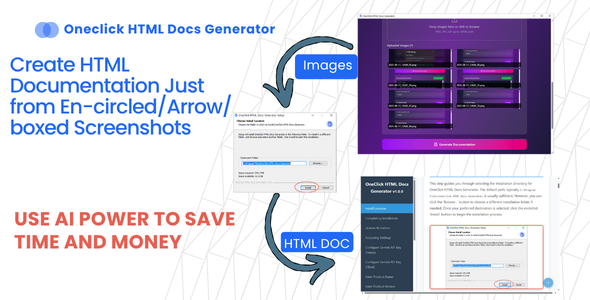
Transform Screenshots Into Beautiful Documentation
Harness the power of AI to instantly generate professional HTML documentation from your marked screenshots. Save hours of manual work with our intelligent Electron-based solution powered by Gemini AI. Eliminate tedious documentation tasks and let artificial intelligence create comprehensive, well-structured HTML docs from your annotated screenshots in seconds.
NOTE: The documention of this software is created by OneClick HTML docs generator itself.
Feature Highlights
AI-Powered Generation
Leverage Gemini AI to automatically interpret and document your marked screenshots with intelligent descriptions and context. The advanced AI engine analyzes visual elements, annotations, and UI components to generate accurate, contextual documentation.
⚡ One-Click Simplicity
Generate complete HTML documentation in seconds. No complex setup, no coding required—just click and create. Perfect for developers, technical writers, and product managers who need fast documentation turnaround.
Professional Output
Create polished, ready-to-use HTML documentation with clean formatting and professional presentation. The output is structured, semantic, and ready to integrate into your projects immediately.
Electron-Based Desktop Application
Cross-platform desktop application built with modern Electron framework for reliable performance on Windows, macOS, and Linux. Enjoy native application performance with the flexibility of web technologies.
Automated Workflow
Streamline your documentation process with automated screenshot analysis and content generation. Set up your workflow once and generate consistent documentation every time.
How It Works
Step 1: Capture Your Screens
Take screenshots of your application, website, or product. Mark important areas with boxes, circles, or pointing arrows to indicate key features and elements you want documented. Use any screenshot tool or image editor to add your annotations.
Step 2: Upload & Process
Import your marked screenshots into OneClick HTML DOC GENERATOR. The software automatically detects your annotations and prepares them for AI analysis. Batch upload multiple screenshots for comprehensive documentation.
Step 3: AI Analysis
Gemini AI examines each screenshot, interprets the marked areas, and generates contextual descriptions and documentation based on the visual content. The AI understands UI elements, workflows, and user interfaces to create meaningful documentation.
Step 4: Generate Documentation
With one click, receive a complete, professionally formatted HTML documentation file ready to share, publish, or integrate into your project. Export as standalone HTML or integrate into existing documentation systems.
Use Cases
Software Documentation
Create user guides and technical documentation for your applications with annotated UI screenshots. Perfect for SaaS products, desktop applications, and web platforms.
Training Materials
Develop step-by-step training guides and tutorials for teams, clients, or educational purposes. Create onboarding documentation that helps new users understand your product quickly.
Product Presentations
Build compelling product demos and feature showcases for stakeholders and customers. Present your product features visually with professional documentation.
API Documentation
Document API endpoints, responses, and workflows with visual examples and descriptions. Make your API documentation more accessible with visual guides.
Process Documentation
Record internal processes, workflows, and standard operating procedures with visual clarity. Ensure consistency across your organization with standardized documentation.
️ Bug Reports
Create detailed bug reports with annotated screenshots for development teams. Communicate issues clearly with visual documentation that developers can understand immediately.
Benefits
⏱️ Time Savings
Reduce documentation time by 90%. What took hours now takes minutes. Free your team from tedious documentation work.
Cost Effective
Eliminate expensive technical writing services and reduce labor costs. One-time purchase with unlimited documentation generation.
Consistency
Maintain uniform documentation standards across all your projects. AI ensures consistent tone, structure, and quality.
Accuracy
AI-powered analysis ensures precise and relevant documentation content. Reduce human error in documentation.
Productivity Boost
Free your team to focus on development instead of documentation. Redirect resources to core product development.
Universal Format
HTML output works everywhere—web, email, documentation platforms, wikis, and content management systems.
Quick Updates
Regenerate documentation instantly when your product changes. Keep docs up-to-date without manual rewriting.
Easy Collaboration
Share generated docs easily with team members and stakeholders. Export and distribute documentation effortlessly.
Prerequisites
- Gemini AI API Key – Required for AI processing (obtain from Google AI Studio)
- Active Internet Connection – For API access and processing
- Screenshot Tool – Any tool capable of capturing and marking screenshots
- Image Editor (Optional) – For marking/annotating screenshots before upload
System Requirements
Operating System
- Windows 10 or Windows 11 (64-bit)
Hardware Requirements
- RAM: 4GB minimum (8GB recommended for optimal performance)
- Storage: 100MB available disk space for installation
- Processor: Intel Core i3 or AMD equivalent (Intel i5/AMD Ryzen recommended)
- Display: 1280×720 minimum resolution (1920×1080 recommended)
- Graphics: No dedicated GPU required
Software Dependencies
- Node.js runtime environment (bundled with installer – no separate installation needed)
- Electron framework (included in application)
- Internet browser for viewing generated HTML documentation
What’s Included
- OneClick HTML DOC GENERATOR desktop application (Windows)
- Complete user documentation and quick start guide
- Sample screenshots and example projects
- HTML output templates
- Configuration guide for Gemini AI API setup
- Free updates for 6 months
- Email support
Key Features Summary
- ✅ AI-powered documentation generation using Gemini AI
- ✅ Process marked/annotated screenshots automatically
- ✅ One-click HTML documentation export
- ✅ Cross-platform Electron application
- ✅ Batch processing of multiple screenshots
- ✅ Customizable HTML output templates
- ✅ Professional, clean HTML formatting
- ✅ Responsive documentation output
- ✅ Save 90% of documentation time
- ✅ No coding skills required
- ✅ Instant documentation updates
- ✅ Support for various image formats (PNG, JPG, JPEG)
Perfect For
- Software Developers documenting applications
- Technical Writers creating user guides
- Product Managers building feature documentation
- UI/UX Designers documenting design systems
- QA Teams creating bug reports
- Training Coordinators developing tutorials
- System Administrators documenting processes
- API Developers creating visual API docs
Why Choose OneClick HTML DOC GENERATOR?
Traditional documentation is time-consuming, expensive, and often outdated. OneClick HTML DOC GENERATOR revolutionizes the documentation process by combining cutting-edge AI technology with user-friendly design. Whether you’re a solo developer or part of a large team, this tool will transform how you create and maintain documentation.
Stop spending hours writing documentation manually. Let AI do the heavy lifting while you focus on building great products. Join thousands of developers who have already streamlined their documentation workflow with OneClick HTML DOC GENERATOR.
Support & Updates
We’re committed to providing excellent support and continuous improvement. Purchase includes 6 months of free updates and email support. Extended support packages available separately.
Get Started Today
Transform your documentation workflow with the power of AI. Purchase OneClick HTML DOC GENERATOR now and start creating professional documentation in minutes, not hours.
One-time purchase. Lifetime license. Unlimited documentation.
| Type | Windows App |
|---|---|
| Author | RamzanUllah |
| Price | $19 |
| Sales | 1 |
| Rating | 0 (0) |
| Published | Nov 4, 2025 |
| Last Update | Jan 12, 2026 |
| Application Runtime | Native |
| Operating System Versions | Windows 11, Windows 10 |
Categories
Tags
External listing. code.market does not sell this product and does not process payment for it. Pricing, payment, delivery, licensing, refunds, and support are handled by the third-party merchant on its own website. We may earn an affiliate commission from a referral. Details.
Products of the Week.
Submit🥇

STOP GUESSING WHAT TO POST
AI that learns your brand voice and builds a month of consistent, on-brand social content: carousels, posts and hooks that sound like you, not like everyone else's AI.
SaaS · 7,354 views · 67 clicksSaaS · Week 46 · 7,354 views · 67 clicks
🥈

Conversational Backlinks for Busy Founders
Place Backlink Relevant Conversation for your domain across Forums and Conversations
Website · 46,636 views · 232 clicksWebsite · Week 46 · 46,636 views · 232 clicks
🥉

upvote.club
Free Social Media Engagement that Helps Boost Your Content. Upvote Club supports 19 social networks with 100+ engagement actions in one dashboard. Add links to your posts and get free engagement from real users.
SaaS · 44,576 views · 127 clicksSaaS · Week 46 · 44,576 views · 127 clicks
#4

Substack Posting API
Onboard your Agent to Substack. Write Publish on Substack via API
SaaS · 63,464 views · 206 clicksSaaS · Week 46 · 63,464 views · 206 clicks
#5

Seenshot App
Free, Fast, MacOS Screenshot app. Make Screenshot cmd+shift+2 and send it via link
Desktop App · 32,713 views · 127 clicksDesktop App · Week 46 · 32,713 views · 127 clicks
#6

Hand-Placed Backlinks $9.99 per link. Flat rate.
Buy hand-placed forum, Q-A and directory backlinks. Flat $9.99 per link, no subscriptions — you only pay for approved listings.
Website · 8,334 views · 19 clicksWebsite · Week 46 · 8,334 views · 19 clicks
#7

Free Invoice Generator - PDF Invoices in Your Browser, No Sign-Up
A free invoice maker for freelancers and small businesses: fill in the invoice, check the live preview, and download a PDF that looks exactly like it. Any currency, tax per item, three templates, no sign-up, and nothing leaves your device.
6,960 views · 29 clicksWeek 46 · 6,960 views · 29 clicks
#8

Merge PDF Files Free - Combine PDFs in Your Browser, No Upload
A free PDF merger for office workers, students, and freelancers: combine PDFs and images into one file in the browser, reorder files and pages, pick page ranges, keep bookmarks, and open password-protected PDFs. Nothing is uploaded, no sign-up, no watermark.
6,441 views · 18 clicksWeek 46 · 6,441 views · 18 clicks