
On-Scroll Section Effects for Elementor

Description



On-Scroll Section Fixed/Sticky Effects for Elementor
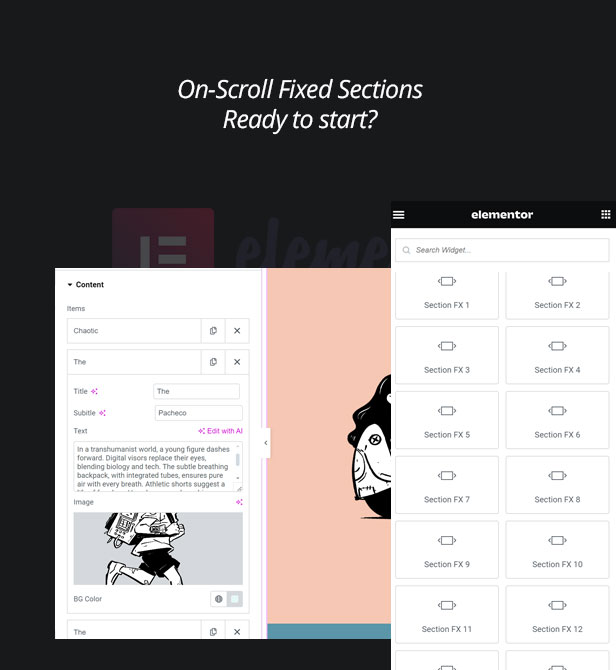
Creative ideas for on-scroll effects using fixed/sticky sections. A collection of easy-to-use the total 15+ media elements triggered by scroll ready for Elementor. Video/Image options are now added and combinations are possible.Within few minutes, you can add unique image hover effects to your website – easily!
Categories
- Classic Section Effect
- Section Effect 2 – Video New v.1.0.8
- Top/Scale Section Effect
- Side/Scale Section Effect
- Section Effect 5 – Video New v.1.0.8
- Perspective Section Effect
- Centered Section Effect
- Centered Section Effect – Video New v.1.0.8
- Stacked Screen Section Effect
- Stacked Screen Section – Video New v.1.0.8
- Split Screen Section Effect
- Split Screen Section Effect – Video New v.1.0.8
- Section Effect 10 – Video New v.1.0.8
- Section Effect 11 – Video New v.1.0.8
- FX12 Section Effect
- Section Effect 13 – Video New v.1.0.8
- Section Effect 14 – Video New v.1.0.8
- Offset Section Effect
Features
- 15 different versions, 30+ variants
- Video/Image mode as well as combinations
- Elementor Widgets ready
- Clean and minimal animations for the galleries
- Fully Responsible
- Easy to use
- WPML Supported
- Clean, minimal and modern design
- Powered by HTML5/CSS3
- Optimized for mobile devices
- Optimized for touchable devices
- Installation guide and detailed documentation included
- And more…
Before start using
Item registration/activation is now required to start using the item and to get the auto updates through the system. After the activation, please, allow up to 12 hours ( during the week days, at the weekends may take longer ) for whitelisting your purchase code Once the process is completed, you will be receiving an email. After that, please go to Dashboard > Updates and click Check again button. There will be a newer auto update will be waiting for you. And you can enjoy using the item. Refer the documentation for the details in case of need more information or you can contact the item author for help/support.Before updating
If you haven’t registered the item before 1st of May, before updating the plugin, please, contact the author, first – Your purchase code needs to be whitelisted. Contacting the author is not required for the buyers who purchased the item after 1st of May – although, their purchase code will also need to be whitelisted.Change Log:
June 15th, 2024 - v.1.0.8:
- Video versions are added.
- Improvements for Elementor 3.21.7 version

May 1st, 2024 - v.1.0.6/v.1.0.7:
- Improvements for security
- Improvements for Elementor 3.21.4 version
Please, see "Before updating" section for the notes

April 2nd, 2024 - v.1.0.2:
- Security issue(s) found and fixed.
- Improvements for WordPress 6.5 version
- Improvements for Elementor 3.20.4 version

February 6th, 2024 - v.1.0.0:
- Initial update.
Check This Out
If you liked this item, you can also check this item as well:





| Type | WordPress Plugin |
|---|---|
| Author | ki-themes |
| Category | Wordpress / Interface Elements / Miscellaneous |
| Price | $69 |
| Sales | 30 |
| Published | Feb 6, 2024 |
| Last Update | Apr 10, 2026 |
| Compatible Browsers | Firefox, Safari, Opera, Chrome, Edge |
| Compatible Software | WordPress 6.8.x, WordPress 6.7.x, WordPress 6.6.x, WordPress 6.5.x, WordPress 6.4.x, WordPress 6.3.x, WordPress 6.2.x, WordPress 6.1.x, WordPress 6.0.x |
| Compatible With | Elementor, Elementor Pro, WPML |
| Gutenberg Optimized | No |
| Source Files Included | JavaScript JS, CSS, PHP |
Categories
Tags
External listing. code.market does not sell this product and does not process payment for it. Pricing, payment, delivery, licensing, refunds, and support are handled by the third-party merchant on its own website. We may earn an affiliate commission from a referral. Details.
Products of the Week.
Submit🥇

Perceptle
Perceptle is a daily browser-based game that challenges you to test your sensory intuition through five quick estimation and rhythm-based rounds.
Other · 1,489 views · 9 clicksOther · Week 47 · 1,489 views · 9 clicks
🥈

Free LinkedIn Likes From Real
Get free LinkedIn likes on your posts from real members who react by hand. No
SaaS · 1,632 views · 10 clicksSaaS · Week 47 · 1,632 views · 10 clicks
🥉

STOP GUESSING WHAT TO POST
AI that learns your brand voice and builds a month of consistent, on-brand social content: carousels, posts and hooks that sound like you, not like everyone else's AI.
SaaS · 9,176 views · 75 clicksSaaS · Week 47 · 9,176 views · 75 clicks
#4

aaas.market
407 reliable micro tools for solo founders, marketers and creators. They work in your browser
SaaS · 1,597 views · 5 clicksSaaS · Week 47 · 1,597 views · 5 clicks