
Office Visits Logbook Plugin for WordPress
Description
Demo URL
(You need to log in WordPress to access this page. Log in username and password are below.)
https://mingsitservicesfree.infinityfreeapp.com/officevisitslogbookpro/
Log in using
username:
test
password:
test
Youtube link
https://youtu.be/ejDUh_D4Kow?si=mWpEdXN_Ep4t8SIu
Documentation file is inside the source code root folder with the name documentation_officevisitslogbookpro.pdf Please follow the file to install this plugin.
A simple visitor management system for small businesses. Let office guests, interview candidates, contractors, and clients check in and out digitally from a tablet or kiosk. Features include visitor logs, search history, responsive design, accessibility support, and receptionist monitoring.
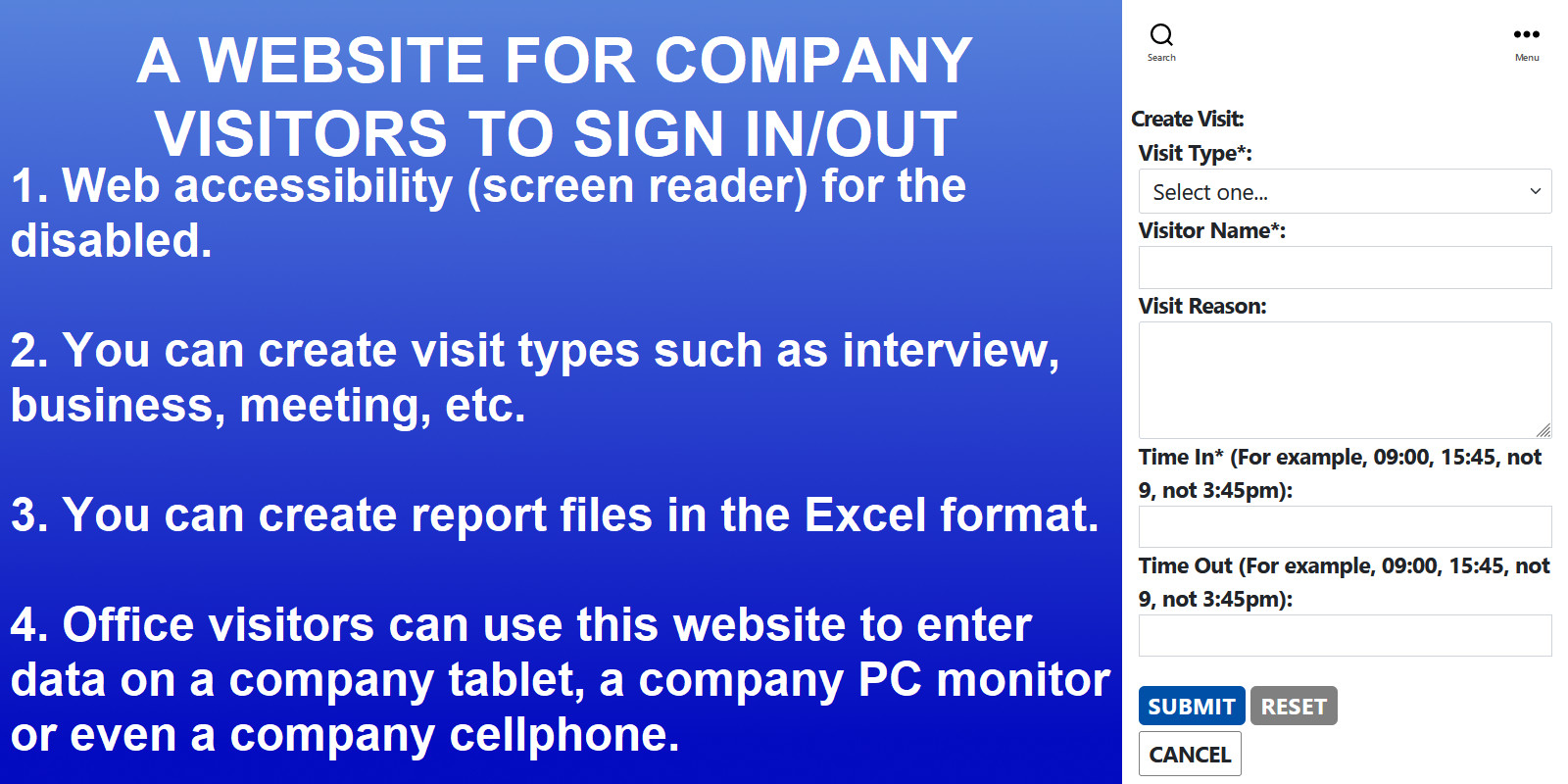
This office visits logbook plugin is for the sign-in and sign-out of office interview, business, meeting, etc. You can add any new visit type categories and new visit types if you want. For example, for hospitals and clinics, you can add new visit types such as surgery, emergency, ICU. For dental offices, you can add new visit types such as wash teeth, root canal, dental implants, wisdom tooth extraction, reconstructive surgery, and cosmetic surgery.
This plugin can also be used for events such as wedding, party, funeral, campaign, etc. You can create unlimited events. For each events, there is a separate landing page to use.
This plugin has the web accessibility feature for the disabled people to listen to the screen reader. The disabled people just need to press the tab key to access the elements on the page. Then use keyboard to input. Then press enter key for submit, reset and cancel. To use this feature, you can download and use any screen reader software such as NVDA (for Windows), VoiceOver (for Apple), etc. Most of this kind of software is free to download and use.
A visit record can be updated only when it is active and timeout is empty. Deleted visits and finished visits are not available for editing.
This plugin stores all data in your own WordPress database. It does not track visitor activity or share your data with any third party, keeping your visit data completely private.
It has a decent welcome page (you can use your company's image to replace the background image). It does not use stored procedures and sqli extension. So you can install this plugin on any cloud platform, even free wordpress platform such as https://infinityfreeapp.com. Plus, you can export visits into an excel file.
This plugin has an access restriction feature. You can give a user access to the visit landing page by adding the user to the wp_dragonvisitzyx987_users table.
After you are added to the wp_dragonvisitzyx987pro_users table, you must log in WordPress website to access this plugin’s landing page. On the admin setting page, admin and assigned users can access admin setting page to see table lists.
This plugin uses a responsive design. You can use it from your cellphone, tablet, laptop, and PC. The layout will change accordingly.
For this plugin to get your company’s current local date, you must set the timezone value correctly. You can edit the timezone at Dashboard -> Settings -> General -> Timezone -> check if the value has been set correctly.
By default, a WordPress login session timeout is usually about 2 days if “Remember Me” is not checked. If “Remember Me” is checked, it can last about 14 days. So, a receptionist only needs to log in one time in the morning, and the visitor management system does not need to log in again during the day. This makes this visitor management system perfect for being in a tablet in a kiosk. Guests just go to the tablet and check in.
Platform and Database
You can run it on any platform: Windows, Mac, Linux.
Database is MySQL. It's free.
"Live Demo" link does not work because, to protect your security, the demo website will not allow your browser to display the page if another site has embedded it. You need to directly go to the demo URL:
Demo URL
(You need to log in WordPress to access this page. Log in username and password are below.)
https://mingsitservicesfree.infinityfreeapp.com/officevisitslogbookpro/
Log in using
username:
test
password:
test
This user can not access the admin plugin setting page.
Donate URL link: https://paypal.me/mingsitservices?country.x=CA&locale.x=en_US/
Company website:
https://www.mingsitservices.ca
The visitor management system market is increasing fast. According to this website https://www.globenewswire.com/news-release/2023/06/27/2695465/0/en/Global-Visitor-Management-System-Market-Size-To-Grow-USD-2-7-Billion-By-2032-CAGR-of-18-4.html, Spherical Insights & Consulting published a report saying the global visitor management system market size was valued at USD 1.5 billion in 2022 and the worldwide visitor management system market size is expected to reach USD 2.7 billion by 2032.
Features
- Web accessibility. This plugin has the web accessibility feature for the disabled people to listen to the screen reader. The disabled people just need to press the tab key to access the elements on the page. Then use keyboard to input. Then press enter key for submit, reset and cancel. To use this feature, you can download and use any screen reader software such as NVDA (for Windows), VoiceOver (for Apple), etc. Most of this kind of software is free to download and use.
- Responsive design. You can create a visit from cellphone, tablet, laptop, and PC.
- Access pages based on your role. Admin role can set up type category, type, role, etc. User role can only log in and access visit page for visitors to fill in.
- On the admin setting page, admin and assigned users can access admin setting page to see table lists and export to Excel files.
- On the admin setting page, admin and assigned users can access admin setting page to automatically or onetime backup database.
- Constant value can be changed by admin and assigned users. The web application's setting can be changed by changing the constant values.
- Admin and assigned users can export visit data as Excel files.
- A welcome page with check in and check out buttons. The welcome page background image can be changed. You only need to add a new image to images folder with the same name reception.png to replace the old image.
Requirements
PHP, a WordPress website
Instructions
Copy the folder to your wp-content/plugins folder. See the pdf document in the plugin's root folder for instructions: documentation_officevisitslogbookpro.pdf
| Author | mike2012 |
|---|---|
| Category | Plugins / WordPress / Miscellaneous |
| Price | $24 |
| Extended License | $72 |
| Likes | 2 |
| First Release | Sep 19, 2022 |
| Last Update | Oct 5, 2026 |
| Files included | .php, .css, .html, .sql, JavaScript .js |
Categories
Tags
External listing. code.market does not sell this product and does not process payment for it. Pricing, payment, delivery, licensing, refunds, and support are handled by the third-party merchant on its own website. We may earn an affiliate commission from a referral. Details.
Products of the Week.
Submit🥇

Actionbook
It works inside the user's own browser with the accounts already signed in. The user describes the result they need, and the agent reads, clicks and types through the pages, then delivers a dashboard or report where each data links back to its source.
Other · 689 views · 9 clicksOther · Week 44 · 689 views · 9 clicks
🥈

Free social media tools for creators & solofounders
295 free tools for growing your social media: write, plan, grow on local AI models, 100% free forever, No sign-up required, No trial. Write, check and measure posts on LinkedIn, Instagram, TikTok, X, YouTube, Reddit, Product Hunt and more: a free social media scheduler for 17 networks, engagement rate calculators, character counters, best time to post, hook generators and follower growth calculators. No login anywhere, no API or credit usage.
659 views · 6 clicksWeek 44 · 659 views · 6 clicks
🥉

STOP GUESSING WHAT TO POST
AI that learns your brand voice and builds a month of consistent, on-brand social content: carousels, posts and hooks that sound like you, not like everyone else's AI.
SaaS · 1,907 views · 21 clicksSaaS · Week 44 · 1,907 views · 21 clicks
#4

Hand-Placed Backlinks $9.99 per link. Flat rate.
Buy hand-placed forum, Q-A and directory backlinks. Flat $9.99 per link, no subscriptions — you only pay for approved listings.
Website · 1,859 views · 17 clicksWebsite · Week 44 · 1,859 views · 17 clicks
#5

Conversational Backlinks for Busy Founders
Place Backlink Relevant Conversation for your domain across Forums and Conversations
39,321 views · 210 clicksWeek 44 · 39,321 views · 210 clicks
#6

Free Invoice Generator - PDF Invoices in Your Browser, No Sign-Up
A free invoice maker for freelancers and small businesses: fill in the invoice, check the live preview, and download a PDF that looks exactly like it. Any currency, tax per item, three templates, no sign-up, and nothing leaves your device.
603 views · 11 clicksWeek 44 · 603 views · 11 clicks
#7

Merge PDF Files Free - Combine PDFs in Your Browser, No Upload
A free PDF merger for office workers, students, and freelancers: combine PDFs and images into one file in the browser, reorder files and pages, pick page ranges, keep bookmarks, and open password-protected PDFs. Nothing is uploaded, no sign-up, no watermark.
545 views · 4 clicksWeek 44 · 545 views · 4 clicks