
Document Reader & PDF Tools + Scanner – Full Android Source Code (SDK 36)
Description
Document Reader & PDF Tools – All-in-One Source Code New Update
✅ Updated to SDK 36 – Fully compatible with the latest Android.
✅ NEW: Document Scanner – Scan documents with camera & convert to PDF instantly.
✅ Optimized PDF Tools – Lightweight but extremely powerful.
✅ Full source code – Modern UI/UX, clean structure, easy to customize.
✨ Overview
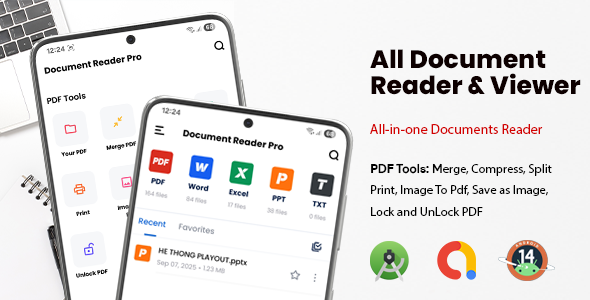
Document Reader source code is a complete Android solution to read, edit, convert, and now scan documents. Built with a focus on modern UI/UX, smooth animations, and responsive design for phones & tablets.
Core Features
- ⚡ Open any document fast: DOC, DOCX, XLS, XLSX, PPT, PPTX, TXT, PDF.
- ✏️ Edit documents: Basic editing for Word, Excel, and PowerPoint.
- Convert formats: Instantly convert DOC/XLS/PPT to PDF.
- Reading modes: Night mode, eye-protection mode, adjustable font size.
- Search & highlight: Find keywords and mark important pages.
- Notes & annotations: Add highlights, draw, and share quickly.
- File manager: Create folders, rename, move, delete inside the app.
NEW – Document Scanner
- Scan with camera: Capture documents in high quality.
- Auto edge detection: Smart crop & perspective correction.
- Filters: Black & White, Enhance, Color, Grayscale.
- Scan to PDF: Convert scanned pages into a single PDF.
- ✂️ Multi-page scan: Combine multiple scans into one file.
Powerful PDF Tools
- Merge PDF: Combine multiple PDFs into one.
- Lock / Unlock: Add or remove password protection (with valid password).
- Compress PDF: Reduce file size while keeping quality.
- ✂️ Split PDF: Extract selected pages or page ranges.
- Image → PDF: Convert images into a single PDF file.
- PDF → Image: Export each page as PNG/JPEG.
Note: PDF Tools and Scanner modules are optimized to keep the build lightweight.
UI & UX Highlights
- Intuitive navigation: Fewer steps, faster workflow.
- ✨ Modern design: Smooth transitions, soft shadows, readable fonts.
- ⚙️ Customizable: Easy to change colors, themes, and layouts.
Integration & Monetization
- AdMob ready: Monetize instantly with ads.
- Modular code: Reader, Editor, Scanner, and PDF Tools are independent modules.
Package Includes
- Full Android source code (Java/Kotlin).
- Layouts, drawables, and icons with modern UI design.
- Demo APK for quick testing.
Why Choose This Source Code?
- Save development time with ready-to-use document reader, editor & scanner.
- Lightweight build with SDK 36 compatibility.
- Customizable UI/UX for branding and reskinning.
Support & Contact
Email: devgurus.mobile@gmail.com
Telegram: @super_mario1991
| Type | Android App |
|---|---|
| Author | Dev_Gurus |
| Price | $65 |
| Sales | 50 |
| Rating | 0 (1) |
| Published | Aug 10, 2023 |
| Last Update | Mar 4, 2026 |
| Compatible Software | Android 15.0, Android 12.0, Android 11.0, Android 10.0, Android 9.0, Other |
| Mobile Files Included | .apk, .dex, .so, .java, .xml |
Categories
Tags
External listing. code.market does not sell this product and does not process payment for it. Pricing, payment, delivery, licensing, refunds, and support are handled by the third-party merchant on its own website. We may earn an affiliate commission from a referral. Details.
Products of the Week.
Submit🥇

STOP GUESSING WHAT TO POST
AI that learns your brand voice and builds a month of consistent, on-brand social content: carousels, posts and hooks that sound like you, not like everyone else's AI.
SaaS · 7,348 views · 67 clicksSaaS · Week 46 · 7,348 views · 67 clicks
🥈

Conversational Backlinks for Busy Founders
Place Backlink Relevant Conversation for your domain across Forums and Conversations
Website · 46,626 views · 232 clicksWebsite · Week 46 · 46,626 views · 232 clicks
🥉

upvote.club
Free Social Media Engagement that Helps Boost Your Content. Upvote Club supports 19 social networks with 100+ engagement actions in one dashboard. Add links to your posts and get free engagement from real users.
SaaS · 44,568 views · 127 clicksSaaS · Week 46 · 44,568 views · 127 clicks
#4

Substack Posting API
Onboard your Agent to Substack. Write Publish on Substack via API
SaaS · 63,454 views · 206 clicksSaaS · Week 46 · 63,454 views · 206 clicks
#5

Seenshot App
Free, Fast, MacOS Screenshot app. Make Screenshot cmd+shift+2 and send it via link
Desktop App · 32,704 views · 127 clicksDesktop App · Week 46 · 32,704 views · 127 clicks
#6

Hand-Placed Backlinks $9.99 per link. Flat rate.
Buy hand-placed forum, Q-A and directory backlinks. Flat $9.99 per link, no subscriptions — you only pay for approved listings.
Website · 8,326 views · 19 clicksWebsite · Week 46 · 8,326 views · 19 clicks
#7

Free Invoice Generator - PDF Invoices in Your Browser, No Sign-Up
A free invoice maker for freelancers and small businesses: fill in the invoice, check the live preview, and download a PDF that looks exactly like it. Any currency, tax per item, three templates, no sign-up, and nothing leaves your device.
6,953 views · 29 clicksWeek 46 · 6,953 views · 29 clicks
#8

Merge PDF Files Free - Combine PDFs in Your Browser, No Upload
A free PDF merger for office workers, students, and freelancers: combine PDFs and images into one file in the browser, reorder files and pages, pick page ranges, keep bookmarks, and open password-protected PDFs. Nothing is uploaded, no sign-up, no watermark.
6,436 views · 18 clicksWeek 46 · 6,436 views · 18 clicks