
Northbit - IT Services HTML Template
Description
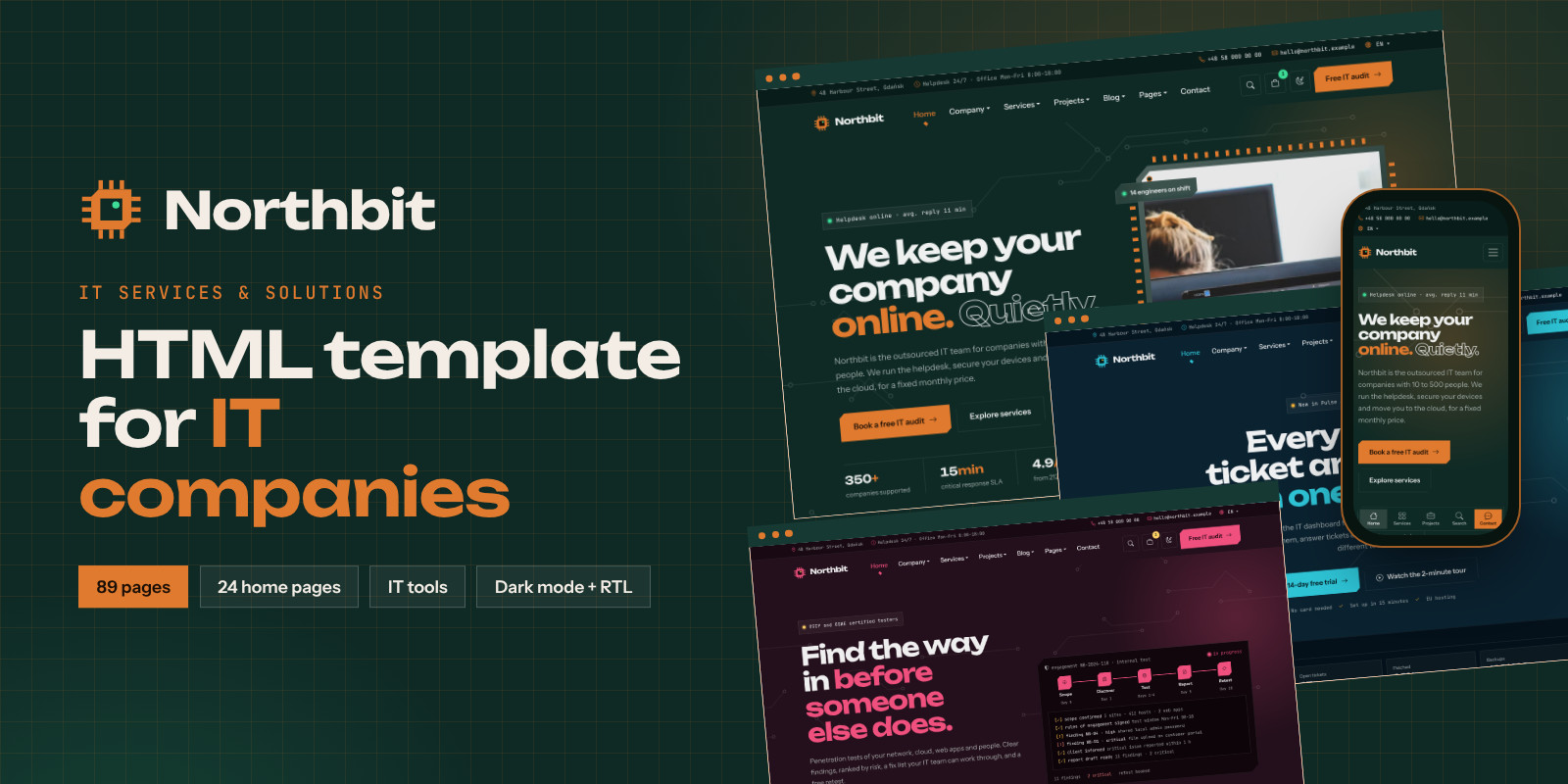
Northbit is a multi-page HTML template for IT companies: managed service providers (MSP), helpdesk and IT support teams, cybersecurity firms, cloud and hosting providers, AI consultancies, software houses and IT consultants. Its circuit-board design with cut corners and monospace details sets it apart from generic corporate layouts, and the pages do real work: an IT cost calculator, a security check, a client portal, a status page and printable client documents.
Built on Bootstrap 5.3.8 with plain JavaScript. No jQuery and no build step: open index.html and it works.
What's included
- 89 HTML pages, plus a right-to-left copy of every page in the
rtl/folder - 24 home pages: Managed IT, Slider, Video background, Cybersecurity (SOC), Cloud & hosting, AI solutions, Software house, IT consulting, Small business IT, SaaS product, Network & Wi-Fi, Data centre, DevOps (dark), Healthcare IT, Education IT, Freelance consultant, Mobile apps, Business phones (VoIP), Data & BI analytics, Microsoft 365 migration, IoT & smart buildings, IT staffing, Web agency, Penetration testing
- 5 one-page versions with scrollspy navigation
- 5 landing pages: free security audit, webinar sign-up, e-book download, app free trial, paid ads campaign
- IT tools: IT cost calculator, security check with an 8-question quiz, price calculator, system status page, meeting booking
- Client area: client portal dashboard with charts and tickets, and 3 printable A4 documents (monthly IT report, proposal with signature block, invoice)
- Company: About (2 layouts), Team (2 layouts), Team member, Testimonials, Careers, Job details with CV upload, Industries, FAQ
- Services and projects: Services (2 layouts), Service details (2 layouts), Pricing (2 layouts), Projects grid and masonry, Case study (2 layouts)
- Blog and resources: Blog (list, left sidebar, grid, masonry), Blog post, Resources with gated downloads, Webinars, Webinar details
- Shop: Shop (grid and list), Product, Cart with coupon codes, Checkout, Wishlist
- Account and utility: Sign in, Create account, Reset password, Search results, Thank you, Coming soon, Maintenance, Privacy, Terms, 404, Contact (2 layouts), Elements
- A 4-column Pages mega menu, plus Home and Services mega menus
- 8 bonus HTML e-mail templates with a preview gallery
- HTML documentation (also online: https://www.netmakers.pl/docs/northbit-html/), readable and minified CSS and JS, 31 SCSS partials
Demo photos and video are not included. The live preview uses photos from Unsplash and a video from Pexels for presentation only; in the download every photo is a placeholder with its size, ready to be replaced with your own. All company names, people, figures and reviews in the sample content are fictional.
Changelog
Version 2.2.0 (14 Oct 2026)
- New: 6 home pages: Home 19 data & BI, Home 20 Microsoft 365 migration, Home 21 IoT & smart buildings, Home 22 IT staffing, Home 23 web agency, Home 24 penetration testing.
- New: 21 section types for them: live BI dashboard, data pipeline tabs, chart with metric and period switch, maturity levels, migration paths, migration timeline slider, licence comparison, live sensor gauges, floor plan hotspots, automation rules, before/after bars, specialist filter, engagement models, hiring cost calculator, browser preview with device switch, tech stack picker, project estimator, test stages, vulnerability ticker, findings board and findings story.
- Improved (15 Oct 2026, same version): forms show the success message only when the server confirms the message was sent.
- Improved (15 Oct 2026, same version): forms also work without JavaScript (honeypot and rate limit protect them; allow_no_js option in the PHP settings).
- Improved (15 Oct 2026, same version): the Home 3 video section shows a photo until you add your own your-video.mp4.
Version 2.1.0 (14 Oct 2026)
- New: 8 HTML e-mail templates (
email-templates/). - New: optional Vite dev server with
npm run devandnpm run build. ist
ist - New: documentation rebuilt with screenshots, search and dark mode (also online).
- Fixed: W3C validation errors, WCAG 2.2 AA contrast in light and dark mode, keyboard access to scrolling rows, tables and code blocks, focus after the video window and cart drawer close, ARIA roles on windows and mock-ups.
- Improved: the map loads only when needed; faster loading of the contact page.
Version 2.0.0 (14 Oct 2026)
- New: 12 pages: service details 2, industries, resources (downloads behind a form), webinars and webinar page, thank-you page, IT cost calculator, security check with quiz, client portal dashboard, and three printable documents (monthly report, proposal with signature, invoice).
- New: "Pages" is now a mega menu.
- New: effects: word-by-word headings, magnetic buttons, parallax, text that fills while scrolling, horizontal scrolling section, custom cursor, before/after slider and gallery lightbox.
- New: forms can open a thank-you page after sending.
Version 1.9.0 (14 Oct 2026)
- New: 10 home pages (Home 9 to 18): small business IT, SaaS product, network & Wi-Fi, data centre, DevOps (dark), healthcare, education, freelance consultant, mobile apps and business phones.
- New: 5 landing pages: security audit, webinar, e-book, app free trial and paid ads campaign, with a landing page header, offer bar, evergreen countdown, lead forms and a sticky button on phones.
- New: the "Home" menu is a mega menu with all home, one-page and landing pages.
- New: particles hero background.
Version 1.8.0 (14 Oct 2026)
- New: shop mini cart that slides in from the side, free delivery progress bar (mini cart and cart page), quick view on product cards, sticky "Add to cart" bar on the product page.
- New: Calendly booking calendar on the appointment page and in Elements, loaded on click or after marketing consent.
Version 1.7.0 (14 Oct 2026)
- New: SEO: canonical links, Open Graph and Twitter cards, schema.org JSON-LD (company, website search, breadcrumbs, article, product, FAQ, job posting),
sitemap.xml,robots.txt, web app manifest and app icons. - New: newsletter forms send to
newsletter.php(Mailchimp or e-mail); meeting request and job application (with PDF CV) send tocontact.php; optional reCAPTCHA v3 and a CSV copy of every message. - New: cookie bar where scripts wait for consent (data-consent), Google Consent Mode v2, "Cookie settings" link in the footer.
- New: live search suggestions, mobile bottom bar, WhatsApp button, reading progress bar and copy link on blog posts, infinite scroll option for "Load more".
- New:
custom.cssfor your own styles and fonts.
Version 1.6.0 (6 Oct 2026)
- New: 2 one-page versions: cloud hosting (sun skin) and AI solutions (orchid skin).
- New: newsletter popup with timer, exit intent and a "do not show again" period.
- New: right-to-left copy of every page in
rtl/with an LTR/RTL switch in the style switcher. - Fixed: masonry layouts keep the same order and even columns in Chrome, Firefox and Safari; the preloader closes as soon as the page loads in Firefox.
Version 1.5.0 (6 Oct 2026)
- New: 3 header styles: transparent over the hero (Home 3), centred logo (Home 2) and side menu panel (Home 6).
- New: site search window on every page and a search results page with highlighted words.
- New: masonry portfolio, masonry blog with "Load more", shop list view with a grid/list switch.
Version 1.4.0 (6 Oct 2026)
- New: self-hosted fonts, no requests to Google Fonts (GDPR friendly), with a preload of the main fonts.
- New: responsive photos with srcset and sizes.
- New: minified style.min.css and main.min.js,
npm run build:mincommand.
Version 1.3.0 (6 Oct 2026)
- New: second layouts: about, team, contact, pricing (with team size slider) and case study.
- Fixed: HTML and CSS validated with the W3C validator (no errors); better colour contrast in all skins, correct heading order, accessible names.
- Improved: scripts load with defer; optional .htaccess with compression, caching and the 404 page.
Version 1.2.0 (6 Oct 2026)
- New: 3 one-page versions with ScrollSpy menu.
- New: pages: book a meeting, sign in, create account, reset password, wishlist, coming soon, maintenance, blog with left sidebar, services layout 2 and an Elements page.
- New: light header and light/short footer variants; countdown, password show/hide and strength meter, wishlist; Pages menu in two columns.
Version 1.1.0 (6 Oct 2026)
- New: 5 home pages: cybersecurity (Home 4), cloud & hosting (Home 5), AI solutions (Home 6), software house (Home 7) and IT consulting (Home 8).
- New: live threat feed, domain search, AI chat with typing answer, code window, tech stack tabs and meeting booking.
- New: Home menu in two columns; SCSS source files.
Version 1.0.0 (6 Oct 2026)
- First release: 28 pages, 6 colour skins, light/dark mode, style switcher, mega menu, PHP contact form, shop and cart, price calculator, status page, careers, cookie consent, video lightbox, preloader and RTL layout.
Features
- 6 colour skins with a live style switcher; any brand colour from four CSS variables (
--brand,--on-brand,--accent,--deep) - Light and dark mode; the visitor's choice is remembered
- Header variants: dark, light, transparent over the hero, centred logo, side menu panel, one-page and landing page header; dark, light and short footers
- Home, Services and Pages mega menus; the Pages menu has four columns (company and resources, tools and documents, shop and account, utility)
- Working PHP contact form with AJAX sending and spam protection (honeypot, time check, rate limit), optional Google reCAPTCHA v3
- Newsletter forms with optional Mailchimp, a newsletter popup with timer and exit intent
- A CSV copy of every message on your server; forms can open a thank-you page after sending
- Job application form with PDF CV upload
- IT cost calculator: users, offices, servers, downtime and cloud options give the yearly saving, sent on as a quote request
- Security check with a demo domain scan and a self-assessment quiz
- Price calculator with monthly and yearly billing, team size slider with live totals
- Client portal dashboard with SVG charts, ticket filter and SLA figures
- Printable monthly report, proposal with live totals and typed signature, and invoice (print or save as PDF)
- System status page with uptime bars and incident history
- Front-end shop: filters, sorting, quick view, side mini cart with a free delivery bar, coupon codes, checkout, wishlist, sticky add-to-cart bar
- Cookie consent with Analytics and Marketing categories and Google Consent Mode v2; your scripts wait for consent
- Calendly booking that loads only on click or after marketing consent
- Live search suggestions in the search window and a results page that highlights the words
- Mobile bottom bar, WhatsApp button, reading progress bar on blog posts
- Effects: word-by-word headings, magnetic buttons, parallax, text that fills while scrolling, a pinned horizontal scrolling section, custom cursor, particles background; all off for "reduce motion"
Before/afterslider, photo slider, gallery lightbox, video lightbox, background video- SEO ready: canonical and Open Graph tags, JSON-LD structured data,
sitemap.xml,robots.txt, web app manifest - Full RTL version built with CSS logical properties, with an
LTR/RTLswitch - Self-hosted fonts (Unbounded, Instrument Sans, JetBrains Mono), no requests to Google Fonts
custom.cssfor your own styles, kept apart from updates- Optional npm workflow: Vite dev server with live reload, Sass and minified files
- W3C-valid HTML and CSS, keyboard friendly, visible focus states
Requirements
- A current web browser: Chrome, Edge, Firefox or Safari
- A code editor to change the content, for example Visual Studio Code
- Any web hosting for the static pages (Apache, nginx, LiteSpeed or a static host); no database
- PHP 7.4 or newer with mail() only for the contact and newsletter forms (
assets/php/). All other pages are plain HTML and work without PHP - Optional: a Mailchimp account for the newsletter and a Google reCAPTCHA v3 key for extra spam protection
- Optional:
Node.js20.19 or newer, only for the npm workflow (Vite, Sass). It is not needed to use the template
Instructions
- Unzip the download. The
northbit/folder is the template; the documentation is innorthbit/documentation/index.html. - Open
northbit/index.htmlin your browser to look around. No build step is needed. - Pick your colours: choose one of the 6 skins, or change the four variables at the top of
northbit/assets/css/style.css. - Choose your home page (rename it to
index.html), delete the pages you do not need and replace the texts. Replace the placeholder images innorthbit/assets/img/placeholder/with your own photos. - Set your e-mail address in
northbit/assets/php/contact.phpandnewsletter.php. Optionally add your Mailchimp and reCAPTCHA keys as described in the documentation. - Replace
https://northbit.examplewith your domain, then upload the contents of the northbit folder to your web hosting. - Using the RTL version? Upload the
rtl/folder too. - Optional: run
npm install, thennpm run devfor a local server with live reload, ornpm run buildto compile the SCSS.
The documentation explains every page, component and setting, with a FAQ. You can also read it online: https://www.netmakers.pl/docs/northbit-html/ For help, send us a message through this item page.
| Author | netmakers |
|---|---|
| Category | Themes / HTML / Business |
| Price | $29 |
| Extended License | $87 |
| First Release | Oct 15, 2026 |
| Last Update | Oct 21, 2026 |
| Files included | .php, .css, .html, .scss, JavaScript .js |
| Html/css framework | Bootstrap |
Categories
Tags
External listing. code.market does not sell this product and does not process payment for it. Pricing, payment, delivery, licensing, refunds, and support are handled by the third-party merchant on its own website. We may earn an affiliate commission from a referral. Details.
Products of the Week.
Submit🥇

Actionbook
It works inside the user's own browser with the accounts already signed in. The user describes the result they need, and the agent reads, clicks and types through the pages, then delivers a dashboard or report where each data links back to its source.
Other · 646 views · 9 clicksOther · Week 44 · 646 views · 9 clicks
🥈

Free social media tools for creators & solofounders
295 free tools for growing your social media: write, plan, grow on local AI models, 100% free forever, No sign-up required, No trial. Write, check and measure posts on LinkedIn, Instagram, TikTok, X, YouTube, Reddit, Product Hunt and more: a free social media scheduler for 17 networks, engagement rate calculators, character counters, best time to post, hook generators and follower growth calculators. No login anywhere, no API or credit usage.
614 views · 6 clicksWeek 44 · 614 views · 6 clicks
🥉

STOP GUESSING WHAT TO POST
AI that learns your brand voice and builds a month of consistent, on-brand social content: carousels, posts and hooks that sound like you, not like everyone else's AI.
SaaS · 1,865 views · 19 clicksSaaS · Week 44 · 1,865 views · 19 clicks
#4

Hand-Placed Backlinks $9.99 per link. Flat rate.
Buy hand-placed forum, Q-A and directory backlinks. Flat $9.99 per link, no subscriptions — you only pay for approved listings.
Website · 1,819 views · 17 clicksWebsite · Week 44 · 1,819 views · 17 clicks
#5

Conversational Backlinks for Busy Founders
Place Backlink Relevant Conversation for your domain across Forums and Conversations
39,281 views · 210 clicksWeek 44 · 39,281 views · 210 clicks
#6

Free Invoice Generator - PDF Invoices in Your Browser, No Sign-Up
A free invoice maker for freelancers and small businesses: fill in the invoice, check the live preview, and download a PDF that looks exactly like it. Any currency, tax per item, three templates, no sign-up, and nothing leaves your device.
566 views · 11 clicksWeek 44 · 566 views · 11 clicks
#7

Merge PDF Files Free - Combine PDFs in Your Browser, No Upload
A free PDF merger for office workers, students, and freelancers: combine PDFs and images into one file in the browser, reorder files and pages, pick page ranges, keep bookmarks, and open password-protected PDFs. Nothing is uploaded, no sign-up, no watermark.
507 views · 4 clicksWeek 44 · 507 views · 4 clicks