
NexTools | 48-in-1 Utility and Multi-Tool Flutter App with AdMob and In-App Purchases
Description
NexTools – 48-in-1 Premium Utility, Calculator & Sensor Tools Flutter App
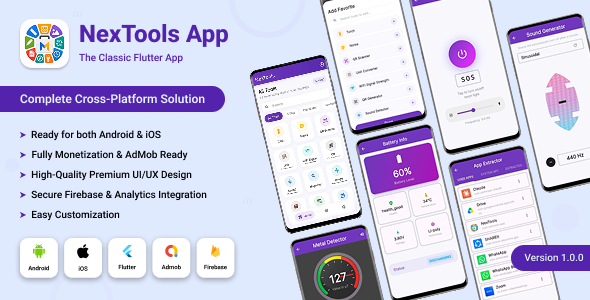
NexTools is a comprehensive, feature-rich 48-in-1 utility, calculator, and sensor application built with Flutter. It serves as an all-in-one daily companion application combining essential daily utilities, smart financial & health calculators, offline file & unit converters, and hardware sensor tools into a single, beautifully crafted application.
Designed with a modern Glassmorphic Dark-Purple UI, fluid micro-animations, responsive layout, dynamic multi-language localization, and a dual monetization system (Google AdMob + In-App Purchases), NexTools is 100% production-ready for publication on Google Play Store and Apple App Store.





Key Features & Highlights
- 48 Tools in 1 App: Replaces dozens of standalone apps, saving device storage while providing maximum user convenience.
- Flutter & Dart Compatibility: Fully compatible with Flutter 3.29.x / 3.41.8+ and Dart 3.11.5+ (SDK constraint >=3.9.0 <4.0.0).
- Dual Monetization System: Fully integrated Google AdMob (Banner, Interstitial, and App Open ads) plus 3-Tier In-App Purchases (Monthly, Yearly, Lifetime).
- Automatic Ad-Free Experience: Subscribing or purchasing Lifetime access automatically disables and disposes all ads across the app.
- GetX Clean MVC Architecture: Modular, well-organized codebase with 0 Dart analyzer warnings/errors, fast performance, and easy customizability.
- Dynamic Light & Dark Themes: Seamless instant theme switching powered by a centralized GetX theme controller.
- 7 Built-in Languages with RTL Support: English, Spanish, Hindi, Chinese, Arabic, French, and Urdu with full Right-to-Left layout adaptation.
- Instant Tool Search & Category Filtering: Real-time instant search bar along with filterable category chips on the dashboard.
- Favorites System: Users can bookmark their most frequently used tools for quick access from the home screen.
- Android & iOS Ready: Pre-configured build files, Android 16 (API 36) support, iOS 14+ target, and ready-to-use release signing setup.
Complete Breakdown of All 48 Tools
1. Core & Daily Utilities
- Flashlight & Screen Light: High-power LED flashlight toggle with screen brightness light modes.
- Quick Notes & Memo: Built-in lightweight note taker to save thoughts and quick lists locally.
- Speech-to-Text: Voice-to-text converter supporting real-time dictation.
- Text-to-Speech: Reads out entered text with adjustable pitch and speed speech engine.
- Voice Recorder: High-quality audio voice recorder with save and playback controls.
- Wi-Fi Signal Strength Detector: Real-time wireless network signal monitor and connection analyzer.
- Stopwatch & Lap Counter: Millisecond precision stopwatch with lap history recording.
- Countdown Timer: Customizable countdown timer with audio alert on completion.
- Calendar & Date Planner: Integrated date picker and calendar view for quick reference.
- Morse Code Converter: Encodes plain text into Morse code signals and decodes back.
- Cryptography & Hash Tool: Text encoder/decoder supporting hashing algorithms and secure text conversions.
- Pendulum Simulator: Physics-based interactive pendulum animation tool.
2. Smart Calculators & Financial Tools
- BMI & Health Index Calculator: Body Mass Index calculator with health category classifications.
- Age Calculator: Exact age finder displaying total years, months, days, hours, and minutes.
- Date Difference Calculator: Calculates exact duration and days between two selected calendar dates.
- Fuel Cost & Consumption Calculator: Computes trip fuel expenses, mileage, and total travel cost.
- Car Loan & EMI Calculator: Monthly loan payment calculator with principal and interest breakdowns.
- Discount Calculator: Instant percentage discount and final price savings calculator.
- Tip & Split Bill Calculator: Restaurant tip calculator with per-person bill split capability.
- Leap Year Checker: Quick tool to determine if any given year is a leap year.
- Temperature Converter: Converts values between Celsius, Fahrenheit, and Kelvin scales.
- Random Number Generator: Custom min/max range number spinner for games and raffles.
3. Hardware Sensors & Physics Tools
- Digital Compass: Real-time magnetic compass showing directional heading and degrees.
- Step Counter (Pedometer): Hardware sensor step tracker monitoring daily walking activity.
- Ambient Light Meter: Measures surrounding illuminance in Lux using the device light sensor.
- Sound Level Detector (Decibel Meter): Real-time acoustic noise level meter measuring audio decibels (dB).
- Battery Health & Info Monitor: Displays battery level, charging status, temperature, voltage, and health status.
- Metal Detector: Uses magnetometer sensor to detect nearby ferrous metallic objects.
- Bubble Surface Leveler: Dual-axis spirit level meter for alignment checking.
- Magnifier (Camera Zoom): Digital camera magnifying lens with flash control for close-up viewing.
- GPS Speedometer: Speed tracking gauge using device location sensors (km/h and mph).
- Ruler & On-Screen Measurement: Precise visual screen ruler calibrated for quick hardware measurements.
- Sound Frequency Generator: Generates audio frequency sine waves and tone pitches.
4. Media, Files & Converters
- QR Code Scanner: Fast camera-based QR code reader with auto-action triggers (URL, text, WiFi).
- QR Code Generator: Generates downloadable high-resolution QR codes for custom links, contacts, and text.
- Image Compressor: Compresses large images to save disk space without quality degradation.
- Image Format Converter: Converts images between JPG, PNG, WEBP, and HEIC formats.
- Unit Converter: Multi-unit converter for Length, Mass, Volume, Speed, Area, and Time.
- Number Base Converter: Converts numbers across Binary, Decimal, Hexadecimal, and Octal formats.
- Hex to RGB Color Converter: Converts hex color codes into RGB/RGBA values with interactive color picker.
- PDF Utility Converter: Converts text/images into formatted downloadable PDF documents.
- App APK Extractor: Extracts installed applications into shareable APK files.
Monetization Engine Details
1. Google AdMob Integration (3 Ad Types)
- Banner Ads: Fixed policy-compliant banner ads anchored at the bottom of designated settings screens.
- Interstitial Ads: Frequency-capped full-screen ads shown automatically after every 4th tool launch.
- App Open Ads: Displayed on cold app launch and when resuming app from background, equipped with anti-overlap guard.
2. In-App Purchases (3 Subscription Tiers)
- Monthly Subscription: Recurring auto-renewable monthly subscription plan.
- Yearly Subscription: Discounted annual recurring subscription plan.
- Lifetime Purchase: One-time payment option providing permanent ad-free status forever.
- Automatic System-Wide Ad Disposing: Any active subscription or purchase instantly hides and disposes all AdMob banners, interstitials, and app open ads permanently.
Technical Specifications & Compatibility
| Specification | Details |
|---|---|
| Flutter SDK Version | Flutter 3.29.x / 3.41.8+ (Fully updated & tested) |
| Dart SDK Constraint | >=3.9.0 <4.0.0 (Dart 3.11.5+) |
| State Management | GetX (Reactive State, Dependency Injection, Named Routes) |
| Minimum Android Version | Android 5.0 (API 21 – Lollipop) |
| Target Android Version | Android 16 (API 36 – Latest Requirement) |
| Minimum iOS Version | iOS 14.0 and higher |
| Java Version Requirement | JDK 17 (Fully configured in build.gradle.kts) |
| Responsive Framework | Flutter ScreenUtil (Base reference screen size 390×844) |
| Analyzer Status | 0 Errors • 0 Warnings |
What is Included in the Purchase Package?
- Full Source Code: Complete, un-obfuscated Flutter source code for Android and iOS.
- Android Release Signing Template: Pre-configured
build.gradle.ktsrelease signing block withkey.properties.exampletemplate. - Full HTML Offline Documentation: Comprehensive guide covering setup, package renaming, AdMob config, In-App Purchase setup, iOS build instructions, and FAQ.
- 5-Minute Quick Start Guide: Quick reference guide for immediate setup.
- Free Lifetime Updates: Access to all future app updates and bug fixes.
Support
Email: codepulsestudio67@gmail.com

Built with love by CodePulse Studio.
| Type | Flutter App |
|---|---|
| Author | codepulsestudio67 |
| Price | $15 |
| Sales | 1 |
| Rating | 0 (0) |
| Published | Jun 2, 2026 |
| Last Update | Jun 2, 2026 |
| Compatible Software | Flutter 3.x |
| Mobile Files Included | Dart, YAML |
Categories
Tags
External listing. code.market does not sell this product and does not process payment for it. Pricing, payment, delivery, licensing, refunds, and support are handled by the third-party merchant on its own website. We may earn an affiliate commission from a referral. Details.
Products of the Week.
Submit🥇

Perceptle
Perceptle is a daily browser-based game that challenges you to test your sensory intuition through five quick estimation and rhythm-based rounds.
Other · 1 views · 0 clicksOther · Week 47 · 1 views · 0 clicks
🥈

Free LinkedIn Likes From Real
Get free LinkedIn likes on your posts from real members who react by hand. No
SaaS · 124 views · 2 clicksSaaS · Week 47 · 124 views · 2 clicks
🥉

STOP GUESSING WHAT TO POST
AI that learns your brand voice and builds a month of consistent, on-brand social content: carousels, posts and hooks that sound like you, not like everyone else's AI.
SaaS · 7,686 views · 71 clicksSaaS · Week 47 · 7,686 views · 71 clicks
#4

aaas.market
407 reliable micro tools for solo founders, marketers and creators. They work in your browser
SaaS · 122 views · 0 clicksSaaS · Week 47 · 122 views · 0 clicks