
NextList | Post and Buy - Classified Ads Marketplace React Native App
Description
NextList | Post and Buy Classified Ads Marketplace React Native App – Version 1.1.0
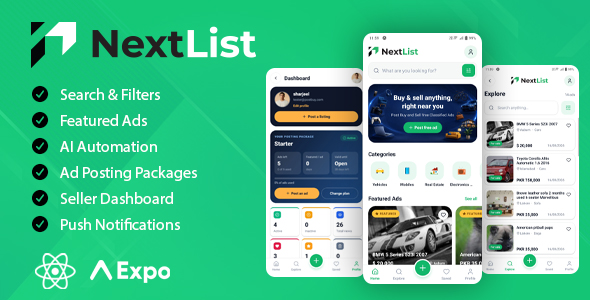
NextList is a complete buy & sell classifieds mobile app built with React Native, Expo and TypeScript. Users can browse, search, post and manage ads, buy posting packages, pay with popular gateways and receive push notifications. It also includes optional AI ad review and an AI help assistant, powered by your own AI account. Launch your own OLX-style marketplace for Android and iOS.
Important: Laravel backend required (separate purchase)
This item includes the mobile app source code only. The app connects to the Post and Buy Laravel backend (website, admin panel and REST API), which is not included in this item and must be purchased separately. The app will not work without the backend installed on your own HTTPS server.
Get the backend here: Post and Buy – Classified Ads Listings (Laravel)

Once the backend is installed, the app reads categories, packages, payment gateways, currency, FAQs and pages from your admin panel, so most changes need no app rebuild.
What you need
- 1. NextList Mobile App (this item): React Native + Expo source code, documentation and demo APK
- 2. Post and Buy Laravel Backend (separate purchase): buy on CodeCanyon
Live demo
Visit the demo page to see all screens and features, and to download the Android demo app: View the NextList demo
- Android demo APK: download from the demo page (scan the QR code or tap Download)
- Demo username: tester@postbuy.com
- Password: 12345678
You may need to allow “Install unknown apps” on your device. The demo uses a shared test server, so please don’t enter real personal or payment details.
Third-party services & costs
AI ad review and the AI help assistant call a third-party AI provider — OpenAI, Anthropic Claude, Google Gemini, or an OpenAI-compatible service such as Groq, OpenRouter or Ollama — using your own account and API key with that provider. The provider bills you directly for usage; this is not a fee charged by us, and no API key or AI credit is included with this item. Both AI features are optional and switched off by default.
Email (SMTP): registration and password reset send OTP codes by email through the SMTP provider you configure in the backend. You are responsible for any costs charged by your chosen SMTP / email provider.
Push notifications run on the free Expo Push Service together with Firebase Cloud Messaging and Apple Push Notification service, so there is no per-message cost. You do need your own free Firebase project and, for iOS, an Apple Developer account.
Payment gateways (Stripe, PayPal, Razorpay, SSLCOMMERZ) each charge their own transaction and currency-conversion fees, billed by the gateway to your own merchant account. These fees are not included in the price of this item.
Buyer features
- Home screen with categories, featured ads and latest ads
- Search with filters: category and sub-category, price range, city or area, featured only and category-specific filters
- Sort by most recent, price low to high or price high to low
- Ad details with photo gallery, seller card, features, description and similar ads
- Save favourite ads
- Call the seller, send a message or report an ad
Seller features
- Post ads with up to 8 photos, category-based fields, price, currency and location
- Edit ads and remove individual photos
- Dashboard with active, inactive, deleted and saved ads plus total views
- Activate, pause, delete and restore ads
- Featured ads to get more reach
- Edit profile with photo upload and delete account option
Packages & payments
- Free and paid posting plans with ad limits, validity and featured days
- Payment gateways: Stripe, PayPal, Razorpay, SSLCOMMERZ and Bank Transfer
- The app shows only the gateways you enable in the admin panel, with your currency and amounts
- Bank transfer with receipt upload for admin approval
- Payment history and saved cards
- Full-screen success confirmation after payment, ad posting, registration and password reset
AI ad review (optional)
- Approve or reject new ads automatically with your own AI model, or use manual approval by an admin
- Unsure ads wait in an admin review queue, with the AI verdict and full decision history
- Clear Under review and Rejected status in the app, rejection reasons and Edit & resubmit
- Sellers get a push notification when their ad is approved or rejected
- Works with OpenAI-compatible services (Groq, OpenRouter, Ollama), Anthropic Claude and Google Gemini using your own API key
- Off by default and controlled from the admin panel, with adjustable confidence thresholds and your own marketplace rules
AI help assistant (optional)
- In-app chat for logged-in users, answering from your FAQs and pages
- Explains the user’s own plan and ads, for example why an ad was rejected
- Daily question limit per user and a Contact support button when it cannot help
- Admins can review what users ask to improve their FAQs
Push notifications
- Plan activated, ad approved or rejected and featured ad alerts
- Tap a notification to open the related ad or dashboard, even when the app was closed
- Uses the free Expo Push Service and Firebase Cloud Messaging
Authentication
- Register, login and logout with secure token storage
- Email OTP verification with resend timer
- Forgot and reset password with OTP
Requirements
- The Post and Buy Laravel backend (separate purchase) on an HTTPS server
- An SMTP mail provider for OTP emails
- Node.js 20 or newer
- An Expo account (free) for cloud builds
- A Firebase project (free) for Android push notifications
- Optional: an API key from your AI provider for the AI features
- Apple Developer and Google Play Developer accounts to publish
Notes
- The Laravel backend is not included in this item and must be purchased separately.
- Push notifications need a development or production build. They do not work in Expo Go.
- AI features are optional. You pay your AI provider directly, and there is no extra fee from us.
- You are responsible for any costs charged by your chosen SMTP / email provider.
- Payment gateway transaction fees are charged by the gateway to your own merchant account and are not included in this item’s price.
- Screenshots and the demo show the default theme. Colors, logo and icons can be changed.
Support
Please read the included documentation first, as it covers most setup questions. For anything else, contact us through the item comments or by email at sharjil.hz@gmail.com. Support covers setup help and bug fixes for the item as sold. Custom features and design changes may be quoted separately.
| Author | piratestech |
|---|---|
| Price | $29 |
| Sales | 1 |
| Rating | 0 (0) |
| Published | Oct 1, 2026 |
| Last Update | Oct 1, 2026 |
| Compatible Software | Node.js, iOS 14, Other, Other, Android 12.0, Other, Other, Other |
| Demo Url | https://sharjeelanjum.com/demos/nextlistapp/ |
| Mobile Files Included | JavaScript JSON, .apk, JavaScript JSON |
Categories
Tags
External listing. code.market does not sell this product and does not process payment for it. Pricing, payment, delivery, licensing, refunds, and support are handled by the third-party merchant on its own website. We may earn an affiliate commission from a referral. Details.
Products of the Week.
Submit🥇

Perceptle
Perceptle is a daily browser-based game that challenges you to test your sensory intuition through five quick estimation and rhythm-based rounds.
Other · 1,489 views · 9 clicksOther · Week 47 · 1,489 views · 9 clicks
🥈

Free LinkedIn Likes From Real
Get free LinkedIn likes on your posts from real members who react by hand. No
SaaS · 1,632 views · 10 clicksSaaS · Week 47 · 1,632 views · 10 clicks
🥉

STOP GUESSING WHAT TO POST
AI that learns your brand voice and builds a month of consistent, on-brand social content: carousels, posts and hooks that sound like you, not like everyone else's AI.
SaaS · 9,176 views · 75 clicksSaaS · Week 47 · 9,176 views · 75 clicks
#4

aaas.market
407 reliable micro tools for solo founders, marketers and creators. They work in your browser
SaaS · 1,597 views · 5 clicksSaaS · Week 47 · 1,597 views · 5 clicks