
NextLife - Next.js Ecommerce CMS
Description
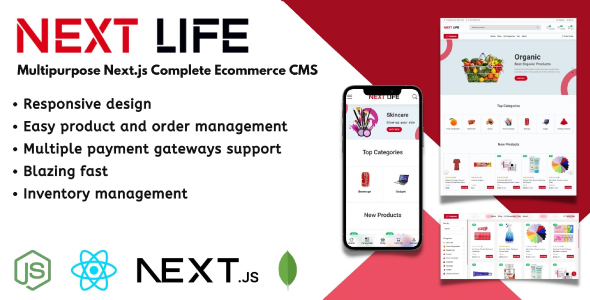
NextLife is a comprehensive eCommerce content management system (CMS) designed with Next.js and MongoDB for easy customization and flexibility. With its intuitive and streamlined user interface, Your customers can enjoy a seamless and lightning-fast shopping experience. Additionally, NextLife features a robust role-based staff access management system that simplifies staff management. The CMS also supports multiple payment gateways, making it effortless to sell any product and focus on expanding your business. Installing and deploying NextLife is incredibly straightforward, making it a hassle-free process.
Our suggestion would be to avoid cPanel hosting and opt for a shared Ubuntu virtual private server instead.
Getting Started
- Demo: https://ecom.dslabtech.com/
- Admin panel login information:
- Login Link: https://ecom.dslabtech.com/signin
- Login Email: demo@admin.com
- Login Password: 12345
- Customer account login information:
- Login Link: https://ecom.dslabtech.com/signin
- Login Email: demo@customer.com
- Login Password: 12345
- Documentation: NextLife Documentation
- Support Email: dslab.web@gmail.com
Technology that we used
- Node.js v20
- Next.js v13
- React.js v18
- Bootstrap 5
- MongoDB v7
Features
- Server-side rendering
- SEO supported and SEO friendly URL
- Responsive design
- Multiple payment gateways
- AWS S3 is used as the default file storage server
- Cash on delivery supported
- Category based product filtering
- Coupon
- Google Analytics support
- Facebook Messenger support
- Social media login
- Application colors change
- Analytics Dashboard
- Manage products and product types
- Manage orders and order status
- Manage coupons
- Manage shipping charges
- Manage Attributes
- Multi-currency supported
- Customizable page content
- Complete role-based staff access management system
- Refund system
Supported payment gateways
- PayPal
- Stripe
- Sslcommerz
- Razorpay
Changelog
version : 1.1.4 (March 29, 2024)
  - Important bug fixes and improvement
  - Updated user interface and user experience
  - Added child categories to the category filter
  - Added price range filter
  - Added Razorpay payment gateway
  - Added a sales summary report for the entire year to the admin panel
  - Added product refund system
  - Added VAT and TAX management
  - Added a feature for managing user addresses
  - Added support for many different currencies
version : 1.1.3 (May 6, 2023)
  - Important bug fixes and improvement
  - The admin may now choose which product photos to use based on the product variety.
  - Multi-language functionality has been added.
  - The application's crash problem has been fixed.
version : 1.1.2 (Apr 4, 2023)
  - Important bug fixes and improvement
  - Updated to NextJS 13 and ReactJS 18
  - Added brand management system
  - Updated user interface and user experience
  - Fixed checkout page navigation system
  - Added feature for address saving in checkout time
  - Added new CODEMOD API for transferring storage from S3 Bucket to local hosting storage
  - Updated product filter and sorting system
version : 1.1.1 (Dec 13, 2022)
    - Added role-based access control
    - Important bug fixes and improvement
version : 1.1.0 (Oct 13, 2022)
    - Auto-scrolling features for carousels
    - Added features in the admin panel to control the login requirement for placing orders
    - Important bug fixes and improvement
version : 1.0.9 (July 26, 2022)
    - Added review system on the product details page
    - Added a question-answer system on the product details page
    - Notification system added in the admin panel
    - Important bug fixes and improvement
version : 1.0.8 (June 12, 2022)
- Important Bug Fixing
Let us know if you’re looking for a missing feature or want to report an issue.
| Type | JavaScript Script |
|---|---|
| Author | ds-lab |
| Category | Javascript / Shopping Carts |
| Price | $59 |
| Sales | 107 |
| Rating | 5.00 from 5 ratings |
| Published | Jun 7, 2022 |
| Last Update | Mar 28, 2024 |
| Compatible Browsers | IE9, IE10, IE11, Firefox, Safari, Opera, Chrome, Edge |
| Compatible Software | ReactJS, Node.js |
| Source Files Included | JavaScript JS, JavaScript JSON, HTML, CSS |
Categories
Tags
External listing. code.market does not sell this product and does not process payment for it. Pricing, payment, delivery, licensing, refunds, and support are handled by the third-party merchant on its own website. We may earn an affiliate commission from a referral. Details.
Products of the Week.
Submit🥇

STOP GUESSING WHAT TO POST
AI that learns your brand voice and builds a month of consistent, on-brand social content: carousels, posts and hooks that sound like you, not like everyone else's AI.
SaaS · 5,037 views · 47 clicksSaaS · Week 45 · 5,037 views · 47 clicks
🥈

Conversational Backlinks for Busy Founders
Place Backlink Relevant Conversation for your domain across Forums and Conversations
Website · 43,048 views · 226 clicksWebsite · Week 45 · 43,048 views · 226 clicks
🥉

upvote.club
Free Social Media Engagement that Helps Boost Your Content. Upvote Club supports 19 social networks with 100+ engagement actions in one dashboard. Add links to your posts and get free engagement from real users.
SaaS · 41,075 views · 122 clicksSaaS · Week 45 · 41,075 views · 122 clicks
#4

Substack Posting API
Onboard your Agent to Substack. Write Publish on Substack via API
SaaS · 60,027 views · 202 clicksSaaS · Week 45 · 60,027 views · 202 clicks
#5

Seenshot App
Free, Fast, MacOS Screenshot app. Make Screenshot cmd+shift+2 and send it via link
Desktop App · 29,392 views · 124 clicksDesktop App · Week 45 · 29,392 views · 124 clicks
#6

Hand-Placed Backlinks $9.99 per link. Flat rate.
Buy hand-placed forum, Q-A and directory backlinks. Flat $9.99 per link, no subscriptions — you only pay for approved listings.
Website · 5,176 views · 19 clicksWebsite · Week 45 · 5,176 views · 19 clicks
#7

Free Invoice Generator - PDF Invoices in Your Browser, No Sign-Up
A free invoice maker for freelancers and small businesses: fill in the invoice, check the live preview, and download a PDF that looks exactly like it. Any currency, tax per item, three templates, no sign-up, and nothing leaves your device.
3,820 views · 17 clicksWeek 45 · 3,820 views · 17 clicks
#8

Merge PDF Files Free - Combine PDFs in Your Browser, No Upload
A free PDF merger for office workers, students, and freelancers: combine PDFs and images into one file in the browser, reorder files and pages, pick page ranges, keep bookmarks, and open password-protected PDFs. Nothing is uploaded, no sign-up, no watermark.
3,528 views · 14 clicksWeek 45 · 3,528 views · 14 clicks