Nexora - Laravel SaaS CRM and AI Website Builder
Description
Nexora – Multi-Tenant SaaS Platform for Agencies and Service Businesses
Manage your business operations, client relationships, websites, bookings, campaigns, and support workflows from one centralized application.
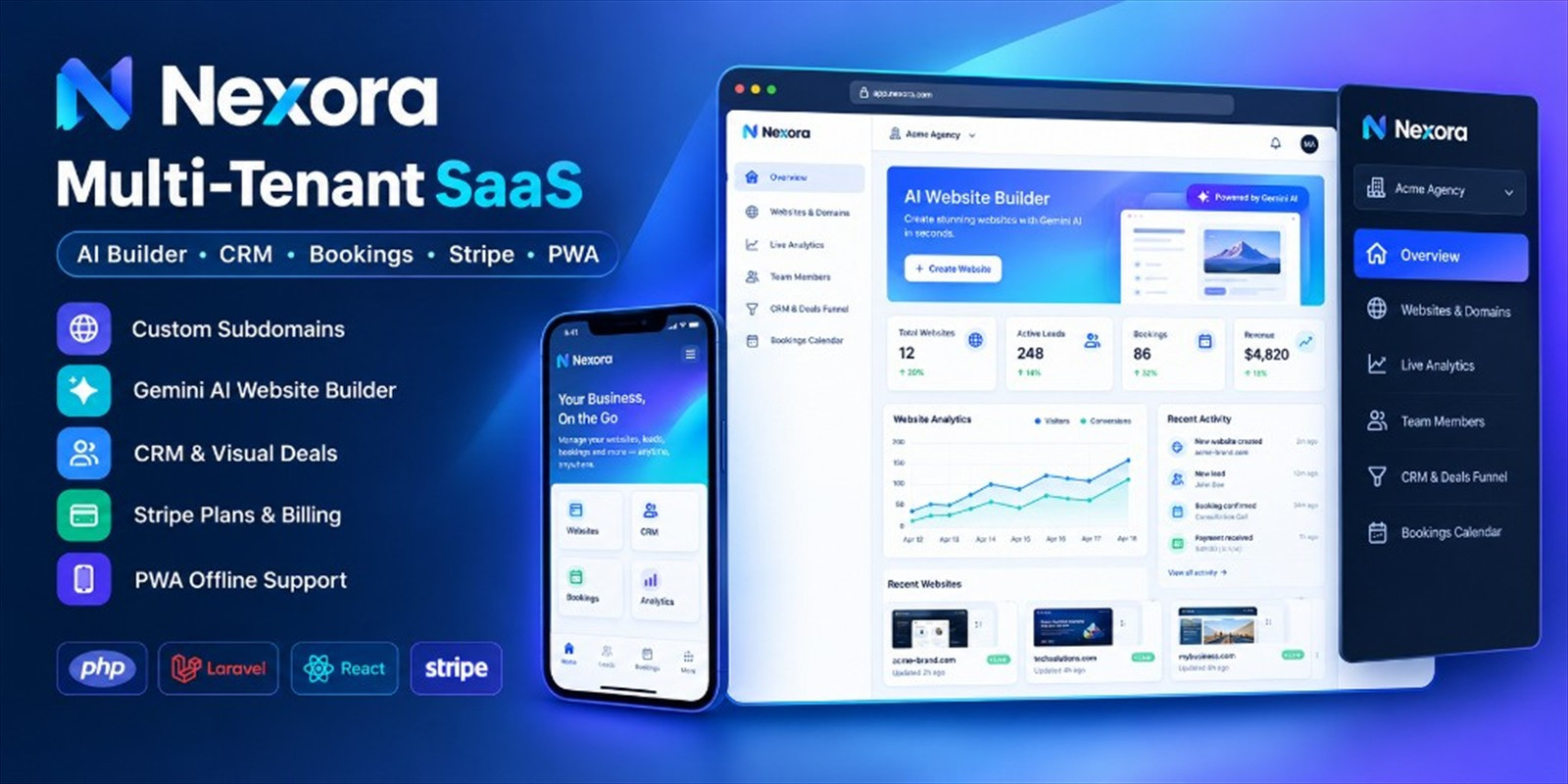
Nexora is a self-hosted Laravel multi-tenant SaaS platform designed for digital agencies, service businesses, and teams that need a structured environment to manage multiple workspaces and client operations. It brings CRM, AI-assisted website building, bookings, campaigns, and support tickets together in one application with four role-based portals.
Deploy Nexora on your own hosting infrastructure and manage your platform, tenant workspaces, staff, and clients through a unified system.
🚀 Core Features
1. Multi-Tenant Workspace Architecture
- Organize business operations into separate tenant workspaces.
- Support agency and service-business workflows within a multi-tenant application.
- Provide dedicated portals based on user roles.
- Keep workspace access organized according to the application's role and authorization rules.
- Manage the platform and tenant operations through dedicated interfaces.
2. CRM and Lead Management
- Manage CRM contacts from a centralized interface.
- Organize deals and track sales-related records.
- Create and manage tasks for day-to-day business activities.
- Keep contact, deal, and task information organized within the relevant workspace.
- Support a more structured approach to client relationship management.
3. Section-Based Website Builder
- Create websites using a section-based building workflow.
- Start with available website templates.
- Arrange and manage website content through supported sections.
- Publish websites using the application's publishing functionality.
- Use AI-assisted content tools to help prepare website content.
4. Gemini AI Content Tools
- Integrate Google Gemini API for supported AI content workflows.
- Use your own Gemini API key.
- Assist website content creation with AI-powered tools.
- Keep AI service configuration under your own account and API credentials.
- Requires a valid Gemini API key and applicable service access.
5. Booking Management
- Manage booking records through the application.
- Keep booking-related operations organized within the relevant workspace.
- Use the booking module as part of your service-business workflow.
6. Campaign Management
- Access campaign management functionality within the platform.
- Organize campaign-related records and activities.
- Manage campaign workflows supported by the installed application.
7. Support Ticket Management
- Manage customer support tickets from the application.
- Organize support requests within the platform's available workflows.
- Provide a dedicated client portal alongside the staff and administration portals.
8. Subscription Plan Payments
- Integrate Stripe Checkout for subscription plan payments.
- Configure Stripe credentials using your own account.
- Use the included checkout return verification flow.
- Requires valid Stripe configuration and availability in your region.
- Automated webhook reconciliation for the complete recurring subscription lifecycle is not included.
9. Custom Domain Guidance
- Includes guidance for custom domain DNS verification.
- Helps administrators understand the DNS configuration needed for a domain.
- Domain ownership, DNS changes, and server configuration remain your responsibility.
- HTTPS certificates must be provisioned and maintained on your own infrastructure.
10. Progressive Web App (PWA) Support
- Includes PWA installation support.
- Allows supported browsers and devices to offer the application's install experience.
- Installation behavior depends on browser, device, and deployment configuration.
11. Installation Wizard and Documentation
- Includes an application installation wizard.
- Provides offline-accessible documentation within the package.
- Includes compiled frontend assets for deployment.
- Open documentation/index.html to access the included guides.
- Review the installation and configuration requirements before deploying to production.
👥 Four Role-Based Portals
1. Platform Administrator
Access the platform-level administration portal for the administrative functions provided by the application.
2. Tenant / Agency Owner
Manage tenant-level operations and access the workspace features available to the tenant or agency owner.
3. Staff Portal
Provide staff members with access to their permitted workspace features and business workflows according to their assigned role.
4. Client Portal
Give clients a dedicated portal for the client-facing features and workflows available in the application.
🧰 Technology Stack
- Backend Framework: Laravel 12
- Server Language: PHP 8.2 or higher
- Frontend Framework: Vue 3
- Frontend Integration: Inertia.js 2
- Build Tool: Vite
- Database: MySQL 8 or MariaDB 10.6
- Payment Integration: Stripe Checkout
- AI Integration: Google Gemini API
- Deployment Model: Self-hosted web application
📦 What Is Included in the Package?
- Nexora application source code.
- Laravel backend application.
- Vue 3 and Inertia.js frontend.
- Multi-tenant workspace functionality.
- Four role-based application portals.
- CRM, website builder, bookings, campaigns, and support ticket modules.
- Gemini AI content integration.
- Stripe Checkout integration.
- Installation wizard.
- Compiled frontend assets.
- Offline documentation and setup guides.
⚙️ Installation Overview
- Upload and Extract: Upload the package to your hosting environment and extract the application files.
- Configure the Web Root: Point your domain's document root to the application's /public directory.
- Install Dependencies: Run Composer using a compatible PHP environment.
- Configure Environment: Set up your .env file, database credentials, application URL, and required service settings.
- Prepare the Database: Configure database access according to the included installation instructions.
- Complete Installation: Open the application and follow the /install installation flow.
- Configure Integrations: Add the API credentials and service settings required for Gemini, Stripe, email, DNS, and HTTPS.
- Review Documentation: Open documentation/index.html for the full installation and configuration guides.
Important: Follow the included documentation for the exact installation sequence and server requirements. Do not expose environment files or secret API credentials publicly.
💻 Server Requirements
- PHP 8.2 or higher.
- MySQL 8 or MariaDB 10.6.
- Composer and the PHP extensions required by Laravel and the included dependencies.
- A web server configured to serve the application's /public directory.
- Writable storage and cache directories as required by Laravel.
- HTTPS and external service credentials where required by your deployment.
Check the included documentation and dependency configuration for the complete list of PHP extensions and server requirements.
⚠️ Important Notes and External Services
- Self-Hosted: You are responsible for hosting, server maintenance, backups, and deployment configuration.
- Gemini AI: Requires your own Google Gemini API key and applicable API access.
- Stripe: Requires your own Stripe account, API credentials, and supported payment configuration.
- Email / SMTP: Requires your own email service credentials if email delivery is needed.
- Custom Domains: DNS verification guidance is included, but domain registration and DNS management are your responsibility.
- HTTPS: SSL/TLS certificate provisioning and renewal must be handled on your hosting infrastructure.
- Recurring Billing: Stripe Checkout return verification is included. Automated webhook reconciliation for the complete recurring subscription lifecycle is not included.
- Third-Party Costs: Hosting, domains, API usage, payment processing, and other external services may involve separate charges.
🎯 Who Should Use Nexora?
- Digital agencies managing client projects and workspaces.
- Service businesses organizing CRM, bookings, and support workflows.
- Entrepreneurs building a self-hosted multi-tenant SaaS offering.
- Development teams looking for a Laravel and Vue-based application foundation.
- Businesses that prefer control over their hosting environment and external service credentials.
📚 Documentation and Support
Offline documentation is included in the download package. Start with documentation/index.html for installation instructions and configuration guidance.
For product-related assistance, contact support through the Nexora item page on Codester after purchase.
✅ Get Started with Nexora
Nexora brings multi-tenant workspaces, CRM, website building, AI-assisted content tools, bookings, campaigns, and customer support into one self-hosted Laravel application.
Review the included documentation, verify your server requirements, and configure the required third-party services before deploying your application.
Features
- Multi-tenant workspace architecture with role-based portals - Administrator, Tenant Owner, Staff, and Client dashboards - CRM contacts, deals/pipeline, and task workflows - Section-based multi-page website builder with templates and publishing - Gemini AI content tools (buyer uses their own API key) - Online bookings and appointment workflows - Campaigns and support ticket management - Stripe Checkout for subscription plan payments - Custom domain connection with DNS verification guidance - Progressive Web App (PWA) install support - Installation wizard, migrations, reference data, and offline documentation - Built with Laravel 12, PHP 8.2+, Vue 3, and Inertia
Requirements
- PHP 8.2 or higher
- Composer 2 - MySQL 8 or MariaDB 10.6 (empty database) - Apache or Nginx with document root set to /public - PHP extensions: PDO MySQL, cURL, Mbstring, OpenSSL, Tokenizer, XML, DOM, Ctype, Fileinfo, BCMath, GD - HTTPS recommended for production - Cron and queue worker support - Node.js 22.12+ only if rebuilding frontend assets from source - Buyer-managed accounts for Gemini, Stripe, and SMTP when those features are used
| Author | Codeflex |
|---|---|
| Category | Scripts & Code / PHP Scripts |
| Price | $30 |
| Extended License | $90 |
| First Release | Oct 7, 2026 |
| Last Update | Oct 7, 2026 |
| Database | MySQL 8.0, MySQL 8.4 LTS |
| Files included | .php, .css, .html, .sql, JavaScript .js |
| Software version | PHP 8.2, PHP 8.3, PHP 8.4, PHP 8.5 |
| Html/css framework | Tailwind CSS |
| Software framework | Laravel |
| Javascript framework | Vue.js |
| Programming language | PHP, JavaScript, TypeScript |
Categories
Tags
External listing. code.market does not sell this product and does not process payment for it. Pricing, payment, delivery, licensing, refunds, and support are handled by the third-party merchant on its own website. We may earn an affiliate commission from a referral. Details.
Products of the Week.
Submit🥇

Actionbook
It works inside the user's own browser with the accounts already signed in. The user describes the result they need, and the agent reads, clicks and types through the pages, then delivers a dashboard or report where each data links back to its source.
Other · 743 views · 10 clicksOther · Week 44 · 743 views · 10 clicks
🥈

Free social media tools for creators & solofounders
295 free tools for growing your social media: write, plan, grow on local AI models, 100% free forever, No sign-up required, No trial. Write, check and measure posts on LinkedIn, Instagram, TikTok, X, YouTube, Reddit, Product Hunt and more: a free social media scheduler for 17 networks, engagement rate calculators, character counters, best time to post, hook generators and follower growth calculators. No login anywhere, no API or credit usage.
710 views · 6 clicksWeek 44 · 710 views · 6 clicks
🥉

STOP GUESSING WHAT TO POST
AI that learns your brand voice and builds a month of consistent, on-brand social content: carousels, posts and hooks that sound like you, not like everyone else's AI.
SaaS · 1,957 views · 22 clicksSaaS · Week 44 · 1,957 views · 22 clicks
#4

Hand-Placed Backlinks $9.99 per link. Flat rate.
Buy hand-placed forum, Q-A and directory backlinks. Flat $9.99 per link, no subscriptions — you only pay for approved listings.
Website · 1,908 views · 17 clicksWebsite · Week 44 · 1,908 views · 17 clicks
#5

Conversational Backlinks for Busy Founders
Place Backlink Relevant Conversation for your domain across Forums and Conversations
39,367 views · 211 clicksWeek 44 · 39,367 views · 211 clicks
#6

Free Invoice Generator - PDF Invoices in Your Browser, No Sign-Up
A free invoice maker for freelancers and small businesses: fill in the invoice, check the live preview, and download a PDF that looks exactly like it. Any currency, tax per item, three templates, no sign-up, and nothing leaves your device.
647 views · 11 clicksWeek 44 · 647 views · 11 clicks
#7

Merge PDF Files Free - Combine PDFs in Your Browser, No Upload
A free PDF merger for office workers, students, and freelancers: combine PDFs and images into one file in the browser, reorder files and pages, pick page ranges, keep bookmarks, and open password-protected PDFs. Nothing is uploaded, no sign-up, no watermark.
593 views · 4 clicksWeek 44 · 593 views · 4 clicks