
Newsgoo | Flutter News App and Multi Publication Platform With Admin Panel
Description
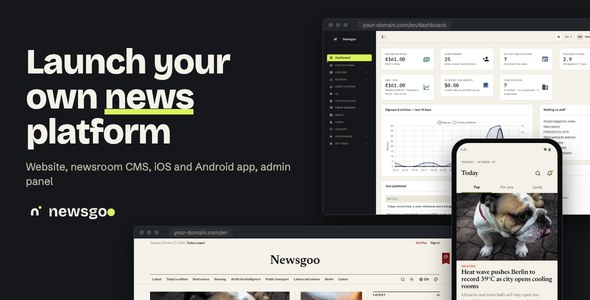
Newsgoo is a full-stack news platform: a cross-platform Flutter mobile app (iOS & Android) and a companion
web platform built with the Laravel PHP framework (news website, newsroom CMS, admin panel and
web checkout). Newsrooms, local outlets and independent writers each run a publication on it,
with a team, an editorial CMS, a paywall, newsletters and push alerts; readers follow publications, topics and
authors across one website and one app. It ships with a production-ready backend: the included PHP / MySQL API
(built with Laravel), Stripe with Stripe Connect for reader subscriptions and publication payouts, Firebase for
sign-in and push notifications, and RevenueCat for in-app reader plans.
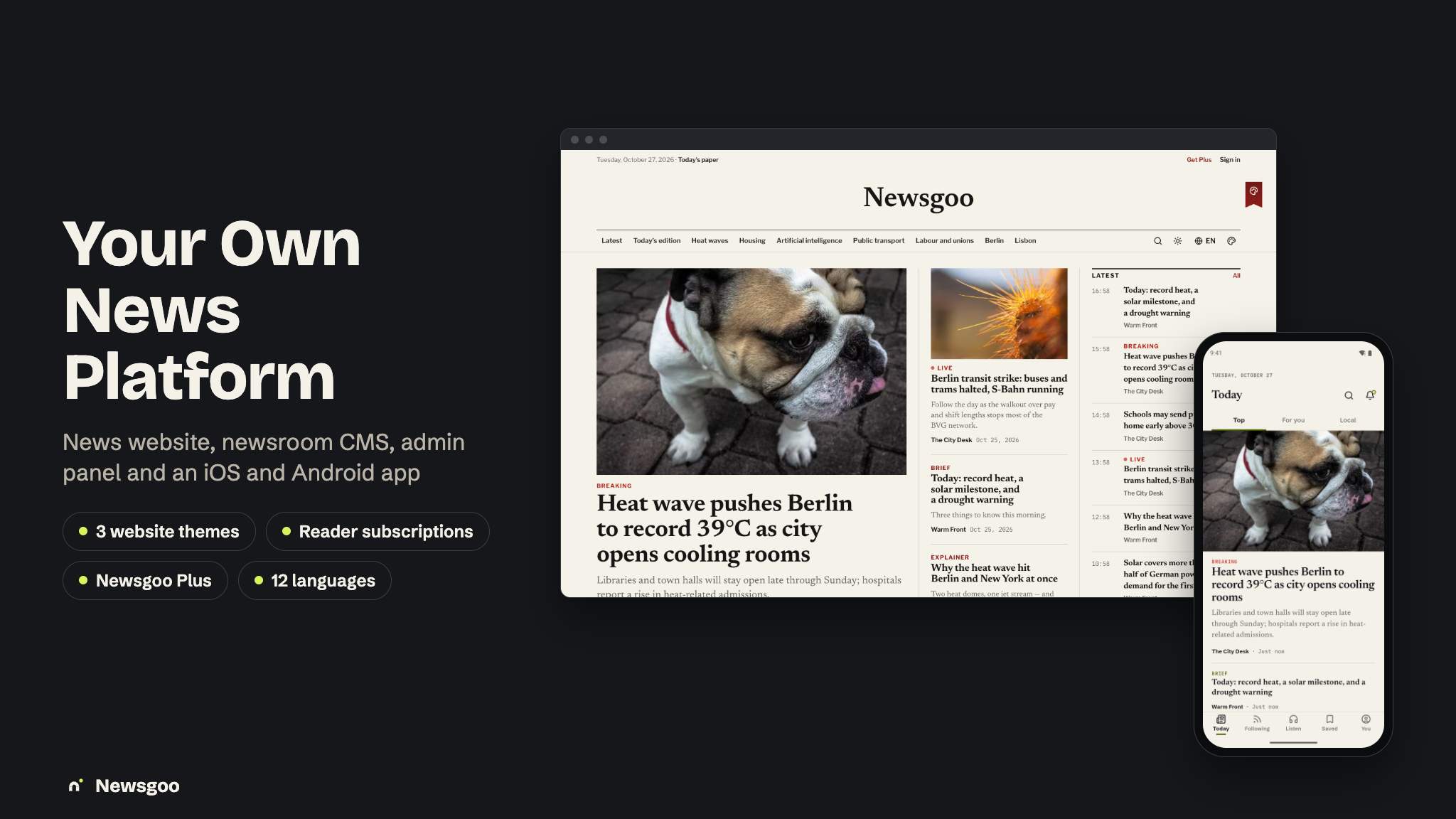
One platform covers the whole news day: articles in every format (news, analysis, explainer,
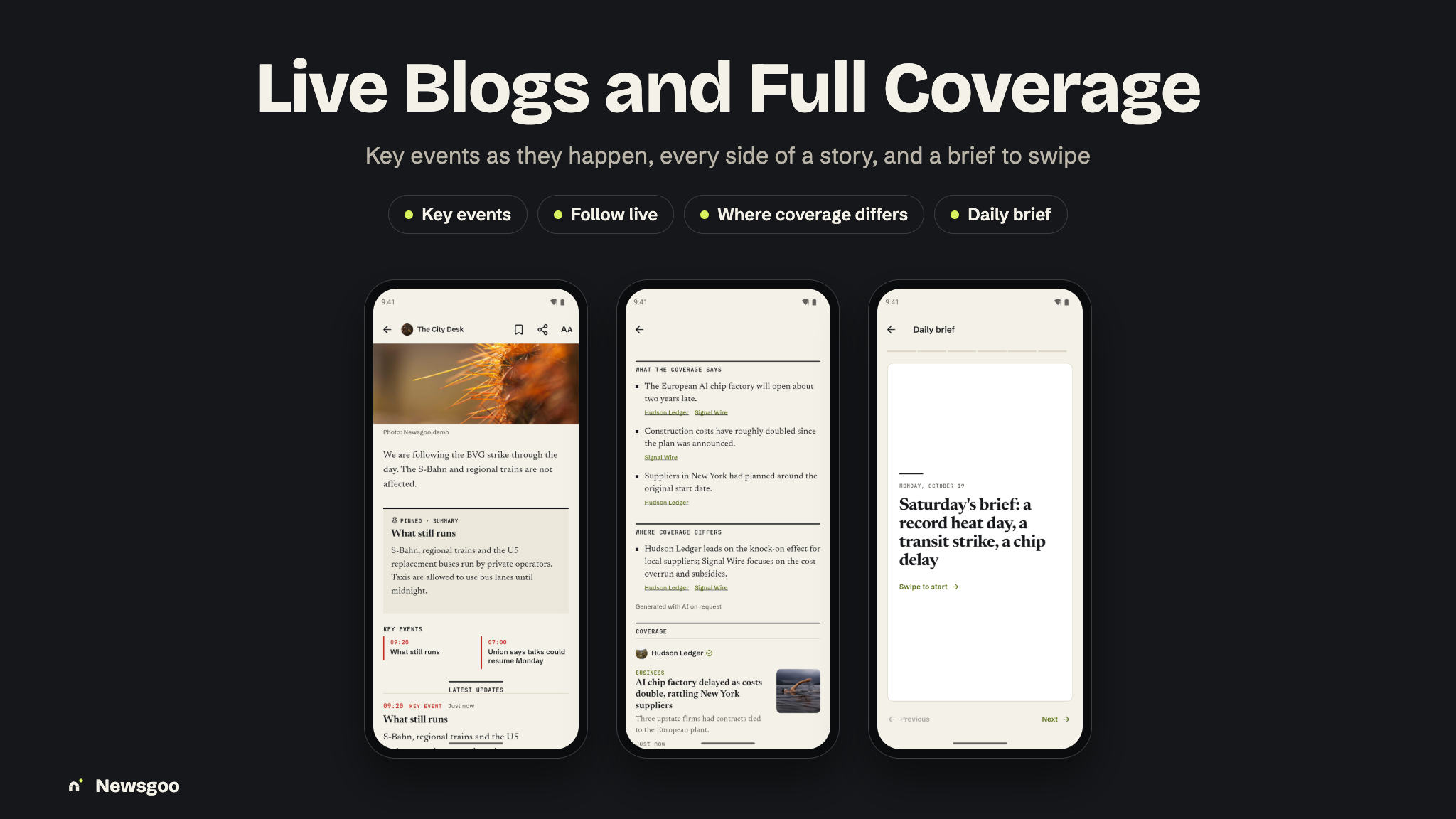
opinion, review, interview, brief), live blogs with key events and a “new updates” pill,
Full coverage that groups every publication’s take on one story, and a daily
edition you can read or listen to. Editors plan, write, review, schedule, publish and correct in the
browser or post to a live blog from the phone. Reader subscriptions per publication (with a meter and gift links),
free and paid publisher plans pay for it.

Test card: reader subscriptions and publisher plans are paid through Stripe or
the web payment provider you choose (Stripe, Paddle, Lemon Squeezy, Polar, Creem or Dodo Payments), and all six
can be checked in test mode with card number 4242 4242 4242 4242, any future expiry date and any
CVC.
Note: All supported payment services (Stripe and Stripe Connect, Midtrans, Duitku, Paddle, Lemon Squeezy, Polar, Creem and Dodo Payments) are third-party services and may charge transaction fees or other service fees depending on their pricing plans. Most require merchant account approval and verification before accepting live payments, and Stripe Connect requires you to onboard and verify each publication you pay out. These services are not included in the purchase price, and buyers are responsible for creating their own accounts, completing any required approval processes, configuring API keys, and covering all applicable fees. In-app purchases of reader plans on iOS and Android go through Apple and Google (via RevenueCat) and are subject to their store commissions.
AI disclosure — Newsgoo AI features. The AI features use the open-source (MIT)
laravel/ai package, which calls an external AI provider over the internet at runtime:
Google Gemini by default, or OpenAI, Anthropic, Mistral, Groq, DeepSeek, OpenRouter or xAI if you choose one
(Ollama runs on your own server instead). The calls go directly from your server to your own provider
account, with no Laravel Cloud or other Laravel subscription and no author-run proxy. These are
paid services: you need your own account and API key with that provider, and usage costs apply: every AI request
is billed to you by the provider. No AI credits are included. The admin panel has a platform monthly
spend cap and, per feature, a provider, a model and its own monthly cap; AI can be switched off entirely.
Data sent to the provider is only the content of the feature in use: article text (key points,
headlines, translation, audio, copy check, moderation), the reader’s question with the matching articles, search
queries, voice memos and notes photos sent for a draft, aggregated analytics for the newsroom’s insights, and
tip text for triage. Passwords, payment details and access tokens are never sent. Readers are told in the app and
on the website when content comes from AI, every AI output records its model, prompt version and reviewer, and
key points are public only after an editor approves them. Without an AI key, nothing is sent and the AI features
are simply unavailable.
RevenueCat. In-app subscriptions use RevenueCat. You must create your own RevenueCat account, accept RevenueCat’s own Terms of Service and use your own API keys; no author RevenueCat key or app identifier is included. The RevenueCat client SDK is not bundled: the app declares it as a dependency, and it is governed by RevenueCat’s MIT licence and terms, not by this item’s licence. No Facebook App ID or client token is included either, not even as a fallback; you add your own in the build settings.
Use of AI tools in making this item. AI tools were used to assist with parts of this item: writing and reviewing code, drafting the documentation, and some graphics (preview and marketing images). Everything was reviewed, edited and tested by the author.
Demo Instructions
Try everything before you buy, with no install needed. These logins are public on purpose.
Live demo: https://newsgoo.laravelbeginner.net
- Admin panel: https://newsgoo.laravelbeginner.net/en/admin
Emailadmin@newsgoo.test· Passwordpassword123456 - Newsroom CMS: https://newsgoo.laravelbeginner.net/en/newsroom/the-city-desk
Editor-in-chief:editor@newsgoo.test· Passwordpassword(owner with Money, Team and Settings:publisher@newsgoo.test·password) - Website (reader): https://newsgoo.laravelbeginner.net/en → Sign in
Emailmia@example.com· Passwordpassword(follows, saved articles and a City Desk subscription) - Mobile app (Android): download the demo APK and sign in
with any login above. Newsroom mode: sign in as
editor@newsgoo.test, then You → Newsroom. - Test card for every checkout:
4242 4242 4242 4242, any future date, any CVC.
The demo is sandboxed. It is a separate installation on the author’s own server, isolated from any buyer’s site, and holds no real data: the publications, people and articles are fictional, every payment provider is in test mode, and the data is reset regularly. Demo mode blocks the admin actions that would change or delete the shared setup (settings, keys, users, plans and payment providers, media, themes, languages, pages and email templates).
Documentation
The package includes a full guide in HTML and PDF (newsgoo-docs/) with screenshots throughout: the
installation (a one-command local setup and a browser installer), running the Flutter app and connecting it to
your backend, a walkthrough of the app, the website in its three themes, the newsroom CMS and the admin panel,
setting up each third-party service (Firebase, Stripe and Stripe Connect, RevenueCat, AI providers, push,
newsletters, Live Activities and widgets), a step-by-step branding guide for the app name, icon and splash
screen, and the Play Store and App Store release notes.
Third-party services and costs (please read before buying)
This item connects to services run by independent companies. None of them is included in the purchase:
each operates under its own terms of service, its own account approval process and its own fees. You
create every account yourself, under your own name, and pay every fee yourself. No author-owned accounts, API keys,
merchant ids, Firebase projects or analytics ids are included; every key in .env.example is blank.
- Firebase (Google): required for the mobile app (not needed for a website-only install). Authentication, Cloud Messaging (push and Live Activity updates), Remote Config, Analytics and Crashlytics. Configure: your own Firebase project, its
google-services.jsonandGoogleService-Info.plistin the app, and its service-account key atFIREBASE_CREDENTIALSon the server. Cost: the free Spark plan covers testing; usage above it is billed by Google (Blaze plan). - Stripe and Stripe Connect: required to sell reader subscriptions (they always run on Stripe Connect), and the default web checkout. Configure:
STRIPE_*in.envor Admin → Settings → Integrations and two webhooks. Cost: Stripe’s processing, Connect and payout fees, after Stripe’s own business verification. - Lemon Squeezy, Polar, Paddle, Creem, Dodo Payments: optional. Alternative web checkouts for the publisher plans (
PAYMENTS_DEFAULT=stripe,lemonsqueezy,polar,paddle,creemordodopay). Configure: their keys in.env; the active one in Admin → Monetisation → Payment providers. Cost: each charges its own fees and runs its own seller review. - Midtrans, Duitku: optional. Regional payment gateways (Indonesia, IDR only). Configure: Admin → Settings → Integrations. Cost: their own fees and merchant approval.
- RevenueCat, Apple App Store, Google Play: required only to sell reader plans inside the app. Use your own RevenueCat account, your own public SDK keys (
revenuecat_ios_api_key,revenuecat_android_api_keyin Remote Config), your own entitlement ID (in Remote Config and on the server) and your own webhook secret (REVENUECAT_WEBHOOK_SECRET). No RevenueCat key, project id or app id is preset. Cost: Apple and Google developer fees and store commission; RevenueCat’s pricing above its free tier. - Google sign-in: optional. App: enable Google in Firebase Authentication (iOS also needs
GOOGLE_REVERSED_CLIENT_IDinios/Flutter/AppSettings.xcconfig). Website:GOOGLE_CLIENT_ID/GOOGLE_CLIENT_SECRETor Admin → Settings → Social login. Cost: free. - Facebook SDK (sign-in and Meta App Events): optional, empty by default. No Facebook App ID or client token ships, not even as a fallback; without them the Facebook button is hidden and the SDK never starts. Setup: create your own Facebook app, enable Facebook in Firebase Authentication, and put
FACEBOOK_APP_IDandFACEBOOK_CLIENT_TOKENinandroid/local.propertiesandios/Flutter/Facebook.xcconfig(copy it fromFacebook.xcconfig.example); for the website,FACEBOOK_CLIENT_ID/FACEBOOK_CLIENT_SECRETor Admin → Settings → Social login. Cost: free. - App Tracking Transparency (iOS). The app shows Apple’s tracking prompt only when Facebook keys are set, for Meta App Events; it ships no ad SDK and no ad-network ids. You are responsible for your own ATT compliance, privacy labels, privacy policy and App Store review.
- Google Analytics 4 (website): optional. Your own measurement id in
GOOGLE_ANALYTICS_ID; it ships blank, and while it is blank no analytics script loads. Cost: free. - AI providers: optional. Gemini (default), OpenAI, Anthropic, Mistral, Groq, DeepSeek, OpenRouter, xAI or a self-hosted Ollama, called directly from your server through
laravel/aiwith your own API key. Configure: the provider’s key in.env; provider, model and spend caps in Admin → AI → Settings. Cost: usage costs apply; the provider bills every request to your account (Ollama runs on your own hardware). Without a key the AI features stay off. - Email (SMTP or a mail provider): required for account emails, password resets and newsletters. Configure:
MAIL_*or Admin → Settings → SMTP. Cost: your provider’s pricing and sending limits. - Storage and CDN: optional. Media stays on your own server by default (
MEDIA_PROVIDER=local). Or Cloudflare R2, Amazon S3, DigitalOcean Spaces, Backblaze B2, Wasabi, Google Cloud Storage, MinIO or Bunny Storage, with a CDN (Cloudflare, Bunny, CloudFront or your own) in front. Configure: Admin → Media → Storage & CDN, orMEDIA_PROVIDERand the provider’s keys. Cost: storage and bandwidth billed by the provider. - Other optional services: Upstash QStash (queue on shared hosting), Pusher (live updates on the website), Cloudflare Turnstile or Google reCAPTCHA, Mailchimp (the platform mailing list; off by default, double opt-in) and OpenStreetMap Nominatim (place search). Each has its own terms and pricing.
Hosting (PHP/MySQL, a queue worker or QStash, cron), TLS for publications’ custom domains, bandwidth and storage are yours too.
Backend (included)
The mobile app runs on the backend included in the package:
- Admin panel / Web API (built with Laravel) — the included
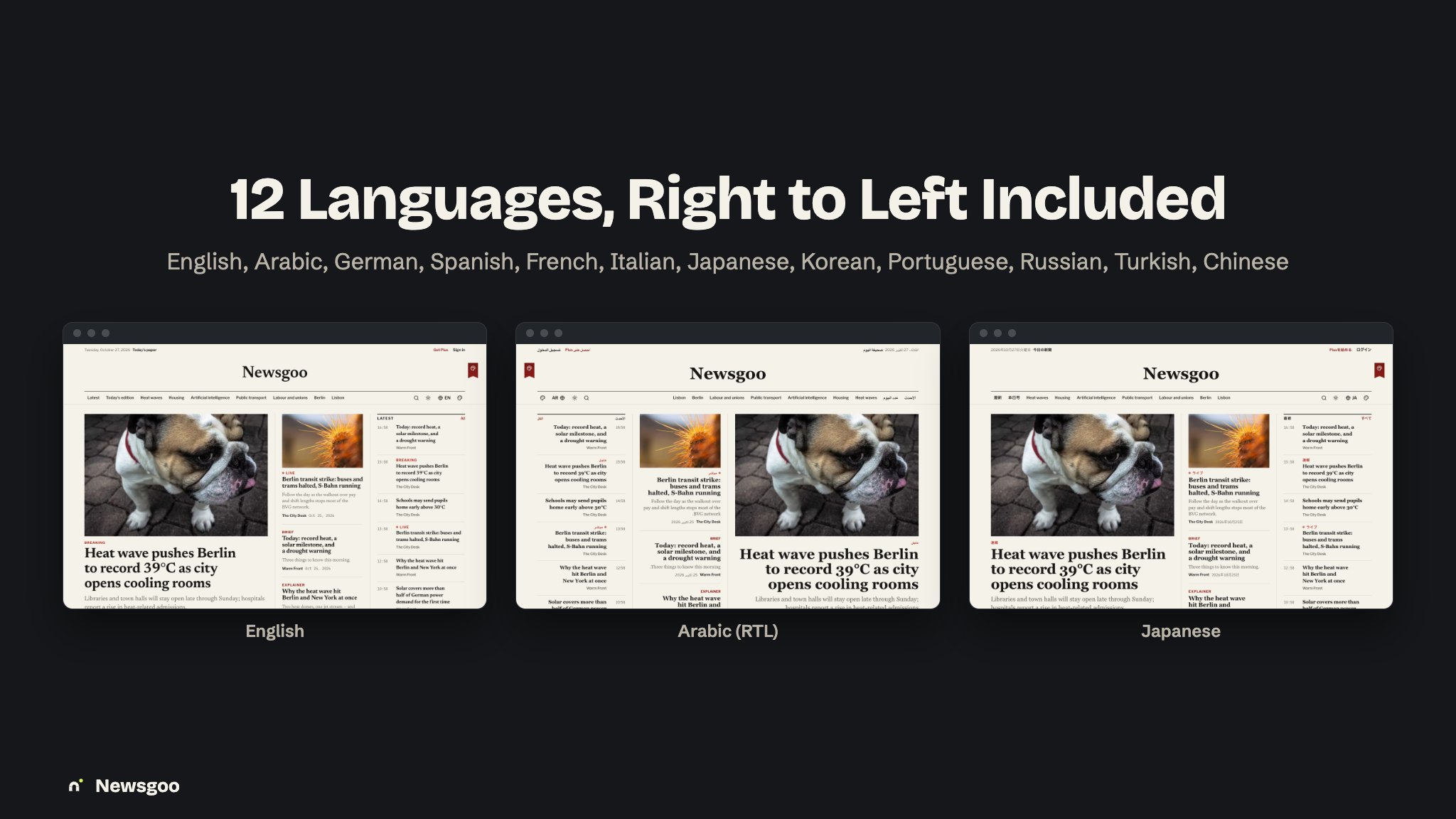
news-admin-panelplatform: a PHP web app built with the Laravel framework, with a platform admin and its moderation queues, the newsroom CMS each publication works in, database migrations + seeders, and the mobile REST API the app talks to. It also ships a news website in 12 languages (including Arabic, right to left) with three complete website themes, each in light and dark, reader subscriptions through Stripe Connect, web checkout for publisher plans through six providers, newsletters with one-click unsubscribe, RSS, sitemaps and JSON-LD, a media library with CDN support, editable email templates and Google and Facebook sign-in. Ideal if you already run on classic PHP/MySQL hosting or prefer the Laravel ecosystem.
Deploy the web project once and the app talks to that same origin. The queue runs on a VPS worker, or on Upstash QStash on shared hosting where no process can stay running; the scheduler needs one cron entry.
Note: all of our items are built on the same base project (built with Laravel) and use the same setup system, so this installation video applies to every one of them, including this one.
Key Value Propositions
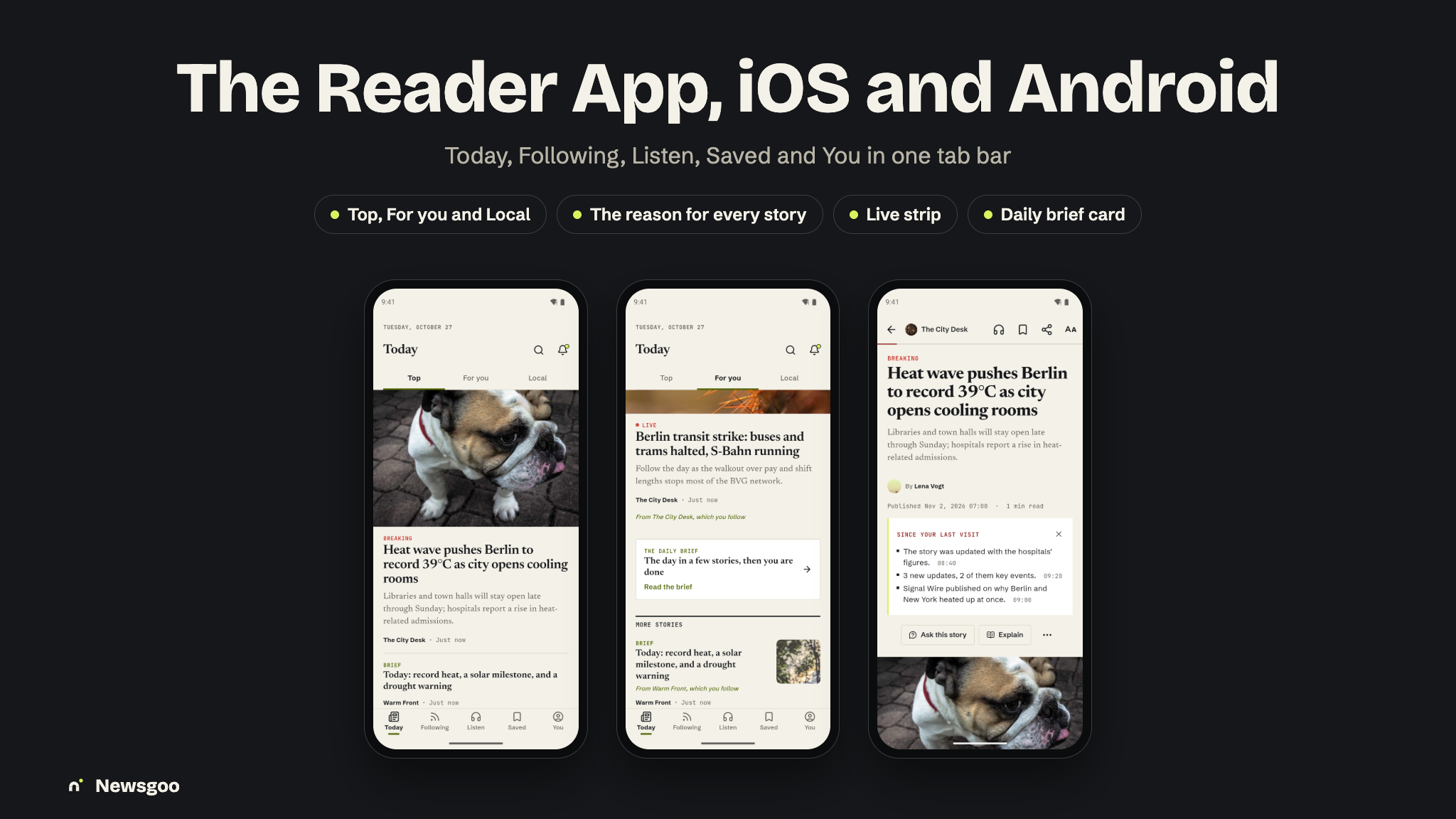
- For Readers: the news from the publications they follow in one place — Top, For you (with the reason shown) and Local, live blogs that say what changed, every side of a story in Full coverage, a daily brief to read or listen to, and AI answers that cite their sources.
- For Newsrooms: a CMS in the browser and a newsroom mode in the app — plan on a budget, write in a block editor with revisions and corrections, run a live desk, send editions, push alerts and newsletters, and sell their own reader plans paid out through Stripe Connect.
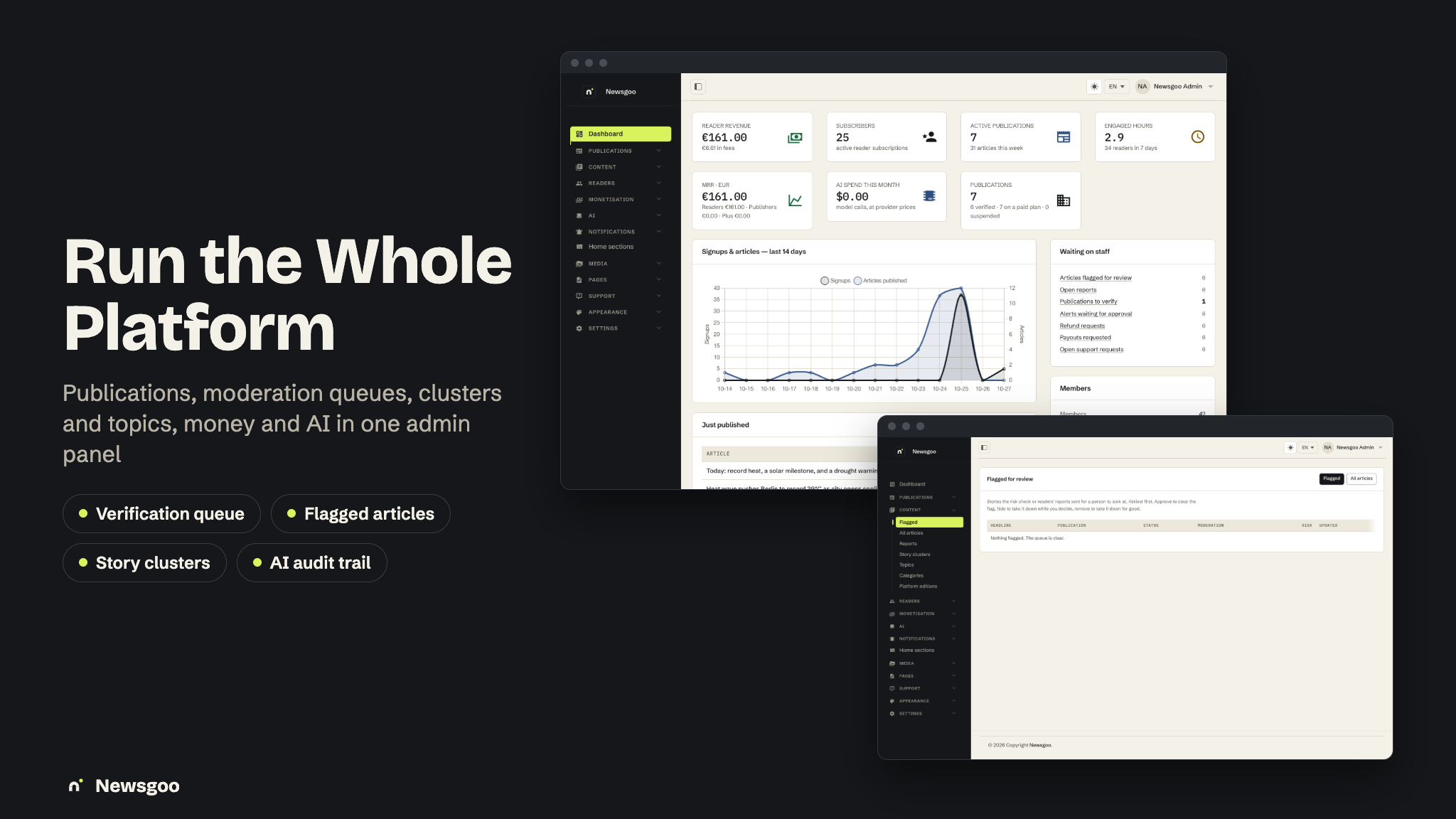
- For Operators: a complete, monetizable multi-publication platform — a fee on every reader subscription, free and paid publisher plans, publication verification, moderation queues, story clusters and topics, and AI audit and caps — managed from one admin panel.
- For Developers: Laravel 13 + MySQL, a documented v1 API with a recorded contract shared by both repos, one set of domain services for the site, the app and the panel, a headless theme layer for the website, and a Flutter app with Riverpod and go_router.
Content Disclosure
Newsgoo ships as a complete news platform with demo content so you can run it end-to-end out of the box:
- The demo publications, articles, live blogs, authors and readers (Berlin, Lisbon and New York; seven publications) are fictional and meant for local and staging installs only; they are never seeded in production. The demo images are free stock photos from picsum.photos, downloaded once into your media library.
- The categories, regions, plans, email templates and the legal pages are original and editable in the admin panel; the interface is translated into all twelve languages.
- The legal pages (privacy policy, terms, refund policy) are starting templates, not legal advice; have them reviewed for the countries you operate in.
Running a news platform makes you responsible for the publications you allow, the publications you pay out, refunds, corrections and takedowns, and the media, consumer-protection, tax, privacy and data-protection rules of the countries and app stores you publish in. Newsgoo provides the app, the web platform, the backend and the moderation tools; the platform and its moderation are yours. You are also responsible for following each AI provider’s terms of use; AI provider accounts and their usage are up to you.
AI Usage Disclosure
Graphics. The feature banners in this description and the item preview images were composed from real screenshots of the product. The screenshots in the item gallery and the documentation are captures of the running app and website.
AI as a feature. Some features rely on a third-party generative AI service at runtime. The provider is not hard-coded — Gemini (default), OpenAI, Anthropic, Mistral, Groq, DeepSeek, OpenRouter, xAI and Ollama are supported. AI can be switched off entirely, and any single feature stopped with a monthly cap of zero:
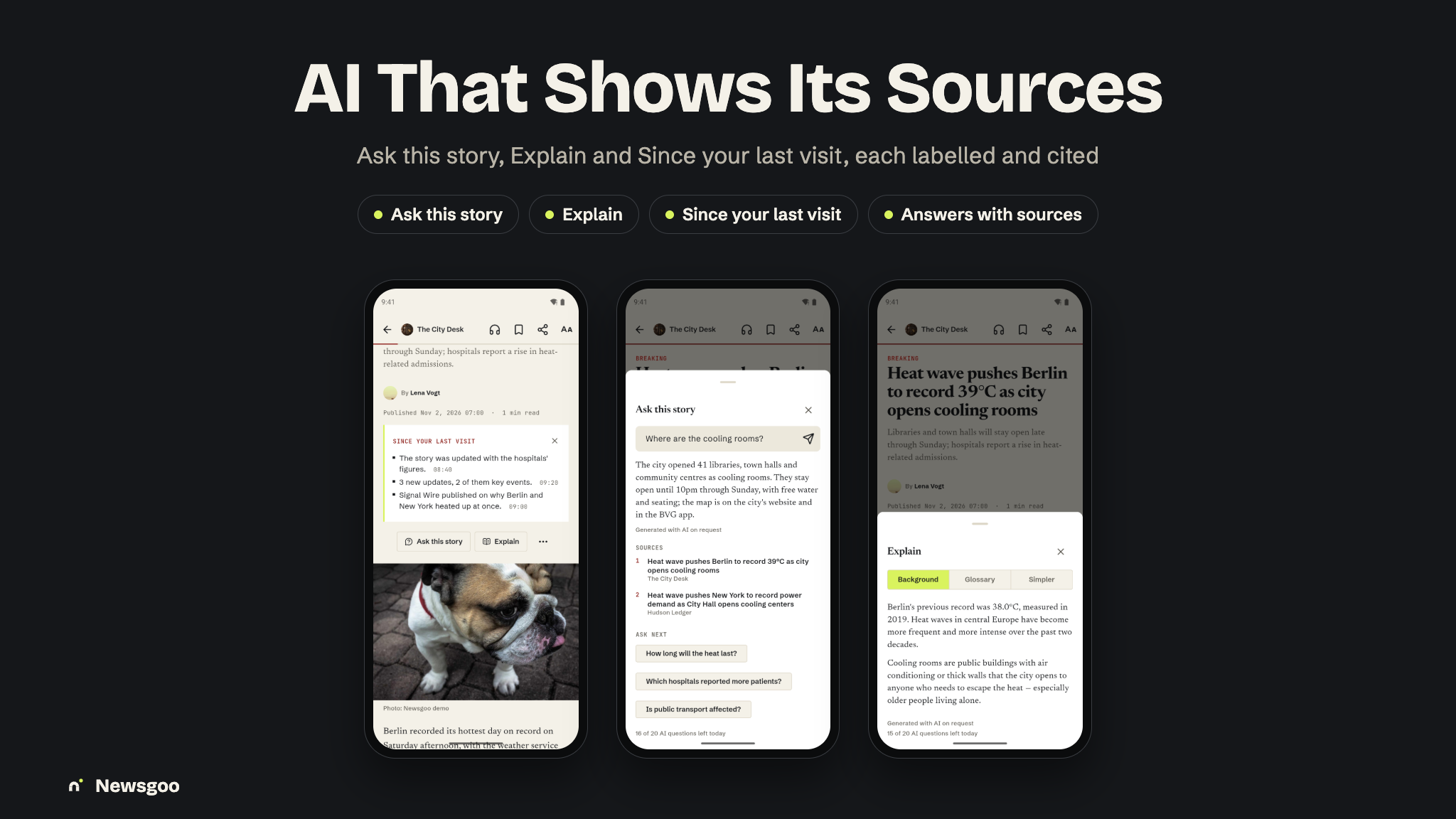
- Ask this story and Ask Newsgoo: answers drawn only from Newsgoo articles, with numbered citations; it says so when nothing relevant was found.
- Explain and Translate: background, a glossary and a simpler version; block-preserving translation cached per revision and language, with the original one tap away.
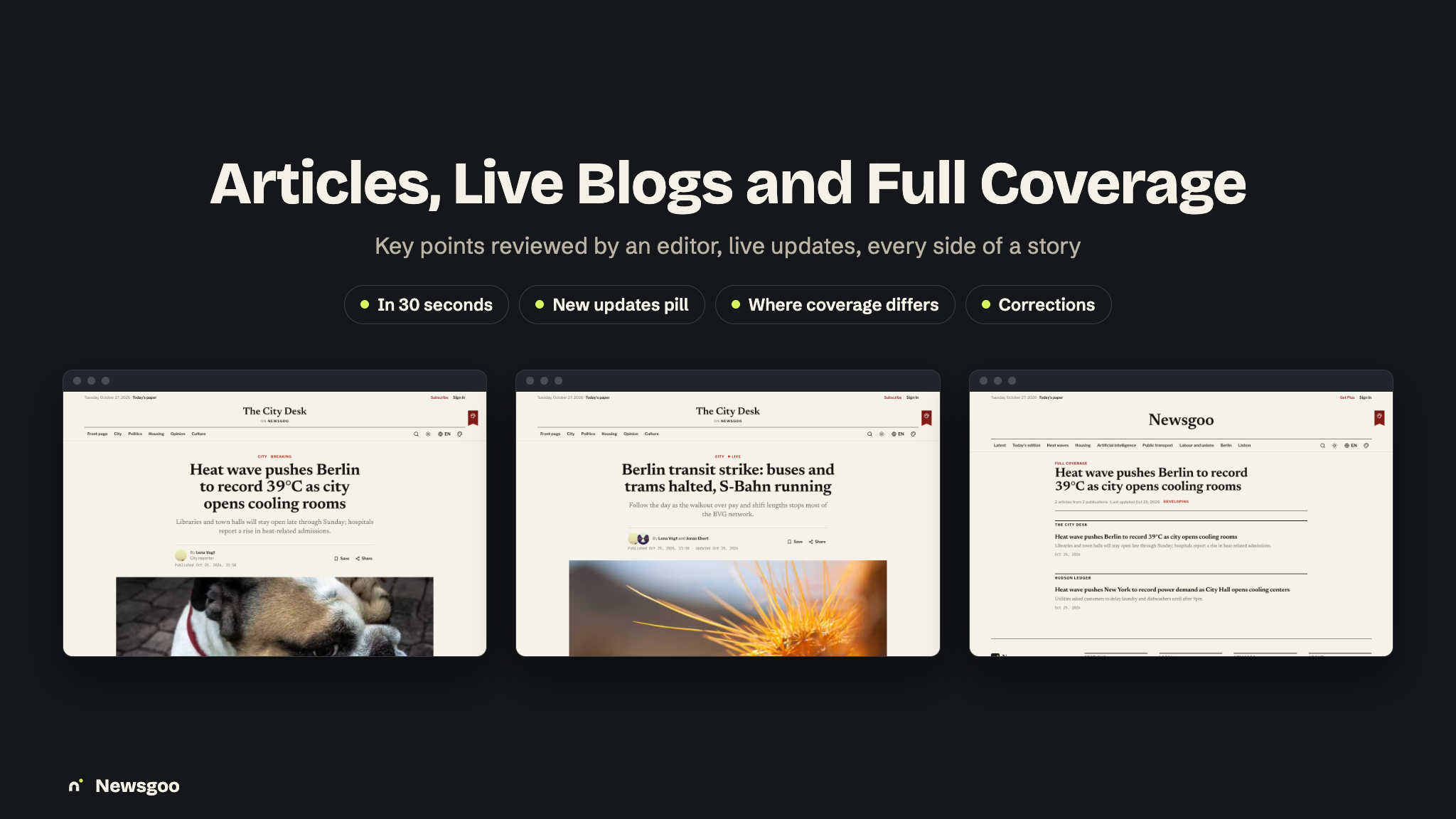
- Key points, Full coverage summary and since your last visit> “In 30 seconds” key points shown only after an editor approves them; a story summary with “where coverage differs”.
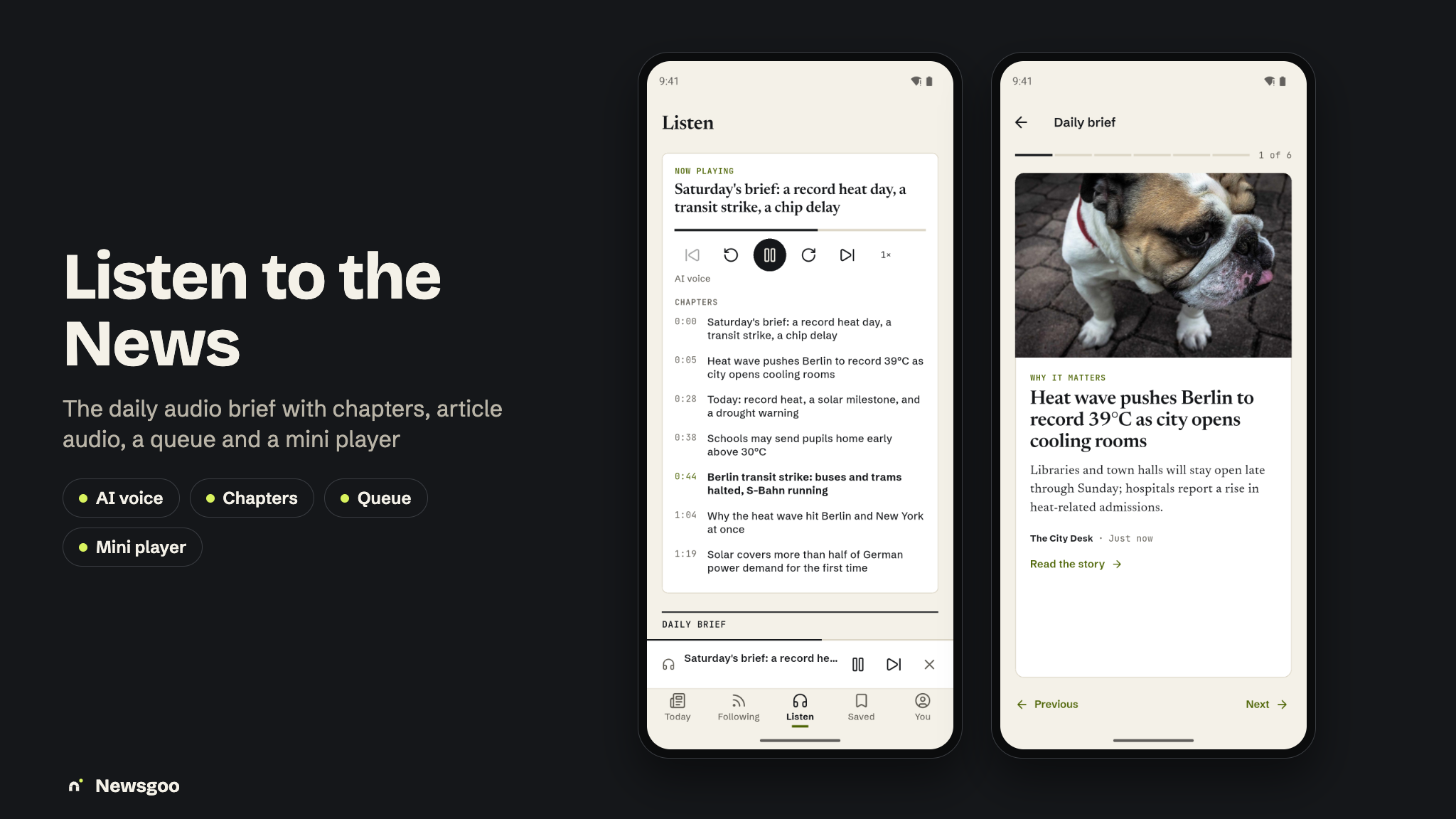
- Audio: article audio and the daily audio brief with chapters (the app falls back to device speech).
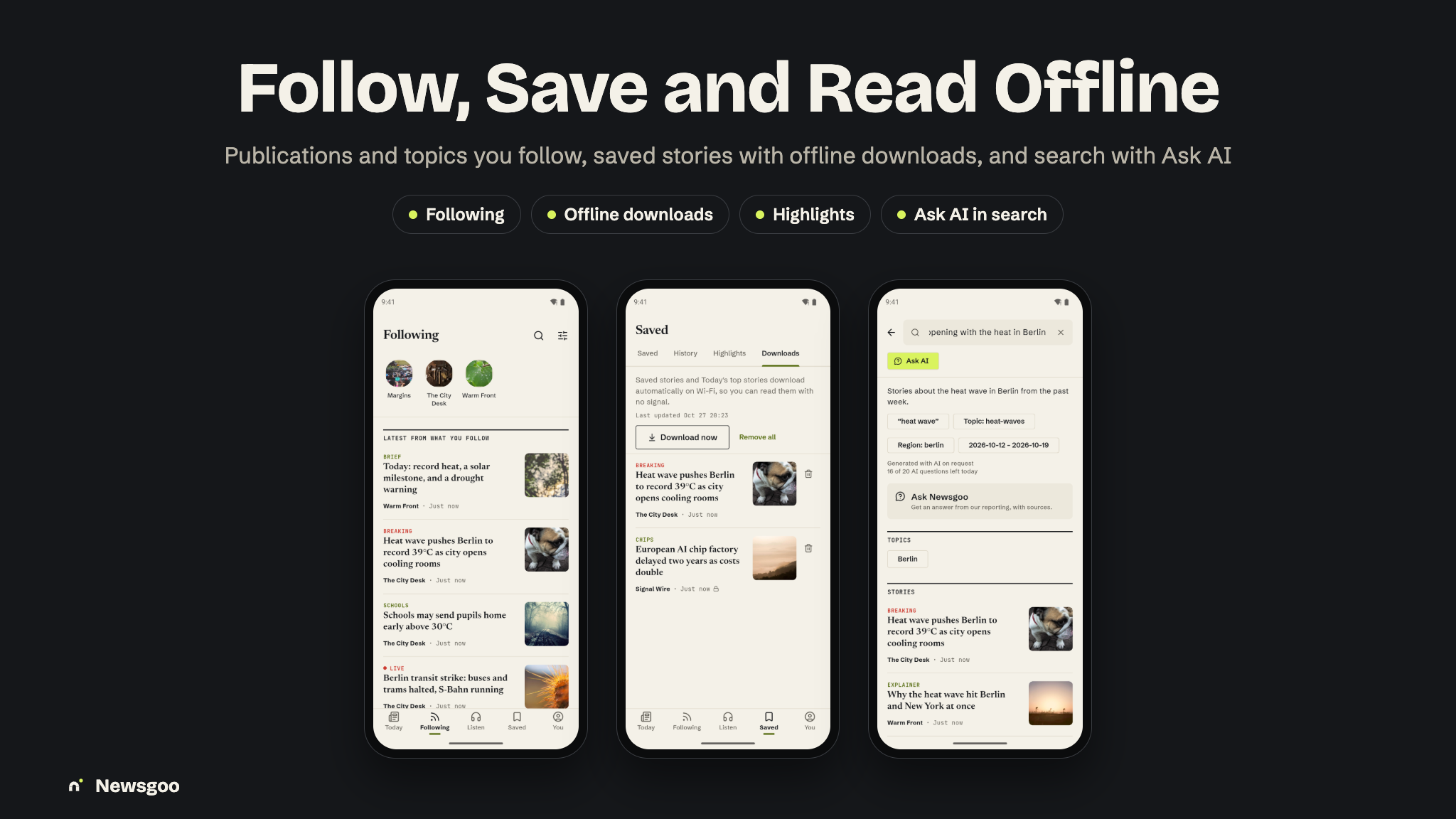
- AI search: a sentence turned into search filters you can see and change.
- Newsroom assistants: headline lab, dek, SEO, social and newsletter copy, a copy-desk check with the house style, tag suggestions, related coverage and alt text.
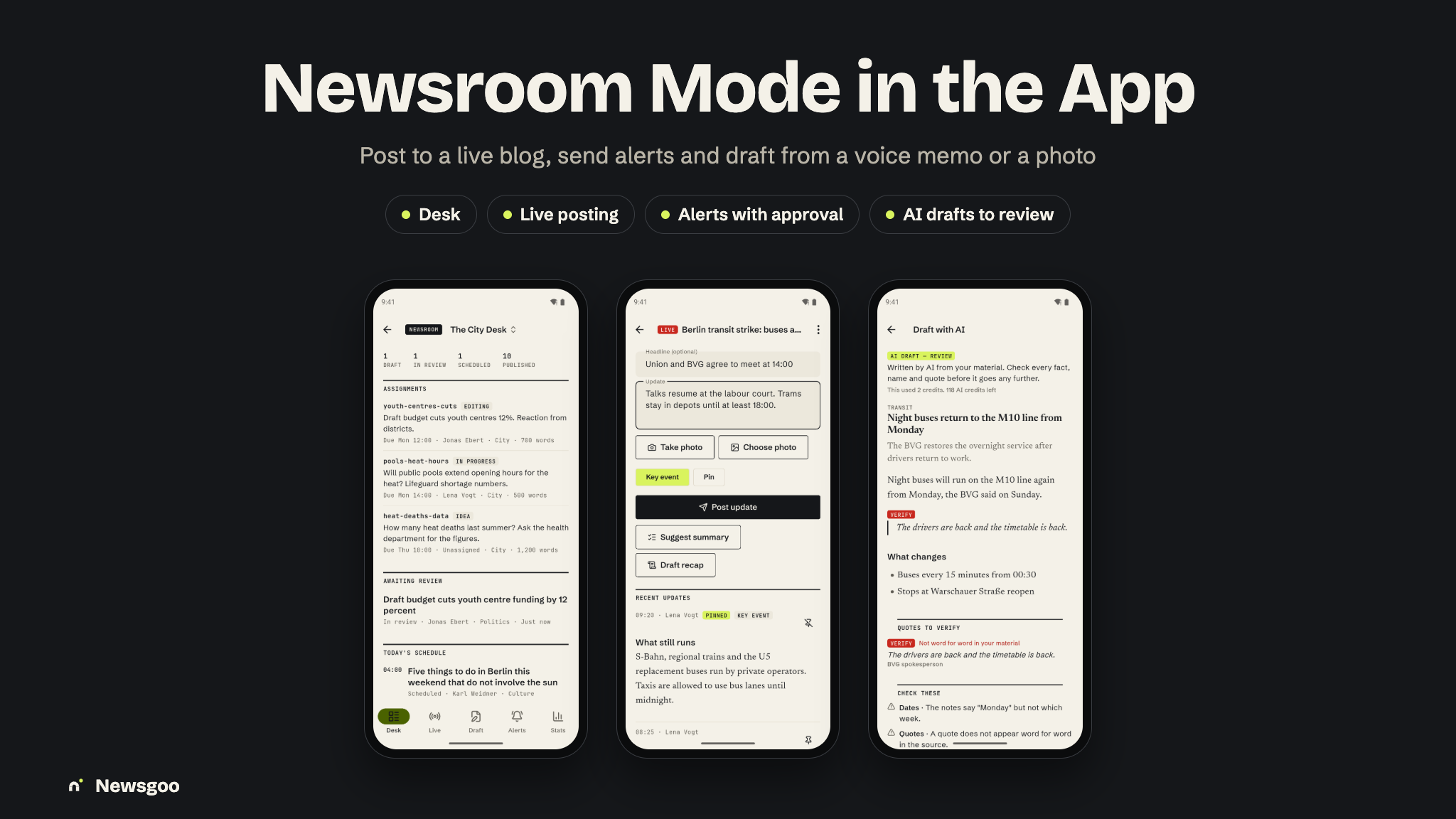
- Drafts and recaps: an article draft from text, a voice memo or a notes photo, a live summary and recap, an edition draft with blurbs, an insights copilot and tip triage — never published without a person.
Everything the AI writes or judges is machine output and may be wrong: applied AI fields block submit and publish until a person reviews them, and every output carries its provenance and a plain-text label for readers: in the app “AI summary · reviewed by an editor”, “Generated with AI on request”, “AI voice” and “Translated with AI” (with the original one tap away); on the website “Drafted with AI and checked by an editor.” To use the AI features you must create your own account with the provider you choose and supply your own API key. Keys are read only on the server and never reach the app or the browser. Newsroom features spend monthly AI credits from the publication’s plan, readers have a daily allowance, and cached answers are free.
laravel/ai. The AI features run on laravel/ai, Laravel’s official open-source (MIT)
package, a stable 1.x release installed with Composer ("laravel/ai": "^1.0"; the item is
built and tested on v1.0.0, and Composer installs the latest stable 1.x). Source and releases:
github.com/laravel/ai and
packagist.org/packages/laravel/ai.
It needs no Laravel Cloud, Forge or other Laravel subscription: requests go directly from your server to the
provider you choose, and nothing passes through the author.
Main versions: PHP 8.3+, Laravel 13 (tested on 13.30), laravel/ai 1.x (stable), Inertia 3, Laravel Fortify 1.39, stripe-php 21, Flutter 3.35 (stable channel), Dart 3.9.
Privacy & Data
No telemetry. The package sends no data to the author and has no license phone-home. Every third-party identifier — Google Analytics, Firebase, Facebook / Meta, RevenueCat, Stripe and the AI keys — is blank and supplied by you, so the data each service collects goes to your own accounts. No advertising SDKs or ad-network IDs are included. The package contains source code only, no ready-built APK or IPA; the demo APK above is only for trying the app.
App Tracking Transparency. The tracking prompt is used only for Meta App Events, appears only when you add your Facebook keys, and can be removed if you do not use them. You are solely responsible for your own ATT compliance, privacy labels, privacy policy and App Store / Google Play review outcomes.
Disclaimer
This product is built to work with the included web API / admin panel (built with Laravel, MySQL) and the third-party services listed above under “Third-party services and costs”. Hosting, payment processing fees, AI usage, queue usage, email sending and storage/CDN are not included in the purchase: you create your own accounts, configure your own API keys and manage usage yourself. A separate Firebase project is required for the app to function; the package contains no Firebase configuration files and no service-account key. Basic familiarity with Flutter, Xcode, Android Studio, Firebase, Stripe, PHP/MySQL hosting, App Store Connect and Play Console setup is recommended before launching.
Laravel, Flutter, Stripe and all other product names, logos and trademarks mentioned here belong to their respective owners. Newsgoo is an independent product built with these frameworks and is not affiliated with or endorsed by any of them.
What’s Included
- Full Flutter application source code (
news-mobile): the reader app and newsroom mode, with iOS widgets and Live Activities and Android Glance widgets - Web platform + newsroom CMS + admin panel + mobile Web API, built with Laravel (
news-admin-panel) — the backend for the app, with migrations and seeders - Seeded categories, regions, currencies, the platform fee, the free and paid publisher plans, email templates and legal pages, and a demo world of seven publications with articles in every format, live blogs, series, story clusters and editions for local and staging installs
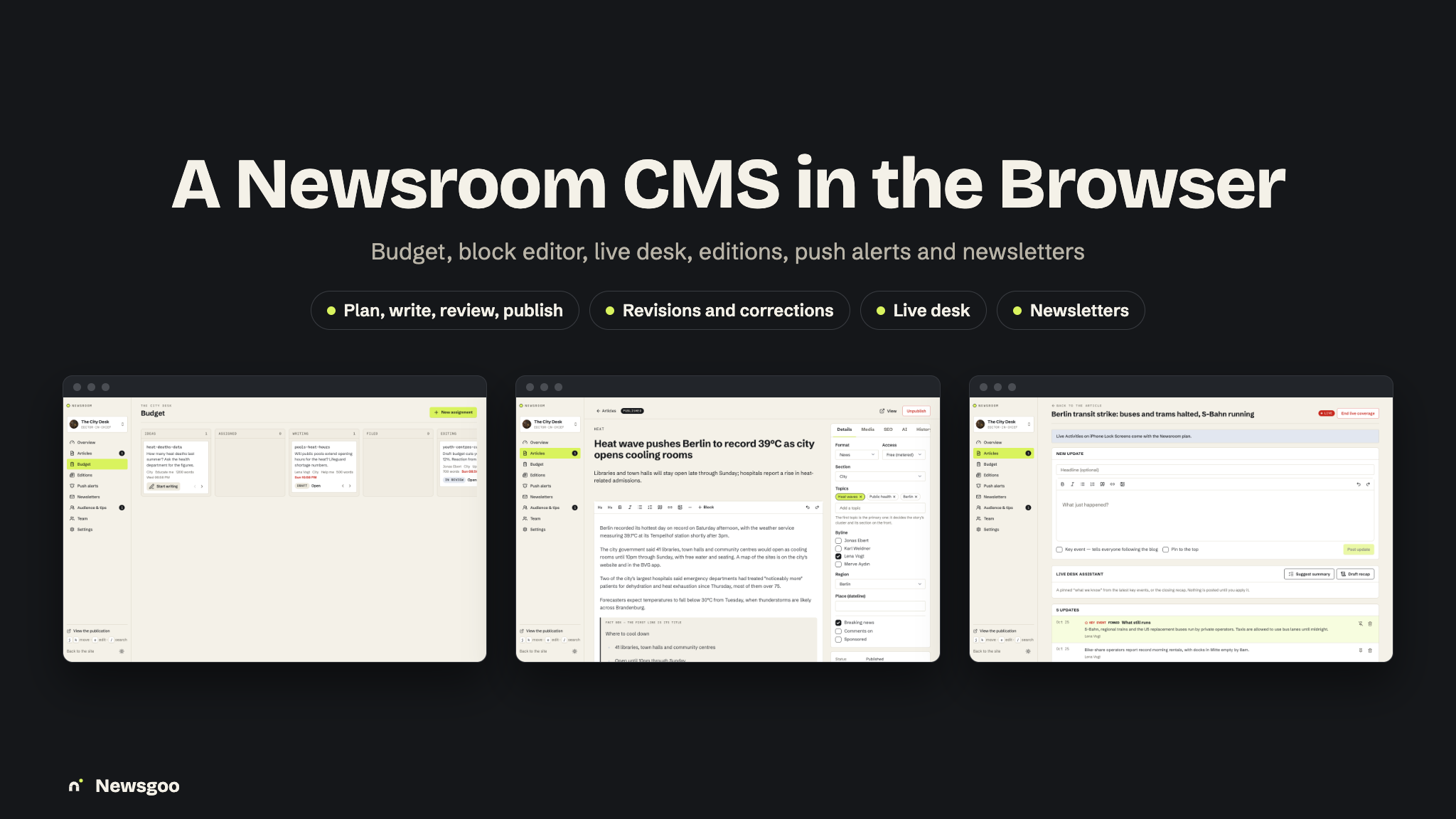
- Publishing: a budget, a block editor (pull quote, fact box, timeline, know / don’t know, correction and more), autosave, edit locks, revisions, scheduling with an embargo, corrections, live desk, editions, push alerts with second-person approval, and newsletters
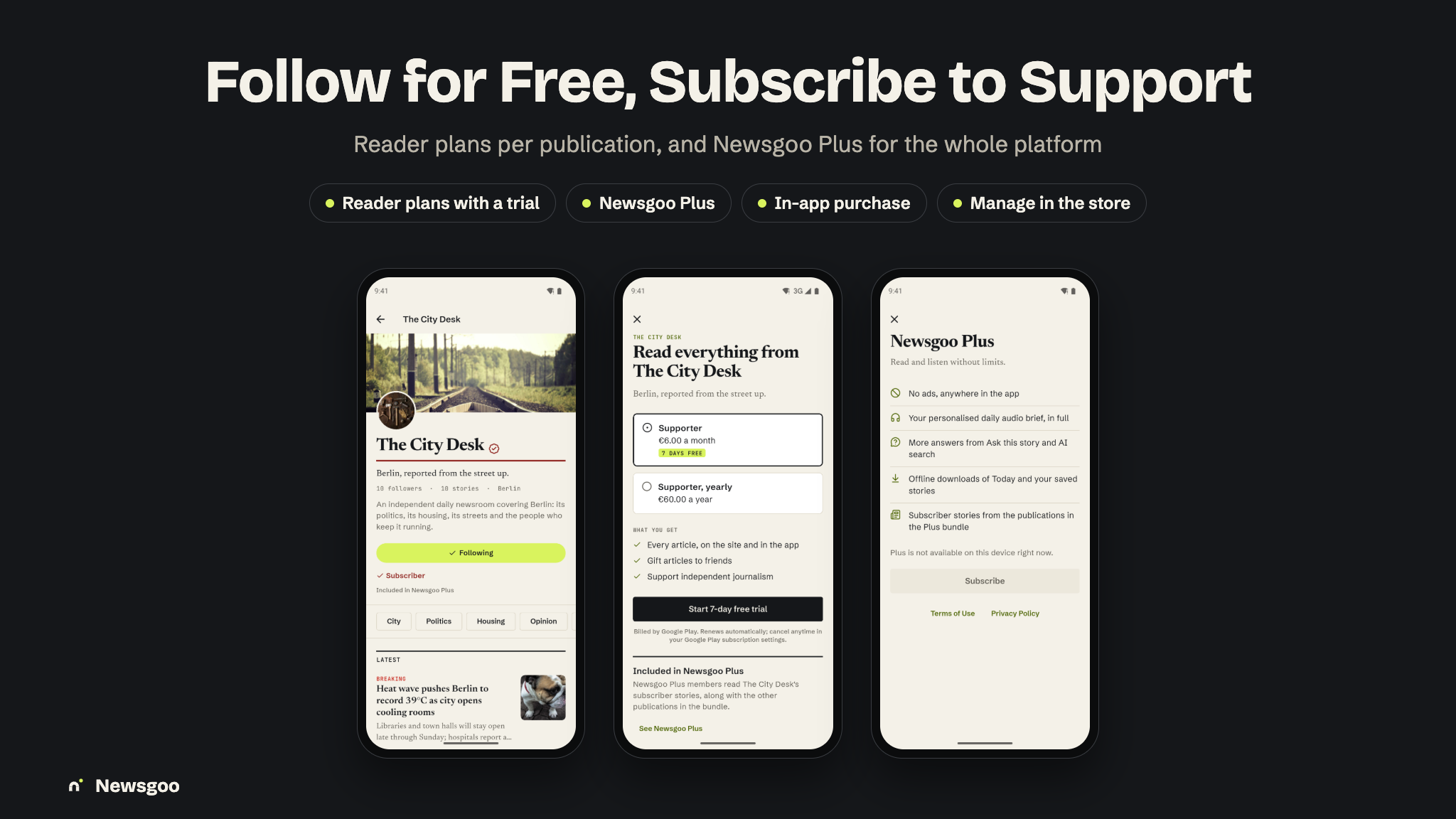
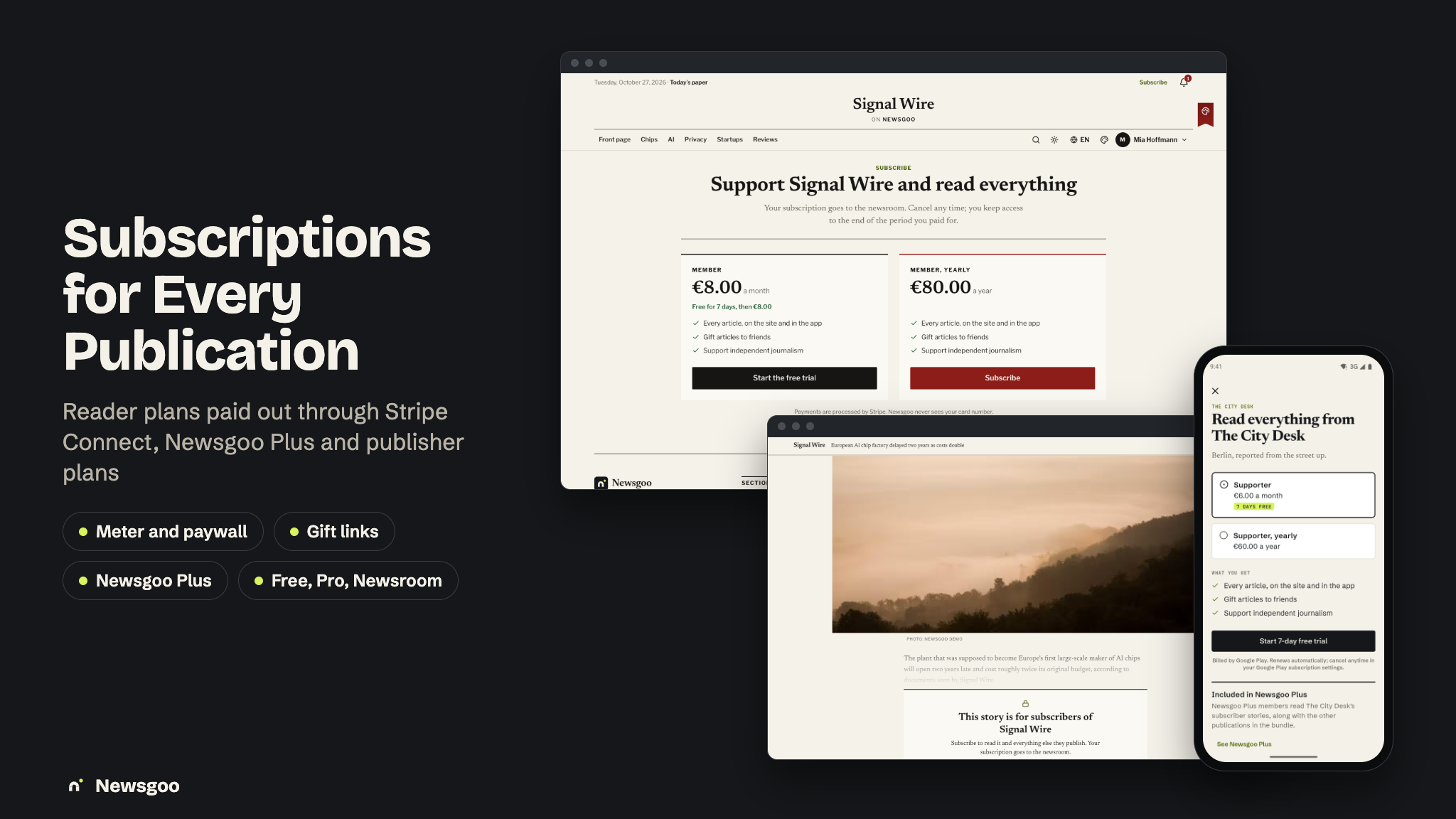
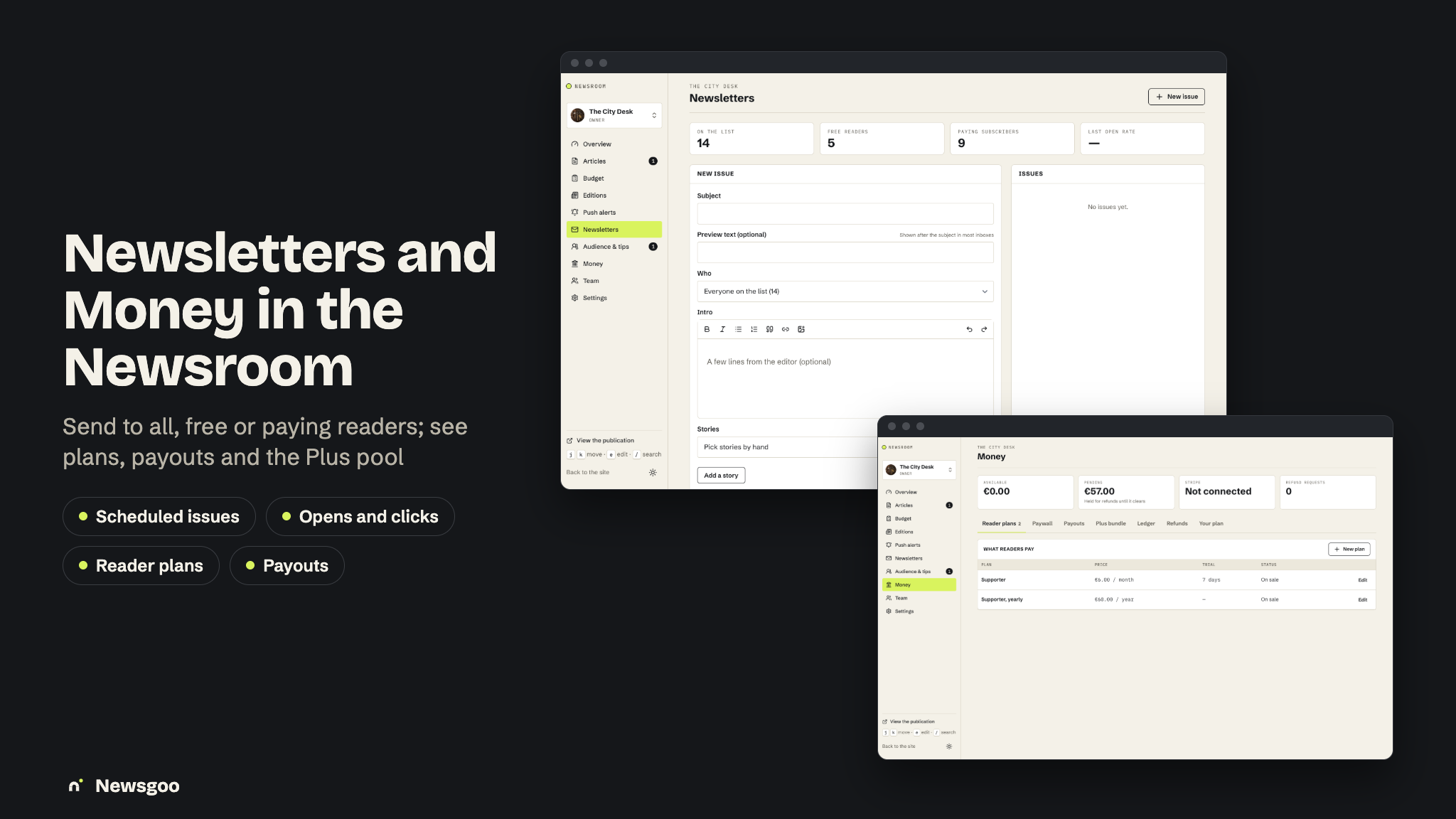
- Payments: reader subscriptions on Stripe Connect with renewals and trials, in-app reader plans through RevenueCat, six web providers for publisher plans, Midtrans and Duitku, refunds, payouts and a ledger
- A notification system on Firebase Cloud Messaging with categories, breaking alerts, Live Activities and email
- Reader and newsroom AI features through your own AI provider keys, with provenance and an audit trail
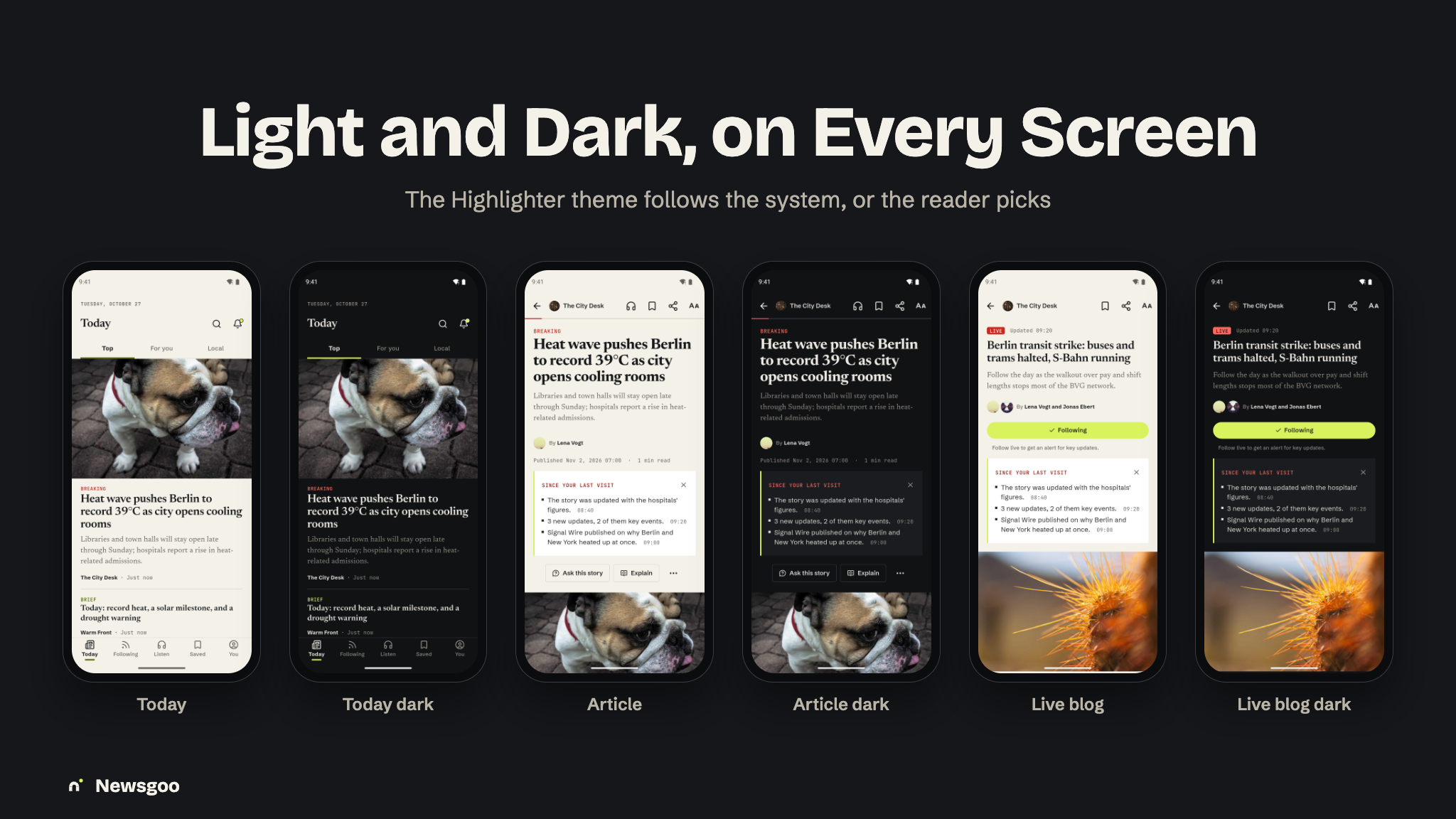
- One app design (“Highlighter”), light and dark, tinted per publication
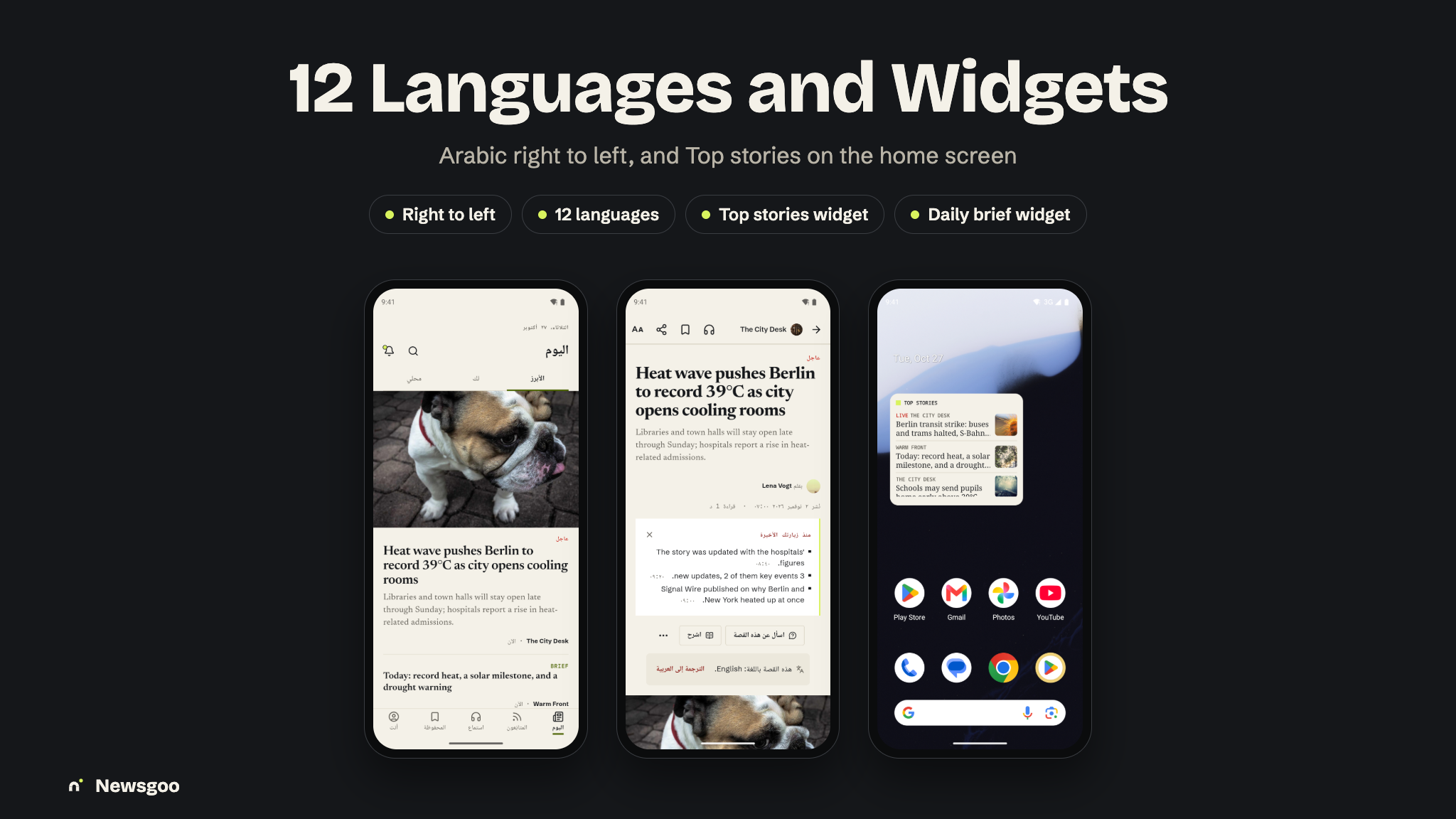
- 12-language app and website (ar, de, en, es, fr, it, ja, ko, pt, ru, tr, zh), with a right-to-left layout for Arabic
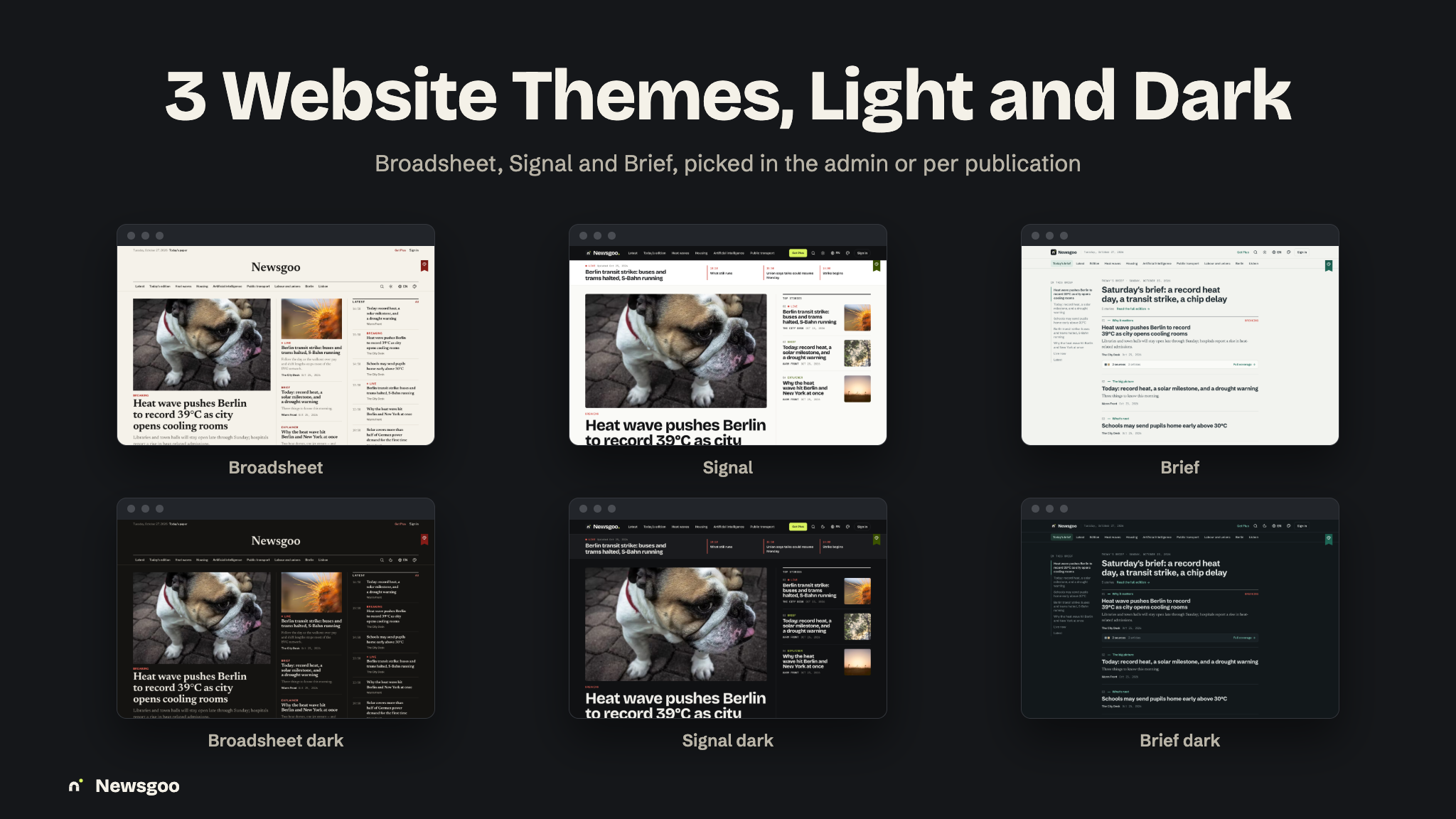
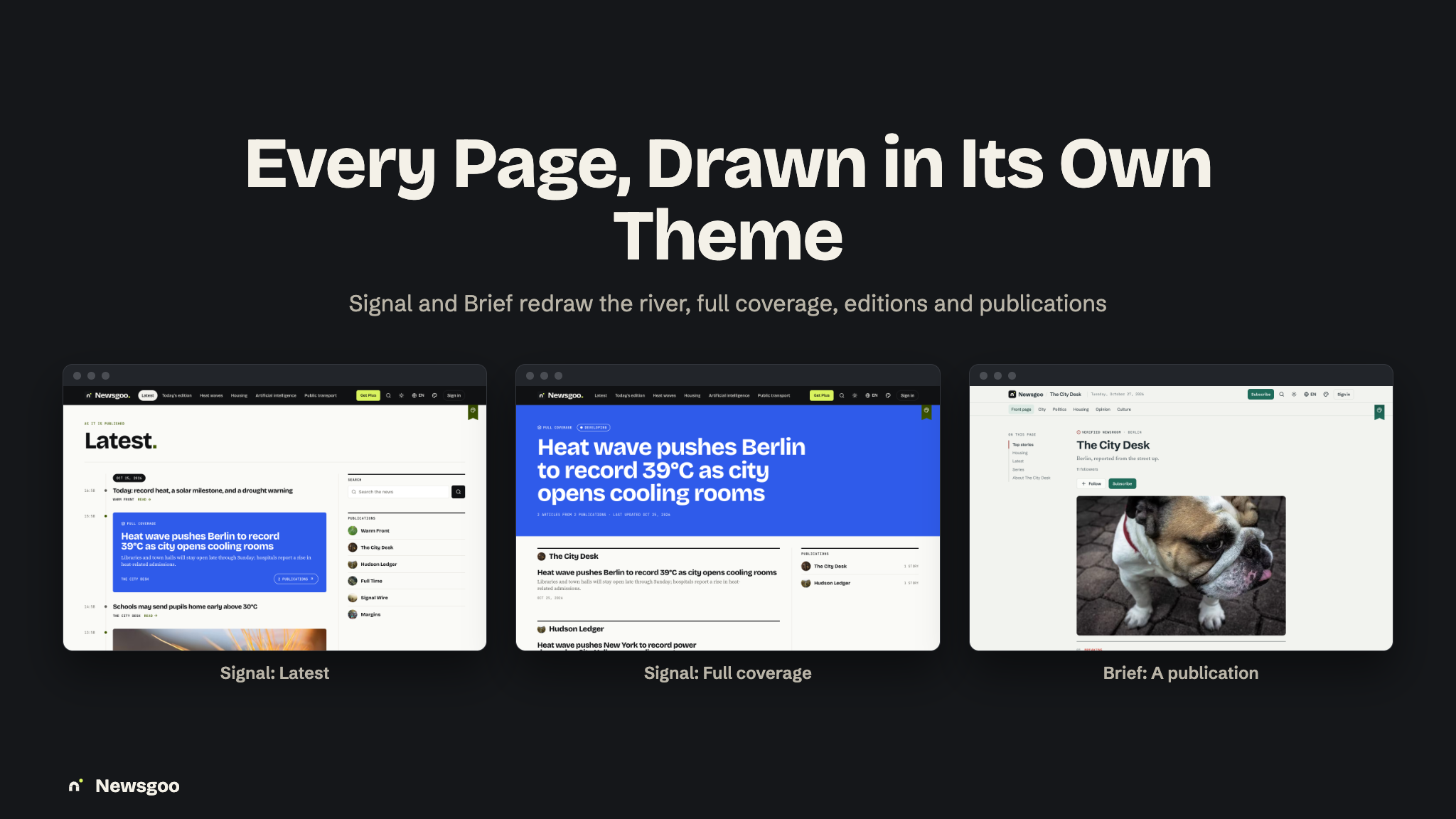
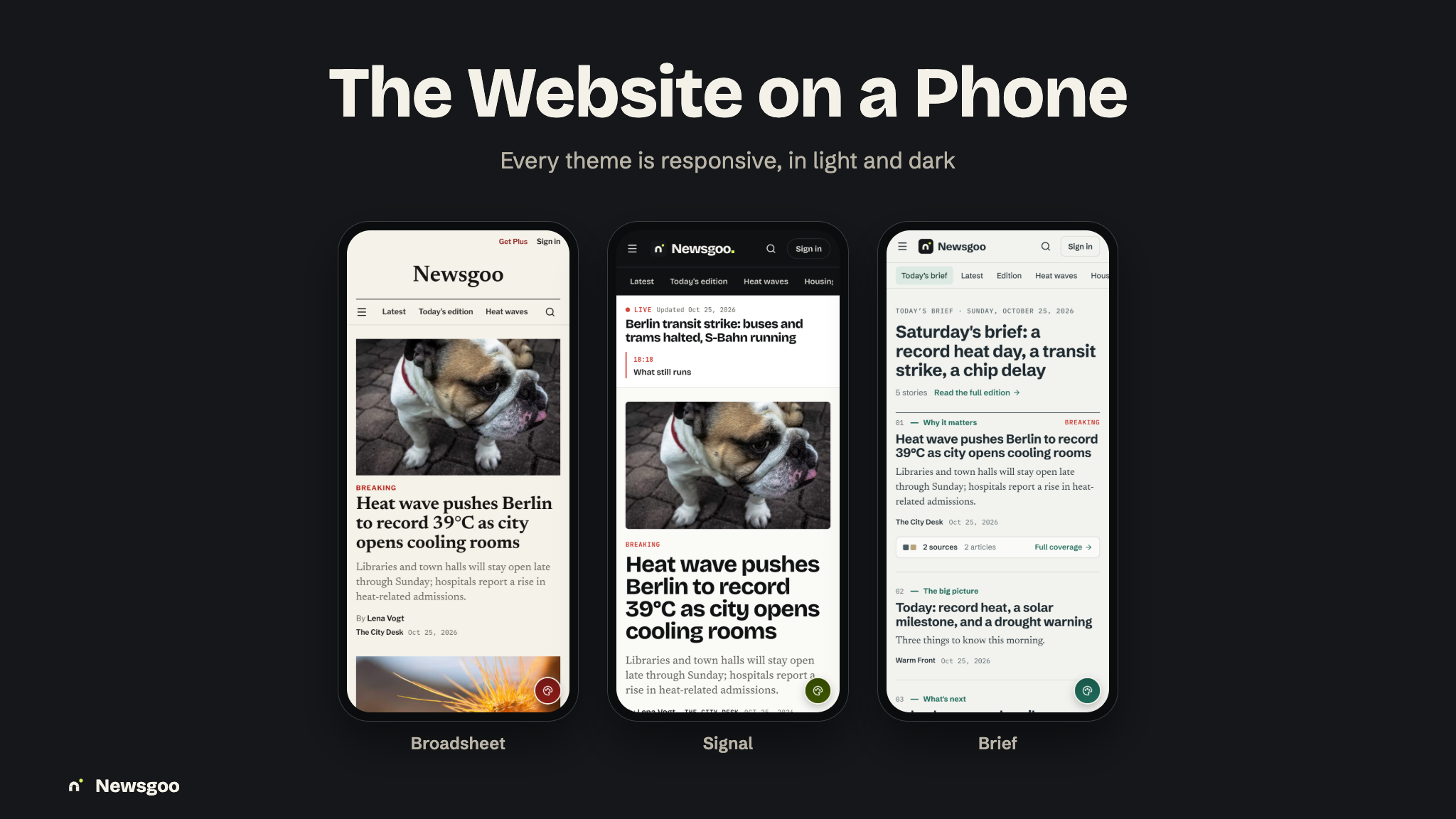
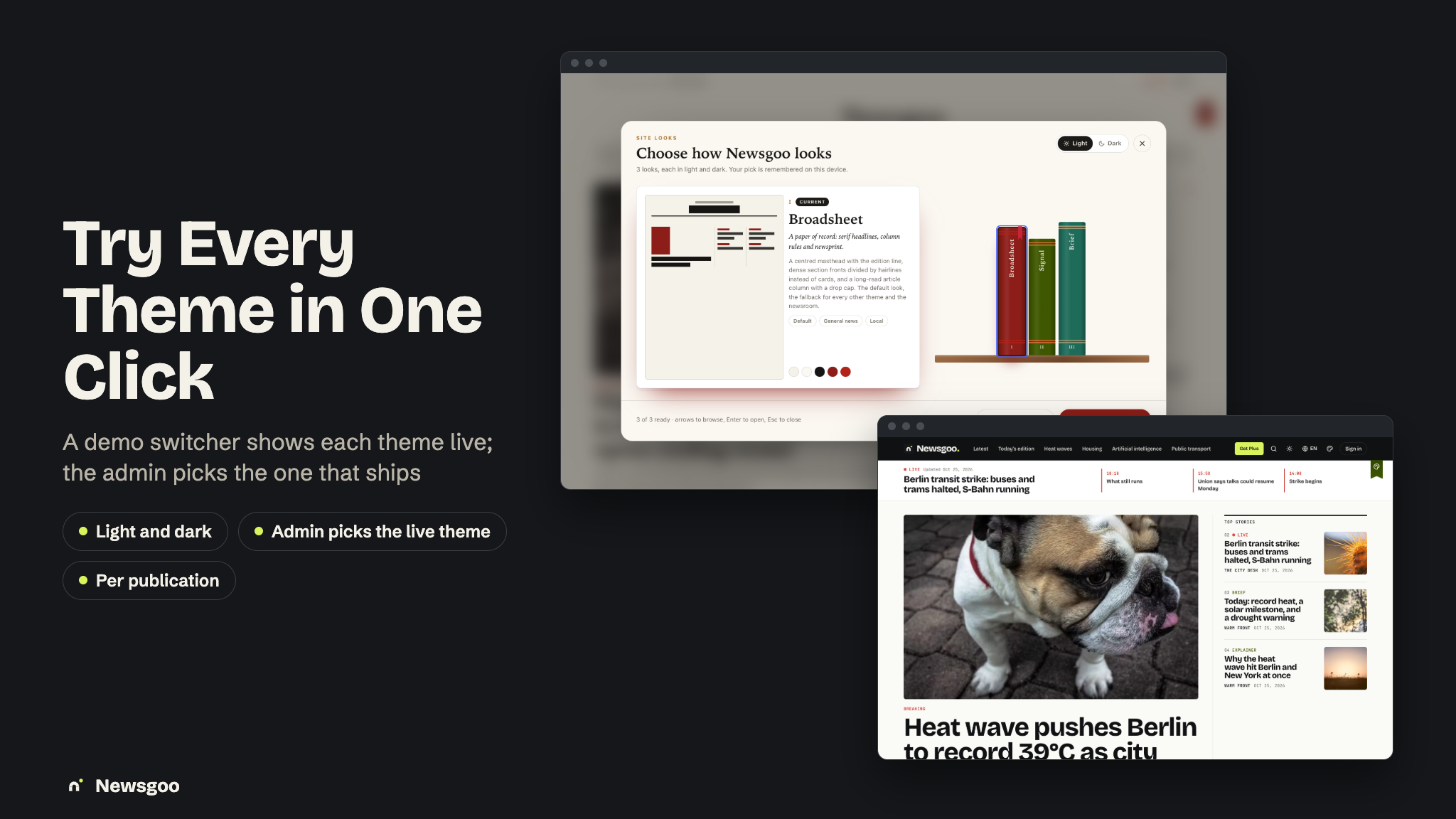
- 3 complete website themes (Broadsheet, Signal, Brief), each in light and dark, chosen in the admin panel and per publication
- A browser installer (
/setup, aftercomposer installandnpm run build), a one-command local setup script and a production doctor command - Complete documentation in HTML and PDF with screenshots — installation, a feature walkthrough, connecting the backend, Firebase, Stripe and Stripe Connect, RevenueCat, AI, queues, newsletters, Live Activities and widgets, branding (app name, icon, splash) and store release
Key Features
- Today: Top, For you (each story shows why it is there) and Local, a live strip and the daily brief card; Following for publications, topics and authors; Saved with offline downloads.
- Every article format: news, analysis, explainer, opinion, review, interview and brief, with series, corrections, editor’s notes and “In 30 seconds” key points reviewed by an editor.
- Live blogs: pinned summary, key events, a “N new updates” pill, Follow live and, on iOS, a Live Activity on the Lock Screen and in the Dynamic Island.
- Full coverage: one story across several publications, with a summary and “where coverage differs”.
- The daily edition and Listen: a brief deck to swipe, article audio and an audio brief with chapters, a queue and a mini player.
- Reader AI: Ask this story, Ask Newsgoo, Explain, Translate, “since your last visit” and AI search, each labelled and cited.
- Newsroom CMS: Overview, Budget, Articles and Editor, Live desk, Editions, Push alerts, Newsletters, Audience & tips, Money, Team and Settings, each behind a staff role (owner, editor, reporter, audience editor and more).
- Newsroom mode in the app: the desk, posting to a live blog, alerts, stats, and an article draft from text, a voice memo or a photo of notes.
- Reader subscriptions: each publication sells monthly or yearly plans with trials, a meter of free articles with a registration wall, and gift links; renewals, refunds and payouts through Stripe Connect.
- Publisher plans: free and paid tiers with lower fees, more seats, custom domains, a custom accent and logo, newsletters, Live Activities and more AI credits — all editable.
- Newsletters: double opt-in sign-ups; from an intro, an edition or picked stories, to all, free or paying readers; scheduled, queued in chunks, with opens, clicks and one-click unsubscribe.
- Home-screen widgets: Top stories and the Daily brief on iOS (WidgetKit) and Android (Glance).
- Moderation: publication verification, a flagged-article queue with risk scores, readers’ reports, story clusters and topics you can merge and split, platform editions and an AI audit trail.
- Sign-in: Google, Apple, Facebook and email.
- 3 Website Themes, Light and Dark: Broadsheet (a paper of record in serif newsprint), Signal (a dark-first digital-native river) and Brief (a calm single column for newsletters and explainers) — picked in Admin > Appearance > Themes, per publication in the newsroom, and tried by visitors in a theme switcher on a demo site.
- 12 Languages: English, Arabic (right to left), German, Spanish, French, Italian, Japanese, Korean, Portuguese, Russian, Turkish and Simplified Chinese — on the website, in the newsroom, in the admin panel and in the app.
- Open web: RSS per publication, sitemaps (including a Google News sitemap), schema.org NewsArticle data and share cards drawn in each theme.
- Media Library with Storage Back Ends & CDN: keep images on this server, Cloudflare R2, Amazon S3, DigitalOcean Spaces, Backblaze B2, Wasabi, Google Cloud Storage, MinIO or Bunny Storage, with any CDN in front and responsive WebP and AVIF variants.
- Runs on shared hosting: a browser installer, Upstash QStash instead of a queue worker, and a doctor command that checks the whole production setup without printing a secret.
Important Notice to Our Valued Customers
We are committed to building a reliable and continuous business system, with your satisfaction and the success of
this product as our top priorities. Your feedback is crucial, and we encourage you to share any bugs, suggestions,
or new feature ideas. Your input directly supports our ongoing improvement and innovation.
We’re here to help — send us a message anytime through the CodeCanyon messaging system.
Thank you for being part of our journey.
Warm regards,
The Morningstarcode Team
| Author | morningstarcode |
|---|---|
| Price | $19 |
| Sales | 0 |
| Rating | 0 (0) |
| Published | Nov 2, 2026 |
| Last Update | Nov 2, 2026 |
| Compatible Software | Flutter 3.x |
| Demo Url | https://newsgoo.laravelbeginner.net/en |
| Mobile Files Included | Dart, YAML, .kotlin, Layered PNG, JavaScript JS, CSS, PHP, HTML |
Categories
Tags
External listing. code.market does not sell this product and does not process payment for it. Pricing, payment, delivery, licensing, refunds, and support are handled by the third-party merchant on its own website. We may earn an affiliate commission from a referral. Details.
Products of the Week.
Submit🥇

Perceptle
Perceptle is a daily browser-based game that challenges you to test your sensory intuition through five quick estimation and rhythm-based rounds.
Other · 1 views · 0 clicksOther · Week 47 · 1 views · 0 clicks
🥈

Free LinkedIn Likes From Real
Get free LinkedIn likes on your posts from real members who react by hand. No
SaaS · 124 views · 2 clicksSaaS · Week 47 · 124 views · 2 clicks
🥉

STOP GUESSING WHAT TO POST
AI that learns your brand voice and builds a month of consistent, on-brand social content: carousels, posts and hooks that sound like you, not like everyone else's AI.
SaaS · 7,686 views · 71 clicksSaaS · Week 47 · 7,686 views · 71 clicks
#4

aaas.market
407 reliable micro tools for solo founders, marketers and creators. They work in your browser
SaaS · 122 views · 0 clicksSaaS · Week 47 · 122 views · 0 clicks