
Nest - Flyout Sliding Panels for WordPress

Description
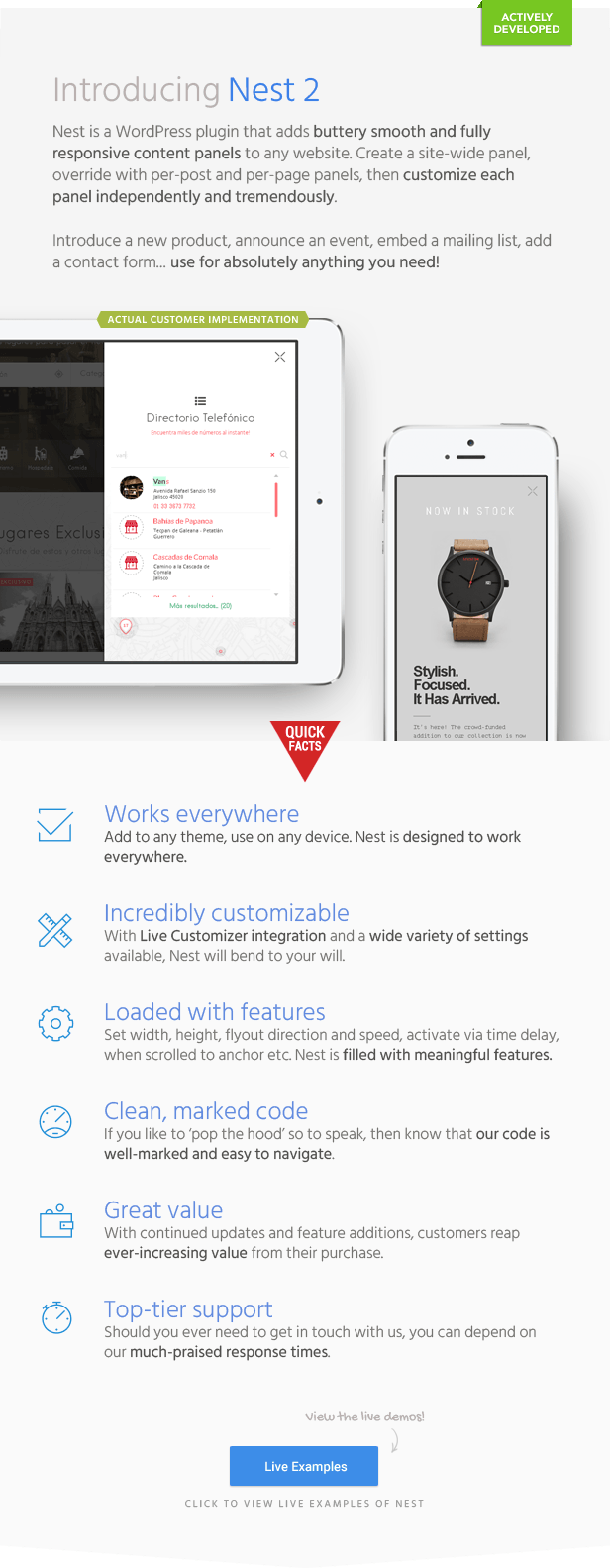
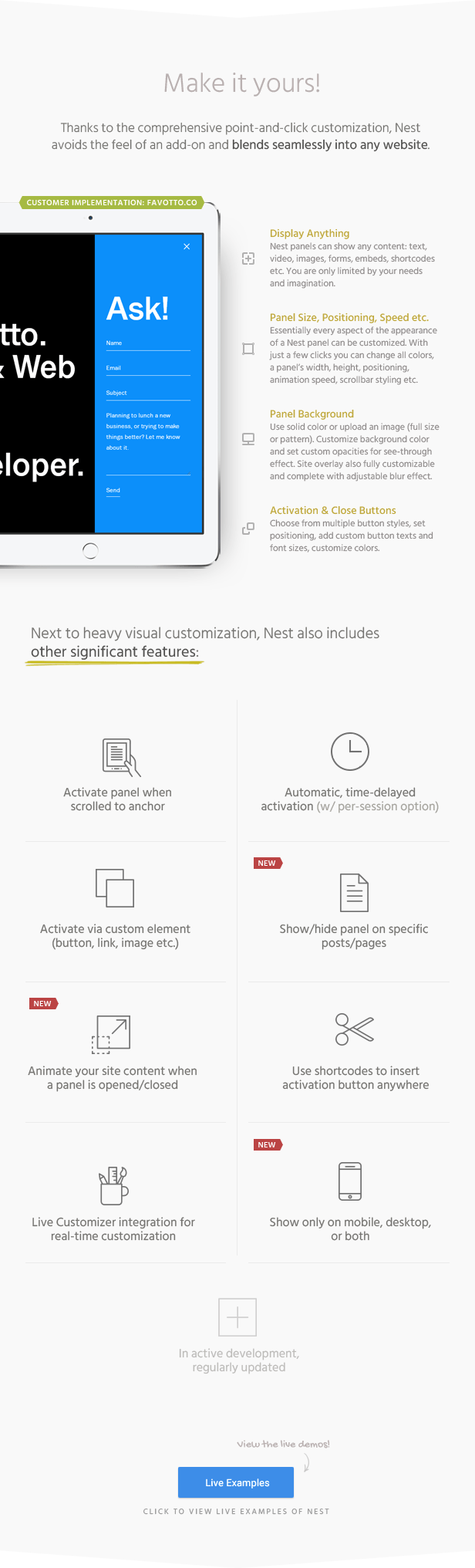

Nest is a lightweight WordPress plugin that lets you add animated off canvas sliding panels to any website. Whether you’d like to set up a sliding sidebar, a sliding header or footer, or even a full-screen flyout panel for your WordPress site, Nest’s feature set makes it an absolute and utter breeze. Not only is Nest easy to set up and use but it’s also very customizable. For example, you can customize a panel’s size and animation speed with pixel and millisecond accuracy. And there are many more features and customization options:
Features
- Sliding panel plugin for WordPress
- Create WordPress sliding panels to display any content
- Site-wide panel with per-post and per-page overrides
- Optionally show panel on front page only
- Optionally hide panel on specific posts/pages
- Apply scaling/opacity animations to specified theme content when a panel is opened/closed
- Smooth and stutter-free animations
- Activation options
- Activate via customizable buttons
- Activate via custom element (simple text link, an image, your own button etc.)
- Insert activation buttons via shortcode (or use included positioning options)
- Activate automatically via customizable time delay
- Show once per browser session option included
- Activate when scrolled to anchor (example use: open panel automatically when scrolled to bottom of page)
- Deactivate by clicking/tapping the close button, site overlay, or the ESC button
- Optionally lock body scroll when panel open
- Massively and easily customizable:
- Each sliding panel can be customized independently for vastly different results
- Customize site-wide panel in real-time using the WordPress Live Customizer (per-post/page slides are customized on the post/page’s edit page)
- Show to all visitors, or only to logged in or logged out users
- Clean and well-marked code
- Thoroughly tried and tested:
- desktop, tablets, smartphones
- iOS, Android, Windows devices
- Chrome, Safari, Firefox, Edge, Internet Explorer, Opera
- Proven author with fast and friendly support
- Lifetime free updates
- Jargon-free documentation
Customization
Nest’s sliding panels are effortlessly yet massively customizable. Essentially every aspect of the appearance of a panel can be customized to your liking:
- Sliding panel:
- Customize width and height
- Chose flyout direction (top, bottom, left, right)
- Customize slide animation speed
- Set maximum width for the content inside the panel
- Customize background color and opacity
- Add background image or pattern and customize its opacity
- Optionally fade in content upon panel activation
- Customize styled scrollbar (change colors, thickness, roundness, distance from sides)
- Optionally display panel at specified resolutions only
- Activation:
- Set custom time delay for automatic panel display
- Open panel when scrolled to anchor (ID/class both accepted)
- 4 activation button designs (each fully color customizable)
- Set custom text for activation button
- Change activation button text size
- Fine-tune activation button top/left/right/bottom distance
- Position activation button top-left, top-right, bottom-left or bottom-right of screen
- Give activation button absolute or fixed positioning
- Optionally enter activation buttons via shortcode; useful if you’d like to place an activation button inside a post, into a sidebar etc.
- Optionally hide activation button (useful for cases where you want to open a panel automatically, enter the activation button via shortcode or use a custom activator)
- Close button:
- 3 close button designs (fully color customizable)
- Position close button top-left, center or top-right of panel
- Fine-tune close button top/left/right distance
- Overlay:
- Customize overlay color
- Customize overlay opacity
- Give overlay blur effect (strength freely adjustable)
- Optionally display a close icon when hovering the overlay (instead of the default mouse cursor)
Why would a sliding panel be useful to me?
Sliding panels, sliding bars and sliding sidebars are a fantastic way to display content to your visitors in a memorable way. To give some examples, you can use Nest to display a mailing list sign-up form, alert your audience to an upcoming event, introduce a product, invite feedback from your readers, show off your vacation photos, set up a menu and so on. You really are only limited by your needs and imagination. With the possibility to show a Nest panel on a specific post or page only and activate it from any element, automatically via time delay or when scrolled to an anchor, Nest can even be used to perform a call-to-action function; absolutely fantastic for marketing purposes.
Changelog
Quick update (no version change)
- Some JS script and translation string updates
UPDATE 2.2
- Added option to display a close icon instead of mouse cursor when hovering the background overlay
UPDATE 2.1
- Optionally, it is now possible to show a flyout panel to logged in or logged out visitors only
UPDATE 2.0
- Blur effect can now be applied to site overlay when a panel is opened (effect shown on example #2 of demo site). Strength of blur effect can be adjusted freely
- Added option to lock site scroll when panel opened
UPDATE 1.9
- Added option to hide panel at specified resolutions (useful if you'd like to hide a panel on mobile screens, for example)
UPDATE 1.8
- Added options to fully customize the styled scrollbar (edit colors, thickness, roundness, and distance from sides)
UPDATE 1.7
- Added possibility to animate site content when panel is opened/closed by applying custom scaling and opacity to specified elements (see Example One and Example Two on demo site)
- Added anchor links to per-post/page panel tools for easier navigation
UPDATE 1.6
- Added option to show site-wide panel on front page only
- Added option to hide panel on specific posts and pages
UPDATE 1.5.1
- Added 'once per session' setting to the automatic, time-delayed panel activation option (done via Session Storage, check browser compatibility here: https://caniuse.com/#search=sessionstorage
UPDATE 1.5
- It is now possible to have the Nest panel activate on its own when a post or page is scrolled to an anchor (ID/class both work)
UPDATE 1.4
- It is now possible to have the Nest panel open automatically. For example, the panel can be set to open on its own after 10 seconds (time delay is customizable).
- Activation button can now be given absolute positioning (button either scrolls with the page or remains at the specified position at all times)
UPDATE 1.3
- Added option to customize activation button font size
- Added options to customize background overlay color + overlay opacity
UPDATE 1.2
- Activation buttons can now also be entered via shortcodes (updated documentation accordingly)
- Added option to subtly fade-in the content upon opening/closing of a fly-out panel (see Example Two on demo site)
UPDATE 1.1
- Activation button: Added options to fine-tune top/left/right/bottom distance
- Close button: Added options to fine-tune top/left/right distance
- Tidied up the Live Customer settings pages for easier navigation (separated descriptions from titles + instead of two sections on the Live Customizer's main page, Nest's settings are now placed jointly under "Nest Plugin")
Please also consider our MEGA Bundle:

| Type | WordPress Plugin |
|---|---|
| Author | BonfireThemes |
| Category | Wordpress / Interface Elements |
| Price | $24 |
| Sales | 775 |
| Rating | 4.87 from 52 ratings |
| Published | May 16, 2016 |
| Last Update | Jan 14, 2021 |
| Compatible Browsers | IE9, IE10, IE11, Firefox, Safari, Opera, Chrome, Edge |
| Compatible Software | WordPress 6.9.x, WordPress 6.8.x, WordPress 6.7.x, WordPress 6.6.x, WordPress 6.5.x, WordPress 6.4.x, WordPress 6.3.x, WordPress 6.2.x, WordPress 6.1.x, WordPress 6.0.x, WordPress 5.9.x, WordPress 5.8.x, WordPress 5.7.x, WordPress 5.6.x, WordPress 5.5.x, WordPress 5.4.x, WordPress 5.3.x, WordPress 5.2.x, WordPress 5.1.x, WordPress 5.0.x, WordPress 4.9.x |
| Gutenberg Optimized | No |
| Source Files Included | JavaScript JS, HTML, CSS, PHP |
External listing. code.market does not sell this product and does not process payment for it. Pricing, payment, delivery, licensing, refunds, and support are handled by the third-party merchant on its own website. We may earn an affiliate commission from a referral. Details.
Products of the Week.
Submit🥇

STOP GUESSING WHAT TO POST
AI that learns your brand voice and builds a month of consistent, on-brand social content: carousels, posts and hooks that sound like you, not like everyone else's AI.
SaaS · 4,287 views · 38 clicksSaaS · Week 45 · 4,287 views · 38 clicks
🥈

Conversational Backlinks for Busy Founders
Place Backlink Relevant Conversation for your domain across Forums and Conversations
Website · 41,998 views · 223 clicksWebsite · Week 45 · 41,998 views · 223 clicks
🥉

upvote.club
Free Social Media Engagement that Helps Boost Your Content. Upvote Club supports 19 social networks with 100+ engagement actions in one dashboard. Add links to your posts and get free engagement from real users.
SaaS · 40,039 views · 117 clicksSaaS · Week 45 · 40,039 views · 117 clicks
#4

Substack Posting API
Onboard your Agent to Substack. Write Publish on Substack via API
SaaS · 59,049 views · 198 clicksSaaS · Week 45 · 59,049 views · 198 clicks
#5

Seenshot App
Free, Fast, MacOS Screenshot app. Make Screenshot cmd+shift+2 and send it via link
Desktop App · 28,423 views · 122 clicksDesktop App · Week 45 · 28,423 views · 122 clicks
#6

Hand-Placed Backlinks $9.99 per link. Flat rate.
Buy hand-placed forum, Q-A and directory backlinks. Flat $9.99 per link, no subscriptions — you only pay for approved listings.
Website · 4,258 views · 19 clicksWebsite · Week 45 · 4,258 views · 19 clicks
#7

Free Invoice Generator - PDF Invoices in Your Browser, No Sign-Up
A free invoice maker for freelancers and small businesses: fill in the invoice, check the live preview, and download a PDF that looks exactly like it. Any currency, tax per item, three templates, no sign-up, and nothing leaves your device.
2,935 views · 17 clicksWeek 45 · 2,935 views · 17 clicks
#8

Merge PDF Files Free - Combine PDFs in Your Browser, No Upload
A free PDF merger for office workers, students, and freelancers: combine PDFs and images into one file in the browser, reorder files and pages, pick page ranges, keep bookmarks, and open password-protected PDFs. Nothing is uploaded, no sign-up, no watermark.
2,711 views · 13 clicksWeek 45 · 2,711 views · 13 clicks