
Nada - Music and Podcast Flutter UI Kit
Description
Note: This Flutter UI KIt also can be bought as a bundle in Ultimate Flutter UI Kit, which contains dozens of full app Flutter UI Kits and hundred of reusable screens & custom widgets.

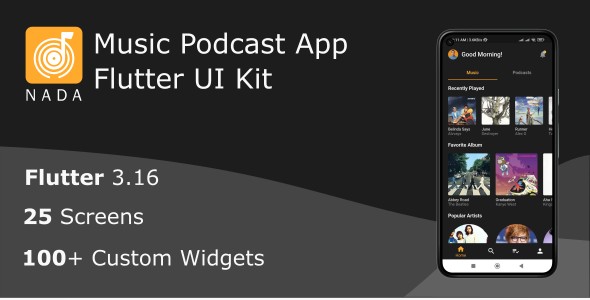
Nada is a Flutter UI Kit that can be used as a starting point to build a music streaming service that provides users with access to a vast library of songs, podcasts, and other audio content. Below are the features you can find in an Nada:
- Onboarding screen: The initial pages users encounter in a new app, introducing key features and guiding setup. It highlights functionalities, facilitates account creation and login.
- Sign-up screen: A screen where users provide information, such as name and email, to create an account. It also contains social media login integration that enables users to create accounts swiftly by connecting their social media profiles. It facilitates account creation, allowing users access to personalized features and services while ensuring a secure and user-friendly experience.
- Sign-in screen: A user interface where individuals enter their credentials, such as email and password, to access their existing accounts. Additionally, social media login integration allows users to sign in seamlessly by connecting their social media profiles.
- A preference screen for selecting artists or shows allows users to customize their music experience. On this screen, users can choose and follow their favorite artists and shows, influencing personalized recommendations and curated playlists. This feature enhances the app’s ability to tailor content to individual tastes, providing a more engaging and enjoyable listening experience.
- Home Screen: The home screen is the default landing page when you open the Nada app. It features personalized recommendations, including playlists like ‘Recently Played’, ‘Favorite Album’, ‘Popular Artists’ and so on. You may also put recommendations based on users listening habits, recent activity, and new releases. The Home Screen incorporates a tab bar view, effectively segregating Music and Podcasts for a more organized user experience.
- Search and Recommendations: The app offers a search feature to quickly find specific titles. It also provides personalized recommendations based on the user’s viewing history and preferences.
- Your Library: This section contains all user saved music, playlists, podcasts, and albums. You can organize your content by playlists, artists, albums, and podcasts. The ‘Liked Songs’ playlist, which includes all the songs you’ve liked, is often prominently featured.
- Profile: The profile screen displays user’s account profile, including user’s subscriptions, devices setting, storage settings, giving feedback. Users can access the settings screen, which allows users to customize their app experience, including account settings, playback preferences, and notifications.
- Now Playing: The now playing screen shows the currently playing song. Users can control playback, access additional options like repeat and shuffle, and view the album artwork.
- And another screen, 25 of totals.
Watch demo and how to:


| Type | Flutter App |
|---|---|
| Author | FlutKit |
| Price | $14 |
| Sales | 1 |
| Rating | 0 (0) |
| Published | Feb 23, 2024 |
| Last Update | Jun 12, 2024 |
| Compatible Software | Flutter 3.x |
| Demo Url | https://youtu.be/SlAp8ZLHHcc |
| Mobile Files Included | Dart, YAML |
External listing. code.market does not sell this product and does not process payment for it. Pricing, payment, delivery, licensing, refunds, and support are handled by the third-party merchant on its own website. We may earn an affiliate commission from a referral. Details.
Products of the Week.
Submit🥇

STOP GUESSING WHAT TO POST
AI that learns your brand voice and builds a month of consistent, on-brand social content: carousels, posts and hooks that sound like you, not like everyone else's AI.
SaaS · 7,397 views · 67 clicksSaaS · Week 46 · 7,397 views · 67 clicks
🥈

Conversational Backlinks for Busy Founders
Place Backlink Relevant Conversation for your domain across Forums and Conversations
Website · 46,697 views · 232 clicksWebsite · Week 46 · 46,697 views · 232 clicks
🥉

upvote.club
Free Social Media Engagement that Helps Boost Your Content. Upvote Club supports 19 social networks with 100+ engagement actions in one dashboard. Add links to your posts and get free engagement from real users.
SaaS · 44,633 views · 127 clicksSaaS · Week 46 · 44,633 views · 127 clicks
#4

Substack Posting API
Onboard your Agent to Substack. Write Publish on Substack via API
SaaS · 63,518 views · 206 clicksSaaS · Week 46 · 63,518 views · 206 clicks
#5

Seenshot App
Free, Fast, MacOS Screenshot app. Make Screenshot cmd+shift+2 and send it via link
Desktop App · 32,767 views · 127 clicksDesktop App · Week 46 · 32,767 views · 127 clicks
#6

Hand-Placed Backlinks $9.99 per link. Flat rate.
Buy hand-placed forum, Q-A and directory backlinks. Flat $9.99 per link, no subscriptions — you only pay for approved listings.
Website · 8,384 views · 19 clicksWebsite · Week 46 · 8,384 views · 19 clicks
#7

Free Invoice Generator - PDF Invoices in Your Browser, No Sign-Up
A free invoice maker for freelancers and small businesses: fill in the invoice, check the live preview, and download a PDF that looks exactly like it. Any currency, tax per item, three templates, no sign-up, and nothing leaves your device.
7,012 views · 29 clicksWeek 46 · 7,012 views · 29 clicks
#8

Merge PDF Files Free - Combine PDFs in Your Browser, No Upload
A free PDF merger for office workers, students, and freelancers: combine PDFs and images into one file in the browser, reorder files and pages, pick page ranges, keep bookmarks, and open password-protected PDFs. Nothing is uploaded, no sign-up, no watermark.
6,488 views · 18 clicksWeek 46 · 6,488 views · 18 clicks